58 comments found.

Hi, we try to update the theme & plugins for 2 years now (we changed nothing but updating theme and plugins files via ftp) but it destroys everything. Would you please help us safely update the theme, without having to re-pay for 6 month support ?
Hello,
Thank you for contacting us!
Starting from version 2.0, there is a major theme update and migration to Elementor page builder. If you choose to update the template, you need to set up the website again and re-build the content using Elementor. Please follow these steps to update the theme to 2.0 properly – https://handyman-services.ancorathemes.com/doc/#update_to_v2
Our Tech support team will be glad to assist you with that. You may use option “Pre-sales question” at https://themerex.net/support/ that does not require support renewal.
Regards.
Hello,
On my site, which uses your theme, on a portfolio page: https://cetab.fr/cetab-new/portfolio/restructuration-et-extension-du-parking-de-laeroport-biarritz-anglet-bayonne-64/, I want to hide the social network sharing icons. I’d like to apply the change to all my portfolios.
Could you please tell me how to do it?
Update: I’ve solved my problem.
Hello,
Thank you for contacting us!
We are glad that you have found a solution. In case you have any further questions, please submit a support ticket at https://themerex.net/support/ and get qualified assistance.
Regards.
Hi,
I would like to use the theme images, but there seems to be a watermark, how do I remove it? THANKS
Hello,
Thank you for contacting us!
All the images on the demo are copyrighted to their respective owners and used for demonstration purposes only. We do not package them with the theme. However, we include their blurred/watermarked versions in the demo data import.
Our Tech Support team can send you the list of image IDs from http://www.bigstockphoto.com/, just submit a support ticket at https://themerex.net/support/
Regards.
HI, how can i change the color of the themes? it compantible with elememntor?
When is the new version coming up?
Hello,
Thank you for your interest in our template!
Theme colors can be easily changed in the admin panel in a few clicks: Appearance > Fonts & Colors – http://handyman-services.ancorathemes.com/doc/#theme_options
The package includes Themerex Updater plugin allowing you to update all bundled plugins automatically directly in the Dashboard and to keep the theme components up-to-date. Please review this guide: http://handyman-services.ancorathemes.com/doc/#theme_update
This theme is built with WPBakery. It is a user-friendly visual composer that allows you to create any layout you can imagine with intuitive drag and drop builder. If there is a need, our Customization Studio would be glad to help you with theme conversion to Elementor. To get started, please use “Get a Free Quote” option in our Help Desk at the following link: https://themerex.net/support.
You can also consider these themes created with Elementor:
1 – https://themeforest.net/item/towny-outdoor-home-services-wordpress-theme/37680813?s_rank=13
2 – https://themeforest.net/item/wd-windows-doors-company-wordpress-theme/42672549?s_rank=3
3 – https://themeforest.net/item/small-tiny-house-living-lifestyle-wordpress-theme/42277101?s_rank=4
5 – https://themeforest.net/item/dom-house-services-elementor-wordpress-theme/38199829?s_rank=16
Regards.
Pages are unable to update. When I make changes to the homepage and try to update/publish, it directs me to a 403 error page. Never had this issue before… is it because my support has expired and i need to renew my license annually in order for the theme to work properly?
Had to reinstall again but now, i just can do anything with the theme.
Hello,
Thank you for getting in touch with us!
You may use option “Presales Question” at https://themerex.net/support/ and provide the purсhase code in the message body. Our tech support team will check if the issue can be solved without support renewal.
Regards.
WPBakery Page builder is not working in the front end and has issues with Essential Grid plugging, also necessary to work with the theme. if I activate Essential Grid, WPBakery Page builder does not work at all and if I deactivate it just works in the backend.
Hello,
Thank you for contacting us!
To avoid any issues, WPBakery, Essential Grid and all the bundled plugins should be updated to the latest version using Themerex Updater plugin included in the package. Please review the detailed instructions: http://handyman-services.ancorathemes.com/doc/#theme_update
Also, please disable Gutenberg Editor in WPBakery > General Settings – https://prnt.sc/vzmntr
In case you have any further questions, please submit a support ticket at https://themerex.net/support/ and get qualified assistance.
Regards.
Seems to be working now, but I can’t update WPbakery. It is not possible to update WPBakery using Themerex Updater. Can you please advise regarding WPBakery updates?
Let our Tech support team have a closer look at your website settings. Please provide your website details in the support ticket at https://themerex.net/support/ Our Tech Support team will assist you with the issue.
Thank you!
The back end editor isn’t working….
Hello,
Thank you for contacting us!
Please ensure that WPBakery, Essential Grid and all the bundled plugins are updated to the latest version using Themerex Updater plugin included in the package. Feel free to follow these instructions: http://handyman-services.ancorathemes.com/doc/#theme_update
Also, please disable Gutenberg Editor in WPBakery > General Settings – https://prnt.sc/vzmntr
In case you experience any difficulties in this matter, please submit a support ticket at https://themerex.net/support/ and get qualified assistance.
Regards.
hi, I would like to know how to change the color of the header? thanks
Hello,
Thank you for choosing our theme!
You can easily change the color of the header in: Appearance -> Fonts & Colors. Please check these screenshots: https://prnt.sc/ravwcg and https://prnt.sc/ravv7p
Please do not forget to clear browser’s memory cache before checking your changes. In case you have any further questions, please submit a support ticket at https://themerex.net/support/ and get qualified assistance.
Regards.
Hello, pre-sale question: which booking plugin does this theme use? Thanks! 
Hello,
Thank you for your interest in our theme!
We have added Booked plugin to let you easily manage your appointments. All the installation instructions, tutorials and any kind of guides regarding its functionality can be found at https://boxystudio.ticksy.com/articles/7827/
Regards.
Hello , I have purchased the theme I am almost done but I am facing 2 issues, 1. how can I change size of the service icons or images, 2nd how can I change the font and font size of services title under images. Please support
Hello,
Thank you for choosing our theme!
1. To change the size of the service image please navigate to Services > All Services > Edit > Featured Image – https://prnt.sc/vprimj > Edit image – https://prnt.sc/vprhgj, https://prnt.sc/vprh09
2. It can be achieved by setting custom height and width. Please add the following lines to Appearance -> Customize -> Additional css: with the height/width you need
.sc_services .post_featured img {
max-width: 163px;
max-height: 158px;
}
Also, you can change H5 under Appearance > Fonts & Colors – https://prnt.sc/vpqbd5
In case you have any further questions, please submit a support ticket at https://themerex.net/support/ and get qualified assistance.
Regards.
How often do you update the included premium plugings?
Hello,
The latest version of bundled plugins is included new theme update.
If plugin is outdated and there is no new theme updated, you are always able to request the latest version in tickets https://themerex.net/support/
Thank you.I am trying to update to the latest version of WPBakery Page Builder and removing the plugin and trying to reinstall it only gets me back the older version.
How can I access the latest version?
Hello,
Please submit a ticket to category “Pre-sales Questions” at https://themerex.net/support/ – our support team provide you with latest version of plugin.
This doesn’t require support renewal.
Thank you in advance.Hello guys, I just purchased this theme and my editor doesn’t work. How can I fix this?
Hello,
Thank you for choosing our theme!
Please provide us with your WordPress URL, username and password at https://themerex.net/support/ – our Support team look into that and assist you.
Thank you in advance.Hello, I have a problem with installing Plugin – Handyman Services Utilities, its not possible to see it for installation.Already tried to reinstall the whole wordpress theme and demo site content. Could you please help me?
Thank you in advance
Hello, for ThemeREX Utilities I am missing LAYOUTS and in APPEARANCE – ThemeREX addons sections.
Could you please help me?
Hello,
ThemeREX Utilities and ThemeREX Addons – two different plugins.
In your theme ThemeREX Utilities (Handyman Utilities) plugin is used.
There is no layouts feature in this theme. Please check theme documentation: http://handyman-services.ancorathemes.com/doc/ Thank you.After the WP update now I can’t access the Handman Theme Options page or even get the same error page when trying to add a new page??
Deprecated: Function create_function() is deprecated in /home/rf9m2iu9js3l/public_html/rnroof/wp-content/plugins/essential-grid/essential-grid.php on line 101
Fatal error: Allowed memory size of 134217728 bytes exhausted (tried to allocate 20480 bytes) in /home/rf9m2iu9js3l/public_html/rnroof/wp-includes/meta.php on line 958
I tried to send in a ticket but it says me=y support time is over??
Hello,
The error occurs because of the low memory_limit on your server.
You can increase memory_limit on your server in several ways, namely by editing: wp-config.php file: define(‘WP_MEMORY_LIMIT’, ‘256M’);
Or contact your hosting provider regarding that.
Thank you in advance.I don’t think that is the issue because when I disable the Esst Grid Plugin then everything works. I noticed the Esst Grid Plugin included in the theme is old now so that could be the issue. Anyway I don’t have time to play with it. The them did work great for what is was just had some little fixes here and there. I am going to install a new theme and go from there. Thanks !
Hello,
Some plugins might consume a large amount of memory (RAM) while they are enabled and in use. More plugins enabled on website – more memory is used.
For instance, after installing and activating the Revolution Slider, your website’s memory (RAM) consumption might increase up to 70-80Mb. Add WooCommerce and your website’s RAM consumption might not fit even in 128Мb. Same with Essential grid.
If you add lots of pages, images on your website you’ll have same error and you’ll have to increase memory limit on your server.
So you will have to increase the available memory to 256Mb to make all plugins work properly.
Best regardsHello, after installing the theme I have this error on the website:
Fatal error: Uncaught Error: Call to undefined function handyman_services_sc_socials() in /data/web/virtuals/239337/virtual/www/domains/makaci-brno.cz/wp-content/themes/handyman-services/templates/headers/_parts/top-panel-top.php:27 Stack trace: #0 /data/web/virtuals/239337/virtual/www/domains/makaci-brno.cz/wp-includes/template.php(724): require() #1 /data/web/virtuals/239337/virtual/www/domains/makaci-brno.cz/wp-includes/template.php(671): load_template(’/data/web/virtu…’, false) #2 /data/web/virtuals/239337/virtual/www/domains/makaci-brno.cz/wp-includes/general-template.php(168): locate_template(Array, true, false) #3 /data/web/virtuals/239337/virtual/www/domains/makaci-brno.cz/wp-content/themes/handyman-services/templates/headers/header_7.php(53): get_template_part(‘templates/heade…’) #4 /data/web/virtuals/239337/virtual/www/domains/makaci-brno.cz/wp-content/themes/handyman-services/fw/core/core.wp.php(1272): handyman_services_template_header_7_output(Array, false) #5 /data/web/virtuals/239337/virtual/www/domains/ in /data/web/virtuals/239337/virtual/www/domains/makaci-brno.cz/wp-content/themes/handyman-services/templates/headers/_parts/top-panel-top.php on line 27
Hello,
Sorry for delayed reply – we don’t work on weekends.
Please provide us with your website details in support ticket at https://themerex.net/support/ – our developers look into that and fix the issue.
Thank you in advance.I’m getting this error when I try uploading the theme.
The package could not be installed. The theme is missing the style.css stylesheet.
Theme installation failed.
Hello,
Please take my apologies for delayed reply, we do not work at weekends.
If you try to install the wrong files you will get missing styles.css file error. This is the most common error meaning you are trying to install incorrect package.
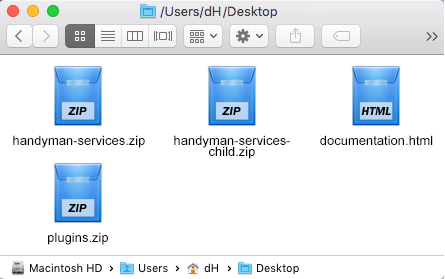
Before installing the theme please make sure you unpacked the archive and extracted theme files. After unzipping the archive you will see the following files:
http://handyman-services.ancorathemes.com/doc/images/unzipped_theme.pngSo use “handyman-services.zip” file to upload.
If you still have any further issues or questions, please submit your request at https://ancorathemes.ticksy.com/ – our tech support team can help you with that.
Thank you in advance.
I’m getting this error message while uploading the plugin. “The package could not be installed. No valid plugins were found.
Plugin installation failed.”
Hello,
Thank you for choosing our theme!
Please try uploading the plugin via FTP client – to wp-cotent/plugins directory. If the issue persists, please submit a ticket at https://ancorathemes.ticksy.com/ and provide your website login details and our support team will check the issue.
Regards.
Its support is terrible because it doesn’t provide the updated WPBakery Plugin. I don’t want to waste time creating a ticket.
Hello,
Sorry, but we keep to Bundled plugins policy:
https://help.market.envato.com/hc/en-us/articles/213762463-Bundled-PluginsProvide us with your email, so we’ll send you latest version of plugin.
Best regards
He there,
Need Update version of WPBakery Page Builder & Revolution slider. please send me updated version files as soon as possible
Hello,
Please submit your request at https://ancorathemes.ticksy.com/ , so we’ll provide your with latest versions for these plugins.
Thank you in advance.