2014 comments found.

Hi,
Great theme!
I am trying to figure out how to list under a parent page (that only has the Title) its child pages but can’t find it. Is there a way to do this?
Thanks a lot in advance.
Hi,
I guess you can use a Custom menu widget for that.
Lubos
Thanks Lubos, it worked for me. Now I would like to know if there is any way to arrange columns of the custom menu. You can see at this photo (https://ibb.co/PQMbnbD) that spaces are not evenly distributed. Can I change them?
Thanks Lubos, it worked for me.
Now, I would like to know if there is any way to arrange column spacing of the custom menu. You can see at this photo (https://ibb.co/PQMbnbD) that the spacing is not even between colums, can I change this?
Sorry for the double post, I updated and didn’t se it so I had to rewrite it, the right link to the photo is this: https://ibb.co/PQMbnbD
Try this CSS:
.lsvr-townpress-sitemap__list { margin: 0 -10px; }
.lsvr-townpress-sitemap__item--level-0 { padding: 0 10px; }
I’m sorry it didn’t work. I tried pasting it under Unique ID, and under Addtional CSS classes to no aveil. I have also added items to the menu so that you can see it clearer: https://ibb.co/tQVd6s5
You have to add it under Appearance / Customize / Additional CSS
Thanks a lot! That worked. New question, is it possible to insert line breaks at People’s role?
Forgot the image to ilustrate it: https://ibb.co/HzPvyZP
I am sorry but that is currently not possible, That field wasn’t really meant to have so much text. I will take a look at it in the next update and see what can be done about it.
No problem. I suppose this may be a weird situation. There are some councilors that have more than one council. I thought in listing them in the main text area, but it is not as cool formatted as listing it in the role area.
Thanks foy your help Lubos!
Those strings are not (only) in the plugin, but in the theme itself. Check out theme’s translation file.
Thanks Lubos, I found it =) Now I’m looking for days displayed at Weather widget: Monday, Tuesday, etc… I thought they were the ones at theme’s translation file, but they don’t seem to be because I can’t manage to put the first letter in Capital letters. Please take a look at it: Theme translation file: https://ibb.co/syTm3Ny Weather Widget: https://ibb.co/m8cXPRW
By the way, I installed today new update and see that you have already implemented line breaks at people’s roles. Thanks a lot!!!
You can find those in the LSVR TownPress Toolkit plugin translation files.
General rule of thumb: strings related to TownPress widgets and elements (widgets and page builder elements with the “TownPress” prefix in name) can be found in TownPress Toolkit plugin, strings related to LSVR widgets and elements (widgets and page builder elements with the “LSVR” prefix in name) can be found in respective LSVR plugin (events widgets in LSVR Events etc.), other strings, like stuff related to header, footer, post archive and detail pages can be found in the theme itself. There are some exception to the rule, but it applies to most strings.
<?php echo date_i18n( get_option( ‘date_format’ ), strtotime( current_time( ‘mysql’ ) ) + ( 60 * 60 * ( 24 * ( $i ) ) ) ); ?>
So I thought it might be related with Settings->General->Date format. I had selected d/m/Y, and now I have selected custom D/m/Y to no avail. Any other clues?Right. Those particular strings are provided by the WordPress itself. Are you using localized version of WordPress?
How can I know that? I used the automatic installer of my hosting.
Is your admin in Spanish or in English?
Spanish
Weird. Try to open wp-content/languages/es_ES.pot (not sure if that is your correct language code, it should be the same like for theme/plugin translation files) and search for those name days there, if they are translated.
I am sorry, I got a bit lost in this thread. You do not need to translate them, just change capitalisation. In that case just use this CSS:
.lsvr-townpress-weather-widget__weather-item-title { text-transform: capitalize; }
Changing it in the translation file will affect it even on places you may were not want to change the capitalisation.
No problem, this last thing worked fine!! Thanks a lot Lubos! For further doubts I will post in a new thread if you find it more convenient.
Yeah, it is better to heave separate threads for each issue. But I should also read more carefully.
Townpress-Municipality Theme
I would like to use the lsvr style switcher toggle as on your demo but am unable to find it. Does this come with the theme or is it a separate plugin, and if so, where can I download it?
Many thanks Tim Thornley
Hi,
I am sorry but the switcher is used only for the demo purposes, it was not intended to be used on a live site. May I ask why would you want to use it?
Lubos
It would be useful for people with sight disabilities such as colour blindness.
There are specialized plugins for this purpose. Check out this https://wordpress.org/plugins/wp-accessibility-helper/ or this https://wordpress.org/plugins/wp-accessibility/
Hi there,
Just finishing off a test site before going live and having a problem with a default link in the theme. https://www.paul-mahoney.co.uk/lannerparish/category/news/ is the category with news posts.
But in the black menu bar above the first post if you click News it takes you to a page that I can’t find to change. This seems to be embedded in the theme somewhere. Any help to change the address of the News would be helpful please.
Cheers…Paul
Hi,
you can change the name and URL of default post archive page by editing the title and slug of a page which you’ve set as your posts page under Settings / Reading.
https://wordpress.org/support/article/creating-a-static-front-page/
Lubos
Hi Lubos,
Thanks for that, all sorted. Quick follow up please. When you click on the News option on black menu bar it shows all the posts from all the categories. Is it possible to select specific category posts to show? So I have agendas, accounts categories as well as News and I only want the news to come up.
Cheers…Paul
It is not possible without some custom coding or maybe a 3rd party plugin. I mean this has nothing to do with the theme actually. You are trying to change how the WordPress itself works.
1- how to disable the option (ALL) In the directory, since all lists are shown.
I just need the subdirectories to be shown, and its list to be shown if that subdomain is selected
https://preview.lsvr.sk/townpress/directory2- is there any way to exclude (hide), sub-directories from being shown in the main list?
Hi,
I am sorry but your support has expired. Please renew it (under your ThemeForest account / Downloads) if you need my assistance. Thanks.
Lubos
sorry just realised that, I will do that, thanks
Hello. Very nice theme. I would like to know if you have plans to frontend submission listings for the directory and events? The fact is that businesses are not created by municipalities, and events very often come precisely from businesses.
Hi,
I am sorry but I do not have plans for that in the near future. The built-in events and directory are meant to be very simple. There are advanced 3rd party plugin you can use if you need something more complex.
Lubos
suggestion to add a third column for the (email address), since many offices prefer to use email address beside the phone numbers too
https://preview.lsvr.sk/townpress/phone-numbers/Hi,
thank you for you suggestion. I will consider it.
Lubos
Hello,
I have a problem about my translation, I need to change to English texts as “contact” or “Opening hours”. As I see, it’s H2, but I don’t find the way for setting this texts to my Spanish language
Text example:Contact
This H2 is inside a single directory, for example: https://preview.lsvr.sk/townpress/directory/high-school/
Hi,
please read this tutorial on how to translate the theme: http://docs.lsvr.sk/townpress.wp/#translation
Lubos
Hi,
I did already, this “opening hours” or “contact” are not available on the townpress.pot document, that’s why I’m asking your directly
I’ve just checked and they are there. Are you using the latest version of the theme? Are you using POEdit app for translation?
Hi,
Yes, I’m using POEdit app for translation. but it’s not on the list of the .pot document
How can I sent you a screen capture to check it?
Or maybe can you attach me the file to my email address please?
Try to open the townpress.pot directly within the languages folder in the theme then click on Catalogue / Update from Source Code.
It’s not working.
What I need to change it’s the H2 as “Opening hours” or “Contact”
DONE,
THANK YOU SO MUCH! 
So what exactly was the issue?
My mistake. I was not choosing the correct file.
hello again, so far still no issues with RTL and all working fine, thanks for this wonderful theme
one question please, is there any way to have a fixed menu on the responsive ? i.e while viewing on the mobile to have the menu fixed
Hi,
I am sorry but that is not possible without some advanced code customization.
Lubos
thx
Netřeba mě vynadat že jsem neudělal renew support. Jenom hlásím, že na webu jinak https se mi v 3.3.0 zobrazují nově zvolené OpenStreetMaps ale Firefox hlásí “částečně nezabezpečený web”. Nato jsem zjistil, že z neznámých důvodů se zobrazované části OSM stahují takto: http://a.tile.openstreetmap.org/17/71498/44956.png //např. zde: https://ivancice.cz/udalosti/farmarske-trhy-ivancice-3/ , ale vlastně i na Home i v Directory.
Dobry den,
jo to vyzera na bug v teme. Hned zajtra na to vydam update.
Lubos
“Palec hore” – 3.3.1 OpenStreetMaps & HTTPS = OK
I would like to add a second CSS style sheet; I’m adding it to the child theme using the “wp_enqueue_style” command (below) in the child theme’s functions.php file. However, the second CSS sheet takes over styling everytime and supplants the theme’s styling. Any advice on how to prevent this? Thanks.
function custom_style_sheet() {
wp_enqueue_style( 'w3', get_stylesheet_directory_uri().'/w3.css');
}
add_action('wp_enqueue_scripts', 'custom_style_sheet');
Hi,
this doesn’t make sense. If you haven’t touched the code for loading the original CSS in the child theme, then there is no reason why would that happen. Can’t help without knowing the full context, but you must be doing something wrong. Please share you URL.
Lubos
Thank you for your response, unfortunately the site is not live yet and is being prepped on a local network. Below is the content of the functions.php file, perhaps you could tell me if I at least have things in the correct places? I’m newcomer to Wordpress, so it’s a bit of a learning curve. Thank you for quick response.
<?php add_action( 'after_setup_theme', 'lsvr_townpress_child_theme_setup' );
if ( ! function_exists( 'lsvr_townpress_child_theme_setup' ) ) {
    function lsvr_townpress_child_theme_setup() {

        /**
         * Load parent and child style.css
         *
         * @link https://codex.wordpress.org/Child_Themes#How_to_Create_a_Child_Theme
         */
        add_action( 'wp_enqueue_scripts', 'lsvr_townpress_child_enqueue_parent_styles' );
        if ( ! function_exists( 'lsvr_townpress_child_enqueue_parent_styles' ) ) {
            function lsvr_townpress_child_enqueue_parent_styles() {

                // Load parent theme's style.css
                $parent_version = wp_get_theme( 'townpress' );
                $parent_version = $parent_version->Version;
                wp_enqueue_style( 'lsvr-townpress-main-style', get_template_directory_uri() . '/style.css', array(), $parent_version );

                // Load child theme's style.css
                $child_version = wp_get_theme();
                $child_version = $child_version->Version;
                wp_enqueue_style( 'lsvr-townpress-child-style', get_stylesheet_directory_uri() . '/style.css', array( 'lsvr-townpress-general-style' ), $child_version );

                // Load RTL
                if ( is_rtl() ) {
                    wp_enqueue_style( 'lsvr-townpress-rtl-style', get_template_directory_uri() . '/rtl.css', array( 'lsvr-townpress-general-style' ), $parent_version );
                }

            }
        }

        /* Load editor style */
        add_action( 'enqueue_block_editor_assets', 'lsvr_townpress_child_load_editor_assets' );
        if ( ! function_exists( 'lsvr_townpress_child_load_editor_assets' ) ) {
            function lsvr_townpress_child_load_editor_assets() {

                $child_version = wp_get_theme();
                $child_version = $child_version->Version;
                wp_enqueue_style( 'lsvr-townpress-child-editor-style', get_stylesheet_directory_uri() . '/editor-style.css', array(), $child_version );

            }
        }

        /* Add your code after this comment */

function custom_style_sheet() {
wp_enqueue_style( 'w3', get_stylesheet_directory_uri().'/w3.css');
}
add_action('wp_enqueue_scripts', 'custom_style_sheet');

    }
} ?>
Try to change your part of the code to this:
function custom_style_sheet() {
wp_enqueue_style( 'w3', get_stylesheet_directory_uri() . '/w3.css', array( 'lsvr-townpress-child-style' )  );
}
add_action('wp_enqueue_scripts', 'custom_style_sheet');
If you haven’t touched the code above “Add your code after this comment” then this has to load your CSS right after the child theme’s one. So three CSS files will be loaded: 1. parent one, 2 child theme one and 3. yours. In exactly this order.
Also definitely change the name of your function to something more unique like for example “lakegis_custom_style_sheet” and your handle to something like “lakegis_w3” just to keep it safe for the future. If you install any 3rd party plugin which uses those same IDs you are using now, it will cause you issues and you will spend hours debugging it until you find the culprit.
If still no luck then try to put your site online. Hard to help without seeing it live.
BTW, why do you even need to load a separate style instead of just putting your CSS into child theme’s style.css?
I got it to work with your code (which really ticks me off since I swear I wrote that exact thing and tried it and it didn’t work—oh well), thank you for your help! I also changed the function name to something more specific. Thanks again!
You didn’t have file dependency in your original code (array( 'lsvr-townpress-child-style' )). Maybe that was the issue.
Hi Lubos, is it possible to disable google maps on the directory site or maybe even in general?
Hi,
sure, you can disable the header map under Appearance / Customize / Header. To disable the directory map go to Appearance / Customize / Directory (there are separate options for archive and detail maps). And to disable the events map go to Appearance / Customize / Events.
There will be an update soon which will allow to disable the maps globally via a single option as well as changing the maps provider to something else than just Google Maps.
Lubos
Thanks Lubos, didn´t see the option in customizer… Great you´re doing the updates!
Hi there, your theme is actually one of the best I’ve ever worked with, so thank you for that! I just want to know which specific google APIs need to be enabled for the site (there are 15 to choose from)? The Maps Javascript API works for the header map but doesn’t seem to show up for the directory listings details. Places API one doesn’t seem to do it. Do I need to enable any other map APIs? Thanks
Hi,
you will also need geocoding API if you want to place locations via address instead of just latitude / longitude. Once you will enable that API, you will have to resave your listing posts in order to geocode those location addresses. Or just stick to using latitude / longitude only and it should work without any additional messing around with the API settings.
BTW, I am currently working on implementing alternative map providers (e.g. Open Street Map) so if you have issues with Google Maps there will be other ways to enable maps in the theme soon.
Lubos
Thanks very much for that. Does the API key need to be regenerated for the additional enabled Geocoding API to work? It still shows up as blank loading square where the map should be on the directory detail. Have updated the listings.
Honestly I don’t know if you have to regenerate it. However, first I would advise to try to locate a listing just via latitude / longitude fields alone, just to see if this part of the API works. Then we can move to checking out what is wrong with the geocoding.
Latitude/longitude fields work fine, but the address doesn’t, even with Geolocation API enabled. Just shows the map area as a grey square, no error message.
Great. Now try to locate a listing via an address in some big city like this one for example “20 W 34th St, New York, NY 10001, United States”. This one worked on my end, so if still no luck the issue is 100% in your Google API settings. In that case try to regenerate your API key or maybe wait for few hours for any changes you made in the Google API settings.
If still no luck then check out some troubleshooting guides on the Google page. There is not much I can do in this case since this issue goes beyond the theme itself. The Google API can be a major PITA, that’s why I am implementing the alternative providers. If you won’t be able to make Google geocoding work, then you will have to stick to using latitude/longitude until the update with the alternative map providers will be released.
No luck with that address so will look into the API. Thanks for your help with the rest of it! Hope you’re well xx
Yeah, take a better look into API settings.
Hey so I talked to Google support and they said this:
By the error it looks like the website is trying to use the Geometry Library for the map. In order to use the library you need to include it in the script tag for the map as it’s not a default. You can see the documentation for this on the link below:
https://developers.google.com/maps/documentation/javascript/geometry#Geometry URL to listing (with address set rather than lat/long): https://sydenhamsociety.com/directory/on-the-hoof/Ininspect > console there seems to be some jquery error? The map seems to be there as I can drag it around but it’s just not showing anything.
In Google dev console the API is getting a ‘google.places.geocoding.http’ API Method error.
Thanks
I see. I will have to release an update for this. Will do my best to have it ready next week. Meanwhile, please use latitude and longitude instead of address.
Ah amazing, that’s great. No problem, it’s not an urgent part of the website so I’ll look out for the update. Thanks so much
Dear Friend Hi,
I would like your support in some questions that i have.
1) I would like to disable the ’’black box with the title’’ in the following sections: -Directory -Posts -Notices -People -Events [In the home page and in the pages that i have created manually this is simple and i follow those steps: page editing -> page features -> box w/o title.] Could you please provide me some directions for the sections that i mention earlier?
2) I would like to place the logo exactly above the menu, in the middle of the width of the menu. When i add my logo, automatically this is been placed above the menu but a little on the left. Could you please provide me directions to fix this?
Below you can find our Site: https://villagepetriti.grLooking forward to your response,
Best, Andreas Stoupas
Hi,
1.) just use this CSS and it will be hidden everywhere
.main__header { display: none; }
2.) I’ve noticed that you’ve found a workaround by placing a logo into the bg image, but the problem is that on bigger screens it will get cut. Check out your site on a display with 2560×1440px screen and you will see what I mean. Also, it is generally not a good idea to put logos into the background image. They get stretched and distorted on various screen sizes. I am sure you do not want to treat a logo of a town like that. Proper way is to insert a logo as normal, and then do some CSS magic to position it where you want. For example try this (after you insert the logo as normal):
@media ( min-width: 1200px ) {
body .header-logo { display: block; margin: 0 auto; }
}
Lubos
Thank you so much my friend. So useful informations. Cheers
Hi,
I’ve just started to work with your lovely theme. Is there an option to display directory listings and events on the front page in the grid layout as they are displayed on their archive pages? Thanks.
Hi,
unfortunately not. You can theoretically just put bunch of LSVR Featured Listing widgets into a grid, but it is obviously not the same as the default archive. Or use LSVR Directory widget and hire someone to do some custom CSS styling to turn the list into more grid-like layout.
Lubos
Can we expect this in some of the following updates? It might be pleasant to find information, right away, on the front page – latest town news, events and some random listings – which is a bit more likeable in grid layout for desktop visitors.
One more thing I would like to know if it is possible to display post category archive in such grid layout or I have to use some 3rd party plugin?
Thanks.
Thanks for feedback. I will consider it.
You will need a 3rd party plugin for that.
Thank you for the quick responses.
Kind regards
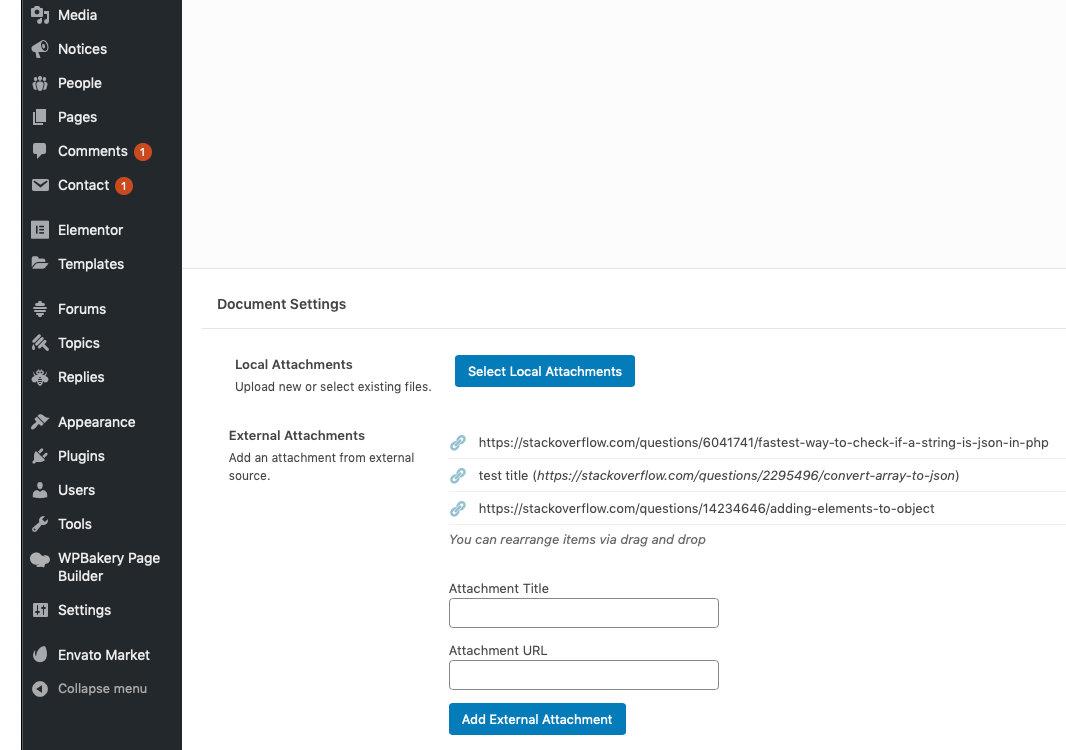
Do you have any further documentation for the LSVR Document plugin? It’s confusing me and I’m not sure how to ‘attach’ anything to a document (which is a post?). At the moment I’m adding PDFs using the ‘File’ element within the Document but not sure if that’s right. What’s in the documentation for Townpress doesn’t explain exactly how it works. Thanks
Hi,
just scroll down to Document Settings when editing a document post and use those fields, see the screenshot.
Lubos
Hi I’ve just updated the Theme to the latest one and it has removed all the styling and I’m not sure what to do. It did look like this: https://web.archive.org/web/20190213221348/https://www.luddington.org/ and now look like this: https://www.luddington.org/ Any tips you can give? Karen
Hi,
please read this https://themeforest.net/item/townpress-municipality-wordpress-theme/11490395/faqs/41792
Lubos
Hello!
I would like to purchase the template, but I need some plus information.
It might be not a clever question, but I ask that: Can I edit the HTML code in a text editor like Komodo Edit because I do not like the Wordpress online editor.
Can I repurchase if I do not like the template?
Does the code articulate, because when I view the source code with Google Chrome the code is in bulk?
Or how can I make the code more transparent?
Thank You for your answer!
Zoltan
Hi,
text editors can be used to edit the code of the theme, but that has nothing to do with the content of your site which has to be edited via WordPress admin. You are mixing together two different aspects of the theme.
What do you mean by “repurchase”? Do you mean refund? If so then I currently do not offer refunds unless you have a valid reason for it (for example, the fact that you didn’t like the theme is not a valid reason).
The demo site code was minimized, so try to use Object Inspector of your browser to examine the code. The source codes are of course not minimized, but you should not edit the source codes anyway. Any code customization has to be done using the child theme.
Please note that some WordPress experience is required to work with this (or any other) theme. And the theme support doesn’t cover WordPress basics, only topics related directly to the theme.
Take a look at the HTML version (however please note that there are many design differences compared to the WP version), because it sounds like that would be a better fit for you.
Lubos
For example: if I buy the template without support but after I realize though need it what are the support price conditions?
Are you talking about this WordPress version or the HTML version? The WordPress version includes 6 month support, it can’t be purchased without it. The HTML version does not come with support at all (and it can’t be purchased). Here are more details on what is included with the support (this applies to all items on Envato) https://themeforest.net/page/item_support_policy
But again, if you plan to purchase the WordPress version, it is expected that you already have some basic WordPress experience (for example you can create and edit posts/pages etc.).
You can also read through the documentation for the WordPress version to take a peek “under the hood” http://docs.lsvr.sk/townpress.wp/
Dear Support!
Is there a way to create document categories and create/update document posts with external attachments programmatically?
We have a source from which we can get the list of all local government regulations for our town in Json format. For each regulation we receive in the response a unique id, a title, a year, a sequential number and data to versions of it, ergo to the already repealed versions (if there are any), the currently in force version (if there is one) and the versions in prospect (if there are any). For each version of a regulation we receive in the response as data to each of them a unique id, an URL and two dates, which defines the interval from which the version was/is/will be in force
If possible I will for each regulation create a new document post, if there is not already one based on the received unique id, assign it to an already existing document category (for all regulations) and to a document category for the year of the regulation (which I will also create if it does not already exist). Furthermore, for each version of the regulation I will - create an external attachment (to the document post of the regulation), if there is not already one based on the (to the version) received unique id, otherwise - update the existing external attachment if needed.
I’m a software developer but I’m not a WordPress developer but I kwon some things about WordPress.
My approach would be to create an filter for the “get_lsvr_document_cat” hook, which will be triggered by the method “get_term” (https://developer.wordpress.org/reference/functions/get_term/). In the filter I have access to the current document category, and if it is the already defined one (for all regulations) or the ones created for yearly categorization, then I will do which I have described above.
I know also, that I can - get already exisitng posts/categories using the class “WP_Query”, - create new posts using the method “wp_insert_post”, - create new categories using the method “wp_insert_category”.
Can you please confirm me, that my approach will work, and give me some help how can I create/update document posts, external attachments and document categories, furthermore how can I assign document categories to document posts. Can you recomend me a way, how can I store the unique ids from the response to document posts and attachments.
Thank you!
Hi,
well, this is really more like a general development question. I am sorry but stuff like this is way, way beyond what is included in the theme support. Everything you need to know can be found in the WordPress Codex and in general WP development threads on sites like Stack Overflow and such. I guess it can be done, but it is unfortunately not something I can help you with.
However, I can share with you at least some theme specifics you will need. The document post type name is “lsvr_document”. The document category (taxonomy) name is “lsvr_document_cat”. Attachments are saved in “lsvr_document_local_attachments” and “lsvr_document_external_attachments” meta fields. I advise to create a document posts, add few local and external attachments and then display Custom Fields (there is a switch for that in the screen options) so you can see the exact data format used for both fields. And that’s it from the theme side. Everything else you will need is really just a general WP development knowledge, the theme doesn’t play any role there.
Lubos
Thank you for your help! I wrote plugin which does the synchronization.
Hi LSVRthemes,
I use this for a political party and it works quite well – not perfectly but better than any other theme I know.
Here two ideas on what you could do next:
1) Make the various post types “linkable”. I often have a topic that starts with an event, then has a standard post to report about it, then gets some documents to show the outcome. It would be nice to have those refer to each other. At least connect posts with documents – that is hugely important.
2) Multi-author. This is a clear “must”. Give us the option to list the posts by an author on their people-post-type. Simply, by date recent posts and recent docs.
Kind regards zuma
Hi,
1.) you can insert links to any other pages/posts to a post content. Also, you can put a LSVR Documents Widget block to any post. Maybe you have some more specific way for doing that in mind?
2.) the problem is that person posts are currently not connected to site users. But I will consider something like this, sounds like a good idea.
Thanks for feedback!
Lubos
Thank you for your quick reply.
Hello,
I am trying to use the weather widget, and it seems to be loading fine. The problem is that the time is all wrong and the actual values of the weather are no were to be seen. Json is returned to us with proper format you can check here: http://api.openweathermap.org/data/2.5/forecast?id=146214&units=metric&appid=8be1d664b556e8c0e48a4e9326d9ed09 You can also see the widget here: https://pentalia.soft-surge.com/Kind regards, Soft Surge team.
Hi,
have you set your timezone setting correctly under Settings / General? Because the time is generated by WP itself, it has nothing to do with the forecast functionality. If it is wrong in the widget, it has to be wrong all around your site (for example time of publishing for posts etc.).
I am not able to access your site, I am getting security warning in both Firefox and Safari. However make sure you’ve added your address in a correct format. Try to find it on https://openweathermap.org and then copy the exact address from there.
Lubos
Hello once again. I have figured out the problem with the weather and now its running fine. But i have a follow up question for google maps. I have found how to add latitude and longitude for the directory listings, and display the proper locations on the map, but i have not figured out how to change the map on the home screen. It loads directly, onto stowe,us and i need to change it to pentalia,cy
Once more you were very fast to reply and really helpful. Have a nice day.