

18 comments found.

Great job again on this theme! There’s been updates for woo commerce and visual bakery. I keep getting “outdated woo commerce templates” errors on the the theme now. Are you coming out with an update soon? thanks in advance! great work
Hello,
We already solved this. But the release is pending for other final steps. It will be released in 1 or 2 weeks.
But if you want to solve it now, then you can create a ticket on our support site so our team will send you latest files.
Best regards,Cheers from the Themesion team
| Get Support | Subscribe | | |
|
|
|
|
Thank you!!!!!! You’re the best.
Really nice theme – glad to hear that you can add a shop – I will be back.
Thanks 
Hi, We are interested in the theme, but I wanted to ask a question, can it work with WPBakery? does it come installed? I have seen that the Kirki plugin has caused problems, is it already solved? Thanks
Hello,
Thanks for your message.
Can it work with WPBakery? does it come installed?
—Yes our theme is created with WPBakery Page Builder plugin. Also the plugin is included with our theme so you don’t need to buy it.
I have seen that the Kirki plugin has caused problems, is it already solved?
—Yes, the Kirki plugin problem is solved and now it’s working perfectly.
Best regards,
Cheers from the Themesion team
| Get Support | Subscribe | | |
|
|
|
|
Hello,
The Kirki plugin just released their new version v4.0.3 which has so many bugs. The bug effects our all theme. So we suggest you to revert back to the older version. The steps are very easy and it just takes 1 minute to solve the issue. We created video for the steps. Please see this video:
https://youtu.be/dIOhUwzhxi8
Thanks,
Themesion Team
I love this theme. I installed the demo 1 version but didn’t realize there wasn’t a shopping cart in it. Is there anyway to install the cart like in demo 3 but on demo one theme?
Hello,
Thanks for writing to us.
The Shop section is created using WooCommerce plugin. So just install and activate it so the Shop feature will be enabled. After that, please follow the one-time setup wizard so it will create basic pages and default options setup. Here are the setup Wizard setup document:https://docs.woocommerce.com/document/woocommerce-setup-wizard/
This will enable Shop on your site.
Best regards,
Cheers from the Themesion team
|
|
|
Get Support |
Thank you!!!! I LOVE this theme! Great work!
Hi,
Glad to hear you like our theme. Please provide us 5-star ratings. This will help us a lot. Here are the steps:
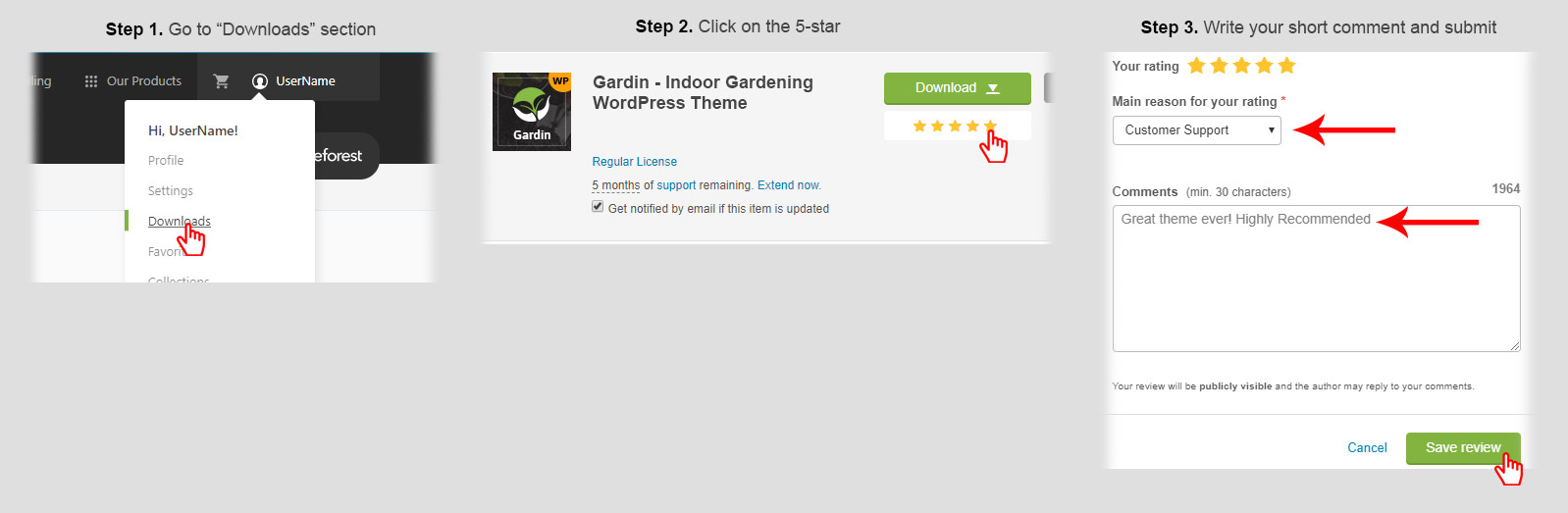
Cheers from the Themesion team
|
|
|
Get Support |
I really like this theme a lot. Your team did a great job. One question though, with the contact form that uses .thsn-main-form.thsn-style-3 the placeholder text is showing a dark font, whereas the input text is very light in color. I expected this was intended to be the other way around. Check out your demo at http://gardin-demo.themesion.com/demo1/contact-us/ The input shows a color of #ecf1f8; yet the actual color is #888888. Can you provide me with the correct CSS? Thanks in advance.
Hi,
Thanks for pointing this. Yes you are right. Yes this is a bug. We missed to check this. Our team is working on this and this will be solved in some time.
For quick solution, we are providing CSS code that will solve this for you. Here is the CSS code:
.thsn-main-form.thsn-style-3 .input-group input[type="text"], .thsn-main-form.thsn-style-3 .input-group input[type="number"], .thsn-main-form.thsn-style-3 .input-group input[type="email"], .thsn-main-form.thsn-style-3 .input-group textarea{
    color: #848484;
}
Just paste this code in Appearance >> Customize >> Gardin Options >> CSS Code box and save it. This will solve the issue. Also the solution will be available with our next update too.
Best regards,
Cheers from the Themesion team
|
|
|
Get Support |
That’s where I was at as well, but thanks. Just can’t seem to get the placeholder text to change color? I expect that we need to use the pseudo-class for “placeholder (::placeholder); eg. .thsn-main-form.thsn-style-3.wpcf7-form-control wpcf7-text::placeholder { color: #ff0000!important; } I used red in the example to make it more evident; however, while it works in dev tools it doesn’t work when added to custom css? Maybe you can deduce the issue?
Hi,
Actually the problem is not with Placeholder text color. So the ::placeholder is not required. The problem was with normal text color which we can apply like {color:#FF0000;}. So the above code is perfectly and should be working.
Best regards,Cheers from the Themesion team
|
|
|
Get Support |
As I noted, the placeholder text color is dark, it needs to be a lighter grey color as is typical. So yes, there is a problem. What you have on your theme now is both the placeholder and the input text as dark, as shown at http://gardin-demo.themesion.com/demo1/contact-us/
Hi,
Yes that’s right. I will correct it and will provide you code for this.
Best regards,Cheers from the Themesion team
|
|
|
Get Support |
Hi,
I installed the theme and imported demo data. But can´t get the layout I want. I want home 2 layout 1. After import always home 3 is shown. What´s to do? By the way: The support system doesn´t work. No confirmation Email, no ticket confirmation. Best regards
Hi,
We checked our support site and it’s working perfectly. We are receiving other user tickets and also sent email too.
The ticket conformation should send you email with ticket ID.
Anyway, we need more details. Please email us at contact@themesion.com and send us your site URL and details so I will check it.
Also please send us email from the email address used to create ticket so I can check your ticket status on our support site and will let you know status of the ticket.
Best regards,Cheers from the Themesion team
|
|
|
Get Support |
Hi, is the theme support RTL?
Hi
Yes our all theme supports RTL. Also supports WPML plugin too.
Best regards,Cheers from the Themesion team
|
|
|
Get Support |
Amazing theme, easily one of the best themes I’ve ever used on a project. Great job.
Tried contacting support, but I can’t register an account on the forum. Did not get a confirmation email.
Images did not all import properly, and I need access to the testimonial background image (the one with the map). I also want to make the services links (when clicked on) to go just to ”/services” page, not the individual services pages. How can I do this?
Thanks!
Hi,
Thank you for your great and positive comments.
I diagnosed email service and it’s working perfectly. Also I conformed with my server admin too. Still, I will look your account personally. I need your username or email for this. Please send us email via our profile page and send us your email or username so I will check it.
For images, sometimes some or all images did not import due to slow internet or timeout error. I will setup images on your site. We need access of your website with administrator login details. Please send us all details via our profile page and I will look set all.
Best regards,Cheers from the Themesion team
|
|
|
Get Support |
Good luck!
Thanks
Congratulations!!! Nice Work, Good Luck With Sale
Thanks
The design is eye catching, you used green color throughout the design for this Gardening niche which is creating an awesome impression. I also appreciate the hero image like features area on home page 3. Well done.
Thank you for your great comments
Congratulations! Looks very nice GLWS
Thanks
Nice work, Congratulations! Good Luck with Sale
Thanks
Congratulations! Nice Work, GLWS
Thanks


