61 comments found.
Hi, if I’m not logged in I cannot see the < icon for prev slide or > for next slide, I just can see the text PREV p NEXT. If I log in then I can see both the icons <> can you please fix it? Thank you
Could be a cache or a third-party plug-ins? Try clearing the cache if caching plugins are installed and disabling third-party plugins. We can’t reproduce the error at home.
I fixed it, thank you, it was beacause of a cache plugin

why does your theme not support a lightbox? every lightbox i am trying is somehow overwritten by you js.. 
Technical support is provided only to customers – https://drive.google.com/file/d/19N0Ju8Bq2sEp7oWZL4h33g7GDFi980Fc/view?usp=sharing.
I can’t scroll just by looking at my smartphone. Please respond in a hurry. How can I get it to scroll?
Hi,
Disable parallax in “Dashboard > Appearance > Customize > Animations > Parallax Effect”. Tomorrow we will release an update that fixes this bug. Sorry about this.
I can’t scroll just by looking at my smartphone. Please respond in a hurry. How can I get it to scroll?
Seems I am missing pages
Hello,
When uploading the Demo Content fully, it’s not uploading the pages, and it creates ”#” links in the navigation?
Hello,
1. If you mean that you do not have enough pages to display all the options provided on the demo, then we inform you that our theme is not arranged like this. It has one page (showcase) and options located in the WordPress Customizer. By changing the settings in it, you can get any of the demo presented. And even more, the demo doesn’t show everything. Read paragraph “Portfolio Set Up” in theme documentation – https://itonga.ukathemes.com/documentation.html#Portfolio.
2. ”#” – this is instead of external links to demo sites. Just links replaced with a slash.
3. On account of changing fonts in the theme: this option is not available yet, but it is planned to be added for the next updates.
Hi, thinking of buying this theme. Three quick questions:
1. Is it possible to have a classic navigation for desktop devices and hamburger menu for mobile only?
2. Can I set a single video for my homepage slider, instead of a static image?
3. If I set that single video, will slider navigation (arrows) disappear?
Hi! Unfortunately, the answer to all three questions is no.
Hi!
I would like to ask, that is there any option to make a Bootstrap 4 version of Itonaga Theme for extra many?
Kind regards,
Akos Szel akos.szel@gmail.comSorry, but no. This requires significant changes to the theme. At some point, we refused to bootstrap, as we did not see a special need for It, why do you need a Bootstrap?
Thank you for the answer. Meanwhile I bought the theme, but unfortunatelly it isn’t fit to my choice. Is it possible to refound the money? Sorry for the inconvenience.
Sorry, but this is not a reason for a refund.
in firefox, in your demo, if you open a portfolio item and click back, the page is black..
Thank you, we are aware of this bug. We just can’t catch him yet. For example, it appears on the demo, but is not available on our site – https://ukathemes.com/.
We will try to fix it for the next version of the theme. In the meantime, you can disable visual transitions between pages in the theme settings.
Bug fixed. The theme will be updated soon.
How can I make a page that utilizes the title and subtitle similar to the showcase interactive list page?
(I like the small sub text above the larger text and would like to do that for all pages)
Thanks!
Another question I have is whenever I add an animation to an element, such as an image or a text box, the animation seems to only work some of the time especially if I add a time delay to it … is this an Elementor problem or something related to the theme?
1. This feature is not available in the theme.
2. We have not encountered such a problem. From the description it is not clear how you add animations, can you give an example on a running website?
Hello! Beautiful theme, I’m enjoying using it. Question—is it possible to add scroll triggered animations to load projects on “two column masonry layout” as they appear on “two column grid layout”? I like the look of the projects fading in as you scroll. Or is this not possible on this layout because of uneven columns? Thank you!
Hello! OK, we’ll try to do this in the next version of the theme.
Thanks so much!
Hi, Is it possible to change the portfolio meta name to something else? I want to change “Services” to “Builder”. If you can tell me where to find the code to change this in the theme folders I can change the code in the child theme folder.
I managed to change it here https://prnt.sc/t7v9zw but I need this to be chaned on the front-end.
How can I change the URL of the portfolio to read something else? Like /project and for the category /project-category?
Hi,
This feature is not available in the theme. Only if you are friendly with programming, you can change the plugin that comes with the theme and make appropriate changes to the theme.
Is it possible to change the portfolio meta name to something else? I want to change “Services” to “Builder”. If you can tell me where to find the code to change this in the theme folders I can change the code in the child theme folder.
Never mind, I found the code to change this in the theme file
How to change the page title to read something else other than Portfolio?
https://prnt.sc/t8dl0zI tried changing it here https://prnt.sc/t8dlnm but it doesn’t change on the front-end.
To change the text of the theme to your own, I would recommend that you use the translation plugin and just translate them in your own way. For more information about the plugin and translations, see the documentation for the theme.
Hi, I’d like to show 12 items in portfolio category page, but though I set Uka Portfolio with 12 items, it just show 12 items on mysite.com/portfolio but not on category page. Can you please help? Thank you
Hi,
It seems that this is a flaw in our theme. We will try to fix it in the next few days. Wait for the update.
Hi, I fixed it, I just had to set the number in wordpress reading setting. Thank you
Ok, then we’ll leave the revision until a full update of the theme, currently working on adding new features.
Hi, I just bought your awesome theme. Can you please tell me how to add the privacy policy link in menu footer? Thank you
Hi,
Just go to “Dashboard > Settings > Privacy” and select your page with privacy terms.
Thanks
Hi, I have a trouble importing the demo content. WordPress says me “Media «brdnk-vision-3b-LUTDwLkE-unsplash» already exists.”. Please, help me.
This label only indicates that you already have an image with this name on the server. There’s nothing wrong with that. You either re-upload the demo content file, or you already have such an image.
If at the end of the page there is an inscription that everything ended well, you can go to the site and configure it further.
Hi,
This error even happens in your demo. I am on Safari, when you click back a page, the previous always comes up blank? Thanks
Another question – can you put a blog post like how you feature it in the homepage? At the moment, only a portfolio post can appear on homepage. Thanks
Hi,
1. I can’t test it in Safari, but I will try to reproduce and fix the bug.
2. This is still a portfolio theme, not a blog theme, so it doesn’t have this feature. To add this functionality, we need to refine the product. I don’t think this feature will be added. Unless it is necessary for most users.
Hi,
1. Bug fixed, the theme will be updated soon.
ok when please? thanks
Also, I have another question, how do I set up the stories pages? I can’t find them, demo import didn’t work
1. I think we’ll do it within a week. We are working on adding new features.
2. Demo import does not import demo sites, only content (entries and menus). The appearance is configured via the WordPress Customizer. Go to it and you will find the settings for the blog there. If there is something unclear, please contact us and we will help you.
hey i imported the demo content with this theme, however the homepages didn’t show up with the imports
Hi,
The demo content file contains only entries, pages, and menus. There are no settings for the site. You must configure a particular view yourself. But there is nothing complicated in this: just read the documentation for the theme and configure it at your own discretion using the WordPress Customizer.
Demo sites only show some types of appearance that you can get using Customizer settings. By combining settings, you can also get a different appearance.
If you need the settings of a particular demo, tell me, I’ll tell you what to choose.
Thank You, but I was looking to setup my homepage as “Home Style1”, Your online documentation doesn’t mention anything about setting up the homepage. So am a bit confused, but nice theme btw 
1. Read in the theme documentation paragraph “Portfolio Set Up > To set your portfolio as your home page” – https://itonga.ukathemes.com/documentation.html#Portfolio
2. Go to “Dashboard > Appearance > Customize > Portfolio Settings” and select “List layout” for Portfolio Layout and “Fullscreen carousel” for Portfolio Showcase Layout.
Not sure if you realize this or not, but the “Fullscreen Carousel” does not import with the demo content. I understand how to change the page and create a portfolio, but I am asking “HOW” to create your home page styles. Most of the links in the demo content ”#” which means it’s not linking anywhere. And I do not see those pages as well.
Have you tried to do what I wrote above? Did you complete step 2?
“Fullscreen Carousel” is not a page, it is an option in the WordPress Customizer.
To setup your homepage as “Home Style 1”:
1. Add a new page to your site and name it “Showcase”. If you imported demo content, you should already have this page. No other pages are used for displaying different portfolio styles in the theme.
2. Go to “Dashboard > Appearance > Customize > Homepage Settings” and select “A static page” for “Your homepage displays”.
3. Select your new page “Showcase” for “Homepage” and any other page for “Posts page”.
4. When add or edit portfolio item check “Add item to the showcase page.” checkbox to display item at showcase page.
5. That’s all. Now the main page of your website will display selected projects from your portfolio.
6. To setup your homepage as “Home Style 1” go to “Dashboard > Appearance > Customize > Portfolio Settings” and select “List layout” for Portfolio Layout and “Fullscreen carousel” for Portfolio Showcase Layout. Combine the options in this section of the Customizer to get different display styles for the main page (Portfolio Showcase Layout section) and the portfolio page (Portfolio Layout section).
Hi
Hope you are well.
The carousel slide doesn’t show up on the front page.
How do I sort this?
Hi,
1. Read in the theme documentation paragraph “Portfolio Set Up”, section “To set your portfolio as your home page” – https://itonga.ukathemes.com/documentation.html#Portfolio
2. In “Dashboard > Appearance > Customize > Portfolio Settings” select “Fullscreen carousel” for “Portfolio Showcase Layout”.
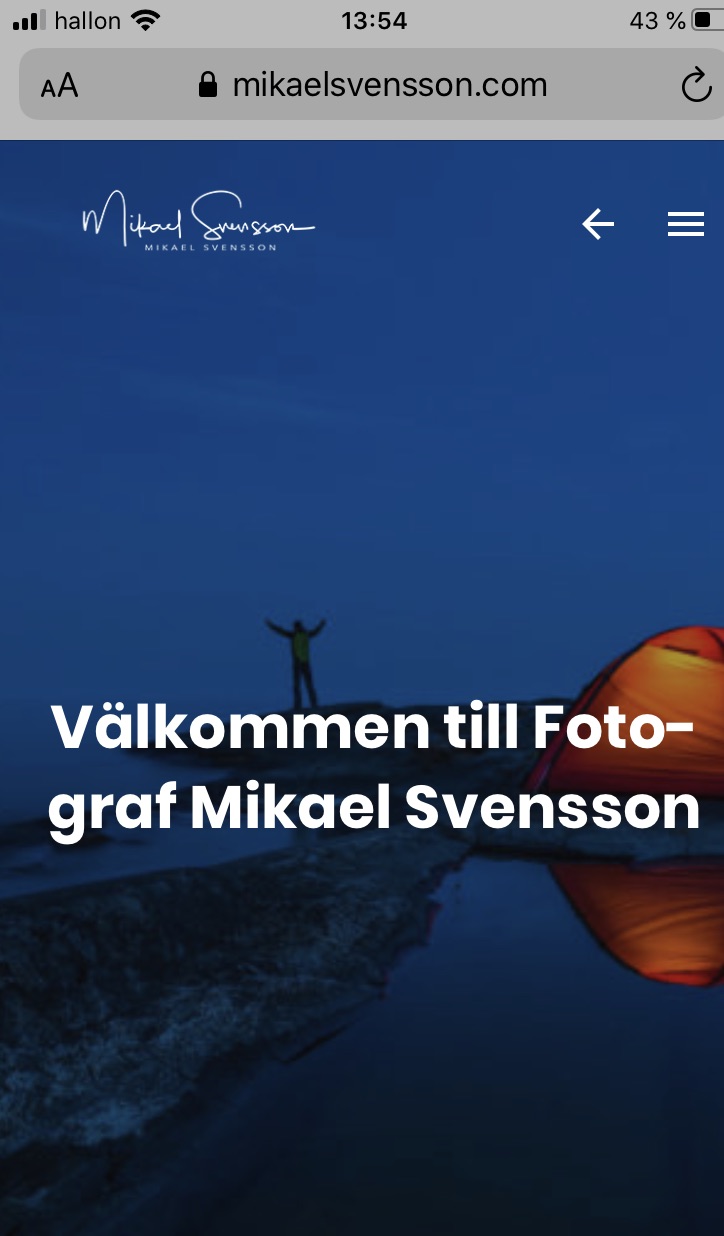
Hi, When using full screen image as a homepage. How can I adjust the title so it looks good on mobile, desktop and tablet. I have a rather long title “Välkommen till Fotograf Mikael Svensson”.
Regards,
Mikael
What’s wrong? Can you describe the problem in more detail and attach screenshots?
Are you talking about a fullscreen carousel for portfolio? We see the problem and will fix it soon. In the meantime, you can add the following styles to the child theme or “Additional CSS” in Customizer:
@media only screen and (min-width: 1920px) {
.loop-container--portfolio-carousel .carousel-item__body > * {
    max-width: 960px;
}
}
Attached is a screenshot from my mobile. What I would like to do is change the title size for the mobile.
https://www.mikaelsvensson.com/photo/wp-content/uploads/2020/05/homepage.jpgTo increase or decrease?
.loop-container--portfolio-carousel .carousel-item__title {
    font-size: 1.875em;
}
Add this code to your styles and change 1.875 to your size.
More precisely, you need to take into account all screen resolutions, so the code is as follows:
.loop-container--portfolio-carousel .carousel-item__title {
    font-size: 1.875em;
}

@media only screen and (min-width: 600px) {
.loop-container--portfolio-carousel .carousel-item__title {
    font-size: 2.625em;
}
}

@media only screen and (min-width: 1280px) {
.loop-container--portfolio-carousel .carousel-item__title {
    font-size: 3em;
}
}

@media only screen and (min-width: 1440px) {
.loop-container--portfolio-carousel .carousel-item__title {
    font-size: 3.75em;
}
}
It didn’t change anything. It’s not a portfolio, it’s a normal page with full screen image.
.post-template-fullscreen-featured-post .entry__title, .page-template-fullscreen-featured-page .entry__title {
    font-size: 1.875em;
}

@media only screen and (min-width: 960px) {
.post-template-fullscreen-featured-post .entry__title, .page-template-fullscreen-featured-page .entry__title {
    font-size: 2.625em;
}
}

@media only screen and (min-width: 1280px) {
.post-template-fullscreen-featured-post .entry__title, .page-template-fullscreen-featured-page .entry__title {
    font-size: 3em;
}
}

@media only screen and (min-width: 1440px) {
.post-template-fullscreen-featured-post .entry__title, .page-template-fullscreen-featured-page .entry__title {
    font-size: 3.75em;
}
}
Thanks! Worked great! What about having excerpt in posts for the two/three-column masonry layouts as classic layouts?
For masonry layouts, we decided not to output excerpts. It often uses vertical images, so increasing its height by a excerpt makes it not quite beautiful.