10957 comments found.

I use Plesk, but I will try to do what you suggested. I just realized I have a missing little house on my homepage bar. Then, I looked in dashboard, and even though the theme is installed (I had to reinstall it), it says at the bottom that I have a missing stylesheet. Do I need to reinstall the whole them?
Hi, here is How to add the house icon http://themes.tielabs.com/docs/sahifa/#!/house_icon - Yes , upload all new version files – How to install theme ( video ) https://vimeo.com/48295608
Hi,
Really do like your theme. Have a few questions though.
1. Although u have provided with a number of ‘main theme’ color options, I would need our main theme to be of Teal color. Would be able to help us with this change?
2. Our posts will have a lot of pictures. Is there any gallery view option where the user wouldn’t have to scroll down to much?
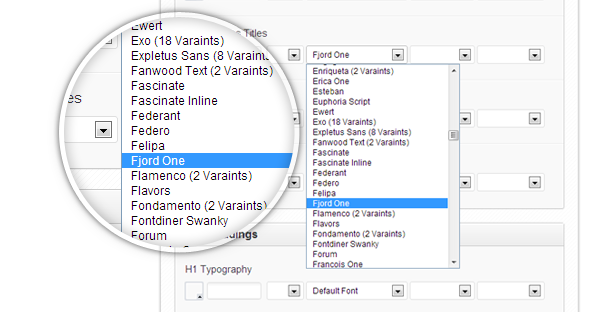
3. Do we have the option for choosing from different fonts? If not, will you be able to help us with that change if required?
Thanks in advance.
Best Regards.
Hi, - There are 8 pre-defined skins and You can use your own skin by changing colors from styling options in the Tiepanel check this link http://d.pr/i/wEmV - You can add your images as slider like this http://themes.tielabs.com/sahifa/?p=45 or use gallery options http://themes.tielabs.com/sahifa/?page_id=223 3- theme has 500+ google font http://themes.tielabs.com/images/sahifa-3.png
Thanks for your reply.
I noticed that non of your images have the fancy image view feature (wherein you click on an image and it zooms out)? You don’t have that feature or am I missing something?
Will it be possible for me to have that feature as my website will have lots of images?
An example of the feature below when you click on the images:
http://www.gsmarena.com/samsung_galaxy_note_10_1-review-798.phpLooking forward to hearing from you soon.
Thanks in advance.
I am interested in purchasing this theme, but I have a few questions first… 1) With the ad boxes, do I have control over how many there are and where they show up on my blog? 2) Am I able to remove and add news sections on the homepage? 3) Instead of placing an Adsense ad, could I place my own ad, like a photo cropped to fit into that space? Thanks.
Hi, - You can add unlimited number of ads Boxes and choose the place of it in homepage or remove it . - also you can add unlimited number of News Boxes and changing the sort if it by drag and drop .. and you can delete it . - Ads Box supports text , html or shortcodes so you can add any thing in it .
Hello, I think there is a problem in the “Authors of the site.” Instead of taking the real authors of the theme fits all users of the site. How do I resolve this problem?
Hi, Are you talking about ’ Authors List ’ page template ? .. it displays all authors registered in the blog .
That’s right, in my case, it shows all the Members in general. Why is that?
Authors list page displays all registered authors in the site without filtering .. what are you want to do ?
Hellomo3aser!
My site has 8 Total Authors, the published page shows all registered users. Look here: http://www.mondoinformazione.com/redazione-test/
For me it is important that they are shown the real authors of the site in Wordpress settings are 8!
Hi, what is the role of the users you wan’t to show them ?
It seems that all are included: Authors and Subscribers. Please solve this problem. I bought it mainly for the theme this convenient feature!
$users = get_users('blog_id=1&orderby=post_count&order=DESC');
with this
$users = get_users('blog_id=1&orderby=post_count&order=DESC&role=Administrator');
don’t forget to change ‘Administrator’ with role you want to show .. Subscriber , administrator , edito , author or contributor
I do not want authors to become administrators. now display only the Admin, it is possible to see Administrators and Authors? So it would be perfect, otherwise it would be useless!
Thank you for your patience, waiting for full resolution!
Use this file http://d.pr/f/14u1
Thanks, now it works! Will be added to the next version by default?
I don’t think so .. some one maybe wan’t to show editor role or any other role  save the file to use it in next version
Is it possible to see ads and banners through smartphones? I can’t see any ads and banners by my iPhone.
Hi watertown0103,
sidebar ADS appear in all devices but other ads doesn’t appear on iphone portrait and landscape mode .. if you wan’t to display it .. edit style.css and go to line 2527 and remove this from the line.ads-top, .home-ads, .ads-bottom, .ads-post,and the same in the 2429
Hi mo3aser,
Thank you very much for your advice! Now I can see all the banners by my iPhone.
I have two more questions.
— question No.1 —
The top 728*90 banner shows in my iPhone, but
its size is too big to show all of the banner.
(I can see the right side of the banner.)
Is there any way to resize its size?
— question No.2 —
I don’t want “Pages” to show “Comments are closed.” at the bottom of the pages.
How can I delete this “Comments are closed.”?
hi,
- To resize 728*90 banners add this code in
@media only screen and (max-width: 767px) and (min-width: 480px){
and
@media only screen and (max-width: 479px) and (min-width: 320px){
.ads-top img, .home-ads img, .ads-bottom img, .ads-post img {
max-width: 100%;
}
- for question 2 add this code to style.css file
body.page .nocomments{ display : none; }
Hi mo3aser,
Thanks to your advice.
Now I can see the resized banner of the “top page” by my iPhone, but in other “pages”, the banner size is still too big to show all of the banner.
Is there any way to resize the banner size?
Hi
Love this theme and plan to buy it, just one question:
On an iPhone, in vertical view, there is no search box. Can you fix this if I buy the theme?
Thanks
James
Hi , I just remove the search box on iPhone portrait view to offer more space so you can use Search widget .
Salam mo3aser i can’t update the theme in the manual version. I am not expert about FTP . Could you help me?
Hi, please check this video : http://www.youtube.com/watch?v=TTW9yC4_f_A
Is it possible to get the share buttons to be aligned correctly when the site is in it’s mobile phone mode? http://cl.ly/image/1K303q1h061c
I added it to to do list for next version … any thing else please tell me about it thanks
I’ll keep a look out.
I want to say to all of those out there that are thinking about purchasing this theme. Do IT. Not only is it great, but the dev offers some of the best support in the business.
Great job!
Thank you T3KD
hi, mo3aser,
Is it possbile to start from full-width design and defining siderbars where needed? I’m trying to implement a bbpress forum (which is loaded in full-width), but when I enter a forum it switches back to sidebars instaed of staying full-width.
Any solution to stay in full-width page? (url: http://www.gebetendoorhonden.be/?page_id=30
Thx in advance! Great Theme!
body.bbPress .content{ float:none; float: none; width: auto; }
having problems with the widgets.
First the author widget for both recent author posts and author bio is displaying the wrong author. for instance this one here: http://t3kd.com/apps/app-a-day/app-a-day-8-doubletwist-alarm-for-android/ is by me, but says it is by Ricky Williams. (widget is in the footer).
Next the News in pictures widget only displays some pictures (should be set to 5) and the alignment is off. http://cl.ly/image/2g0G071g1z1Y
Also having alignment issues on the recent posts section of single.php: http://cl.ly/image/0b192t3u3q3b
This is all started happening after I re-upgraded to version 1.2 of the theme.
#related_posts .related-item {
    height: 185px;
}
Thanks for the reply. Added the code, that problem is fixed. The missing thumbnails for the news in pictures makes sense.
As for the author widgets added them to the sidebar as asked, seems to have solved the problem: http://t3kd.com/internet/should-us-government-be-allowed-to-control-us/
Ok I added the bug of author widgets in footer to next version to do list to fix it
Hello,
I’d like to translate this theme to french, but I don’t know how to do this.
If you can explain to me how to proceed, I’ll be happy to give you the translation when i’ll finish it.
Hi, please check this link http://codex.wordpress.org/Translating_WordPress
Ah, even though I deleted cache, it wasn’t deleting. Had to manually delete. Answered my own question mate. Thanks for reading anyway. 
Hi, if you installed any cache plugin please delete all caches files and delete your browser cache
Would you have any insight as to why the headers for each section (using your demo version it would be “world”, “business” and “sports”) are sending my viewers to a cached version of my old wordpress theme? When I click on your category headers, it takes me to a list of stories in that category but mine actually serves a cached file from the old theme. Your help would be much appreciated. I am running the latest build btw.
Hello, I wish there was an archive page. With the latest articles published. What do you think?
Hi teotindo , I will add a blog page to the next version
I did the upgrade: I placed the download folder in ==> /httpdocs/wp-content/themes/sahifa,
but I have 2 sahifa folders by accident, I tried to delete the last one but it wont delete, is it ok to have two sahifa folders within sahia, instead of one integrated folder, or am I supposed to have one folder. How do I delete the last one so I can carefully upload it to the main sahifa folder and have one.
Hi , try to use your cpanel to delete the folder and follow this steps : – Download the zipped theme pack to your local computer from themeforest and extract the ZIP file contents to a folder on your local computer. and extract the sahifa.zip file . Using an FTP client to access your host web server Upload the Theme files in the extracted folder called ‘sahifa’ to wp-content/themes directoryprovided by WordPress. Visit Administration > Appearance > Themes, under the Manage Themes tab, under the Available Themes, if necessary navigate to the page displaying that Theme, then click the Activate link to make the Theme, the Current Theme.
Hello! How do I color the link (only in the articles) blue?
.entry a{
      color:#ff0000;
}
.entry a:hover{
      color:#ff0000;
}
change color code to color you want
HI, I updated the theme manually (no automatic option?) I still can not delete box builder home page. Please this is urgent, thank you!
Hi, Please delete your browser cache and try again ,, what is the browser you use ?
Hi mo3aser
Great update!
One question, do you need a spanish translation?
I have made a personal translation but tomorrow I can send you a more official one.
Hi OrgiForest ,
yes of course .. please send me po and mo files with your name ans website link .. thanks
ok, no question this time. ive setup my theme, and its just perfect(the last update was perfect). only want to say thank you for this great theme and keep updating it new features.
To the people it problems check you server configuration, most of the problems you guys related here was server fault not theme fault.
Thank you legionfx