2026 comments found.

Hi There, just trying to find where to delete the like this, share this widget on the bottom of the event page (not in footer)
Hi,
there is no such functionality in the theme, so you are probably using some sort of 3rd party plugin which is adding that.
Lubos
So right now, document categories can be used to create pages. Is there a way to leverage that to separate it by a tag specification.
So I want on my menu to be a page called “Financial Audits”, when the user clicks that it takes them to a page where different agencies are listed (as links). When the user clicks on an agency, it will take them to the document category page but only list documents that are associated with a certain tag, instead of ALL documents with that category.
Hi,
I am sorry but you can filter posts either by tags or categories, not both. This is how WordPress itself woks, nothing to do with a theme actually. Maybe there is a plugin which can allow you to do more advanced stuff like you need, but unfortunately I can’t recommend anything specific. Take a look into official plugins repository maybe you will find something there.
Lubos
Hi, the live customization of plugins on my pages with the shift and click option does not work anymore
Hi,
are you using the latest version of the theme (3.4.0)? Can you backtrack all the recent changes you’ve made on your site which could’ve caused this? Try to temporarily disable all 3rd party plugins to see if that helps. Also, I guess you’ve already know this, but just to be sure, this functionality works only for certain elements of the page, particularly sidebar widgets.
Lubos
im using the latest version of the theme. i cannot find any conflict! can you check it?
Feel free to send me your admin credentials via PM and I will take a look at it.
Hi, the live customization of plugins on my pages with the shift and click option does not work anymore
Hi,
I am sorry but you will have to contact me using an account with which you’ve purchased the theme and have a valid support.
Lubos
Keep getting warnings from Google Search about the events schema. Specifically with these two:
Missing field ‘startDate’ Missing field ‘endDate’
I assume this is part of the theme, Is this possibly a bug which could be fixed in a future update? Assume the events schema may have changed.
Hi,
are you using the latest version of the theme (3.4.0)? I’ve just tested it on my demo site and both of these fields were parsed without issues.
Please note that your support has expired. You will have to renew it (under your ThemeForest account / Downloads) if you need additional assistance. Thank you.
Lubos
BTW here is the result from Rich Results Test for the demo site event post example, which seems alright as well.
Thanks for the links, that’s really useful. I’ll do some more digging in that case. On latest version but my site is also looking good with those links. Looks like it may be one rouge event.
Thanks for the super quick response!
Is there a way to have the search feature include document tag searching?
Hi,
I am sorry but tags and categories can’t be searched. This is the limitation of the WordPress itself.
Lubos
By any chance is it on the roadmap to add a publish end date for notices, documents, and the like? Some of these are only in effect for a week or two and then no longer need to appear on the site.
Is there a way to mass add documents? I have about 1115 pdf files from my old site that I want to import and sort into categories in my new Townpress site. Any help?
Hi,
you can mass add document files (under your admin / Media), you can also assign more than one file at once to a document post (just hold CTRL key when selecting more document files), however each document post has to be created manually.
Lubos
Yes I’m aware of that feature, however after about 200 files, it times out and asks me to log back in. Then I have to figure out which files were uploaded and which weren’t. I tried putting the files into the upload directory in wp-content directory via ftp, but then the items were not seen in the Media/Library portion of the dashboard.
I am sorry but the theme itself has nothing to do with how the media uploading works. Maybe it could be prevented via some settings in WordPress itself or on your server. Check out this forum thread.
Ok, but is there a fix where the documents I place into the uploads directory via ftp will show in Media/Library?
Is the Pressville theme WCGA compliant?
Hi,
it was built with accessibility in mind and tested with a screen reader, but this is a comments section for TownPress theme, not Pressville (but it applies to both).
Lubos
Hi, Is there a possibility to automatically set the Right Sidebar to the Default Right Sidebar on all pages.
Hi,
I am sorry, but you need to set it manually for each page.
Please note that your support has expired. Please renew it under your ThemeForest account / Downloads if you need further assistance. Thank you!
Lubos
Ahoj Ľuboš, Prosím ťa môžem sa ta spýtať ako preložím web do viacerých jazykov alebo aspoň do angličtiny? Vopred ďakujem za odpoveď
Nazdar,
mozes na to pouzit plugin ako Polylang alebo WPML.
Ale ja osobne odporucam robit to radsej cez WP multisite – kazdy jazyk bude akoby samostatna stranka. Lebo tie pluginy ti spravia z adminu total mess a moze to mat aj negativny vplyv na rychlost webu. Cez multisite je to ovela cistejsie riesenie.
Lubos
Does the TownPress Theme support WCAG 2.1 for the Web Content Accessibility Guidelines?
Hi,
it was built with the accessibility in mind and was tested using screen reader, but accessibility has to be tested in the context of the whole site. Theme is only part of the equation.
Lubos
Hello, I’m trying to configure my site so that the logo scales properly when converting from desktop to mobile version. Right now the logo looks great on desktop version but gets too small on the mobile version.
Thank you.
I realize that the size can be changed in Appearance>Customize>Header>Logo Max Width on Mobil. I have it set at 100 currently so that it fits on the screen (at least on my iphone 11 pro max). When it resizes to mobile, the logo gets right justified instead of staying on the left, which would me to make it bigger without it being cut off. Is there a way to change the placement of the logo when it resizes to mobile?
Solution – - I have added the following into the Additional CSS (and set all sizes in Header option to max):
div.header-logo {
    max-width: 90vmin !important;
}
Please remove my url from my first reply, it will not let me edit or remove my comments.
Hi,
I do not see it justified on mobile, it is more or less centered (it would be perfectly centered if it wasn’t for your custom CSS). It already takes almost the whole width of the site on mobile so I am not sure what else could be done. Feel free to sketch some mockup so I can better understand what you want to achieve.
BTW you should use something like this to target a specific screensize with your CSS:
@media ( max-width: 991px ) {
.yourclass { something: something; }
}
That on would target mobile resolutions for example.
And you should never use ”!important”, that is a very bad practice which makes your code harder to maintain.
More importantly, your logo is insanely huge file-wise (6000×1500px) and it takes almost 1MB. There is no reason to upload such a huge file, you are only hurting your site performance. In this particular case, around 1500px in width should be more than enough. You should also look into possibilities to have it in the SVG format which could improve the file size even further.
Lubos
Thank you for the suggestion! I modified my logo so it wasn’t so big. I’m new to photoshop and wanted to make sure the logo looked clean and crisp at higher resolutions. I attempted to import at SVG (even with proper plugin) and when it cleansed the SVG, it deleted the actual logo and only kept the text part of the image. So I reverted to using PNG for now. I couldn’t get your css suggestion to work, so just left it at 95vmin and took out the !important part.
Are you able to please delete my comment with my URL in it? Thanks!
PNG is ok as well, just no need for such extreme resolution.
You can click on the flag icon in upper right corner of the comment and explain you just want to remove it.
Thank you, Lubos!
Hi there! I had a question about TownPress template. Does the package include pure HTML code files or is it just made for WordPress?
Thanks
Hi,
this is a WordPress version, HTML version can be found here (however please note that design and available pages are not 1:1 as the WP version).
Lubos
This theme is not compatible with what we would like to do or the plug in. Could you please refund me.
Kind Regards Brenden
Hi,
I am sorry but I do not usually offer refunds on already downloaded items. Can you please tell me more about the issues you are facing, maybe I will be able to assist you.
Lubos
Hi Envato
I am really new to Wordpress and possibly naive. I thought that the development of site would be easier to navigate rather than the free Wordpress themes.
I realize there is still to much work for me to do and I will need to pay someone to do it but spent my money on a high end Wordpress theme.
I will probably close down the site now.
Brenden Masters
Have you read through the documentation at http://docs.lsvr.sk/townpress.wp/? If you already have some experience with WordPress, then it is really not that hard to set this theme up. Just tell me which steps exactly are you having issues with and I can clear it up for you.
As for the refund, I am sorry but official refund policy is very clear under what circumstances you are entitled to a refund, and unfortunately, lack of experience is not amongst them. Setting up TownPress is certainly not any harder than any other theme. Also, if you plan to pay someone to set it up for you then you still need a theme anyway so no harm done (since you should be the one to own the license, not the freelancer / agency who will do the work). You can for example find someone at studio.envato.com.
BTW, you’re not speaking to Envato I am the author of this theme.
Hello, I have a Presale question. Is it possible to set the opening hours like opend from 8 – 12 and 14 – 20 on the same day? I need Breaks, between the opening hours. For example a Café which opens for Breakfast, then close and opens again for Coffee. Or a Business which has more Breaks between. Is it possible or can you make it possible if not yet?
Hi,
that it is a bit complicated. You can use a custom format instead of the predefined selectboxes, but it won’t look as good as the preformatted table as you can see on the demo, it will be just a plain text. Alternatively, you can add a small note under opening hours like “Lunch break between 12 – 14”.
Lubos
First Thanks for the answer. Thats for me not practicable, I still need those function with also a good optic. Then I have to Look for another Theme. Sad, I like youre optic of Theme. But Thanks
No problem. I may implement it in the future, but I can’t promise anything.
Hello,
Can you tell me what might be issue with mobile menu button? When I click on it on mobile devices it just quickly shows and then collapses. No matter how many times I click on menu it just closes down.
Hi,
make sure you are using the latest version of the theme.
Please note that your support has expired. Please renew it under your ThemeForest account / Downloads if you need further assistance. Thank you.
Lubos
Well we can not use latest version of theme because we can not move to 2.0 version of theme.
I will renew support but is this issue solvable without upgrading to 2.0 version of theme?
What version are you using currently?
Current version of theme is 1.6.3
Right, that’s the last of the 1.x branch. But you’ve purchased the theme while ago so I assume you haven’t had this issue before? Maybe it’s caused by some 3rd party plugin conflict? Have you done any code customization? I do not really provide support for the 1.x version anymore, but issue like this doesn’t just appear from nowhere. Try to backtrack all the changes you’ve made recently.
Only custom coding that is done is within child theme. Even when I upload new, clean child theme this happens.
I think that issue started when I updated WordPress. I have tried shutting down all plugins but it continues to happen.
Please share your URL
I’ve just checked it on iPhone using Safari, Firefox and Chrome and don’t see this issue, so it must be something browser-specific.
Hello, My problem: I added events in LSVR Events and these aren’t displayed. All of them are in the future, but the frontend says “no upcoming events”. When I enter one event directly, it says that it is in the past. What is wrong? Regards
Hi,
make sure you correctly set both start and end dates for that event. Feel free to share the screenshot of your event settings as well as your site URL.
Lubos
Hi Lubos, here the frontend: https://bul.stadt-bul.de/veranstaltung/popcorn-kino-fuer-kinder-ab-5-jahren/
and here the screenshot of the settings: https://bul.stadt-bul.de/wp-content/uploads/2020/settings.PNG
Admin look alright. Try to go to Tools / Regen. Events and hit the button.
No positive effect. Is there a problem with the time format? German DD.MM.YYYY versus YYYY-MM-DD…or with the reference, because it says “Event has ended”?
The problem is with the DB, events are not getting properly created for some reason. Try to deactivate the LSVR Events plugin, then activate it again and then go to Tools / Regen. Events and hit the button.
Again not solved. I tried your suggestion and after that I even deleted the Plugin, reinstalled it, pressed regenrate, same status. Wordpress ist running in multisite mode with different domains. Perhaps this is the problem.
My demo site is also running as multisite so that should not be a problem. When you deleted the plugin, have you did it via admin or FTP?
Admin
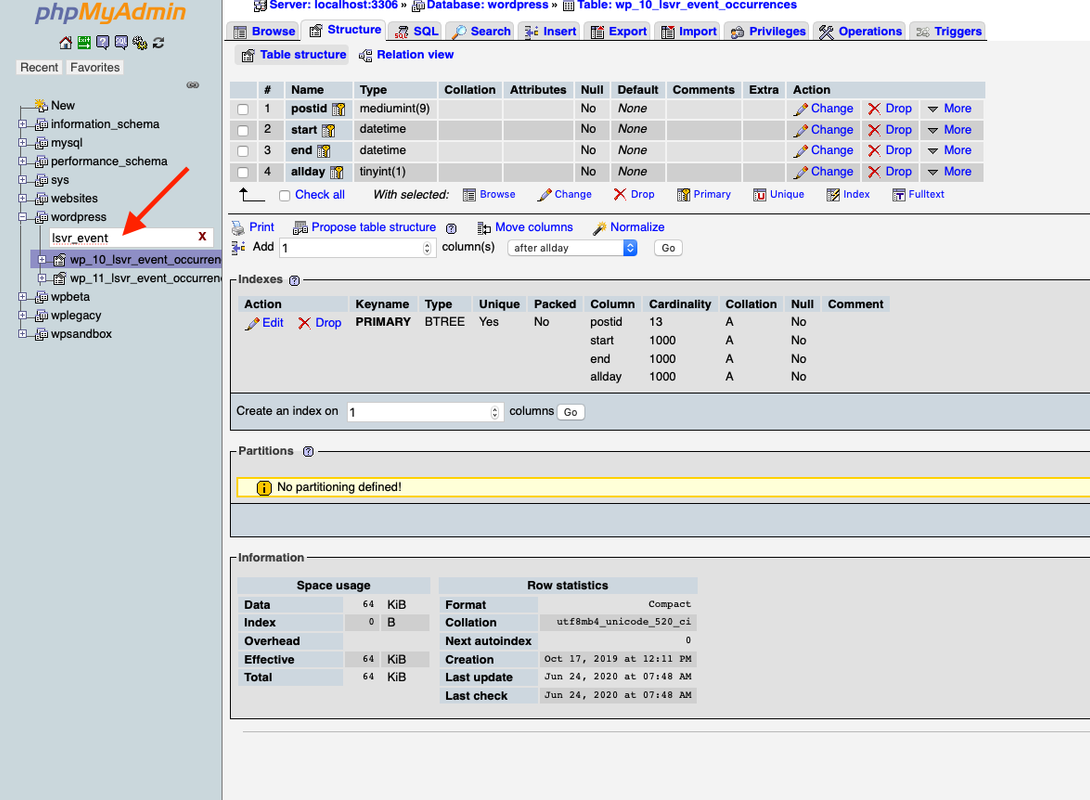
Try to login into your database using PhpMyAdmin for example and check out if there is a database table named “lsvr_event_occurrences”. The name will be prefixed, especially since you are using multisite so it will be more like “wp_10_lsvr_event_occurrences”, depending on the specific prefix. But it doesn’t matter, you can filter tables by name so just type “lsvr_event_occurrences” and you should find it (if it exists). Check out the screenshot.
I only have wp_lsvr_event_occurrences in the database and this is empty. For posts etc. I have wp_2_posts and wp_3_posts for example, but no wp2_lsvr_event_occurrences and wp3_lsvr_event_occurrences. For your info: First I configured the multisite, then I installed the theme and plugins and activated them network wide.
Try to activate the LSVR Events only for the specific site, not network wide. Try to deactivate and remove it first before you do that.
That’s the clou. It works now! Thank you and perhaps it helps for future updates… 
Glad you’ve solved it!
Hi Lubos,
I have a url link copied in two different places of my webpage, one of them is working but the other one is not. The one which is working is inserted as url link in front page Townpress Sitemap. The one which is not is inserted as document attachment, and I suppose this is the reason why it is not working. Nevertheless I would like to confirm with you. Does inserting a url link as document attachment make the link behave in a different way? When I hover over the link, the url displayed is not the same.
Link that is working: https://ibb.co/PQ9D2Jj Link that is not working: https://ibb.co/FK9ZBVzHi,
it shouldn’t work differently, please share the URL and I will try it on my end.
Lubos
The problem is with the % sign n that URL. URLs in document attachment and URLs in basic text element are encoded and stored in a different way and for some reason, the % gets stripped in the former. Best way is to simply use URL shortener for such URLs and save the shortened URL instead.
Thanks a lot Lubos for you help, that is a nice idea.
Hi Lubos,
Would it be possible to modify font size and appearance of LSVR Directory widget that I put on front page to be exactly the same as the one on Sidebars?
https://ibb.co/887VZdNThanks!
Hi,
Try this CSS:
.shortcode-widget { font-size: 0.875em; }
Lubos
Thanks! It worked =)