12802 comments found.

Hello,
Below is an error I’m receiving then using the import/export feature under Theme Seetins
IMPORT ( ! )WARNING: USE OF UNDEFINED CONSTANT AUTH_KEY – ASSUMED ‘AUTH_KEY’ (THIS WILL THROW AN ERROR IN A FUTURE VERSION OF PHP) IN C:\USERS\SFITZ\LOCAL SITES\BIDNBUY-DEALS\APP\PUBLIC\WP-CONTENT\THEMES\WOODMART\INC\OPTIONS\CONTROLS\IMPORT\CLASS-IMPORT.PHP ON LINE 95 CALL STACK #TIMEMEMORYFUNCTIONLOCATION 10.0002417320{MAIN}( )...\ADMIN.PHP:0 21.660022114536DO_ACTION( )...\ADMIN.PHP:254 31.660122114912WP_HOOK->DO_ACTION( )...\PLUGIN.PHP:478 41.660122114912WP_HOOK->APPLY_FILTERS( )...\CLASS-WP-HOOK.PHP:311 51.660122116040XTS\PAGE->PAGE_CONTENT( )...\CLASS-WP-HOOK.PHP:287 61.674622174864XTS\PAGE->DISPLAY_SECTIONS( )...\CLASS-PAGE.PHP:210 71.834522759824XTS\OPTIONS\CONTROLS\IMPORT-> RENDER ...\CLASS-PAGE.PHP:377 81.834522759824XTS\OPTIONS\CONTROLS\IMPORT->RENDER_CONTROL( )...\CLASS-FIELD.PHP:209 91.834822759824XTS\OPTIONS\CONTROLS\IMPORT->GENERETE_SECRET( )...\CLASS-IMPORT.PHP:48
( ! ) WARNING: USE OF UNDEFINED CONSTANT SECURE_AUTH_KEY – ASSUMED ‘SECURE_AUTH_KEY’ (THIS WILL THROW AN ERROR IN A FUTURE VERSION OF PHP) IN C:\USERS\SFITZ\LOCAL SITES\BIDNBUY-DEALS\APP\PUBLIC\WP-CONTENT\THEMES\WOODMART\INC\OPTIONS\CONTROLS\IMPORT\CLASS-IMPORT.PHP ON LINE 95 CALL STACK- TIME MEMORY FUNCTION LOCATION 1 0.0002 417320 {MAIN}( ) ...\ADMIN.PHP:0 2 1.6600 22114536 DO_ACTION( ) ...\ADMIN.PHP:254 3 1.6601 22114912 WP_HOOK->DO_ACTION( ) ...\PLUGIN.PHP:478 4 1.6601 22114912 WP_HOOK->APPLY_FILTERS( ) ...\CLASS-WP-HOOK.PHP:311 5 1.6601 22116040 XTS\PAGE->PAGE_CONTENT( ) ...\CLASS-WP-HOOK.PHP:287 6 1.6746 22174864 XTS\PAGE->DISPLAY_SECTIONS( ) ...\CLASS-PAGE.PHP:210 7 1.8345 22759824 XTS\OPTIONS\CONTROLS\IMPORT-> RENDER ...\CLASS-PAGE.PHP:377 8 1.8345 22759824 XTS\OPTIONS\CONTROLS\IMPORT->RENDER_CONTROL( ) ...\CLASS-FIELD.PHP:209 9 1.8348 22759824 XTS\OPTIONS\CONTROLS\IMPORT->GENERETE_SECRET( ) ...\CLASS-IMPORT.PHP:48
5B0E1A62406E90A5278A035FDE3F7192”>EXPORT OPTIONS
Regards.
Hello,
Could you please disable all plugins that are not related to our theme and provide us your admin access so we can check it? Send us your data via the contact form on our profile page.
Thank you in advance
Hi, ....Elementor question ….. there is not the option to change the footer to my custom Elementor Theme Builder footer? There is only the Theme Option to add the Pre-footer block, or disable the footer. Normally with Elementor, when you set the Footer conditions to Entire Site, the footer should appear…? I cannot send a link as I am building/testing in localhost. Please advise if you know about this. Thanks
Hello,
You can enable one column footer layout in Theme Settings and then put an HTML Block with Elementor to this footer widgets area in Appearance -> Widgets.
Kind Regards
Hi, can you tell me why I cannot use the Elementor Theme Builder for my Header and Footer sections. Seems a bit strange to create HTML blocks then add them into the Widget sections? I thought Woodmart had full Elementor support?
Elementor custom footer replaces our “footer.php” file compately and break the container. That is why it is much better to use our HTML Block. It is almost the same mechanism but will work correctly.
I would like to purchase a Regular License for this theme. My question is, how many websites can I use this Regular License theme, please let me know …
Hello,
You can create one website with one regular license. Each new project requires one regular license.
Kind Regards
Is there a way to add +/- to the cart side menu to adjust if the customer wants to add more than 1 product instead of having to go to the cart page?
Hello,
Yes, you can enable this option in Theme Settings -> Shop -> “Quantity input on shopping cart widget”.
Kind Regards
Did Instagram widget become vertical and cropped images (instead of square) after latest update?
I see now it’s fixed with the update, but one more thing, one of my websites having issue with Instagram API while other works fine. (ps. it’s multisite) I think the error started after update 5.0. See here: https://snipboard.io/4sDOf0.jpg
Hello,
Could you please disable all plugins that are not related to our theme and provide us your admin access so we can check it? Send us your data via the contact form on our profile page.
Thank you in advance
Hola, en qué medida se deben subir las imágenes de las categorías de miniatura? Lo he subido a 300×500px pero la altura no se ve igual al demo. No se adaptan. espero su respuesta, gracias
Hi,
Please, create a topic on our support forum and provide us all the necessary details about the request with some screenshots and including your admin access so we can help you https://xtemos.com/forums/forum/woodmart-premium-template/
Regards
The header builder doesn’t seem to be working?
Hi,
Please, create a topic on our support forum and provide us all the necessary details about the request with some screenshots and including your admin access so we can check it https://xtemos.com/forums/forum/woodmart-premium-template/ If your support is already expired then you need to extend it on ThemeForest first.
Regards
looks PRETTY NICE!
Thank you!
Hi again!
When product is VARIABLE and haves only one variation, on product archive, adds to cart button text appear like “LEER MÁS” read more, but cant find the chain in LocoTranslate to translate it to “Moreoptions”.
https://www.vainsmon.es/categoria-producto/sanitarios/?filter_marca=villeroy-boch-valenciaHow to translate it?
Thanks a lot! ♥
Hi,
This text is related to WooCommerce plugin and not to our theme.
Kind Regards
Thank you a lot! ♥
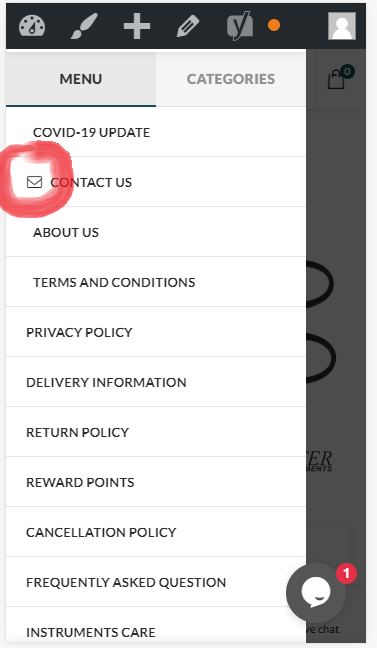
Icon Issue On Mobile Menu see the screenshot https://i.gyazo.com/f306b3d3a91002a06c43f4f1acccde60.png
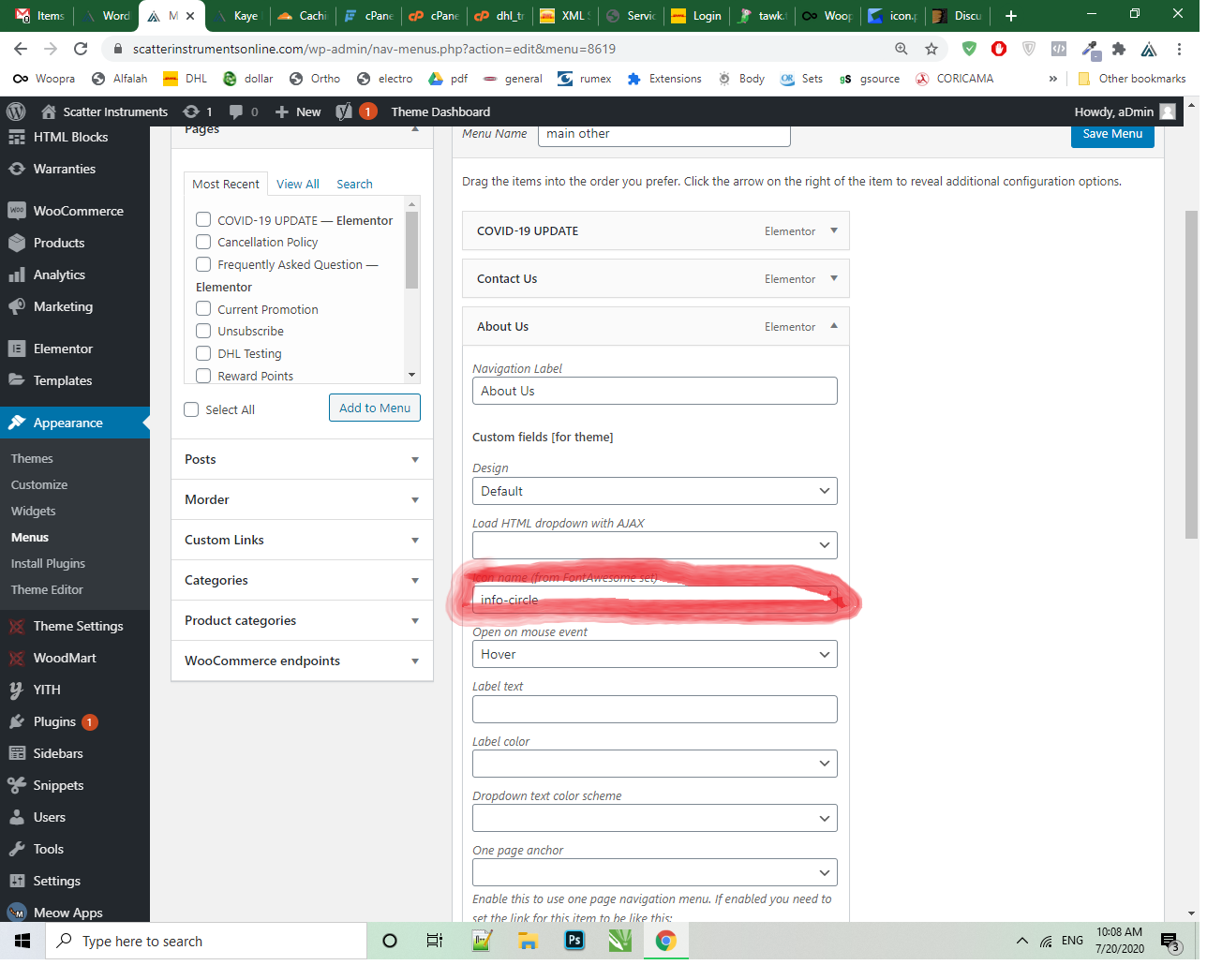
when we add fontawesome icon code did not icon show on mobile menu, only one code is work “envelope-o” like screenshot.
https://i.gyazo.com/8fcdd3c178121ce8e18fd5cb1b85d1cd.png
now what i need to do?
please share the fontawesome icon list or cheatsheet.
Hi,
Could you please send us a link to your website where we can see this issue? You can find the font awesome icons list on the official website https://fontawesome.com/icons?d=gallery
Kind Regards
Https://scatterinstrumentsonline.com
Please, send us your admin access via the contact form on our profile page also.
i sent you my website creditial
We have enabled Font awesome icons permanently on your website in Theme Settings -> Performance. As for the whatsapp icon, you need to change the class name from “fa” to “fab” https://gyazo.com/1d4a1da52d215e25ea2b781b6fc00a61
Thank you for your Awesome Lovely support.!
its work
Great, you are welcome!
Hola, en qué medida se deben subir las imágenes de las categorías de miniatura? Lo he subido a 300×500px pero la altura no se ve igual que el demo. espero su respuesta, gracias
Hola, cómo hacer para que en el filtro aparezca las marcas con sus respectivos logo y los colores con su respectivo color, similar al demo?, He subido las imágenes y colores pero no muestra
Gracias por su ayuda.
Hi,
Please, create a topic on our support forum and provide us all the necessary details about the request with some screenshots and including your admin access so we can check it https://xtemos.com/forums/forum/woodmart-premium-template/
Regards
Hi, There is a 1-Pixel white gap between main menu and the main content and i can’t remove it. I have used negative px and the 1-pixel gap still remains. How can i remove this pixel line?
Hi,
Please, create a topic on our support forum and provide us all the necessary details about the request with some screenshots and including your admin access so we can check it https://xtemos.com/forums/forum/woodmart-premium-template/
Regards
1. I know themes that have a lot of more content on startpage but they have MUCH BETTER pagespeed. Why?
i know, “Google always scores with 20-40 points mobile performance for 99% of websites built with WordPress.”. But this is not correct. I tested the 10 top-seller themes on themeforest and the most of them have realy much better values (minimal 40 points in mobile view of google pagespeed).
Why your theme have less images and mb (total size of tested site) but loads slower? I dont wanna link the other themes here, nut no one was slower. Most of them are realy very much faster then yours although they have more images, more text and more total size of page.
Your already using wp rocket in your demo theme installation?
Please, before adding more functions: try to clean up theme code and functions to improve the massiv slow pagespeed of your theme. If you need the links of the tested themes (top 10 themes on themeforest) i can send you via privat email or here. Its shoking result 
Maybe because you add elementor and theme code is not improved enough for it?
I love woodmart so much. But we cant work with an theme that is so much slow.
Next question: 2. All tested themes have pagespeed 1-4 seconds. Your theme: 7,6 seconds.
We tested pageload also in our browser console and also in https://www.webpagetest.org But now the shoking moment: Your site have total size: 2.06MB, pageload: 7,6 seconds. This is very, very bad for 2mb size page. Other tested themes have 4, 7, and 5 mb and the average pageload time is 3,2 seconds.
So you will see: this is an massive problem. Other themes have much more content but load faster.
3. The tested demo content is build with wpbackery. What about elementor? Is the pagespeed smiliar in elementor, better or more slow?
Hello,
If you will test our demo with Google browser then you will see that loading time when the page is not your cache yet is about 1.2-1.7 seconds. And if it is already cached (you visit it second page for example) the loading time is 0.8-1.1 seconds https://gyazo.com/f078ba52c0ea0e176e05b06f0cbca138 That is a quite fast result as for us. We suggest you to check our demo by yourself and see how fast it is. As for the pagespeed tools, most of them analyze a lot of different factors but not always they really shows how fast is your website. Please, read this article from WP Rocket team that has a huge experience on WordPress optimizations https://docs.wp-rocket.me/article/85-google-page-speed-grade-does-not-improve
So in general, if you will optimize your website and all images and resources then you will not have any issues caused by WoodMart. But if you will see that our theme is not suitable for you, we will return your money back.
Kind Regards
Your theme have theme related elementor elements/widgets like product carousel with style options/settings?
Hello,
Yes, our theme has 40+ elements built for Elementor. You can see them all on our demo website.
Kind Regards
My client purchased this theme for non Woocommerce site. But Elementor works only if Woocommerce is installed. Just for your information. I think it is bad.
Hi,
It works without WooCommerce too. If you have any questions, please, create a topic on our support forum and we will help you.
Kind Regads
Hello I noticed a problem after updating woodmart to 5.0 from Theme setting – Mobile bottom navbar the order of the select buttons changes after saving, does not keep the set order. I ask if there is an alternative to this Thank you
Hello,
Thank you for reporting us. We will fix this in our next theme update very soon.
Kind Regards
Does your theme have theme releated elementor widgets/elements? Is it possible to build custom category archive page and product detail page with elementor pro? To do that its important that your theme will supporting this. We have elementor pro, but its important that your theme support this function and have elements/widgets in elementor, for example “add to cart” element, price element and title element to build custom product detail page.
Hello,
Thank you for your question.
Yes, our theme supports Elementor pro too. But we are working on some improvements and will implement smoother compatibility in our next update.
Kind Regards
Woodmart + Elementor, a dream comes true! So great!
Thank you very much! 
Hello. After update I think that there is animation whick is changed in product styles. When cursor is on top of the wishlist, compare or quick view icon so it’s “aggressive” animation from top left corner to top of icon. Can I change it more “peaceful” and not so much motion? Fadein would be much better. Thank you
Oh.. I restored the backup and the animation is similar. My mistake. I remembered wrong. But still it’s could be nice if that animation would be replaceable.
Hi,
Please, create a topic on our support forum and provide us all the necessary details about the request with some screenshots and including your admin access so we can check it https://xtemos.com/forums/forum/woodmart-premium-template/
Regards