1060 comments found.

Hi Team,
I couldn’t find any footer in the theme apart from a fixed copyright footer. Can you pls help me in creating a footer with multiple links that would go with the theme?
Pls refer the below link for footer reference:
https://imgur.com/3xtq7CtDear kmanojkumar,
Thank you for contacting Design Reset.
1. The footer is already provided in demo 7. You can modify according to your needs.
Check the links mentioned below;
2. You can change the background color on hover or on dropdown open but you have to modify li CSS and it took a lot of effort with some functionality issues.
Kindest Regards,
Design Reset Team
Hi,
I have added the required css to bring hover color on ‘li’ element in navbar but the ‘li’ element is not getting highlighted when active.
Pls help in resolving the issue.
Following css is already added in structure.css
.
topbar-nav.header nav#topbar ul.menu-categories li.single-menu.active > a > div svg:not(.feather-chevron-down) {
          color: #25d5e4;
          fill: rgba(37, 213, 228, 0.29); }
        .topbar-nav.header nav#topbar ul.menu-categories li.menu.active > a > div svg.feather.feather-chevron-down {
          color: #e0e6ed; }
        .topbar-nav.header nav#topbar ul.menu-categories li.menu.active > a > div span {
          color: #25d5e4;
          font-weight: 600; }
HTML CODE
<ul class="list-unstyled menu-categories" id="topAccordion">

                    <li class="menu single-menu">
                        <a href="#" aria-expanded="false" class="dropdown-toggle autodroprown">
                            <div class="">
                            <i class="fas fa-globe" /> <span>Web Hosting</span>
                            </div>
                        </a>
                    </li>

                    <li class="menu single-menu">
                        <a href="category/dev-tools" aria-expanded="false" class="dropdown-toggle autodroprown">
                            <div class="">
                            <i class="fas fa-code" /> <span>Dev Tools</span>
                            </div>
                        </a>
                    </li>
<ul>
</ul></ul>
Hello kmanojkumar,
To apply hover you have to use :hover pseudo class on li tag and the code you have provided does not seem to have :hover pseudo class.
Hope this helps 
Kindest Regards,
Design Reset Team
HI team,
Hover part is already implemented successfully with different css. I want to change the css of active li elements. I have provided the code for the same.
Pls help me with the css for active class. The css code present in structure.css is not working.
Dear kmanojkumar,
We have checked your CSS and it contains some errors we have updated them kindly check the CSS.
.topbar-nav.header nav#topbar ul.menu-categories li.single-menu.active > a > div svg:not(.feather-chevron-down) {
color: #25d5e4;
fill: rgba(37, 213, 228, 0.29); }

.topbar-nav.header nav#topbar ul.menu-categories li.menu.active > a > svg.feather.feather-chevron-down {
color: #e0e6ed; }

.topbar-nav.header nav#topbar ul.menu-categories li.menu.active > a > div span {
color: #25d5e4;
font-weight: 600; }
Hope this helps
Kindest Regards,
Design Reset Team
There seems to be no change in the updated css and the css already existing in structure.css of theme 7. Pls check. It’s not working.
Dear kmanojkumar,
Kindly share your full working code. So that we can solve once for all. We have fixed your code so if it’s still not working it means you have changed something.
Kindest Regards,
Design Reset Team
Hi team
Following is my working HTML Code and I want to change the css of active element in my navbar.
<div class="topbar-nav header navbar" role="banner">
            <nav id="topbar">

                <ul class="list-unstyled menu-categories" id="topAccordion">

                    <li class="menu single-menu">
                        <a href="#" aria-expanded="false" class="dropdown-toggle autodroprown">
                            <div class="">
                            <i class="fas fa-globe" /> <span>Web Hosting</span>
                            </div>
                        </a>
                    </li>

                    <li class="menu single-menu">
                        <a href="category/dev-tools" aria-expanded="false" class="dropdown-toggle autodroprown">
                            <div class="">
                            <i class="fas fa-code" /> <span>Dev Tools</span>
                            </div>
                        </a>
                    </li>

                    <li class="menu single-menu">
                        <a href="#" aria-expanded="false" class="dropdown-toggle autodroprown">
                            <div class="">
                            <i class="fas fa-comment-dots" /> <span>Chat</span>
                            </div>
                        </a>
                    </li>

                    <li class="menu single-menu">
                        <a href="category/databases" aria-expanded="false" class="dropdown-toggle autodroprown">
                            <div class="">
                            <i class="fas fa-database" /> <span>Databases</span>
                            </div>
                        </a>
                    </li>

                    <li class="menu single-menu">
                        <a href="category/blogs-and-forums" aria-expanded="false" class="dropdown-toggle autodroprown">
                            <div class="">
                            <i class="fas fa-blog" /> <span>Blogs and Forums</span>
                            </div>
                        </a>
                    </li>

                    <li class="menu single-menu">
                        <a href="category/e-commerce" aria-expanded="false" class="dropdown-toggle autodroprown">
                            <div class="">
                            <i class="fas fa-shopping-cart" /> <span>E-Commerce</span>
                            </div>
                        </a>
                    </li>

                    <li class="menu single-menu">
                        <a href="category/business-apps" aria-expanded="false" class="dropdown-toggle autodroprown">
                            <div class="">
                            <i class="fas fa-briefcase" /> <span>Business Apps</span>
                            </div>
                        </a>
                    </li>

                    <li class="menu single-menu">
                        <a href="category/security" aria-expanded="false" class="dropdown-toggle autodroprown">
                            <div class="">
                            <i class="fas fa-shield-alt" /> <span>Security</span>
                            </div>
                        </a>
                    </li>

                </ul>
            </nav>
        </div>
Hello,
Please share full working HTML, CSS and Js code via codepen or pastebin.
Kindest Regards,
Design Reset Team
Hello, I want use this template with Sass stylesheets in my Angular project. I have try it( with the Sass folder). I am a little lost, there are so many files. I Maybe an example from you can help me.
Dear mr_cozay,
Thank you for contacting Design Reset
Can you explain more about your issue related to the Bunch of SASS file?
We want to know, exactly what issues you are facing
Kindest Regards,
Design Reset Team
How can I use this in an Angular project ? I have great difficulties integrating it: the charts, the alerts, ... no longer appear. The alerts, the buttons, no longer work … If you can provide an example of integration of the index template of demo1: that will serve as inspiration, preferably SASS
Dear mr_cozay,
We have no working example of angular as the project is not currently developed for angular.
Although you can convert it on your own. But you to convert all jquery into angular js by your own.
Below is some link that shows how to convert the HTML project into Angular.
- https://www.freelancingdesign.com/step-by-step-to-convert-html-template-to-angular-7-template/
- https://www.phpflow.com/misc/angular/convert-bootstrap-html-theme-angularjs-template/
Hope this helps
Kindest Regards,
Design Reset Team
Thank you
Dear Support, is it possible to insert all javascript and css add ones instead of include it in every page?
Dear patrick-pvk,
Yes, you can.
For that, you have to detect page dynamically by using your dynamic language.
We meant to say that detect the page dynamically and include the CSS and JS accordingly.
Kindest Regards,
Design Reset Team
How can i do that? Do you have an example, because in the documentation there is no informatie about importing everything
Dear patrick-pvk,
Get the file name using the code below
echo basename($_SERVER[‘PHP_SELF’]); /* Returns The Current PHP File Name */
and then,
Make a condition ( by using switch loop ) according to each page. Then include all the CSS and JS for the following page.
For example:
<?php
    $pageName = basename($_SERVER['PHP_SELF']); // Let suppose page name is - page-3

    switch ($pageName) {
        case "page-1":
            echo "Page 1 CSS and JS";
            break;
        case "page-2":
            echo "Page 2 CSS and JS";
            break;
        case "page-3":
            echo "Page 3 CSS and JS";
            break;
        default:
            echo "No styles are set";
    }
?>
Hope this helps
Kindest Regards,
Design Reset Team
Hi DesignReset, My client has purchased your template. Can you please tell me how can I reset the file upload field with jquery?
Here is the code – de8298e3-3177-4e40-a0e5-28444e8a4138
Thanks in advance.
Dear masudrana_themeforest,
Thank you for contacting Design Reset
Kindly follow the links mentioned below;
- https://stackoverflow.com/questions/9617738/how-to-clear-file-input
- https://www.gyrocode.com/articles/how-to-reset-file-input-with-javascript/
Hope this helps
Kindest Regards,
Design Reset Team
There has a “X” button that can resetting the input file field. I want to know how do i trigger that “X” with jquery.
Dear masudrana_themeforest,
Try to use clearPreviewPanel option
For more information, kindly check the plugins docs mentioned below
- https://github.com/promosis/file-upload-with-preview
Kindest Regards,
Design Reset Team
Thank you, It works!!
You are most Welcome
Dear robotinc,
Thank you for contacting Design Reset.
We think it’s because of the CSS i.e. is not closed from the end.
Check the screenshot link mentioned below.
Kindest Regards,
Design Reset Team
Hi,
I’ve recently bought your “Cork” theme and upon browsing your files I noticed that some css files for one of the demos aren’t being generated from any sass file. The file in question in on directory “html/ltr/demo3/assets/css/dashboard/dash_1.css” file. Where can I find then the original sass file?
Furthermore, in a few instances I had to manually dig though the files in order to find the hard-coded color I was looking for, which is in the very least annoying. If you say you support sass, you should at least unify variables in a few files and then use those throughout the code instead of hard coding stuff as it makes customizations much harder.
I’m looking forward to a reply, Best,
Felipe M.
Dear felipemoran,
Thank you for contacting Design Reset.
You can find all the dashboard widgets SASS inside assets/widgets/
Also,
Thanks for your feedback.
Kindest Regards,
Design Reset Team
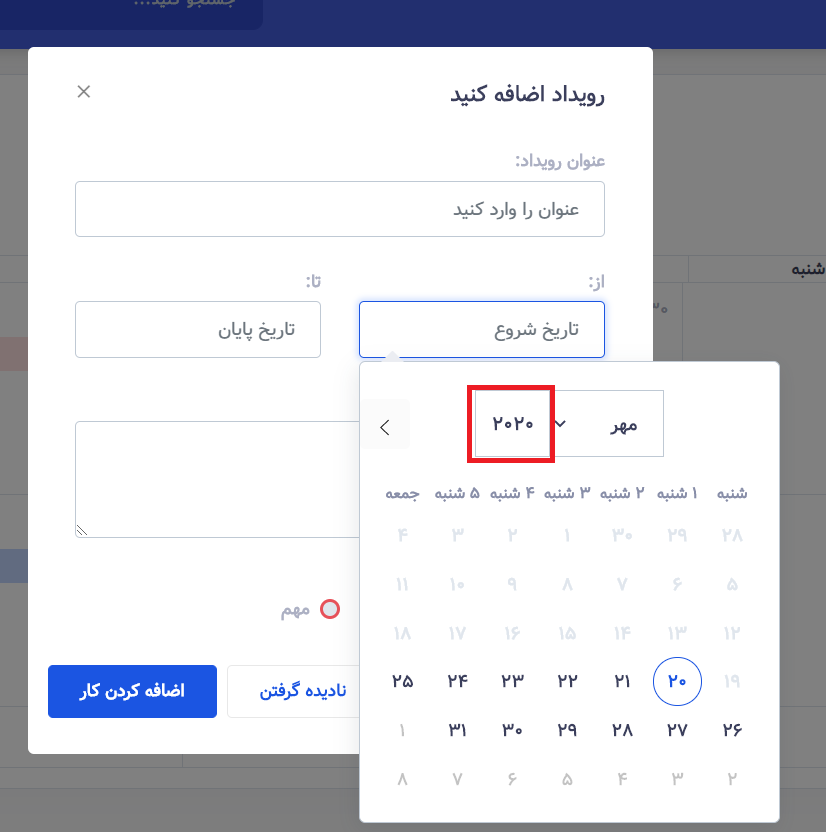
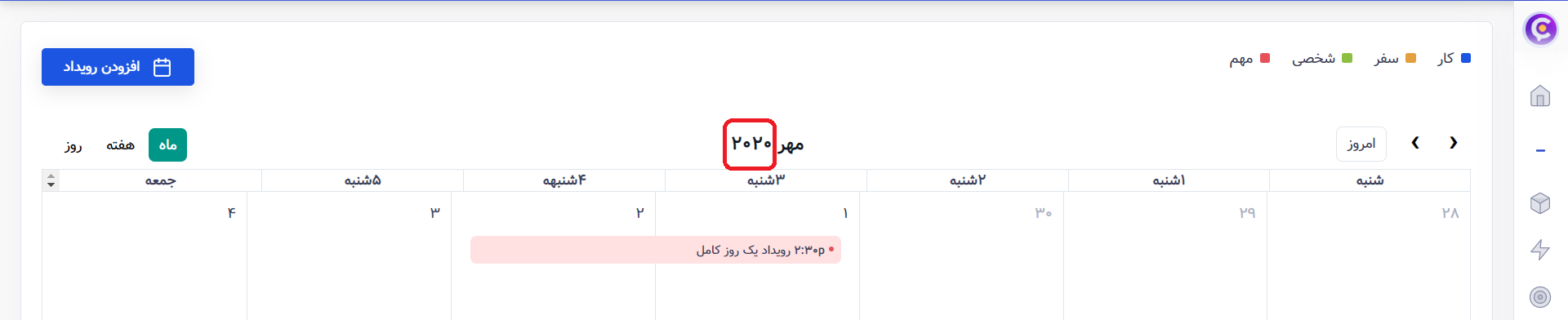
Hello and do not be tired. How can I do solar history? Now we are in the year 1399.
http://s13.picofile.com/file/8403456784/%D8%B4%D8%B3%DB%8C%D8%A8%D8%A8.png http://s13.picofile.com/file/8403456792/%D8%B4%D8%B4%DB%8C%DB%8C.pngHello Badmoham,
Thank you for contacting Design Reset.
Are you asking, how to implement Hijri calendar in date and Time picker?
Kindest Regards,
Design Reset Team
hi thank you for your fast and kind reply. no, actualy there is 2 kind of hijri calendar, one is hijri-shamsi(solar) and other one is hijri-ghamari (lunar). what i want is first one, persian hijri-shamsi(Solar Hijri calendar(jalali)).
here is wikipedia reference: https://en.wikipedia.org/wiki/Solar_Hijri_calendar
thaks for helping
Badmoham
Hello badmoham,
Thank you for explaining. Let us check what are the available solution for this issue. We will get back to you with a suitable answer soon.
Kindest Regards,
Design Reset Team
Thanks. I’m waiting for you.
Dear badmoham,
Kindly follow the links mentioned below to solve this isuue;
- https://stackoverflow.com/questions/22880225/how-can-i-use-persian-date-shamsi
- http://members.casema.nl/couprie/calmath/persian/index.html
- http://www.parstimes.com/persian/calendar/
Hope this helps
Kindest Regards,
Design Reset Team
HI I couldn’t make it with my knowledge and the help of this resources. can you please make 1 demo with jalali calander
HI I couldn’t make it with my knowledge and the help of this resources. can you please make 1 demo with Jalali Calendar?
regard and thanks
Badmoham
Hello Badmoham,
We will not be able to produce a demo based on Jalali calendar as date and time picker is an external plugin.
You can hire someone at fiverr or upwork to integrate date and time picker with Jalali calendar.
Kindest Regards,
Design Reset Team
Why Dashboard graph not show
Dear robotinc,
Thank you for contacting Design Reset.
Share the following information.
1. Which framework you are using.
a. HTML b. Laravel
2. Which Demo you are using.
3. Please provide screenshot of the dashboard as well the inspect code.
Kindest Regards,
Design Reset Team
Hi, how to disable the custom text selection? I would like to use the default one. Thanks
Dear danieleluzai,
Thank you for contacting Design Reset.
Remove the code mentioned below inside main.css
::-moz-selection {
  /* Code for Firefox */
  color: #1b55e2;
  background: transparent; }

::selection {
  color: #1b55e2;
  background: transparent; }
Kindest Regards,
Design Reset Team
After removing it from main.css, I find that similar code on structure.css. Both are loaded by default with the plugin.css. Should I only use one of them or both?
Dear danieleluzai,
Remove the same code from structure.css
Kindest Regards,
Design Reset Team
Thank you for your answers. both solved my problems.
how to make apex chart using dark mode styling? here’s what I got : https://imgur.com/nqJo05o which is copied directly from demo3.
all css code are unchanged. only assets directory are modified to suits PHP framework. Is there any specific file / code that contains apex chart dark mode?
Dear danieleluzai,
Check the following link mentioned below;
- https://apexcharts.com/docs/options/theme/
Kindest Regards,
Design Reset Team
Hi,
I am using demo5. But when I view it in actual iPadPro, I can not pin the menu bar to appear always in the left side. However, this works in Chrome ( inspect – select iPadPro)
How can i proceed, My app need to work in iPadPro only. (please see the sample —http://az10t.com/form4 )
Dear jayaruvan
Thank you for contacting Design Reset.
Can you share a video(through screen recorder) with the issue and some more information such as on which dynamic language you are working with.
This will helps us to solve the issue ASAP.
Kindest Regards,
Design Reset Team
Please Help,
I am finding it difficult to switch from my Old dashboard to my newly Cork Dashboard. Actaully i really do not like the dashboard that was used to for my project(HTM, CSS, PHP, MYSQLi, PSD), so i purchase your dashboard. Ever since, there has been issues for me to change from my old dashboard to my newly corkDashboard.
Looking forward to hearing from you!
Hello Dhannychaoo,
Thank you for contacting Design Reset.
Could you let us know what issues are you facing. If you could provide a screenshot, that would be helpful.
Kindest Regards,
Design Reset Team
Also, my desire theme is https://designreset.com/cork/ltr/demo3/
Hello Dhannychaoo,
We have checked your current dashboard. Cork Admin template is static dashboard theme. This means you have to create categories, menus and pages from scratch to fit your requirement. Then you can apply and connect your MySql database file through PHP.
Hope this Helps.
Kindest Regards,
Design Reset Team
How do you change the images on the round pill tabs? They are home, contact, and settings.
I want to change and then maybe add others round pill tabs.
Thanks. Paul
Dear ptlnh,
Thank you for contacting Design Reset.
The icons ( or SVG image ) can be changed from inside the HTML file itself.
Kindest Regards,
Design Reset Team
Hello, How do i go about the file that was sent to me. How do i start making use of it to fit what i want?
Dear Dhannychaoo,
Thank you for contacting Design Reset.
Extract the download file and place it inside the localhost (such as wamp, xampp etc).
and open the following link locahost/cork/HTML/ltr/demo4/
Kindest Regards,
Design Reset Team
hi, how to edit the footer? can i remove the footer? how? please explain, thankyou
lol, i have found it. my mistake. thankyou
Glad it worked for you
Hi, after installed the laravel as per the instruction I received the following errors once I try to log I to the system , please help
2/2) ErrorException Undefined variable: message (View: C:\wamp64\www\cork\resources\views\auth\login.blade.php)
in 8389e50aaa44745ae0fba7af6f9b54fd98a4b6b7.php line 50 at CompilerEngine->handleViewException(object(ErrorException), 1) in PhpEngine.php line 44
Dear suthakaran2075,
Thank you for contacting Design Reset
Have you run
composer require laravel/ui
and
php artisan ui vue—auth
Kindest Regards,
Design Reset Team
Hello suthakaran2075,
Vuejs & Vue+Laravel version of Cork Admin is now available as a separate item on Themeforest.
Please check the link below;
- https://themeforest.net/item/cork-vuejs-laravel-admin-dashboard-template/35448989
Kindest Regards,
Design Reset Team
how to select one chat user along with his chat window on page load without click
Already replied…please check
how many demos we will get?while we buy this one
Hello Desinger_epage,
Thank you for contacting Design Reset.
You will get all of them.
Kindest Regards,
Design Reset Team
how to select one chat user along with his chat window on page load without click
Dear mahendramore,
Try the code mentioned below.
$( "[data-chat='person1']" ).trigger( "click" );
Kindest Regards,
Design Reset Team
Hello,
I have bought your theme few months ago but I have a question: I would like using the Carousel but without the “auto slideshow”, I want to pause it and let the user switch between it Is it possible?
Thanks for your answer Here is my purchase code: 12a31964-052d-421a-a637-b81c257cd745
Dear Askrir,
Thank you for contacting Design Reset.
Set data-interval=”false”
Follow the link mentioned below
- https://stackoverflow.com/a/14977427/5516725
Kindest Regards,
Design Reset Team
Thanks it’s all work!
You are most Welcome
Everything seems nice and clean except how you have worked with the fonts. It’s really a headache now. I don’t want to use SVGs so I changed to Line Awesome but realized all your CSSs are defined for svg tag which is quite annoying and seems I need to do more work on this template to make “i” based icons to work. Really poor icon management.
Dear hustydesigns,
Thank you for contacting Design Reset.
We have used SVG to reduce the loading time as font icons like font awesome are too heavy and also SVG’s are also easier to customize.
Kindest Regards,
Design Reset Team