1011 comments found.

Hi,
1. how to create slider of artists on homepage?
Go to “Appearance > Widgets” to add “User widgets”
Thank you – works perfectly on desktop. On mobile it’s not showing correctly.
https://snipboard.io/vEaqG3.jpgThese are the slider options I have:
{ items: 4 ,loop: true ,autoplay: true ,nav: true ,animateOut: ‘fadeOut’ ,stagePadding: 50 ,margin: 25 }
1. how can I fix that 2. how can I remove ‘follow’ on mobile?
Use the responsive on mobile https://kenwheeler.github.io/slick/
Hello, I couldn’t find to increase the numbers or add pages on this page, I want to add 250 pieces of music here, but I can’t find the area for this, paging can be 20 on each page
https://enderguneymusic.com/nocopyright/It’s in the templates/template-charts.php ‘posts_per_page’ => 20,
Greetings, Why does it keep shifting from Menu on the Side Menu to Menu Up top? What do I do?
Go to admin > pulsetheme on the basic tab, choose “Layout” for all the site.
How do I get shoutcast to play, where do I go? Because the normal area doesn’t seem to be available
I figuted it out
hi, the photos look poor quality, but we are uploading in high resolution.
https://www.img.gen.tr/image/ekran-alintisi.jWsGo to “Settings > Media” to set the Thumbnail size to a big number
I did 1000×1000 and still hasn’t improved, I want you to find a solution
https://www.img.gen.tr/image/jcxNew big size only for new upload picture. you can use this plugin to regenerate the old pictures. https://wordpress.org/plugins/regenerate-thumbnails/
Hello, there is space in the header area, and it is not visible even though I added the logo
https://www.img.gen.tr/image/jWHGo to settings>general to unselect “Show admin bar for admin user”
Hello, I would like to buy your theme but I have some questions…
Is it possible integrate mixcloud and icecast v2 on the theme?
I’d like to use it for a radio station.
This theme can play the icecast radio url. but not Mixcloud. Thanks
Hello
How to create two different artists page with two different set of users.? I need to create similar layout of artists page. but one will have a set of different artists (users) and another will have different artists(users).
Now all users are getting repeated on both artists pages. I need to filter certain users for one page and another set for another page.
Can you pls help me with any custom code to get this feature?
Copy and rename the templates/template-artists.php
I purchased the theme.
I would like to know how to show the playlist(album) in the artist page below the popular tracks. I am able to rename the playlist menu as album and show it. But our requirement to show below the popular tracks.
Right now the Stream section shows all tracks. Can we show all album under Stream instead all tracks?
Is there any custom code I can add to show like that?
<div id="user-playlist" class="user-playlist">
      <?php
            global $current_user;
            $user = get_queried_object();
            $post_status = array('publish');

            if($current_user && $current_user->ID == $user->ID){
                  $post_status = array('private', 'pending', 'publish');
            }

            $arg = array(
                  'post_type'      => 'music',
                  'post_status' => $post_status,
                  'posts_per_page' => 8,
                  'display' => 'item-grid',
                  'column'  => 4,
                  'author'  => $user->ID,
                  'more'    => 'pager',
                  'tpl'     => 'templates/loop/list-music.php'
            );
            the_widget( 'post_widget', apply_filters('ff_user_playlist_query_filter', $arg) );
      ?>
</div>
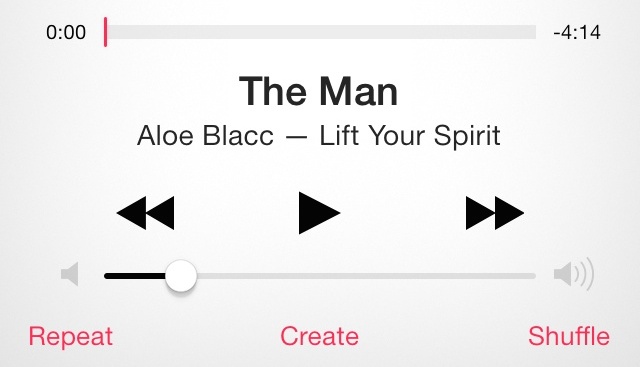
I would like to add the mobile music control. As this image shows
http://media.idownloadblog.com/wp-content/uploads/2014/03/iOS-7-Music-App-Transport-Controls.pngYou need do some custom css on the player. currently it’s float on the bottom of the page.
Thank you for coming back – what about the music control on lock screen or notification panel (drop down)
https://snipboard.io/eDUlSi.jpgthis is ios native control, we can not change it.
Hi,
On artist page, we want to show the products of the artists with a heading?
how to show add to cart button below product?
Change the templates/loop/list-music.php.
Hi, for what is this now 1 or 2?
1. On artist page, we want to show the products of the artists with a heading? 2. how to show add to cart button below product?
1. You can add other element on the templates/single-user/dashboard.php 2. The cart button is on the thumbnail. if you want to change it. change the templates/loop/list-music.php.
Thanks
Thank you
1. Please assist with the code to add to templates/single-user/dashboard.php
Hi Flatfull,
I created a music album consisting of several authors.. Is it possible to add the name of the author under his title?
https://drive.google.com/file/d/1Hh3nM8rc7TIyIhoY_jFQtSyBDkoE3fws/view?usp=sharing https://drive.google.com/file/d/1E3pbWJpSZ1VzZ2kmQBNAAGpUlUqXkws8/view?usp=sharingYou need custom code to get the authors from the album tracks.
The solution is done..Thanks
Why no updates yet? Since 2019
This theme is little old, we focus on WordPress 5.0 up with Gutenberg. Thanks
So do you have any newer version?
No new update for this theme, The Bepop theme using the Gutenberg to build the page and content. Thanks
Any elementor support?
No, we use gutenberg blocks and our custom blocks, so we can control the speed and ajax things. Thanks
Olá, eu preciso de ajuda, sobre como criar painel da artistas. Não consigo criar. Comprei o tema a dias.
This theme? I did not see the purchased badge.
Yes, this topic really, Someone bought it for me yesterday, and now I’m configuring it, I’m having a lot of difficulties, don’t you have instructions or tutorials?
Please use the purchased account to post questions. Thanks
I need instructions on how to create an artist menu. and also how to make the images look in the top widget.
In the download, there is a readme.md file you can get started. Thanks
Já consegui criar o menu de artistas sem vossas ajuda, voçes não ajudam em nada. Tecnicamente não adianta pedir vossa ajuda, porque as vossas respostas são inútil.
I have already managed to create the artists menu without your help, you are not here at all. Technically, there is no point in asking for your help, because your answers are useless.
how do i turn off comments
When create new post or edit post, there is a “Allow comments” in the “Discussion” meta box.
this is my website bonflo.com for some reason if user is not signed in when they try to like or add to playlist they get directed to a different page ? need help asap !
go to WordPress admin “Pulsetheme” > Page to config a login page.
thanks it works … now when a members creates an account where can he go to see his playlist that he created
Go to his own user page.
alse where can i change the pink color ?
You need change the color in “pulsetheme/style-theme.css” file.
did that changed it to #D4AF37 (metallic gold) still not working
imp also the only one that uploads on the website so I want to hide my name under each track and also when i’m listening to a track i want to remove by bonflo … check the website bonflo.com to have better understand
sorry i want to remove “from bonflo”
You need clear your browser cache.
.single-track .page-content .page-left h5{
  display: none;
}
thanks mate … how can i hide all the bonflo names
i wanted to put a google ad on top of where you listen to a music where can i add code
You can hide all the
.item-author{display: none} you can put google ad on sidebar
I know but I wanted to make it show on top …. how can I make website more compact … feels like there’s to much space between widgets
Currently there is no option for this top ad. use custom css to change the margin.
what would be an example of the custom css
you can use
.widget{margin-bottom: 1rem}
hi heres my website bonflo.com … for some reason when a visitors that is not loggin tries to like a music or tries to add to playlist he gets redirected to another page … please have a look.
You need config the login page. go to WordPress admin “Pulsetheme” > Page to config a login page.
Hi By executing code player.js, to auto-play the next track, everything seems fine but playlist doesn’t work properly and it repeats the first track, What should I do to solve the problem?
player.$node.on(‘ended’, function(e){ // find next id in this page and play it var tracks = player.options.mepPlaylistTracks; $(‘[data-id]’).each(function(){ var id = $(this).attr(‘data-id’); var index = player.find(id); if( index == -1){ $(this).find(’.btn-playpause’).trigger(‘click’); return false; } }); });
The next code should work, you can see if there is new track added in to the playlist.
Sorry but i didn’t understand what should i do! the code is works fine except in a Playlist , when i make playlist, instead of going to the next track, it repeats the first track! how should i solve this problem with playlist??
Make playlist? do you mean the playlist on the player? or the playlist item on the page?
In this theme, We have two categories: track and music, the music category is played as a playlist and it causing problem for me because it repeats only the first track and it doesn’t play all tracks in the playlist!
Does all the tracks in the playlist added to player?
Yes, they are added, but when the playlist is playing, It is only the first song that played repeatedly!
hmm, I think it’s the var index = player.find(id); not working for playlist. the playlist id never goes into the player. so it will keep look for it. use these code
player.$node.on('ended', function(e){
      var tracks = player.options.mepPlaylistTracks;
      var playlists = $.map(tracks, function( val, i ) {
        return parseInt(val.parent);
      });
      $('[data-id]').each(function(){
        var id = $(this).attr('data-id');
        var index = player.find(id);
        if( index == -1 && !$.inArray(id, playlists) ){
          $(this).find('.btn-playpause').trigger('click');
          return false;
        }
      });
});
hi , when i put this code to player.js , for auto play next track , everything is fine but playlist work bad and play first track in repeat , What should I do to solve the problem?
player.$node.on(‘ended’, function(e){ // find next id in this page and play it var tracks = player.options.mepPlaylistTracks; $(‘[data-id]’).each(function(){ var id = $(this).attr(‘data-id’); var index = player.find(id); if( index == -1){ $(this).find(’.btn-playpause’).trigger(‘click’); return false; } }); });
Use an purchased account to post questions. Thanks
1. Please assist with the whatsapp share code to be entered templates/modal/share.php
2. Can I duplicate Playlists to have album as well as a separate feature and if yes, please help me
3. Can we modify the artist dashboard to split between products and tracks and playlists? It looks clustered
<a href="" target="_blank" data-url="https://api.whatsapp.com/send?text=" class="btn btn-icon btn-social rounded btn-social-colored btn-whatsapp" title="Whatsapp">
              <i class="fa fa-whatsapp" />
              <i class="fa fa-whatsapp" />
          </a>
also add css .btn-whatsapp{background-color: #01e675}
2. User created playlist will post to “Music” post type. you can create an album type under “Music/types”. and put the albums in this type.
3. You can add endpoint to user, and call woocommerce dashboard shortcode to show the content.
Thank you so much.
Can you explain 3 please?
hi, also icecast 2 links doesn’t want to play – please assist
Also please assist with 2 User created playlist will post to “Music” post type. you can create an album type under “Music/types”. and put the albums in this type.
Make sure the icecast links can be played directly in the browser.
Go to admin panel “Music/types” to create a “Album” type. and you can create album in this type.
You can add user endpoints and call action to add products tab in the user navigation.
function my_user_endpoints($endpoints){
  $endpoints['products'] = 'Products';
  return $endpoints;
}
add_filter('ff_user_endpoints', 'my_user_endpoints');

function ff_single_user_products_endpoint() {
       $user = get_queried_object();
      $arg = array(
            'post_type' => 'product',
            'post_status' => 'publish',
            'author' => $user->ID,
            'posts_per_page' => 8,
            'display' => 'item-grid',
            'column' => '4',
            'more'    => 'pager',
            'tpl' => 'templates/loop/list-music.php'
      );

      $arg = apply_filters('ff_user_product_query_filter', $arg);

      the_widget( 'post_widget', $arg, array(
            'widget_id' => 'post_widget_user_product',
            'before_widget' => '<div id="post-widget-user-product">',
            'after_widget'  => '</div>',
            )
      );
}
Thank you for your response.
The Icecast link plays in the browser but I get an error whenever I add it to the site.
https://snipboard.io/hP4JBK.jpgI added the http://41.190.105.174:8000/stream to the stream field. and it plays.
Hi, I tried again, Still gives me the playback error https://snipboard.io/U1nMLt.jpg
your stream url is https://41.190.105.174:8000/stream , it’s not right. it’s http://41.190.105.174:8000/stream ,
Even with ttp://41.190.105.174:8000/stream – it’s still giving me a playback error
tested http://41.190.105.174:8000/stream , works fine. make sure the url can be played directly in browser.
It does play directly in the browser sir – on my end doesnt work
It’s still https://41.190.105.174:8000/stream on the https://www.donluafrica.com/songs/touchfm/ , can you change it to http://41.190.105.174:8000/stream ? without the “s” after http
1. Where can I add the add user endpoints and call action to add products tab in the user navigation? 2. the icecast2 link doesnt work – I’ve added http://41.190.105.174:8000/stream but still nothing – should I reinstall theme perhaps?
1. Need custom php code. 2. Can not open https://www.donluafrica.com/songs/touchfm/
Thanks
2. please check again
Will you be able to help with 1?
You gave me this:
function my_user_endpoints($endpoints){ $endpoints[‘products’] = ‘Products’; return $endpoints; } add_filter(‘ff_user_endpoints’, ‘my_user_endpoints’);
function ff_single_user_products_endpoint() { $user = get_queried_object(); $arg = array( ‘post_type’ => ‘product’, ‘post_status’ => ‘publish’, ‘author’ => $user->ID, ‘posts_per_page’ => 8, ‘display’ => ‘item-grid’, ‘column’ => ‘4’, ‘more’ => ‘pager’, ‘tpl’ => ‘templates/loop/list-music.php’ ); }
$arg = apply_filters('ff_user_product_query_filter', $arg);the_widget( 'post_widget', $arg, array(
'widget_id' => 'post_widget_user_product',
'before_widget' => ' ',
'after_widget' => ' ',
)
);1. I added the custom user endpoint to my functions.php but gets an error when i click on the products tab.
2. Icecast links still not working even when http://www
3. how can I change this “Playlist” on user tab or remove it? https://snipboard.io/toR2mY.jpg 4. How can I change the size of thumbnails in mobile view https://snipboard.io/tW2ubx.jpg1. You need add ff_single_user_products_endpoint function to make ti works. if you have add this function go to “Settings > Permalinks” to flush the permalink.
2. Hmm, seems that even you set to http, the server post the https. the theme code does not handle the http https.
3. Use the endpoints too. you can
function my_user_endpoints($endpoints){
$endpoints[‘products’] = ‘Products’;
unset($endpoints[‘playlists’]);
return $endpoints;
}
add_filter(‘ff_user_endpoints’, ‘my_user_endpoints’);
4. you can add custom css on .item-grid .item-media{margin: 1rem}
1. Thank you – works
2. Will look at a way around this
3. Thank you – works
4. Thank you works
New query
5. Can I add a user endpoint to show total sales by product by user on single user profile as a tab I found a plugin Woo Total Sales
You can do as same as products code, put the total sales code in the action.
Can you please help me with the code?
function my_user_endpoints($endpoints){
  $endpoints['products'] = 'Products';
  return $endpoints;
}
add_filter('ff_user_endpoints', 'my_user_endpoints');

function ff_single_user_products_endpoint() {
      // put your total sales code here
}
Thank you – for the plugin WooTotal Sales – they give me a shortcode that I can use – is there another way maybe without using the plugin
https://snipboard.io/xeOLjv.jpgecho do_shortcode( '[shortcode]' );
With the WooTotal – we’ll have to change the product_id manually – is there around this
product_id? you want total sales, not a spec product.
I want total sales per product linked to profile page to show totals sales per product on separate tab called statistics
This is out of this theme feature, you need ask the WooTotal to see if there is a shortcode for your needs.
Okay thank you.
1. Will you be able to help me create an extra tab under profile?
2. How do I change the order of the tabs on profile page?
function my_user_endpoints($endpoints){
  $endpoints =  array(
            'playlists' => 'Playlists',
            'stations'  => 'Stations',
            'extra' => 'Extra',
            'likes'     => 'Likes',
            'followers' => 'Followers',
            'following' => 'Following',
            'profile'   => 'Profile',
            'upload'    => 'Upload'
        );
   return $endpoints
}
add_filter('ff_user_endpoints', 'my_user_endpoints');

function my_user_extra_endpoint() {
      // put your extra code here
      echo 'Extra';
}
add_action( 'play_user_extra_endpoint', 'my_user_extra_endpoint', 10);
Hi thank you – all worked.
One last question
Is there a history option – to show what songs users listened to?
The loop block have a “User played” order by. you can use it to build the history.
I’m not sure I understand? Can you please explain?
Sorry. confused with the Bepop theme. This theme does not have history option. but with history player.
How does that work?
When user played a song, the song will store to local storage in user browser, when the user return to the site. the player will load the data.
Also sent you an email, waiting on a reply