99 comments found.

Hi, is it possible to change my present domain to another one without the need to purchase the theme one more time. Only one domain at the same time to use the theme.
Hi,
Yes, you can. Only one domain needs to be active at a time.
Thanks. 
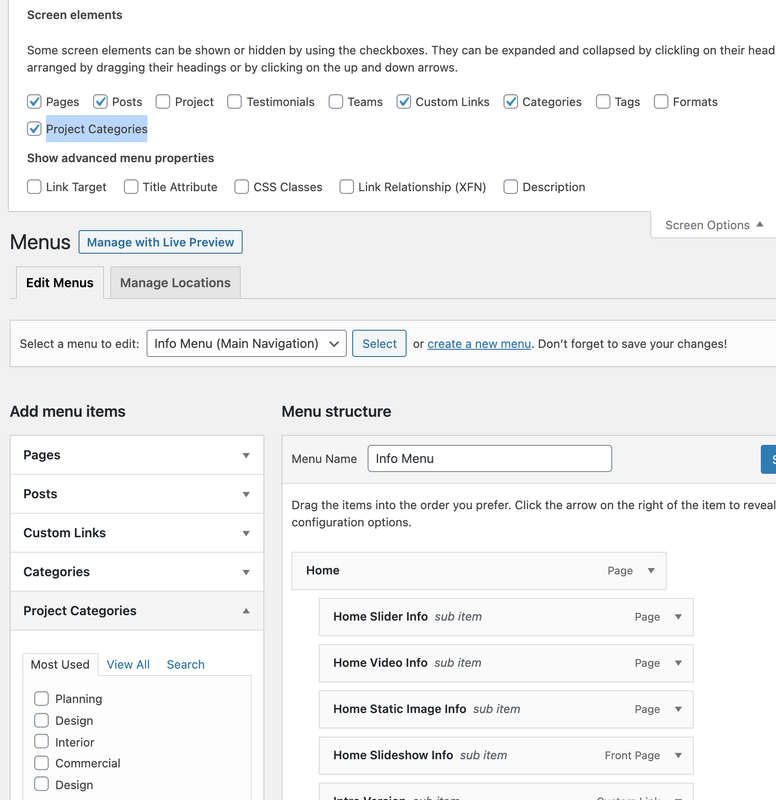
Hi, need help for how to add the projects category to Submenue
Hi,
Thanks for purchasing our theme!
You can easily add project categories into menu using the following step:
Appearance > Menus > Screen Options > Project Categories
Here is the following screenshot:
Click Here
I hope this helps!
Regards,
VictorThemes
Thanks Victor. Another question. Install the theme demo, but there is no any single project layouts demo post. is it something wrong with my installation or any other issue?
Hi,
I think it is an installation error. Can you please share your website URL with temporary administrative login credentials at:
https://victorthemes.com/my-account/support/
We’ll check and let you know the solution for it.
Thanks.
sent. Thanks
We’ll check, You’re Welcome!
Hi, I reinstalled a test demo, but still no any single project layouts demo post.
And another issue, How could I change the button hover colour in the homepage slider, which show the text “explore more” or “view project” https://preview.themeforest.net/item/brixey-responsive-architecture-wordpress-theme/full_screen_preview/19949169?_ga=2.6490928.340119778.1607804568-1395888071.1606988846the same issue in the follow news page, for the bottom “load more post”.
Thanks.
Hi,
I hope our team is already helped you for this fix.
Thanks.
Hi, Thanks for fixing single project layouts demo issue. The button hover colour issue is waiting for their professional advice. Thanks.
Replied, please follow further on tickets instead of this comment form.
How to hide the tags at the bottom of the posts? Thanks.
Hi,
You can able to hide tags using the following option:
Brixey Options > Blog > Single > Show Tags
I hope this helps!
Regards,
VictorThemes
Did that already. But still tags show up at the bottom. The div.bp-tags are still showing.
The ones with hashtags are not showing when I turn it off.
Hi,
Ok, please use the following CSS code at “Appearance > Customizer > Additional CSS”
.bp-tags, .brxy-tags {display: none;}
Regards,
VictorThemes
Thanks! You nailed it!
You’re Welcome!
Hi are you planning on updating the theme? A lot has happened since February.
Your shortcodes aren’t working anymore
Hi,
Please update, Brixey Core plugin to fix this issue.
How to Update our plugin?
Can you please update our Brixey Core plugin using the following steps? It’ll not show any update notice, so do what we did in that video. In the video, we’ve updated the WPBakery/Visual Composer plugin. Apply the same steps to the Brixey Core plugin. The latest version has these fixes.
I hope this helps!
Regards, VictorThemes
There is a grey translucent over the slider area.. How can I change that?
Hi,
To remove that overlay from the banner, Use the following CSS code at “Appearance > Customizer > Additional CSS”.brxy-heading-wrap {background: none;}
Regards,
VictorThemes
Is there a way to add social media Icons just beside the menu, in the normal home-logo style?
Hi,
Unfortunately, we’ve four styles that is not included with social icons.
https://victorthemes.com/themes/brixey/ https://victorthemes.com/themes/brixey/home-slider-overlay-menu/ https://victorthemes.com/themes/brixey/home-transparent-menu/ https://victorthemes.com/themes/brixey/static-menu/I hope this helps!
Regards,
VictorThemes
The project element supports order by ASC and DESC by ID, ,Author, Title and Date…can we make order by “order number”? when I added the projects in the projects area, there is an order column which I used to put a number for each project.. but I can’t use it in the element part
Hi,
Thanks for purchasing our theme!
We recommend you to change the date instead of order number of projects.
Like old to new projects Jan 1, Jan 2, Jan 3 so and so on.
And set to order by Date and ASC.
I hope this helps!
Regards,
VictorThemes
HI,
Is it possible to keep the menu static in all pages ?
Kind Regards
Wassim
Hi Wassim,
Yes. You can control the menu styles from the following options:
Brixey Options > Header > Design > Select Menu Style
I hope this helps!
Regards,
VictorThemes
I’m interested in purchasing this theme to use for real estate portfolio purposes, just a quick question though on the single project pages, are you able to show a combination of video AND images or is it only or the other? Also in the item description section, is that entire section editable via html? If video can’t be added in the gallery section with photos then we’d love to just place an icon there that will link to a video/3d tour. But this theme is absolutely breathtaking.
Hi,
Thanks for showing your interest in our theme!
Yes you can able to do custom page style in single portfolio page. We’ve predefined 10 layout templates. That is not able to achieve your needs.
But, on 11th layout template is work like a custom page creation with WPBakery Page Builder. You can build your own single portfolio layout using it. Just like you create a page using WPBakery Page Builder’s shortcodes.
I hope this helps!
Regards,
VictorThemes
Thanks, is there any way our company can pay you to do custom coding so that on a page like this it will also include a video and images? https://masterpiece.dreamhosters.com/project/dune-view-westhampton-beach/ is an example, we’d like to have the first image be a playable video. please contact me at sjyun@danielgale.com Thanks!
also, how do I add footer widget to be applied for all pages. It only appears on homepage.
Hi,
Please check your email?
Thanks.
Hello
I bought your theme, i have a question:
it is possible change view grid project in mobile one item by three item ?
best regards
Hi,
Thanks for purchasing our theme!
Yes, we can change it using custom CSS code. Please open a support ticket at: https://victorthemes.com/my-account/support/
And mention the exact page URL. We’ll check and let you know the solution for it.
Regards,
VictorThemes
Why do logo’s double up on this theme? I have a dark background image on most pages so I have uploaded a white version of the logo but it still shows the dark version of the logo?
Hi,
Thanks for purchasing our theme!
Can you please let me know the version number of the Brixey theme and Brixey Core plugin.
Please make sure to upload only normal logo, not a retina logo. For the white version of header that is enabled within the page.
Page Edit > Page Custom Options > Header > Transparent Header?
I hope this helps!
Regards,
VictorThemes
Version 1.8 for the core plugin. Version: 1.7.1 for theme.
Hi,
Ok, Can you please share your site URL with temporary administrative login credentials on the support ticket page: https://victorthemes.com/my-account/support/
We’ll check and let you know the solution to it.
Regards,
VictorThemes
Good morning, I have downloaded the theme from Envato Elements. I’d love to open every single link in _blank … any suggestion? Thank you very much
I’m sorry, I meant to say every single PROJECT link. And I also want to know if there is a possibility to make the project image clickable too
Hi,
Thanks for using our theme!
Those are not even available on the live demo website. But, these little improvements we’ll support only themeforest customers.
Regards,
VictorThemes
Hello, thank you for your answer… I’m paying an annual membership to Envato I don’t understand why I have to pay another time just to have a minimum support from you…
Hi,
Unfortunately, downloaded our theme from Envato Elements is not available for support. You can read from Envato Terms here:https://help.elements.envato.com/hc/en-us/articles/360000629166-Item-Support-on-Envato-Elements
Please check on our item page on Envato Elements also.
To get 6 months of free support, please try to purchase our themes separately from the following link:
https://themeforest.net/user/victorthemes/portfolio
Regards,
VictorThemes
I have similar issue where slider imagers disappear, I contacted my hosting provider asking to set max_input_vars. They replied that exact value should be provided by theme developer. Which value should I put for this server?
Hi,
Can you please try to create new page and create same content from your other homepage. This may fix the problem.
Thanks.
Will try that thanks, very happy with your theme.
You’re Welcome!
Hi. I was wondering if there’s a way to order the listing of projects. By alphabetical order, or by the “order number” given in the admin. Can’t figure out what & where to do the adjustments.
Thanks.
Hi,
Please confirm your purchase.
For order, choose “Title” so, it’ll work like alphabetical order.
By “Order Number” is not possible.
Edit that page in page editer, you’ll see Portfolio or Project shortcode, there you can easily edit it. Or Brixey Options > Projects.
I hope this helps!
Regards,
VictorThemes
Hello, I bougth this theme
I need help for order proyect with shorcode:
[brxy_project project_style=”grid” project_layout=”full-width-gutter” project_column=”col-3” caption_style=”style4” project_limit=”100” pagination_style=”button”]
How can I change this? regards Moises
Hi,
Please edit those shortcodes via Backend or Frontend editors.
Check the following two screenshots:https://i.imgur.com/uBPAB3U.png
https://i.imgur.com/4qbuwII.png
I hope this helps!
Regards,
VictorThemes
Hello Victor
I need to be able to sort potfolio results with shortcode, how can I do it?
Regards Moises
Hi Moises,
Please edit that shortcode, to change the sorting settings please change order and orderby.
https://i.imgur.com/eFPHN0C.pngI hope this helps!
Regards,
VictorThemes
Hi there,
I love your layout and I would like to purchase this theme. One query before I do, is this code of this theme written with the best/latest SEO practices?
Thanks in advance!
Hi,
Thanks for showing your interest in our theme!
Yes, our theme developed based on the SEO standards. And it’ll work with the most popular SEO plugins.
https://wordpress.org/plugins/all-in-one-seo-pack/https://wordpress.org/plugins/wordpress-seo/
Regards,
VictorThemes
Thanks so much!
You’re Welcome!
Hi There,
The homepage Meta “Slider” is not showing more than 4 slides. When I set it to another image It will delete it and show only 4 slides.
Please advice.
Hi,
Thanks for purchasing our theme!
This is due to your server: max_input_vars.
Please read the following articles:
Field Limits within our Server PHP
How to Fix Limit on Number of Fields
Is there a limit on a number of fields?
If you’re not clear about the above articles, no worry. Just open a live chat from your hosting provider. And mention to update max_input_vars. They’ll help you to fix this issue within a few minutes.
I hope this helps!
Regards,
VictorThemes
Hi there,
The max_input_vars was set, but nothing happens. It still shows only 4 slides.
please advice.
Hi,
Can you please increase the maximum value?
Even if it’s not fixed after that, please open a ticket at:
https://victorthemes.com/my-account/support/
And share your site URL with temporary administrative login credentials.
We’ll check and let you know the solution for it.
Regards,
VictorThemes
Hello, I have a problem updating js_composer. I tried to do via plugin dashboard and via FTP. Site almost blank and it was written “critical error”. I uploaded the old js_composer and everiting is working but it’s not updated. What should I do in order to have this plugin upadated? Thanks
Hi,
Thanks for purchasing our theme.
You can update the “WPBakery Page Builder” plugin using the following video simple steps: https://www.youtube.com/watch?v=9vTP2fPb4IIIf the above steps did not fix your issue please create a support ticket at http://victorthemes.com/my-account/support/ also share your live URL with temporary administrative login credentials in that ticket.
Regards, VictorThemes.
Thank you very much!
I have A scroll issue at my weppage… poloinsaat.com… Scrolling is stucking at some pages..
Hi,
We have window fit and page scroll options in Home Page Mata > Layout.
1. Window fit is used to fit your page in your device screen size, page scroll is not available. 2. Page scroll option is to display your page with scrolling. Refer: https://imgur.com/a/9HWof8b
For the scrolling issue pages, check you have selected the window fit layout option.
The above will not be fixed your issue please create support ticket at https://victorthemes.com/my-account/support/ with the purchase code.
Regards, VictorThemes
how can I remove the social icons on the team memeber.
Hi,
Use the following CSS code at “Appearance > Customizer > Additional CSS”
.mate-links {display: none;}
I hope this helps!
Regards,
VictorThemes