12895 comments found.

Hello,
I have tried many ways but I cannot display Google map with your Google Map element. I have set up common things as instructed by Google in the Google map console such as enable API, adding credit card, enable payment method, Website restrictions and even not restrictions, and many other things. Still it doesn’t work.
However, I don’t have any problem with the other Google map plugin that requires an API key, it works fine without any problem. I try the same API key that doesn’t work with your Google map element, but works with that plugin. I even create a new API and try separately. It work with that plugin but doesn’t work with yours. I don’t understand why it doesn’t work with your map element. I receive the following error.
“This page can’t load Google Maps correctly. Do you own this website?”
“You are using this API without a key”
Btw, I am your fan and will buy more license for another website soon.
Hello,
Thank you for contacting us. Please, send us a message using the contact form on our profile page and provide us a link to the page with Google map and your API key so we can check.
Thank you
Hello, after activating all plugins that require the theme i have issue with woocommerce, I cant start setup of store
Hello,
Could you please check how it works with some default WordPress themes like TwentyTwenty or WooCommerce Storefront to understand is it our theme issue or not?
Regards
I’ve tried, I guess it is woocommerce issue as same was on TwentyTwenty
It might be some plugin conflict. Try to activate them all one by one to see which one causes the problem.
Hello, the instagram feed on the product pages are not working (Where I added the hashtag). How can I have it use the API as not sure if it’s using the api from theme settings?
Hello,
Our Instagram by hashtag is deprecated now as well as the AJAX method in general. Instagram now blocks such requests and can work with API only. And the API method allows you to display only your personal account photos and doesn’t give access to public categories like photos by hashtag. Sorry, but there is no workaround at the moment. We will try to find some solution in our future updates.
Kind Regards
Hi guys, Slider Revolution is giving me troubles with my site, it doesn’t let me edit the slides, and crashes the site for a couple of minutes, could you help me out with this?
Hi,
Please, create a topic on our support forum and provide us all the necessary details about the request with some screenshots and including your admin access so we can help you https://xtemos.com/forums/forum/woodmart-premium-template/
Regards
I need to hide the onsale product label.
I try this:
.onsale.product-label {
display:none;
}

.product-labels labels-rectangular {
display:none;
}
but doesn´t work. Can you help me? Thank you!
Hi,
Could you please send us a link to your website where we can see this issue?
Kind Regards
hello.. little help here #270588
Hello,
We have answered your request on our support forum. Feel free to continue the conversation there.
Kind Regards
Hello! How can I change the sorting of the top menu from normal https://imgur.com/chKhw2D to this https://imgur.com/mmsgcxQ
https://new.cooga.ru/category/nasosy-vysokogo-davleniya-hawk-interpump-annovi-reverberiHi,
Please, create a topic on our support forum and provide us all the necessary details about the request with some screenshots and including your admin access so we can help you https://xtemos.com/forums/forum/woodmart-premium-template/
Regards
A client of mine is using Woodmart theme for his wordpress ecommerce store. He says that every time he tries to replace and save logo in Header Builder, “Loading, please wait” keeps going and going instead of saving it. Header Builder is kind of not working.
Hello,
Try to disable `mod_security` on your server. It seems to block Header Builder’s “save” requests. Contact your hosting provider for help.
Kind Regards
Hello Guys, is there anyway to remove the word / class and or anything with the word woodmart in the source.
When I view the source code, I see over 130 places just on a single product view, some 300+ in a category view, which can / does pose a security risk. The idea is to be as white label as you can to prevent bots and other sniffers or attacks from ever taking place.
Can this be done within functions.php somehow?
I tried to just replace the word with a wildcard mod and even tried using text replacement plugins, but that just broke the entire site UI as it seems to be in various complied files, thinking js and css files, please advise and kindly thank you for your your time on this.
Great theme otherwise guys, just needs some polish with the header builder and maybe add the same for a footer builder. The key will be using less markup and just changing classes, so the headers do not become markup heavy. Not to mention you need more breakpoints control over the header builder.
Two breakpoints is not enough as I have stated in the past and this needs solved ASAP.
I think once these things are solved it will be one of the best and I have purchased many already.
Thanks again for your time and great support…
Hello,
Thank you very much for your feedback.
According to Envato theme coding requirements, a prefix with a theme or author name is required for all theme functions, classes, CSS classes, hooks, etc. You can read about it here https://help.author.envato.com/hc/en-us/articles/360000479946#h_534299446351522300275039
The only thing that we can do with that is to replace our `woodmart_` prefix with `wd_` for example. But as have already noticed, it is not a simple task. We should do this in a way to not break anything on our clients’ websites. That is why some prefixes will not be changed at all to keep backward compatibility.
Kind Regards
Hello, I fully understand what you are saying, a wd_ prefix would be fine, do you have a way to do this somehow that will not break the UI and thus still be secure.
What are your thoughts about the header component? Future plans / road map, it really needs changed to at the very least support more then just two break points. I can already do this by hand in various front end frameworks, so I’m not sure why you created this limit.
This can be done without extra html markup, just switch classes and change css via script. I already do this in some hand created html I created completely outside of Wordpress. So I know it can be done dynamically as well.
Best regards and thank you for your support.
Hello,
Yes, we will replace this prefix in our next theme update. We will consider header improvement as well. But it will not be included in our next 6.0 that will be mostly dedicated to performance fixes.
Kind Regards
Hey guys! A quick and simple question.. how I can remove this white space below the header? Only appear in the homepage (Electronic Demo 2). I’ve set 0px margin/spacing top everywhere but.. the space is still there (marked in red in the photo). Thanks, img link: https://imgur.com/a/Y7l0QMM
Hello,
By default, our header has a margin-bottom and if you want to remove it on your home page, you can simply add a negative margin-top for the first row on the page with Elementor. So just set -40px for example to compensate it.
Kind Regards
Much Love!! Thanks
You are welcome!
Hi, I working for a friend lighthouse shows many : Links are not crawlable e.g li.item-with-label > ul.sub-sub-menu > li.item-with-label > a span class=”woodmart-burger-label wd-tools-text”>Menu and so on
It is possible to avoid this errors by adding rel no tag or Remove HREF attribute from Empty Anchor Link on WordPress Menu https://easywpcode.com/remove-href-attribute-from-empty-anchor-link-on-wordpress-menu/Thanks
Hello,
Thank you for reporting us. We will fix this in our next theme update and add “nofollow” tags to these links.
Kind Regards
Recently I started getting an error from Instagram element. It is related to CORS policy somehow. The error can be found on your demo site (https://woodmart.xtemos.com/instagram/) as well – https://prnt.sc/10aizek The error is rather strange – it happens not all the time, sometimes the element works well. Also my localhost is not affected by this error at all.
Hello,
It looks like this method is no longer allowed by Instagram. So the only method now is to set up Instagram API as described in our documentation https://xtemos.com/docs/woodmart/faq-guides/setup-instagram-api/
Kind Regards
Maybe. But can you please investigate if there’s any way to update the code – many Woodmart users need the ability to show photos under certain hashtag. Also switching to Instagram business account is not good for everyone cause business accounts get less free traffic. Can you please explain why the feature works well on my localhost?
We can’t explain why they work on your localhost. We tested on different environments and they don’t work. Unfortunately, it is not something that we can fix in our theme. These restrictions are from Instagram and Facebook and there are no other ways to implement this. As for hashtag, we are going to investigate if it would be possible to achieve with API as well.
Thank you for thorough answer. I will continue investigating the issue and will write you if I find something interesting.
Yes, that would be great.
I’ve made some research and found that it is still possible to get all the images links through https://www.instagram.com/explore/tags/yourhashtag/?__a=1 request. This kind of link can be accessed by anybody, you don’t need to be logged in. After some parsing you have all the needed links.
Yes, it is how we parsed images a long time ago. But Instagram sooner or later will block your server’s IP and it is not a solution, unfortunately.
AFAIU this type of link is accessible without authentication if IG account and request geoIP matches. So maybe serving this data from cache would be an option and refreshing cache when request has proper geoIP?
We tried to implement this but didn’t find a way technically. If you have some working prototypes, we would be glad to implement them.
I made some further research, here are my findings:
1) you can get account images through new API with personal account after getting a token. There are a lot of limitations (no likes and comments number etc.) but this still can be useful for many shop owners who don’t want to switch to IG business account
2) hashtags are now officially supported through new API but only for business accounts
3) Some legacy endpoints are still accessible, e.g.:
- https://www.instagram.com/username/channel?__a=1 instead of https://www.instagram.com/username/?__a=1 seems to work from any IP- https://www.instagram.com/graphql/query/?query_hash=31fe64d9463cbbe58319dced405c6206&variables={"id":"account_id_number","first":12} for user photos is accessible- https://www.instagram.com/graphql/query/?query_hash=298b92c8d7cad703f7565aa892ede943&variables={"tag_name":"your_tag_name","first":12} for hashtag is accessibleHello,
1 and 2. We will review this possibility.
3. It doesn’t work in many cases and with high probability will be permanently blocked soon.
Kind Regards
Great. I hope you will add this functionality. In the meantime I want to ask you not to remove deprecated methods as currently I use scrape method with transient without expiration date copied from my localhost which can connect to Instagram.
Sure, we will keep these methods in our next update.
Hi, I’m a freelancer. I brought the theme for one of my websites. but, it’s not useful for that website. And I’m not using this theme on any website as well. So, can I use this theme for another website? Otherwise it would be a loss for me. A huge thanks in advance.
Hello,
Thank you for contacting us.
Yes, you can use your license to create another website if you don’t use it for your first project now.
Kind Regards
Unfortunately, i use the theme and license on the website before. And after some day, i found the theme is not what i want. In this case, can i use it on another website?
Yes, you can use it on another website now.
Kind Regards
Hi There, how can I sort the categories in search form drop menu with my custom sort?
Hello,
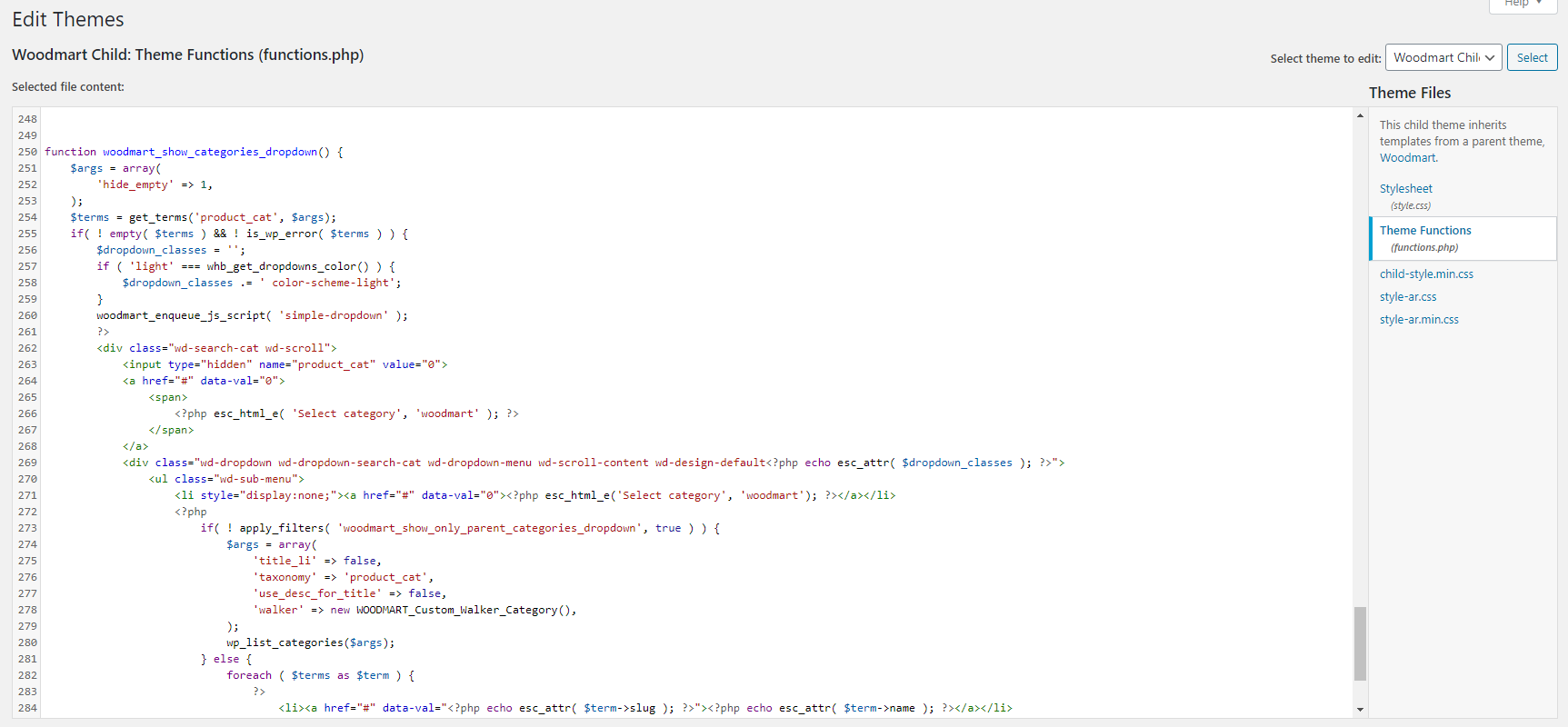
Try to add the following code snippet to the functions.php file and then you will be able to use custom order for product categories
function woodmart_show_categories_dropdown() {
    $args = array(
        'hide_empty' => 1,
    );
    $terms = get_terms('product_cat', $args);
    if( ! empty( $terms ) && ! is_wp_error( $terms ) ) {
        $dropdown_classes = '';
        if ( 'light' === whb_get_dropdowns_color() ) {
            $dropdown_classes .= ' color-scheme-light';
        }
        woodmart_enqueue_js_script( 'simple-dropdown' );
        ?>
        <div class="wd-search-cat wd-scroll">
            <input type="hidden" name="product_cat" value="0">
            <a href="#" data-val="0">
                <span>
                    <?php esc_html_e( 'Select category', 'woodmart' ); ?>
                </span>
            </a>
            <div class="wd-dropdown wd-dropdown-search-cat wd-dropdown-menu wd-scroll-content wd-design-default<?php echo esc_attr( $dropdown_classes ); ?>">
                <ul class="wd-sub-menu">
                    <li style="display:none;"><a href="#" data-val="0"><?php esc_html_e('Select category', 'woodmart'); ?></a></li>
                    <?php
                        if( ! apply_filters( 'woodmart_show_only_parent_categories_dropdown', true ) ) {
                            $args = array(
                                'title_li' => false,
                                'taxonomy' => 'product_cat',
                                'use_desc_for_title' => false,
                                'walker' => new WOODMART_Custom_Walker_Category(),
                            );
                            wp_list_categories($args);
                        } else {
                            foreach ( $terms as $term ) {
                                ?>
                                    <li><a href="#" data-val="<?php echo esc_attr( $term->slug ); ?>"><?php echo esc_attr( $term->name ); ?></a></li>
                                <?php
                            }
                        }
                    ?>
                </ul>
            </div>
        </div>
        <?php
    }
}
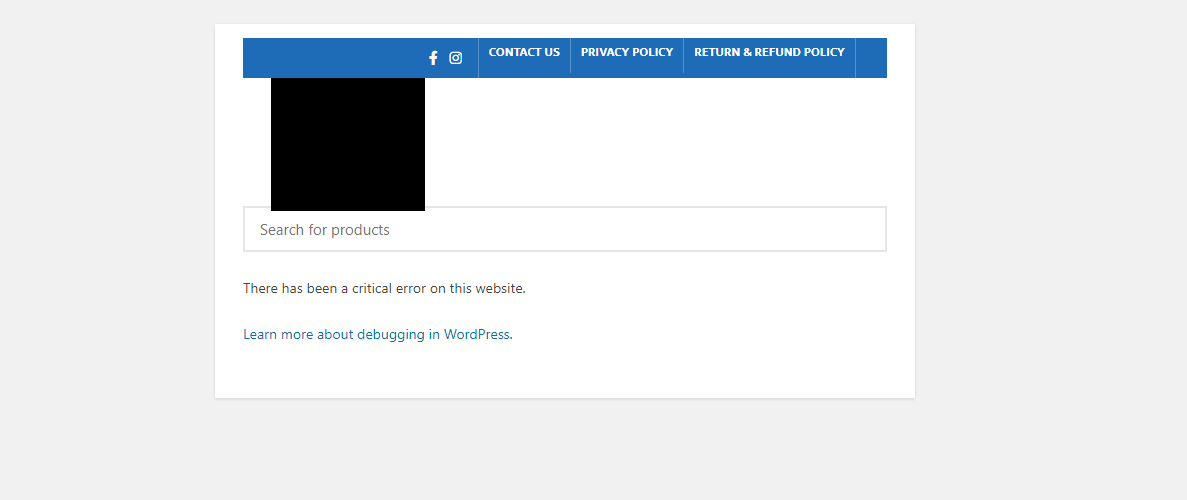
When I use it I am getting a critical error
Could you please send us a screenshot of where you placed the code and also a screenshot of the error?
The Code: https://k.top4top.io/p_1887alsot1.png .... The Result: https://l.top4top.io/p_1887lpmx91.png
Please, send us your admin access using the contact form on our profile page so we can check https://themeforest.net/user/xtemos
Hello, I am interested in purchasing the Woodmart theme. I saw the one called “Grocery” among the demos. In the mobile version I saw that at the bottom there are some icons, such as “Shop”, “Wishlist”, “My account”, “Compare”. I would like to know if it is possible to replace these icons, for example by adding “Cart”. It’s possible to do it? And is it complicated? Thank you
Hello,
Thank you for contacting us. Yes, you can customize these buttons or add your own custom icons via Theme Settings.
Kind Regards
Hi, guys. I have another suggestion. I know you are woking to make your native lazy loading better. It would be great if you will let users to manually add some classes which will be lazy loaded. Now if you want to lazy load some content injected by 3rd party code the only way is to use some lazy load plugin. Supporting native browser lazy loading without JS through would be great as well.
Hello,
Sorry, could you please send us some screenshots or examples so we can better understand your request?
Kind Regards
There are two parts of suggestion, so I will address them consequentially:
1) When some plugin adds images to my site they lack Woodmart woodmart-lazy-load class, so they are not lazy loaded. But they usually do have some special class from the plugin which adds these images. So it would be nice to be able to enter such class somewhere in Woodmart options to let Woodmart know that I want these 3rd party images to be lazy loaded as well.
2) I’ve meant that most modern browsers already support lazy loading through CSS – https://caniuse.com/loading-lazy-attr, so having an option to use native browser lazy loading without added JS would make site performance better. It is described in detail here – https://web.dev/browser-level-image-lazy-loading/
1. Our theme filters all images displayed with core WordPress functions. If they don’t follow best practices and use simple HTML code, then, it is not possible to use our Lazy loading even with the CSS class. Except for the CSS class, we need to filter the SRC attribute.
2. These attributes are added by WordPress automatically in the latest version of the CMS.
Hello, does it have alerts and follow products? Thanks
Hello,
Could you please clarify your question? Do you have some examples so we can better understand what alerts and follow products do you mean?
Kind Regards
Hello,
I have nothing against advertising for Woodmart where it matters (as this is a fantastic theme!), but I honestly like as much white label as possible on the front-end of my site.
So for the product ‘Custom Tab’ and ‘Additional Tab’ IDs they are labeled as such:
’# tab-woodmart_additional_tab’ ’# tab-woodmart_custom_tab’
Is there any way we can get an option to rename those (even if possible by function.php is fine)? Anyone hovering those tabs will see that as the tab URL ID and it doesn’t exactly fit in with my site information. I tried looking into how to change it myself, but I can’t seem to find out how…
Thank you for your time!
Hello,
Try to add the following snippet to the functions.php file to change “woodmart” to “wd” there
    function woodmart_custom_product_tabs( $tabs ) {
        $additional_tab_title = woodmart_get_opt( 'additional_tab_title' );
        $custom_tab_title     = get_post_meta( get_the_ID(), '_woodmart_product_custom_tab_title', true );
        if ( $additional_tab_title ) {
            $tabs['wd_additional_tab'] = array(
                'title'    => $additional_tab_title,
                'priority' => 50,
                'callback' => 'woodmart_additional_product_tab_content',
            );
        }
        if ( $custom_tab_title ) {
            $tabs['wd_custom_tab'] = array(
                'title'    => $custom_tab_title,
                'priority' => 60,
                'callback' => 'woodmart_custom_product_tab_content',
            );
        }
        return $tabs;
    }
Kind Regards
Awesome awesome, thank you for this  . Works perfectly!
Great, you are welcome!
Please consider adding optional lazy loading for background images of your Woodmart slider element after the page is loaded. Only first image is loaded with the page, next image is not laded until user swipes. This is needed cause the animation is not smooth. Also consider using different priority for first and subsequent slider images (see https://developers.google.com/web/updates/2019/02/priority-hints) as this can help improving LCP metric which will be affecting page ranking soon.
Hello,
Thank you for your suggestion. We have already implemented lazy loading for the first slide image. It will be added in our next theme update.
Kind Regards
Great, I will be waiting for this update. However I still want to emphasize that: 1) it is worth investigating how to speed up loading of first slide image. Now it is loaded with low priority as a background image although it can be the main content above the fold and affect LCP metric. 2) 2nd and subsequent slide images are not loaded at all until next slide is shown which makes slide animation look poor.
Sure, we will take your advise into account.
del