155 comments found.

where can i change the footer
Hi.,
Please refer : https://prnt.sc/xky0fn
Get into Admin Panel > Appearance > Customize > Additional CSS > Paste the below css code inside the text area > Save All.
.footer-widgets.dt-sc-dark-bg { background-color: #6dab3c;}
.footer-copyright.dt-sc-dark-bg { background: #6dab3c;}
Note: You can change the color value as per your need.
hi i cant seem to change colors of the menu from dance options
Hi.,
Please refer : https://prnt.sc/xkxky7 , https://prnt.sc/xkxove
Get into Admin Panel > Appearance > Customize > Additional CSS > Paste the below css code inside the text area > Save All.
.header-on-slider.page-with-slider .main-header-wrapper { background: #5472d2;}
.header-wrapper.light #main-menu ul.menu > li > a { color: #f4524d;}
Note: You can change the color value as per your need.
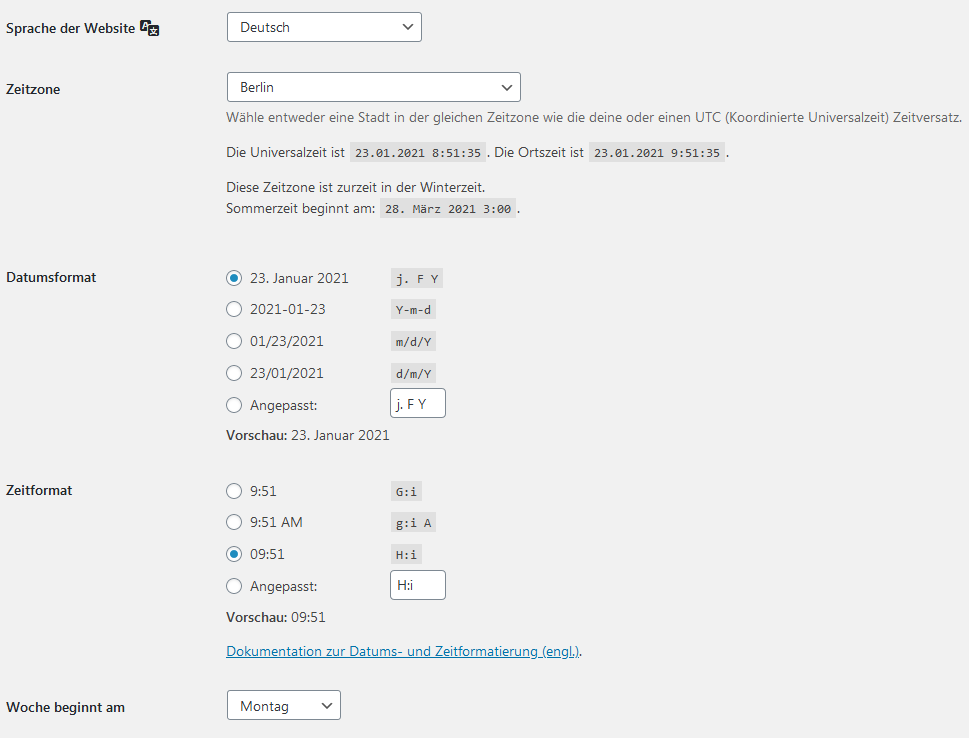
Hello, I hope you can help me. In the individual view of an event, there is an incorrect date and time format. Although all settings in the wordpress settings as well as in the plugin the-event-calendar are correct (24h, timezone etc). What could be the reason? (Example page: https://www.step-la-dance.de/veranstaltung/live-unterricht-kindertanz/) Many thanks in advance Michael.
Hi.,
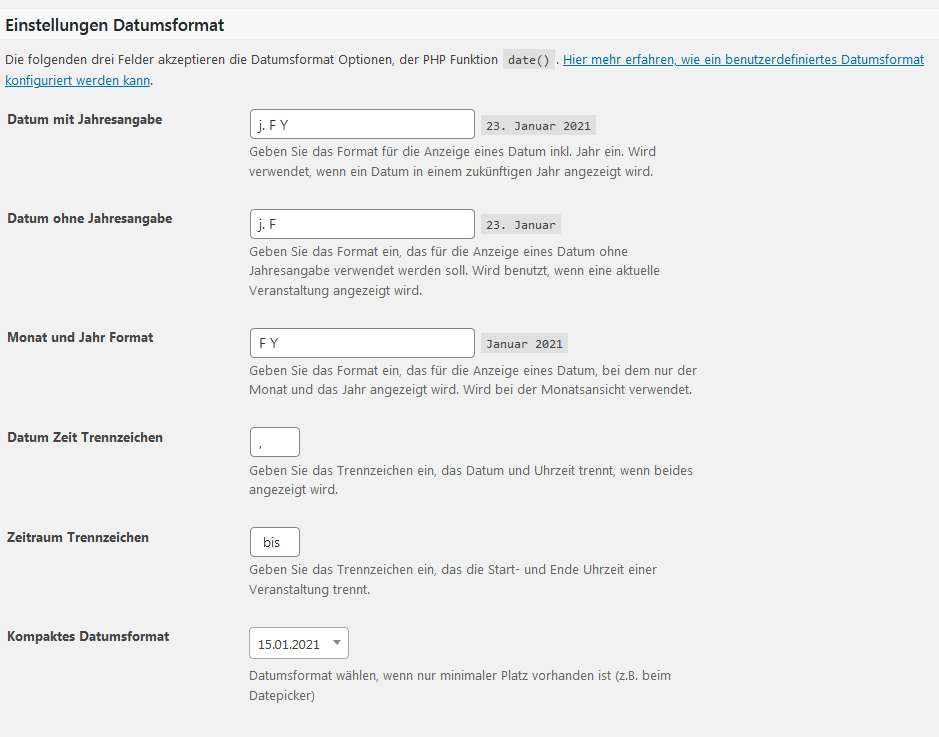
Go to Dashboard / Events / Settings / Display and change “Time Settings” here then check it out.
Regards., DesignThemes Support.
Hello and thank you for the answer.
I have already done this. Without success. Even newly set events remain in the wrong date and time format (as in the example link). Do i have to make changes in the theme folder “tribe-events”? wbr Michael.
Hi.,
Kindly, mail us your site credentials immediately via the right bottom form located @ http://themeforest.net/user/designthemes So that, we can check your issues in your end.
Regards., DesignThemes Support.
Hello and many thanks for the tip. I sent a request yesterday and look forward to a helpful reply. wbr Michael.
Hi.,
We replied to your mail ID. Please check it out.
Regards., DesignThemes Support.
The domo request from is not working. Please provide me the link to download the demo.
Hi.,
Thank you for contacting us.
You can import the demo content via the unyson plugin. Kindly refer our knowledgebase link for how to import the demo contents using the unyson plugin http://docs.wedesignthemes.com/dt_articles/import-demo/
Please check your server requirements., Please refer the below link for server requirements http://docs.wedesignthemes.com/dt_articles/requirements-for-theme/
If still facing any of issues Please mail us your site credentials (WP & FTP access logins) immediately via the right bottom form located @ http://themeforest.net/user/designthemes So that, We import demo data for you.
I have recently migrated my website from one hosting to another. Everything looks great, the only problem I have is that the content of my pages is not displayed on my wordpress desktop, as well as the WPBakery editor (which is what I did all the design with). I have all the plugins required by the theme installed. I don’t know what the problem could be. I need a suggestion. Thank you.
Hi.,
Please be more specific on your query with some screenshots / videos. So that we can get a clear view and help you ASAP.
Regards., DesignThemes Support.
I cannot see the content of all my pages created with WPBakery from the back of wordpress. But my website still looks good. The moment I go to my wordpress desktop and I want to redesign my pages, I can’t because I can’t see the WPBakery plugin.
Is there any solution for this? I attach images of my problem.
https://ibb.co/ZzSKJ16Hi..,
Please check whether you are using our updated version https://prnt.sc/vgisya . If not, Please update our theme and check it out.
Kindly refer this link for how to update the theme
http://support.wedesignthemes.com/knowledge-base/steps-to-update-the-theme/Regards., DesignThemes Support.
If I am using the latest version of your theme Please, this is something I urgently need to fix.
Attached image
https://prnt.sc/vgiwh3Hi.,
Kindly, mail us your site credentials immediately via the right bottom form located @ http://themeforest.net/user/designthemes So that, we can check your issues in your end.
Regards., DesignThemes Support.
I am still having MENU font COLOR issues. On mobile and on desktop the menu items are WHITE, BLACK and PURPLE….I want them to always be seen. Meaning, on DESKTOP they need to be BLACK…always. I could care less about hover-change-color. On mobile, I do know how to change that BLACK background to white, but then the menu items can’t be seen that are white…
I can’t find where I make all link tags BLACK and all visited link tags BLACK and all hover link tags BLACK…?
SEE:
https://www.amazon.com/clouddrive/share/Eqh8ZwWSoYcyTll80msxR3oD9nswdmfRyEPhjDIXYzyHi.,
Please refer :https://prnt.sc/uscgcv
Get into Admin Panel > Appearance > Customize > Additional CSS > Paste the below css code inside the text area > Save All.
`@media only screen and (max-width: 767px) {` `#main-menu {padding: 5px 0; background: #fff !important;}`
Regards., DesignThemes Support.
I cannot find where the time – server time – site time – time zone, year is specified? My search results are showing the pages but it shows they were published 3 years ago and the wrong month and the wrong day….?
https://allstardancecamp55807445.wpcomstaging.com/?s=tango&submit=GoHi d88keyz.,
Please have a look at this video for updating the date, month and year shown in the search results page.
http://recordit.co/jkz8jorm7EIf you are happy with our support, kindly rate us. Have a look at the video for the rating process. http://recordit.co/YqdTBuEJRm Hoping for a 5 star rating from your end 
Regards., DesignThemes Support.
Crap. I never even saw that place there to edit the date. Thanks….
Hi.,
Please check that video again we mentioned.
Regards., DesignThemes Support.
Hi.,
You need to assign breadcrumb for globally like this – https://prnt.sc/ur575h Check your search result page – https://allstardancecamp55807445.wpcomstaging.com/?s=Gemi&submit=Go
Regards., DesignThemes Support.
Hi.,
You can customize the breadcrumb image for all pages from Dashboard > Appearance > Customizer > Site Breadcrumb > Background. Please have a look at this screenshot https://prnt.sc/ur5ayj
Regards., DesignThemes Support.
Great. thanks so much.
How do I customize the 404 page? I do not want that ballet image as the background? Where are the settings for what this 404 page displays?
Hi.,
Kindly watch the following video to get a clear view about customize the 404 page.
http://recordit.co/lMkYJnwhhAWonderful. Thank you
How do i EITHER get rid of the jumping girl in the bottom right of every screen, OR change what icon/image is used? I need to change that image or get rid of it completely. ?
Hi.,
Get into Admin Panel > Appearance > Customize > Additional CSS > Pasted the below css code inside the text area > Save All.
To Change Image
#toTop { background: url(../images/icon1.png) no-repeat right bottom; }
Note: You can change the background url as per your need.
Thank you.
Hi.,
Edit this page and add breadcrump image here – https://prnt.sc/ur0dvt then check it out.
Regards., DesignThemes Support.
Hi.,
You can customize the breadcrumb image for all pages from Dashboard > Appearance > Customizer > Site Breadcrumb > Background. Please have a look at this screenshot https://prnt.sc/ur5ayj
Regards., DesignThemes Support.
Hi.,
Get into Admin Panel > Appearance > Customize > Additional CSS > Pasted the below css code inside the text area > Save All.
@media only screen and (max-width: 767px) { #header { background: #333; } .menu-icons-wrapper .search a, .menu-icons-wrapper .cart a, .menu-icons-wrapper .search a:hover span, .menu-icons-wrapper .cart a:hover span { color: #fff; } }
Refer : https://prnt.sc/uqilzw
Note: If you still have any issues, kindly send us some screenshot/video where you have the issue. So that we will check the issue.
That changed the background so the WHITE logo could be seen. I really wanted the white background to STAY and the DARK logo that I set in the Site Identity used – switched to.
Also, on the mobile menu i have these huge gaps in the menu. Top and bottom of the links. And the top gap is there before you even tap on the menu.?
SEE: https://www.amazon.com/clouddrive/share/ZkJAtRJdg9gI2EiN4mET1ulOfobt1VnzPUkus8Y0nNaHi.,
Please refer :https://prnt.sc/ur1eef
Get into Admin Panel > Appearance > Customize > Additional CSS > Paste the below css code inside the text area > Save All.
@media only screen and (max-width: 767px) {
#main-menu {padding: 5px 0; background: #000 !important;}
#header-wrapper.light #main-menu ul.menu > li > a {color:#8be649 !important;} }
Note: You can change the value as per your need.
Hi.,
Get into Admin Panel > Appearance > Customize > Additional CSS > Pasted the below css code inside the text area > Save All.
#main-menu { padding: 35px 0; }
Refer: https://prnt.sc/uqipdf
Note: If you still have any issues, kindly send us some screenshot/video where you have the issue. So that we will check the issue.
thank you so much!
I need to add a MENU item that is an Anchor tag/link. But in making the Menu item, all i can do is select the PAGE and I cannot append the #tag to the URL. How do I link to the page and append the #tag tot he URL in the menu?
...nevermind. I found it
Thank you, we look forward to helping you!
Hi.,
Kindly, mail us your site credentials immediately via the right bottom form located @ http://themeforest.net/user/designthemes So that, we can check your issues in your end.
Regards., DesignThemes Support.
You fixed it. THANK YOU
Thank you, we look forward to helping you!
Hi.,
Kindly, mail us your site credentials immediately via the right bottom form located @ http://themeforest.net/user/designthemes So that, we can check your issues in your end.
Regards., DesignThemes Support.
You fixed it. THANK YOU
Thank you, we look forward to helping you!
Hi.,
Please refer : https://prnt.sc/upq0tw
Get into Admin Panel > Appearance > Customize > Additional CSS > Paste the below css code inside the text area > Save All.
.header-on-slider .main-header-wrapper { background: #ab1515 !important; }
Note: You can change the color value as per your need.
If the issue persists, please open a support ticket and our team will get back to you as soon as possible.
DesignThemes
Support
Thank you, we look forward to helping you!
I’m not trying to change the HEADER BACKGROUND COLOR, I’m trying to change the color of the WORD in the header….
https://prnt.sc/upq0tw“ABOUT” – I’m trying to change that font color….
Just checking back in - the CSS you sent changes the header BACKGROUND, I need to change the header TEXT (page name). the “ABOUT” word in this image: https://prnt.sc/upq0tw
Is this possible to change? Per page or globally? I can’t find it anywhere to specify the color of the TEXT in the header/breadcrumb.
I want to change the color of the word “ABOUT” at the top, in the header in this image…
https://prnt.sc/upq0twHi.,
Get into Admin Panel > Appearance > Customize > Additional CSS > Paste the below css code inside the text area > Save All.
#main-menu ul.menu>li>a { color: #f00; }
Note: You can change the color value as per your need.
If you still have any issues, kindly send us some screenshot/video where you have the issue. So that we will check the issue.
Regards., DesignThemes Support.
This did not work. I pasted it in the correct location, SAVED, refreshed pages, but that top HEADER TEXT is still that purple color…? SEE: https://www.amazon.com/clouddrive/share/fP1sFhrMje1cDkMftK92iwr0ZOwvOQ666lkoIicw5an
Hi.,
1 ) If you want gradient text color , Then Kindly use given below code.
.main-title-section h1 { background: linear-gradient(to bottom, #353094 , #9a26b0); background: -webkit-linear-gradient(to bottom, #353094 , #9a26b0); background: -ms-linear-gradient(to bottom, #353094 , #9a26b0); -webkit-background-clip: text; }
Note: You can change the background color as per you need.
2 ) If you want solid text color, Then Kindly use given below code.
.main-title-section h1 { background: none; -webkit-text-fill-color: #353094; }
Note: You can change the text-fill-color as per you need.
If you still have any issues, kindly send us some screenshot/video where you have the issue. So that we will check the issue.
Regards., DesignThemes Support.
PERFECT. Exactly what I needed. thank you.
I have no idea what I did, but the style sheet has messed up – the bottom pricing table is not correct.? https://allstardancecamp55807445.wpcomstaging.com/trainings/
Hi!., Please mail us your site credentials (WP &FTP access logins) immediately via the right bottom form located @ http://themeforest.net/user/designthemes So that, we can check and have a clear look form our end. Then we’ll help you to get rid of it ASAP !!
I did. Please confirm that I sent what you needed. Thanks so much….sooooo impressed you guys are on here helping – this is a life-saver!
Hi.,
We have deactivated “Page Optimize” plugin and it seems your site working fine. Please check it out.
Regards., DesignThemes Support.
You fixed it. THANK YOU.
Thank you, we look forward to helping you!
I cannot figure out where to change the HEADER background image on these DEMO pages…this demo page: https://allstardancecamp55807445.wpcomstaging.com/about-us/—I cannot find where to change the top image in the header. I can change the content below it but…I’m sorry, this is my first Wordpress site.
Hi.,
Do you want to change this image http://prntscr.com/jz1fz2 then get into corresponding edit page there you can edit the image,
Refer : http://prntscr.com/jz1jck
And get into Admin Panel > Appearance > Customize > Site breadcrumb there you can change the image globally.
Refer : http://prntscr.com/jz1j5e
Thank you. My fault…”breadcrumb” – I have seen that but it never hit me that it the “header background”. Thanks.
Thank you, we look forward to helping you!