12893 comments found.

There is a small bug when i was checking your theme demo https://woodmart.xtemos.com/ when i want to click “select options” button on a variable product in products category and select a color, the selected color doesn’t appear above and in mobile layout it is ok. For example it shows Color: Black in mobile and on desktop it shows Color: .
Hello,
Yes, this option is for mobile devices only. On desktop devices, the color name can be seen on the tooltip.
Kind Regards
Hello,
Thank you for the great theme.
I have just one problem which is in “after add to cart action”, the display widget is not working, website: www.boutique.ps
Thank you
Hello,
Thank you for your comment.
We don’t see any problems with the widget on your website https://gyazo.com/4e845e490a16407d1503ac7320b1d21b Could you please clarify how can we reproduce the issue?
Kind Regards
Hello,
You can change this in Dashboard -> WoodMart -> Header builder -> edit your current header and customize the cart widget.
Kind Regards
Hello, we have a problem with Data Vocabulary Schema Deprecated on 18 pages. Can you help us? https://www.ra-ueberdachung.de/portfolio/wertheim/
Hello,
We will remove this schema data in our 6.1 update. You can ignore these warnings for now.
Kind Regards
Hello,
Doing some testing with the filters on the shop and if you set it to show IN STOCK products only and then select another filter it doesn’t necessarily mean that variation you searched for is available but just at-least one variation of the product is available.
For example if I set IN STOCK products only and then search for size MEDIUM a product would show as available even though MEDIUM is out of stock but because the SMALL is available it still shows on the filter page.
Thanks!
Hello,
Could you please check how it works with some default WordPress themes like TwentyTwenty or WooCommerce Storefront to understand is it our theme issue or not? Filters are WooCommerce functionality and our theme doesn’t influence this.
Regards
Hi,
The Widget to set ‘IN STOCK ONLY’ is called ‘WoodMart Stock Status’ so i’m guessing this is your widget and wouldn’t work on other themes so I can’t test this out like you said?
The STOCK STATUS feature doesn’t appear to check any other filters applied, only check if the overall product is IN STOCK or not irrelevant of other filters that have been selected.
Thanks
Hi,
Yes, it is how it works in our theme. It doesn’t take into account the variation itself. So if the product in stock and you select some particular variation that is out of stock, it will be still shown in the results. Sorry, but we can’t change this behaviour in our theme.
Kind Regards
How to download the compatible version of WPBakery Page Builder?! you mention v6.1.x is the supported versions but what installed with the theme is v6.6.0 !
Hello,
Thank you for contacting us. You should be able to update the plugin to the latest version via Appearance -> Install plugins.
Kind Regards
Hi, is it possible with this theme that if I redirect to a certain url that it will open the search, Ideally I would like the desktop type search on a mobile display.
Sceneario, user types domain and the searchopen instantly.
Hello,
Unfortunately, there is no such functionality in our theme. It might be possible with additional code customization only.
Kind Regards
Hi thanks for getting back to me, can I ask is there a way to get the menu to auto open so the user needs to close it? Thanks
Do you mean to open the menu every time the user views any page on your website? Sorry, but there is no such option in our theme either.
No that would be an unpleasant website experience, no I meant just the home page as some themes do offer this option. Not to worry.
Hello ,Need help i Bought woodmart theme and working on it , suddenly i could see the addition class mark on each row this is happening only on my home page (i am using WPB page builder). i dont know how to remove it. have restored my home page to a day before setting,but still getting same class mark on left side on each row in home page. pls guide
Hi,
Please, create a topic on our support forum and provide us all the necessary details about the request with some screenshots and including your admin access so we can help you https://xtemos.com/forums/forum/woodmart-premium-template/
Regards
Hello XTEMOS Team,
I have the problem that on the tablet (tested with different devices) the thumbnails in the product view are not loaded completely. Only when refreshing the page again, all thumbnails are displayed completely:
https://i.ibb.co/VVSRqzY/screen001.jpgWhat could be the cause of this?
Hi,
Could you please send us a link to your website where we can see this issue?
Kind Regards
Hi,
I ve seen comments about wp-rocket but plz let us know your advice:
1. lazy loading: enable in theme or wp-rocket ?
2. minify css/js: enable in theme or wp-rocket ?
Thxxx
Hello,
1. We recommend using our theme lazy loading for images.
2. Both options will work together without any problems.
Kind Regards
Since upgrading to the latest versions of Woodmart (and the bundled Revolution slider) we can no longer edit the slides we have or create new ones.
When trying to edit a slider we have already built we recieve a 404 error because the link has ‘undefined’ in it!
When trying to create a new slide we get an ‘ajax error’!
Hello,
Could you please disable all plugins that are not related to our theme and provide us your admin access so we can check it? Send us a message via the contact form on our profile page.
Thank you in advance
Is it possible to only use Gutenberg instead of Visual Bakery / Elementor? As it’s much more performant
Hello,
Yes, you can use Gutenberg but you will not be able to create a website similar to our demo. Most of our theme elements are available for Elementor and WPBakery only.
Kind Regards
I appreciate your new version, No Theme optimized for Woocommerce like you, it’s great. I know you’ve optimized the woodmart class to wd, but this is still there!
http://prntscr.com/112c3l7Hello,
Yes, this option is currently turned on on our demo. But you will be able to disable it completely through Theme Settings after release.
Kind Regards
@xtemos : Thanks, that’s the image I’m using your Beta version!
OK, thank you. You will have an ability to disable this after update.
Woodmart theme is not capable with WooCommerce Measurement Price Calculator.
?
Hello,
Thank you for your question. We haven’t tested our theme with this plugin yet. But it should work without any problems. If you face any compatibility issues, just contact our support and we will help you to solve them.
Kind Regards
Hi there,
Julie here, stepping in for Simon! I’m happy to help out here. 
Thanks very much for the access to the staging site, I was able to take a look at things there.
When I swap to a default theme, such as Twenty Nineteen, there’s no issue—I’m able to use the calculator as intended:
https://cloud.skyver.ge/5zuB7E1zWhen I swap to the original Woodmart theme, I don’t see a box for input:
https://cloud.skyver.ge/4gu2zqxAI think this is the issue that Simon had highlighted—the input box is part of the Woodmart Child theme, though it doesn’t seem to be linked to our calculator. Regrettably, our plugins are not guaranteed to work with themes that are from third-party developers.
What I’d recommend you do here is contact the developer who added the input box that’s visible in the Woodmart Child theme, as that person would better know what they did here.
If they’re unable to help, I would reach out to the developers of the Woodmart theme and ask them how to best make the input box visible on product pages for WooCommerce Measurement Price Calculator. You can reach the Woodmart theme folks here:
https://themeforest.net/item/woodmart-woocommerce-wordpress-theme/20264492/supportWould you please let me know what the person who put together the child theme has to say, or what the Woodmart folks have to say?
Thank you so much.
have configured the plugin measurement price calculator in woocommerce.
But i have two problems with this plugin can you please solved this
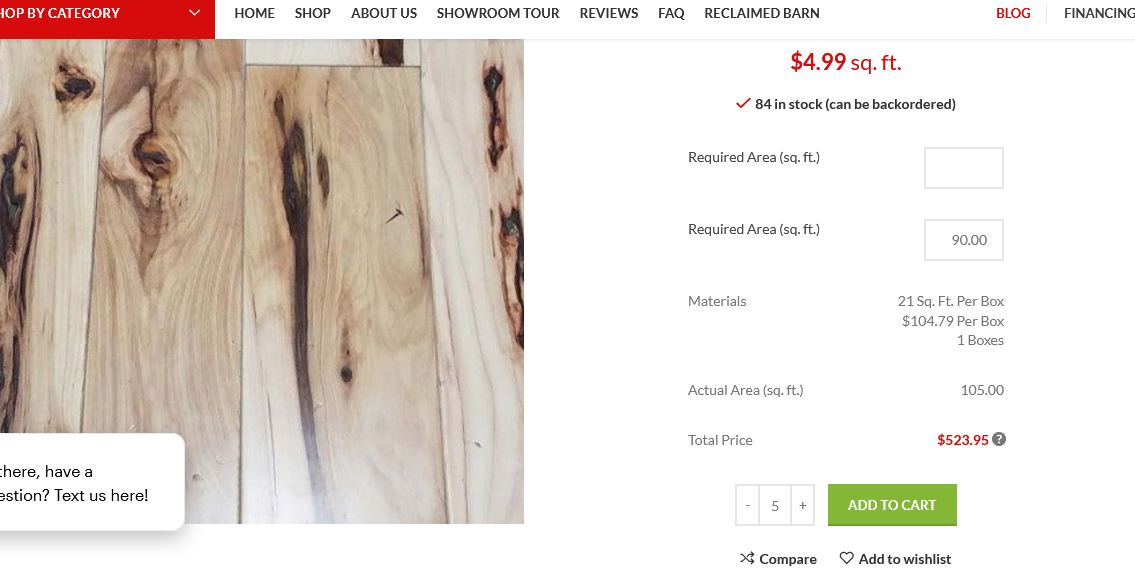
The flooring is listed by the square foot, but sold by the full carton/box, A box has 21 sq.ft when we add our area sq.ft then calculator will generate auto cartons ready to add to cart
We’ve been trying to use the Price calculator for our website, but the problem we are facing is, that the price calculation doesn’t get reset to 0 when the page is refreshed, or if the visitor goes to different page and then comes back.
you can seen url below then you add any square foot area to my box then you know the plugin never work
http://paneltown.com/product/prefinished-hickory-ingrown-bark-5-1-4%E2%80%B3-hardwood-flooring/Hi,
Please, create a topic on our support forum and provide us all the necessary details about the request with some screenshots and including your admin access so we can help you https://xtemos.com/forums/forum/woodmart-premium-template/ If your support is already expired then you need to extend it on ThemeForest first.
Regards
My support is expired, and during the support duration, I wasn’t required any thing. But now I need some support. Can you please help on this.
As we can see, your account doesn’t have any purchased licenses. Please, contact us from the account which you have purchased our theme from.
I have “Purchase Code” of the theme which I can give you separately but I can’t use that email account because it was my Developer account, which is no more in our Company.
In this case, send us a message directly via the contact form with this purchase code. Also, specify the account name of your developer.
send please check your inbox
Support period for that purchase code has been already expired. You need to extend the support period or purchase a new license if you don’t have access to your account.
i already tell you that my support expired just asking you that (Woodmart theme is not capable with WooCommerce Measurement Price Calculator.) for my buy plugin never work on this theme you can check where is is the bug now you saying this
xtemos Author over 3 years ago Flag
Hello,
Unfortunately, we didn’t have a chance to test this plugin with our theme. But if it works with default WooCommerce storefront theme then it should work with WoodMart as well. If you will face any issues we will do our best to help you or provide a refund.
Kind Regards
3 year ago you you said this but still your theme never work
OK, sorry for the inconvenience. Could you please send us your admin access using the contact form so we can check the issue on your website?
ok thanks
1. The input was hidden with your custom CSS code https://prnt.sc/11il3s2 It works well without it https://gyazo.com/1efc061f3efb8d7646fd553c6de939f1
2. It saves the value on reload with our theme. But sometimes, the script doesn’t work well. We have tested this with the default theme and to doesn’t work well also.
i don’t understand you can see this url (https://www.paneltown.com/demo/product/red-oak-2-common-2-1-4-x-3-4-unfinished-solid-hardwood-flooring/)
plugin working other theme but we active this theme they never work can you please explain whats the problem with this
where is hidden code please explain your first url never work
input was hidden with your custom CSS code https://prnt.sc/11il3s2
Hello,
You need to find this custom CSS code in Appearance -> Customize and remove to show the label
hi when i hide
.area-input { display:none; }
there is showing two required box please help what next i do
https://i.gyazo.com/e51698f2e16ef8f66066a5e9ac20ec0b.pngyou have my admin detail please solve this problem and share the video there then i will do on main site please i’m really thanks full to you
Try to switch to the parent theme also. It looks like you have customized this form in the child theme as well.
thanks they work but one think is wrong sidebar look wrong can you seen screenshot
https://i.gyazo.com/8a26f5e4749a00027d78473269a7694e.pngsidebar css missing
It looks like you have set your fitlers area as main shop page sidebar. You need to use default Shop page sidebar there. Not the one dedicated for filters area.
sorry can’t understand
please explain with screenshots please
You need to edit your shop page in Dashboard -> Pages and change this option to “none” https://prnt.sc/11qjsmo
ok thanks
Hi,
I have checked with the Plugin support. And they responded that the plugin is working fine with other theme. And I have already checked as well. You can
check below URL: https://cloud.skyver.ge/E0uYXRXLThe issue is with your master and child theme, in which the plugin is not working. The issue that is causing is there are two Area boxes shown with your theme. That’s why the plugin is not working properly.
https://gyazo.com/ccea40f6b25c0c6a7782c97facf05717Hi,
Please, provide us your new admin access so we can check it again.
Hello,
We have tested it with the default theme an it works in the same way. Sometimes it doesn’t work. Here are some videos:
With WoodMart theme: Sometimes works – https://gyazo.com/7decfa57662407dbba0668c18c7d3d7b Sometimes not – https://gyazo.com/c1bf6a5c193b033840d282af18187c79
And the same with Standard Theme Sometimes works – https://gyazo.com/9567442554356aa6fa51e7aeefb084fc Sometimes not – https://gyazo.com/0d8da793d9395240d5b8bee1af1966d7
ok i’m send this message to plugin support now you can tell me when we active child theme then why to box showing look at below
Required Area (sq. ft.)
Required Area (sq. ft.)
Required Area (sq. ft.) two box showing but i want only one box ?
Required Area (sq. ft.)
If it happens when the child theme is active then it is caused by some customization made in the child theme code. You need to fix or remove the custom code you have added to your child theme.
Hi, Very Nice Theme!
There is rapport in the menu backend from the browser console this DOM problem comes from the Themes ( last version):
[DOM] Found 6 elements with non-unique id #nmi_item_id: (More info: https://goo.gl/9p2vKq) <input type=”hidden” name=”nmi_item_id” id=”nmi_item_id” value=”314751”> <input type=”hidden” name=”nmi_item_id” id=”nmi_item_id” value=”95825”> <input type=”hidden” name=”nmi_item_id” id=”nmi_item_id” value=”81080”> <input type=”hidden” name=”nmi_item_id” id=”nmi_item_id” value=”81081”> <input type=”hidden” name=”nmi_item_id” id=”nmi_item_id” value=”315316”> <input type=”hidden” name=”nmi_item_id” id=”nmi_item_id” value=”315317”> (this comes from 6 menu items) Please check this for next update.
Regards TAL
Hello,
Thank you for your comment. This message is harmless so you can ignore it. It will not influence your website anyhow.
Kind Regards
Hello, I bought woodmart theme some years ago but the domain where I used the activation code I no longer have it; Now that I am launching a new site I want to use this theme again but when I try to activate the code it tells me “You have activated your purchase code more than 3 times.” It tells me to go to the profile in Xtemos but in my account it does not appear anywhere where I can deactivate the code or change to the new domain.
Hello,
Please, send us a message via the contact form on our profile page including your purchase code so we can check this for you.
Kind Regards
Hello good Morning.
There is an urgent problem with the thema
The section to add css for mobile and desktop is not working, please check.
And because of this I am concerned that the section to add js is also not working correctly, because the latter I really need it.
Please review this issue urgently.
Thanks a million in advance.
Best wishes to woodmart.
Hello,
Thank you for contacting us. We don’t see this problem on our side. Could you please try to disable all external plugins that are not related to our theme so we can check?
Kind Regards
When is the next release expected?
Already read it – in a few weeks
Hello,
Yes, we will release a new update next week.
Kind Regards
FATAL ERROR, site wont load Stack trace: #0 /home/ctc/public_html/wp-includes/shortcodes.php(343): woodmart_shortcode_info_box(Array, ‘The airport can…’, ‘woodmart_info_b…’) #1 [internal function]: do_shortcode_tag(Array) #2 /home/ctc/public_html/wp-includes/shortcodes.php(218): preg_replace_callback(’/\\[(\\[?)(html_b…’, ‘do_shortcode_ta…’, ‘
[vc_row full…’) #3 /home/ctc/public_html/wp-includes/class-wp-hook.php(292): do_shortcode(‘
[v #6 [internal function]: do_shortcode_tag(Array) #7 /home/ctc/public_html/wp-includes/shortcodes.php(218): preg_replace_callback(’/\\[(\\[?)(html_b…’, ‘do_shortcode_ta…’, ‘
PHP Fatal error: Uncaught Error: Call to undefined function woodmart_get_image_url() in /home/ctc/public_html/wp-content/themes/woodmart/inc/shortcodes/info-box.php:165I have fixed this. seems the error is caused if WPbakery is inactive. You should add a check to your site to make sure this doesnt break the whole site if it is inactive
Hello,
Thank you for reporting this issue. Could you please specify your WoodMart theme version installed?
Kind Regards
Hey dcool, what do you expect if you spend 59.- dollar? 24/7 support and reaction times of <1h? Very unrealistic. Up to three days seems quite fine to me given the fact, that we all just spend a very low amount of money. I was always very happy with their support …
Hello,
Thank you very much for your support We usually do our best to provide as fast replies as possible. We have 2-10 hours response time during working days and 10-24 hours on weekends.
Kind Regards
your forum support is too bad…no reply even after 3 days….do you have any ticket system???
Hello,
We are sorry you got difficulties getting our support. We have checked your support request and see that we replied 3 days ago to your question. You can check our response and continue the conversation here https://xtemos.com/forums/topic/mobile-menu-42/ Sorry for the inconvenience.
Kind Regards