12892 comments found.

this is a joke i laid the question outr in two parts and asked for the Questions to be answered in this way , NONE WHERE Answered ???? i’ve had the them for 10 days and got NO where I am very good with this stuff even won awards from HostGator because i manipulated wp in a cleaver manor.
your guys that are giving support don’t really want to help they clearly just want to fob customers off they have not answered any questions correctly , its like they are not reading the questions. Your tutorials on the slider are aurfull and there are NO examples of the theses slider working!
Look with a little good support i can do this easy but i am not getting the help NONE!
listen to me please.
if you give me away to get support i will understand how the theme has been designed and buy 8 more lisencs! WO question pleAse answer both! I am stuck with the questions bellow! question 1 There are a bunch of form fields here and they all have drop down menus, “Default template for post types”
i cant change any of this and i think its why i cant get the wp slider to work NOT the Slider Revolution!!! can you go into my wp account?
https://japaneseknives.org/wp-admin/admin.php?page=vc-generalquestion 2 you guys suggest using the slider within wp as its lighter and fast correct?
Private Content
Hello,
Yes, we recommend you use our own built-in slider as it is much lighter than Slider revolution. Most of the sliders you see on our demo come with dummy content so you can import and customize them. If you want to create the slider from scratch you can find instruction in our documentation here https://xtemos.com/docs/woodmart/woodmart-slider/
Kind Regards
please just give me a dummy content i will back engineer it. i need this right away please give me a link to get the slider.
Hello,
Our sliders are a part of our dummy content. So if you haven’t imported our dummy content, we have sent you our slider files on the forum.
Let me know if you have any further questions.
Kind Regards
For mobile version category menu is missing from product page header , how do i fix this?
Hi,
Please, create a topic on our support forum and provide us all the necessary details about the request with some screenshots and including your admin access so we can help you https://xtemos.com/forums/forum/woodmart-premium-template/
Regards
2 quick questions…
1) At the header menu, in the browse categories section, the categories won’t appear. Is this because i translated the theme yesterday?
2) When i want to resize all images in 1:1 or 500×500 the images won’t reseize. Is there something i can do to fix this. Now al my products are not equal next to eachother due different image sizes.
Thanks in advance. The theme is great!
Hi,
Could you please send us a link to your website where we can see this issue?
You can resize your images via Appearance -> Customize -> WooCommerce -> Product images.
Kind Regards
I’m having problems after the last update of the element. I can’t edit content and pages appear unformatted. These errors appear when loading the site:
jquery-migrate.min.js?ver=3.3.2:2 JQMIGRATE: Migrate is installed, version 3.3.2 pitz.pt/:1 Access to font at ’/wp-content/plugins/elementor/assets/lib/font-awesome/webfonts/fa-solid-900.woff2’ from origin ’ https://pitz.pt' has been blocked by CORS policy: No ‘Access-Control-Allow-Origin’ header is present on the requested resource. solid.min.css:1 GET /wp-content/plugins/elementor/assets/lib/font-awesome/webfonts/fa-solid-900.woff2 net::ERR_FAILED pitz.pt/:1 Access to font at ’/wp-content/plugins/elementor/assets/lib/font-awesome/webfonts/fa-solid-900.woff’ from origin ’ ’ has been blocked by CORS policy: No ‘Access-Control-Allow-Origin’ header is present on the requested resource. solid.min.css:1 GET /wp-content/plugins/elementor/assets/lib/font-awesome/webfonts/fa-solid-900.woff net::ERR_FAILED pitz.pt/:1 Access to font at ’/wp-content/plugins/elementor/assets/lib/font-awesome/webfonts/fa-solid-900.ttf’ from origin ’ ’ has been blocked by CORS policy: No ‘Access-Control-Allow-Origin’ header is present on the requested resource. solid.min.css:1 GET /wp-content/plugins/elementor/assets/lib/font-awesome/webfonts/fa-solid-900.ttf net::ERR_FAILED
Hi,
Could you please send us a link to your website where we can see this issue?
Kind Regards
We don’t see any problems on your website now. Could you please clarify the problem? https://gyazo.com/3826567435e7aa3270fea440c237f3da
hello, is there a way to change color for search form (border an elements) and quantity border and input … now it is a light grey and i need to make it black
thank you
Hello,
Would you be so kind and send us a screenshot showcasing the element you would like to change? And send us your website link so we can prepare a custom CSS for this.
Kind Regards
thank you, my associate just open an account at support and he will open a ticket there
OK, let me know if there is anything else I can help you with.
Hello, what are the default plugins names after purchasing this template?
Hello,
Here is a list of plugins you will get after purchasing our theme
Slider Revolution WPBakery Page Builder or Elementor Woodmart Core (functionality theme plugin) WooCommerce MailChimp for WordPress Safe SVG Contact Form 7
Kind Regards
.wd-hover-quick .wd-add-btn>a { font-size: 9px; }
i can do with HTML just asking if there is an option
Hello,
Yes, you can apply your custom CSS. Or you can copy this selector and customize this button font using our Advanced Typography functionality in our Theme Settings.
Kind Regards
Dear all,
It’s excellent theme but we have some questions about demo “Books” before we decide to purchase.
1. Beside standard Woocommerce categories, how can we create new category part, only for author the books and to filter the by the author.
2. Is it possible on product meta to add new product meta for author? Just to have two separate product meta and those meta to be: one for book category (e.g. thriller, psychology, action, romance) and another meta for author/s name?
Best regards,
Hello,
Thank you very much for being interested in our theme.
1. You can create any kind of attribute with our theme and WooCommerce. So you just create a custom attribute called “Author” and display its filter using our widget.
2. Yes, you can create any custom attributes.
Kind Regards
Hello, please find below a presale question.
In all of your demos, the mobile menu does not include any subchoises. For example, in desktop version, under the Sale there are many choises that are not available on mobile menu.
Hello,
Thank you very much for your question.
We just didn’t add these menu items to the mobile navigation. But submenu functionality for our menu is available and can be seen here https://gyazo.com/cea5cfe30031457d85dd6431f5b3aafe
Kind Regards
How to Shop WooCommerce Product ID on product page
Hello,
Sorry, but your question is not quite clear. Could you please send us some screenshots for a better understanding?
Kind Regards
Please extend the Wishlist to something like Amazon, which we can create folders and add the products to the appropriate folders in our wishlist. (this is important feature in b2b stores. a lot of businesses tend to put a bunch of related products into different folders to have quicker, better access for frequent order in future)
We can also set our wishlist to be private or public.
On top of that, when a wishlisted product is out of stock, but then gets back in stock while still in our wishlist, we get email notification about it.
Hello,
Thank you very much for your feature requests!
Kind Regards
Hello, We want to buy this template but we need to see real examples with multilingual and multi currency with a lot of products. Is there any examples because we want to see page speed score, gtmetrix score with plugins etc.
Have a nice day
Hello,
Thank you very much for contacting us.
Currently, we don’t have any real examples with multilingual and multicurrency to share with you. But you can see a lot of examples built with WoodMart in our showcase on our theme’s intro page on ThemeForest.
Kind Regards
Hello, one information, I don’t know if there’s a feature for this. Is there an easy way to show for “products carousel” theme Visual Composer element only 1 item on mobile each time, and not 2 elements side by side?
Thanks 
solved, thanks anyway 
Hello,
We are glad that you sorted it out. Let me know if you have any further questions.
Kind Regards
hi, does the theme have product image outer zoom like amazon. İf not how can we do that?
Hello,
Thank you for contacting us.
Sorry, but our theme default zoom works a bit differently. It doesn’t show the image in a separate window as you can see on amazon.
Kind Regards
Great Theme!
Do you guys know if there is a dutch language pack?
Hello,
Thank you very much for your comment.
Yes, our theme has a Dutch translation pack and you can find it here https://xtemos.com/glotpress/projects/woodmart/nl/dutch/ Read an instruction about how to use our translations here https://xtemos.com/docs/woodmart/translation/
Kind Regards
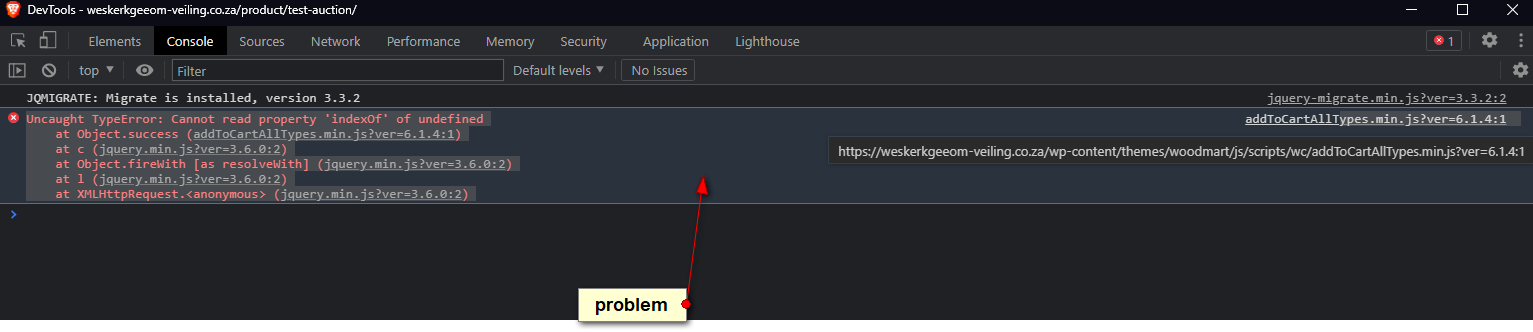
How can this be fixed?
http://storage.wpgenie.org/scr/img043810847.pngHi,
Could you please send us a link to your website where we can see this issue?
Kind Regards
What actions should we take to see this error in the console?
Bid on a product, its should automatically refresh and show the new highest bid, but you will see it doesnt show it.
There is some problem with the ajax or something
Try to disable AJAX add to cart in Theme Settings -> Single product -> Add to cart options.
It worked !!! thank you
Great, you are welcome!
Please add “Back In Stock” as an option for “Data Source” for “Ajax Product Tabs” widget. and once selected, we be able to choose a bumber of days that the products that are back in stock within the past x days, be considered as “Back In Stock” products and be displayed.
This is very useful as popular products get out of stock quickly and users are interested to see them get back in stock, and if we show them in a nice widget like Ajax Product Tabs, it will boost the sale.
Thanks
Hello,
Thank you very much for your feature requests!
Kind Regards
All of a sudden I’m getting errors on all my blog posts: Fatal error: Uncaught ArgumentCountError: Too few arguments to function woodmart_post_date(), 0 passed in /home/customer/www/fotoviva.co.uk/public_html/wp-content/themes/woodmart-child/content.php on line 121 and exactly 1 expected in /home/customer/www/fotoviva.co.uk/public_html/wp-content/themes/woodmart/inc/template-tags/template-tags.php:584 Stack trace: #0 /home/customer/www/fotoviva.co.uk/public_html/wp-content/themes/woodmart-child/content.php(121): woodmart_post_date() #1 /home/customer/www/fotoviva.co.uk/public_html/wp-includes/template.php(772): require(’/home/customer/...’) #2 /home/customer/www/fotoviva.co.uk/public_html/wp-includes/template.php(716): load_template(’/home/customer/...’, false, Array) #3 /home/customer/www/fotoviva.co.uk/public_html/wp-includes/general-template.php(204): locate_template(Array, true, false, Array) #4 /home/customer/www/fotoviva.co.uk/public_html/wp-content/themes/woodmart/single.php(26): get_template_part(‘content’, ’’) #5 /home/customer/www/fotoviva.co.uk/public_html/wp-include in /home/customer/www/fotoviva.co.uk/public_html/wp-content/themes/woodmart/inc/template-tags/template-tags.php on line 584
I would appreciate not having to renew support for something that seemingly looks like a new woodmart error.
Hello,
Please, disable all extra plugins temporarily and switch to the parent theme. Then send us your admin access using the contact form via our profile page on ThemeForest so we can check.
Kind Regards
Thanks, the main theme worked fine so I went back to the child and removed this from the content.php file <?php woodmart_post_date(); ?> and that seems to have fixed it!
We are glad that you sorted it out! Let me know if there is anything else I can help you with.
Kind Regards
Presale question: 1. Am I able to customize the product page like add extra info under the product like the demo: https://woodmart.xtemos.com/shop/furniture/eames-lounge-chair/
2.Also another thing, i noticed that in the mobile version, you the product tabs disapear, is that normal? https://woodmart.xtemos.com/shop/furniture/grand-comfort-chair/?opt=images_col13. Can i load my own font into the theme like a font that i have downloaded from font space?
Hello,
Thank you for contacting us.
1. Of course, you are able to create a product page like on the demo and add your extra content there.
2. You need to test this with a real mobile device. Or reload the browser tab after resizing.
3. Sure, our theme provides custom font uploader functionality.
Kind Regards
Please add a “Free shipping progress bar” widget for elementor.
Something like this: https://apps.shopify.com/free-shipping-progress-bar
This helps us create promotions to boost the sale.
Hello,
Thank you for the feature request. We will consider this improvement for our future updates.
Kind Regards