302 comments found.

Hi there, I purchased this theme but I’m having some trouble with some features. The blog posts are not being reflected in the blog page and I can’t get the second product image to show when hover. Could I get your assistance with these items? Any idea why that might be happening? Thank you!
Please take screenshot your problem and send via email shopifytemplate@gmail.com
Hi there! Quick question: where or how do I edit the “quick view” and “add to cart” options on the individual products, I need to take off the “add to cart” and keep the “quick view” button.
Using Home page 3 if that helps!
Also on some computer the checkout button is not working in the cart page but only happens where there is a password protecting the site. Any advice on this?
I don’t have config disable quickview, but you can invite shopifytemplate@gmail.com to your store I can remove it
Also on some computer the checkout button is not working in the cart page but only happens where there is a password protecting the site. Any advice on this? -> you can disable password your site https://help.shopify.com/en/manual/online-store/themes/password-pageHi, I am trying to add a full width banner, how can I do so?
in section you can config full width for it
Hello, how do I use the “Style with” piece? What code do I need to put in the line for products to show up?
Please invite shopifytemplate@gmail.com to your store I’ll help you
Hi, I recently bought the August multipurpose Shopify theme and installed it. I have been customizing its normal version (not the Dawn version) as a draft and have not published it yet because my online store is active (currently using the Minimal Shopify theme). I am not a developer but a store owner doing this myself and so far, I have not encountered any major issues with customization, except with filters on collection pages. The exact “issue” is that although all my products have their sizes entered as variants on their product page (with the quantity available for each size), the filters on the collection page do not recognize any size and whenever I filter any size, always returns this message: “Sorry, there are no products in this collection.” I watched the video “Collection page and filter” but it did not clarify my doubt. I also checked the settings for Sidebar and Filters in the theme settings and noticed that there are product tags that I need to create in order for the filter to work with them. However, I doubt the sizes should be created as tags as well because first they are already created as variants, and if that’s the case that they need to also be created as tags, they won’t link their actual availability and would show a size that might already be out of stock. So, I guess my question is whether the size filter in this template needs to be linked to the tags for it to work. Is there anything else I need to know about this? I would really appreciate any comments from you. Thanks Purchase codes Authors may ask you for a purchase code to verify that you’ve purchased this item. • 78731075-5f36-4c04-bea0-c1c363444d39 – 25 Sep 2021 REGULAR LICENSE
Hey there
A few issues with the theme I’m hoping to get help with.
Blog posts - Turn off the auto image being on the page at the top (but keep as thumbnail) - Turn off the shadow hover on the image - Turn off header with breadcrumb and pink background
Home page - Turn off the bottom right hand circle showing previous product - Product to change image upon hover (enable second product doesn’t work) - Change font style of product - Error overlay doesn’t save (reverts back upon saving)
Product pages - The theme demo shows the product with a video underneath the main thumbails and description, but no way of getting this on my website.
If you can fix the above, I’d like to get your rates for some additional custom work.
Thanks
Hello Please contact via email shopifytemplate@gmail.com you should list the task and attach image about it I’ll send the cost for you
I’ve sent an email
Thank you
On the blog posts the word “previous” is spelled “previus” how can I change this and correct the spelling
You can find file and edit it article-template-1.liquid
I tried but it isn’t there?
so you can find text in file en.defaul.json or edit language
I have emailed support about the mega menu and nobody has gotten back to me? Can someone please get in touch regarding it??
Hello What is your email? my email shopifytemplate@gmail.com
I will email you now
ok
Hello there,
The menus got bugged it is?. I just get a white block on hover and nothing else. I am doing what the videos say and I am still getting the same. Please help
Please take screenshot about that
Hi My mega menu isn’t working how do you fix it?
You should use theme 1.0 don’t use dawn theme
i have finished off website using 1.0 theme. issue 1 – The homepage slide show after loading on mobile the slide show disappears after you leave the homepage and then come back and just shows the background colour issue 2- the side mobile menu disappears once you have clicked it twice is this normal? so you have navigate back to homepage and select another menu item can you help?
website is https://www.thegratitudeplace.com.au/ (issues happening on mobile only)
Hello I checked I see it still working on mobile You can record video about that
ok
How do i send it through???
I sent an emial to : shopifytemplate@gmail.com with screen record
I see in email Please invite shopifytemplate@gmail.com to your store I’ll check
okay done..have you had a look yet?
emailed
Hi! Love the them, a couple questions:
1) The instagram feed isn’t super pretty as my feed contains alot of different sized images. How can I force crop them down to a square so they are cohesive and pretty?
2) I am still in trial mode building, but the currency converter is not working. I’ve read all the comments and have set up everything properly. Any ideas?
https://htwed.myshopify.com/ – password: htwed1. You should make image same size or hide customize with fee small 2. https://youtu.be/722MpT3i_m0?list=PLnA4OSFhnLasuixGvmNOc7XZ9MrxuH1xR&t=47
see video guide
Thank you, the currency is working now.
I’m not sure I understand your answer about the instagram feed? “hide customize with fee small”?
I’m not sure I understand your answer about the instagram feed? “hide customize with fee small”? -> Because Instagram 2020 it can not allow crop image to squar image We need edit code for it. Or you can make square image same size
Oh ok! Can we edit the code to make them square?
yes, so hire me customize with fee small
ok! please tell me how to hire you and pay you
$20 for it you can contact via email shopifytemplae@gmail.com We can disccuss
ok will email
I emailed
Is there a way to have a slide show in the middle of the home page. It only allow me to have one at the top of the page
Yes, We don’t have config , If you want do it you can hire me do it
please delete this comment, sorry 
You’r welcome
and how can I disable zooming there as well?
I use lazyload, so you don’t need change size image and how can I disable zooming there as well? -> We don’t have config for it but if you want I can remove for you
I want to have a smaller image size? How can I get that? The height is 1800px ?
you can crop image smaller before you enter image to product
thanks for your support. I crop images smaller but the image on the product site is still big
What size are you using ?
Hi There,
I purchased the August theme. But i am struggling to get the mega menu to work or drop down as per your video. Can you please help?
Please contact and invite shopifytemplate@gmail.com to your store i’ll help you
okay added
did you fix it?
yes
The megamenu is not working? I have been trying to get it to work for a week now? Can you please assist
Did you see video guide about megamenu ?
Yes, it is not working.
Please contact via email shopifytemplate@gmail.com
Dear Support -
Greetings!
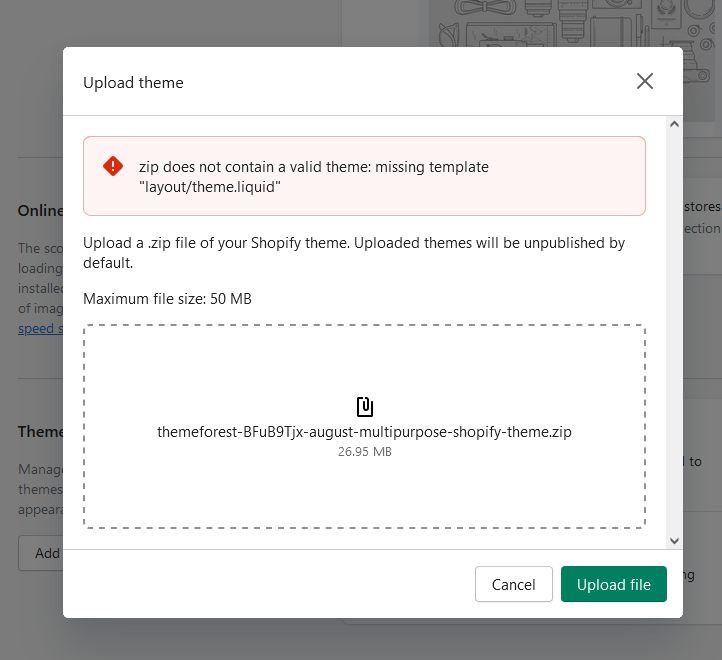
We purchased the Shopify theme “August” and attempted to upload the zip file. We were met with the following error message regarding a “missing template”. See screenshot below. https://snipboard.io/5nBLGa.jpgPlease advise as to how we resolve this error message.
Thank you!
Please extract file downloaded When you extract file downloaded, You see this folder and upload theme.zip in this folder https://www.screencast.com/t/Wv00f1Xa
We unzipped the theme file and spotted the directory you displayed in the screenshot provided in the previous message. Since Shopify would not take an open directory, we zipped up the “theme” folder into it’s own zip file. That second zip file was what we attempted to upload to Shopify. We were met with the same error message. See below.
https://snipboard.io/v730B6.jpgPlease respond with next steps to resolve. Thank you.
Please extract file downloaded When you extract file downloaded, You see this folder and upload theme.zip in this folder https://www.screencast.com/t/Wv00f1Xa
https://www.youtube.com/watch?v=bk254fMFDXM&list=PLnA4OSFhnLasuixGvmNOc7XZ9MrxuH1xR&index=1See video how to install
Hello, The computer banner and the phone banner is not seperated, so it’s not suit for phone banner if one device banner is placed.(home page banner) and the second, the discount code can’t write in when customer arrive to check out. No place to writte
take screenshot about that
my email shopifytemplate@gmail.com Please send screenshot via email
I have sent your emails.
What is your email ?
I can’t open the link, PLZ HELP ME
let try f5 it
HI there
I am really struggling to get the menus to work. I just get a white block on hover and nothing else. I am doing what the videos say and I am still getting the same. Please help
Please use theme 1.0 If you use dawn theme. you need wait me update
If I use 1.0 then I cant use the section builder?
ok. Please invite shopifytemplate@gmail.com to your store
The column is not displayed after the secondary navigation is created
Please take screenshot about that
I sent your email, I can’t send pictures here
What is your email?
I sent email
How to invite?
View mailbox
Currently, I didn’t receive any invite
Has just been sent an invitation, please see
I Fixed for you
Please check the email
I replied
Please check the email
I can not login your store
I have re-invited
I fixed
Check email
emailed