12900 comments found.

Hi
We get the following error on our single product pages:
Warning: array_key_exists() expects parameter 2 to be array, bool given in /home/onsalasol/public_html/wp-content/themes/woodmart/inc/integrations/woocommerce/functions.php on line 17
Please help as soon as ou can.
Hi,
Please, create a topic on our support forum and provide us all the necessary details about the request with some screenshots and including your admin access so we can help you https://xtemos.com/forums/forum/woodmart-premium-template/
Regards
Hi
I have created a topic: Warning: array_key_exists() ARe you checking this out?
We have answered your topic already.
Thank you got great support 
You are welcome!
You earlier suggested that within Theme there is a border for color swatches, specially for white.
But unfortunately, there seems no border when we add the white colored swatch.
Hence, the white swatch is not at all visible neither on Shop page grid, nor in shop side filters, as well as not in Single product page.
Where can I find the option to show the border, so as to make that visible.
https://bit.ly/3nWicg9
Regards
Hi,
Please, create a topic on our support forum and provide us all the necessary details about the request with some screenshots and including your admin access so we can help you https://xtemos.com/forums/forum/woodmart-premium-template/
Regards
After saving any of the theme changes, the small icons(wishlist, cart and so on) continue to disappear. If I activate the dummy content again… they appear. How may I solve this?
Hello,
Check if you have a correct URL set in Dashboard -> Settings -> General. It should start with HTTPS if you are using an SSL certificate on your website. Then go to Theme Settings and resave them. If it doesn’t help, please, provide us your admin access so we can check.
Kind Regards XTemos Studio
Hello, when you click the “quick view” button, nothing happens in the catalog. The button doesn’t work. There should be a window with brief information, but this does not happen. The quick view function in the theme settings is activated. I disabled all third-party plugins, but it didn’t help. What could be the problem?
Hi,
Please, create a topic on our support forum and provide us all the necessary details about the request with some screenshots and including your admin access so we can help you https://xtemos.com/forums/forum/woodmart-premium-template/
Regards
Hi, guys. Please consider adding some fancy shop page product layouts (e.g. with different product card sizes like here – https://stockie.clbthemes.com/shop/scattered-grid/ and alternating grid like here – https://peakshops.fuelthemes.net/shop/?shop_product_listing_layout=style2&products_per_page=10&shop_listing_filter_style=style1) and more slider designs based on Woodmart Slider (e.g. split screen slider like here – https://mrtailor.wp-theme.design/)
Hello,
Thank you for your feature requests. We will consider implementing this in our future updates.
Kind Regards
Also there’s a strange bug – products tab element pagination arrows are out of place when viewed on latest Chrome (96.0.4664.45) while they look OK with other browsers or older Chrome versions.
Hi,
Please, create a topic on our support forum and provide us all the necessary details about the request with some screenshots and including your admin access so we can help you https://xtemos.com/forums/forum/woodmart-premium-template/ If your support is already expired then you need to extend it on ThemeForest first.
Regards
I checked more thoroughly and found that the bug appears when the row has BounceInLeft or BounceInRight CSS animation. Please add an AJAX Product Tab element in WPBakery, enable aformentioned CSS animation for the row containing element, enable arrows for products pagination in product tab and check the result with Chrome 96. You will see there’s a bug and arrows are misaligned. It looks like some of CSS animations code became outdated or maybe a bug was introduced into Chrome.
Hi, guys. I’ve just noticed that magnific-popup.js is still loaded on single product page even if all lightbox options are disabled (like zoom and click action). Maybe I am missing something, but it seems it should not be enqueued I tested the page without this library and everything seems to work properly.
Hello,
This library depends on a lot of different elements. It is not just for the product images lightbox. This library is also needed for such things as size guide, video, promo popup, quick view, and others.
Kind Regards
Hello, I’m going to buy your theme, but now when I check your demo, even though I added a product to the cart, when I go to the cart, I see it as empty. Do you have a problem with your theme’s demo page?
Hi,
Thank you for being interested in our theme and contacting us!
You need to close the ThemeForest bar to check how the cart and checkout pages work. Or you can visit our demo directly using this link https://woodmart.xtemos.com/
Kind Regards
Hi, is it possible to add a text “Search” next to the icon in the search bar or do we still need to edit the php files directly?
https://i.imgur.com/fFgLwiH.pngThanks.
Hi,
Please, create a topic on our support forum and provide us all the necessary details about the request with some screenshots and including your admin access so we can help you https://xtemos.com/forums/forum/woodmart-premium-template/
Regards
how to show Variable Product Description ?
Hi,
Please, create a topic on our support forum and provide us all the necessary details about the request with some screenshots and including your admin access so we can help you https://xtemos.com/forums/forum/woodmart-premium-template/ If your support is already expired then you need to extend it on ThemeForest first.
Regards
How can I reset the wizard to download a demo again? Im switching from wpbakery to elementor and everything is messed up.
Hello,
If you want to reset everything on your website you can use WP Reset plugin for this. But note that it will delete everything from your website. Then you will be able to run the setup wizard again.
Kind Regards
¡Hola! desde donde puedo configurar mega menú para dispositivos móviles?
Hi,
Please, create a topic on our support forum and provide us all the necessary details about the request with some screenshots and including your admin access so we can help you https://xtemos.com/forums/forum/woodmart-premium-template/
Regards
When I try to save theme setting, I always got this error : === Forbidden, You don’t have permission to access this resource ===. Should I have to activate my theme license to be able to save the theme setting?
Hello,
Try to disable `mod_security` on your server. It seems to block Header Builder’s “save” requests. Contact your hosting provider for help.
Kind Regards
I have added a new subdomain, install the theme there, checked all folder permissions, but still not working….
Hi,
Please, create a topic on our support forum and provide us all the necessary details about the request with some screenshots and including your admin access so we can help you https://xtemos.com/forums/forum/woodmart-premium-template/
Regards
I just did
Hi. How can I translate this text on MY ACCOUNT page (not login)
Registering for this site allows you to access your order status and history. Just fill in the fields below, and we’ll get a new account set up for you in no time. We will only ask you for information necessary to make the purchase process faster and easier.
Thanks
Hello,
Thank you for contacting us!
You can change this text via Theme Settings -> Login / Register.
Kind Regards
So good!!!
Thanks 
You are welcome!
Hi, I am using woodmart theme but I didn’t know that my developer used a nulled theme. I want to purchase it and make it genuine. Is there a way to do it? Or I have to get everything done from scratch?
Hi,
Thank you for being interested in our theme and contacting us!
Yes, you can purchase a legal version and reinstall your nulled one. Then, you will be able to activate it with your purchase code and receive auto-updates.
Kind Regards
Hi,
Please, create a topic on our support forum and provide us all the necessary details about the request with some screenshots and including your admin access so we can help you https://xtemos.com/forums/forum/woodmart-premium-template/ If your support is already expired then you need to extend it on ThemeForest first.
Regards
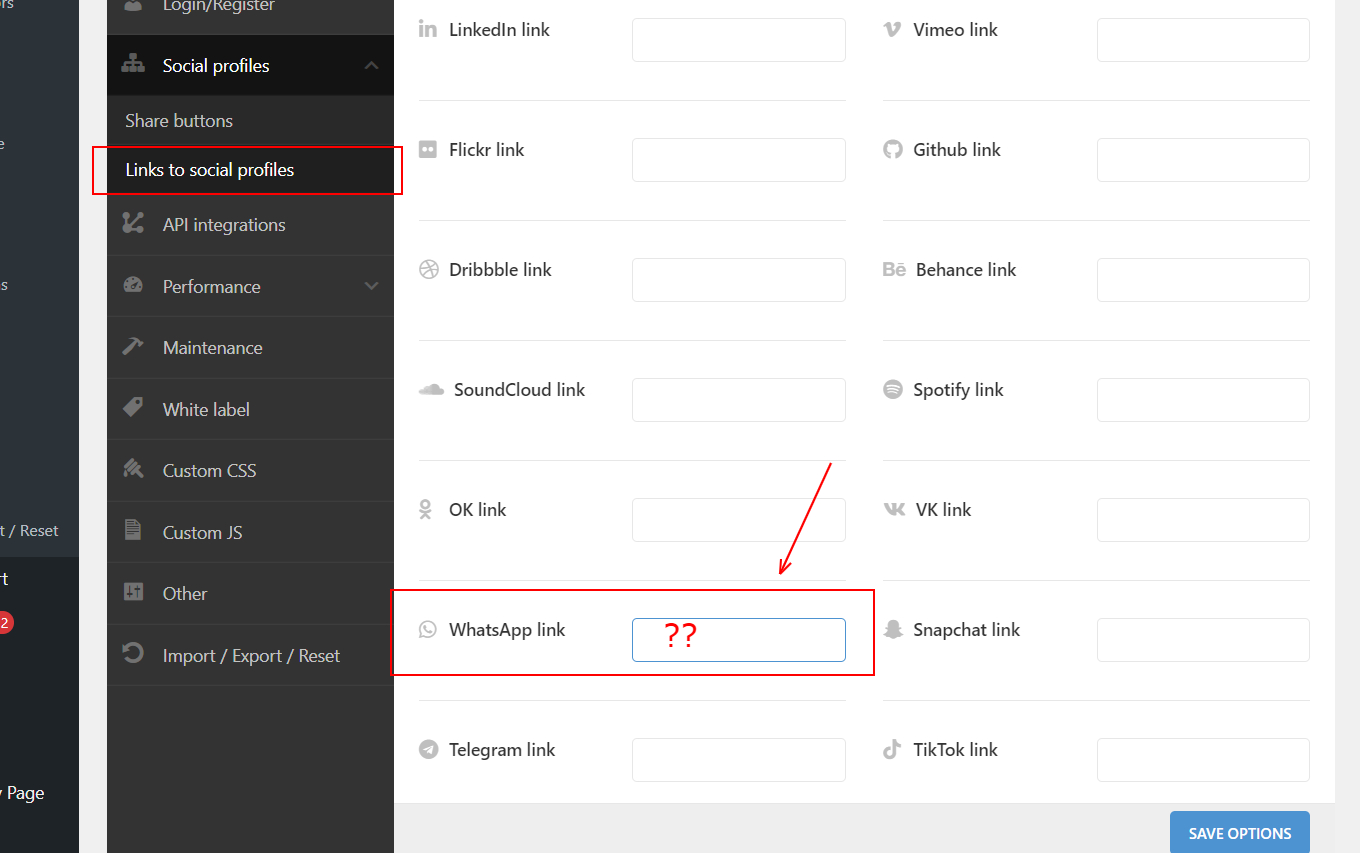
What to enter besides “Watsapp” field under Theme Settings > Links to Social Profiles section, so as to make it work. That is, when the visitor clicks on it, it will redirect for a Chat with owner on Watsapp
https://i2.paste.pics/F3HMR.png
Regards.
Hi,
Please, create a topic on our support forum and provide us all the necessary details about the request with some screenshots and including your admin access so we can help you https://xtemos.com/forums/forum/woodmart-premium-template/
Regards
Hello,
Should not it is supposed to work, as intended. (for Whatsapp)
Please check above screenshot. Expecting you to atleast look into my query and suggest on this
Regards
Here is an article that will help you create your own link https://faq.whatsapp.com/general/chats/how-to-use-click-to-chat/?lang=kk
Upon clicking Video icon displaying on Main image of the product page, it is Not showing the Video Preview
https://pasteboard.co/9VCsiw7zVU7G.png
As well as, upon further clicking the Youtube icon (from Video box), it shows below error message –
https://pasteboard.co/sic7DpoFTlhW.png
Below is the Actual Video URL, that we added on this product while editing it.
https://bit.ly/3FM3O00
What could be causing this issue.
Please resolve
Regards
Hi,
Please, create a topic on our support forum and provide us all the necessary details about the request with some screenshots and including your admin access so we can help you https://xtemos.com/forums/forum/woodmart-premium-template/
Regards
Hello,
It is only about Youtube link that is not working or not opening. It can be checked from frontend also.
PS: I think due to some sort of scripting issue, your system might not be accepting video in the format of Youtube “Shorts”
Can you please look into this and suggest further
Regards
Hi,
On Dashbord – Pages – Page Template there was a problem. Select input has a very high height.
https://monosnap.com/file/PcBTCHSN8ggulp2RjGR2ubzPQGf2RIHi,
Please, create a topic on our support forum and provide us all the necessary details about the request with some screenshots and including your admin access so we can help you https://xtemos.com/forums/forum/woodmart-premium-template/ If your support is already expired then you need to extend it on ThemeForest first.
Regards
There is a Pagination behaviour issue, due to which clicking on the page number (from Shop page) takes the user to the very top of the page instead of just the Start of the product grid display.
After clicking page number, the Auto-scroll-up, should Stop at the beginning where products begin to display, and not Scroll-up until the very beginning of that whole page.
Due to this (after clicking the page number), one has to unnecessarily scroll down again, to keep viewing further products.
This is really frustrating.
Please see below:
https://bit.ly/3cMwhqc
Please resolve this.
Regards
Hi,
Please, create a topic on our support forum and provide us all the necessary details about the request with some screenshots and including your admin access so we can help you https://xtemos.com/forums/forum/woodmart-premium-template/
Regards
Hello @LukeNielson ,
If you could please read my above message and help to resolve this. Currently, this seems, the default behaviour within the Theme itself, and should not require Admin access. As the same can be replicated in your demos also.
Expecting you to please atleast look into them and help to fix this issue
Regards
It actually brings to the shop page beginning including the page title. If you want to change this, please, contact our technical support team and they will do their best to help you.
Thanks for your response. Much appreciable
OK, I will create a topic for this.
Can you please check this message and help to resolve this one, or suggest –
https://themeforest.net/comments/27577746
Will create topic for others also
Regards