111 comments found.

hello, the theme I purchased is not accepting the Purchase Code.
Import %60 can’t load ?
Hi there,
Thanks for writing in! Please check this article here. Also, if you are somehow having an issue with the demo import we would kindly ask you to check your resources as well as you can always try to import our demo content with our XML file.
If you have any additional questions we would kindly ask you to submit a request at our help center and our support team will be happy to help.
Thanks.
Support
Edge Portfolio part of
Qode Interactive
Don’t forget to sign up for our newsletter and be the first to find out all the latest news.
Good morning, Is it possible to adjust the various prices according to the period? (low season / or high season?)
Hi there,
You will have Seassonal Items options where you can define a price for the special seasonal period for the item you want.
Do let us know if you have any additional questions.
Support
Edge Portfolio part of
Qode Interactive
Don’t forget to sign up for our newsletter and be the first to find out all the latest news.
Hey, your theme is great! i need the Calendar in German? I updated the
jquery.datepick.min.js
but it doesnt works? Thanks
Hi there,
Thank you very much! 
Please take a look at the following article: Translating the Booking Date Picker
If you need any further assistance we would appreciate it if you could submit a ticket to our Help Center and include your website URL and one of our support agents will assist you.
Support
Edge Portfolio part of
Qode Interactive
Don’t forget to sign up for our newsletter and be the first to find out all the latest news.
Hello, the problem is still there? German Translate doenst works. It haves automaticly an error with DateTime::__construct(): Failed to parse time string
In your documentation you guarantee for this functionality. Why it doenst works?
Hi,
As we do not have enough information about the settings on your installation, and since author’s dashboard is meant for general inquiries and pre-sale questions, we would appreciate if you could please submit a ticket at our Help Center, include URL of your site, and one of our support agents will check this and assist you further. Thank you.
Support
Edge Portfolio part of
Qode Interactive
Don’t forget to sign up for our newsletter and be the first to find out all the latest news.
I cannot make any ticket because it is expired. But its not a kind of support? It’s a bug from your site, which doesn’t works?
Hi,
The translation of datepicker is working correctly on our local installation. Please double check if all of the steps from the article we’ve linked are followed correctly and make sure to replace “alloggio” with “kamperen”. You can find more info regarding support expiration and option to extend it in this link.
Support
Edge Portfolio part of
Qode Interactive
Don’t forget to sign up for our newsletter and be the first to find out all the latest news.
Hi,
i double checked all of this, replace alloggio with kamperen but I have still the same problem.
datepicker-de.js downloaded, placed into the folder where the functions.php is, add functions php code and all of this and I became this error.
Uncaught Exception: DateTime::__construct(): Failed to parse time string
Hi,
Have you also replaced jquery.datepick-es.js in the function with correct jquery file for German?
Support
Edge Portfolio part of
Qode Interactive
Don’t forget to sign up for our newsletter and be the first to find out all the latest news.
Hey i want to buy the product i need the option to book from back because sometimes a big group close the booking by phone it is possible?
Hello,
Thank you for taking interest in our theme!
Bookings can be overviewed in the backend, please see screenshot. You can also manage booking status in the backend dashboard as shown in screenshot.
Do let us know if you have any additional questions.
Support
Edge Portfolio part of
Qode Interactive
Don’t forget to sign up for our newsletter and be the first to find out all the latest news.
So complicate this theme , I regret having bought , you cant modify de reservation form, also the translation labels , soo complicate !!!
Hi there,
Since author’s dashboard is meant for general inquiries and pre-sale questions we would appreciate if you could submit a ticket to our Help Center, include your website URL, and one of our support agents will assist you. To submit a ticket please follow instructions from this article.
Support
Edge Portfolio part of
Qode Interactive
Don’t forget to sign up for our newsletter and be the first to find out all the latest news.
Does this support booking an individual campsite? For example showing all campsites that meet certain criteria (size, amenities) and the customer can select the individual campsite.
Hello,
You can adjust accommodation single to suit your needs. For more detailed overview of theme’s options for accommodation please check the documentation in this link and do let us know if you have any additional questions.
Support
Edge Portfolio part of
Qode Interactive
Don’t forget to sign up for our newsletter and be the first to find out all the latest news.
Hello, pleas for help. Themes stopped working after updating the Elementor plugin to the new version. It does not work even after reverting to the previous version. It doesn’t work even after uploading the website from a backup, including the sql databases, from when the website was working. Does anyone have any experience with this please ? Thank you very much for any advice. H. The following message is displayed on the website: Warning: Illegal string offset ‘template’ in /data/www/25415/caravan-camp-krumlov_cz/www/wp-content/plugins/elementor/core/settings/page/manager.php on line 242
Fatal error: Uncaught TypeError: Argument 1 passed to Elementor\Controls_Stack::sanitize_settings() must be of the type array, string given, called in /data/www/25415/caravan-camp-krumlov_cz/www/wp-content/plugins/elementor/includes/base/controls-stack.php on line 1097 and defined in /data/www/25415/caravan-camp-krumlov_cz/www/wp-content/plugins/elementor/includes/base/controls-stack.php:2345 Stack trace: #0 /data/www/25415/caravan-camp-krumlov_cz/www/wp-content/plugins/elementor/includes/base/controls-stack.php(1097): Elementor\Controls_Stack->sanitize_settings(‘daravan Camp \xC4\x8C…’) #1 /data/www/25415/caravan-camp-krumlov_cz/www/wp-content/plugins/elementor/includes/base/controls-stack.php(2094): Elementor\Controls_Stack->get_data(‘settings’) #2 /data/www/25415/caravan-camp-krumlov_cz/www/wp-content/plugins/elementor/core/base/base-object.php(142): Elementor\Controls_Stack->get_init_settings() #3 /data/www/25415/caravan-camp-krumlov_cz/www/wp-content/plugins/elementor/core/base/base-object.php(40): Elementor\Core\B in /data/www/25415/caravan-camp-krumlov_cz/www/wp-content/plugins/elementor/includes/base/controls-stack.php on line 2345
Hi there,
We located your ticket and as we can see the ticket has been updated with an answer. Please check the ticket status now and continue the coversation there.
Support
Edge Portfolio part of
Qode Interactive
Don’t forget to sign up for our newsletter and be the first to find out all the latest news.
Hi, a quick pre-sales question – is there any way to set up automatic sync with bookings made via booking.com within this theme?
Hi there,
The Kamperen booking system is our own where the reservation form is integrated within the theme and the process of purchasing goes through WooCommerce where we do use their functionality for this purpose.
However if you want to organize the booking or a request differently then you will need to edit our theme files, as there is no option to make a reservation request other than through our booking form. Please note that we haven’t tested syncing booking.com so we can not guarantee that it will work.
If you have any additional questions please let us know.
Support
Edge Portfolio part of
Qode Interactive
Don’t forget to sign up for our newsletter and be the first to find out all the latest news.
Please check your demo checkout page
Hi there,
Thanks for writing in! It has now been resolved, please check once again.
Thank you for your patience and let us know if you have any additional questions.
Support
Edge Portfolio part of
Qode Interactive
Don’t forget to sign up for our newsletter and be the first to find out all the latest news.
Does this theme support razorpay integration via woocommerce payment? Please reply asap
Hi there,
The Kamperen booking system is our own where the reservation form is integrated within the theme and the process of purchasing goes through WooCommerce where we do use their functionality for this purpose.
Since the theme is using WooCoomerce for purchases you could use the payment gateway for sure. Please check the WooCommerce documentation on this. You should know that we have not tested this extension nor can we guaranty theme compatibility, but you can always test it on your end.
Do let us know if you have any additional questions.
Support
Edge Portfolio part of
Qode Interactive
Don’t forget to sign up for our newsletter and be the first to find out all the latest news.
Hi, we are using this theme since more than couple of months without any issues, but now the layout is broken & we have tried fixing it from our end but nothing worked. Please help. we are using this theme here – https://tentotreat.com/
Hi there,
Thank you for reaching us!
Since the author’s dashboard is meant for general inquiries and pre-sale questions, we would appreciate it if you could submit a ticket to our Help Center and one of our support agents will assist you.
Thanks.
Support
Edge Portfolio part of
Qode Interactive
Don’t forget to sign up for our newsletter and be the first to find out all the latest news.
Hello, we really like this theme and have a pre-sale question. Our client already has a booking service to integrate to the theme that will be chosen.
What will be the price to edit the theme files to remove the calendar, check-in/checkout and any other trace of the on-site booking functionality from being displayed on the site?
Hi there,
Thanks for taking an interest! The Kamperen booking system is our own where the reservation form is integrated within the theme and the process of purchasing goes through WooCommerce where we do use their functionality for this purpose.
However if you want to organize the booking or a request differently then you will need to edit our theme files, as there is no option to make a reservation request other then through our booking form.
You should know that we do not customize the themes as this is not included within our support scope, and our support team is focused on answering all theme related questions.
Do let us know if you have any additional questions.
Support
Edge Portfolio part of
Qode Interactive
Don’t forget to sign up for our newsletter and be the first to find out all the latest news.
Hi, I really like your theme! I need to use the template on two different websites (xx.com and yy.com) owned by the same company, is it possible to use one single licence or I have to buy it twice? thanks
Hi there,
Thank you for taking interest in our theme!
Each installation requires a separate license. Therefore, with the Regular license you purchase with our theme, you can use the said theme only on a single website or a domain.
Do let us know if you have any additional questions.
Support
Edge Portfolio part of
Qode Interactive
Don’t forget to sign up for our newsletter and be the first to find out all the latest news.
Hi all. As I’ve a bit of urgency and while I’m waiting for some feedback from the Support Team, is someone able to help me with problems I have on importing demo content (ALL option)? I tried twice and always stops at 24%. Suggestions are really appreciated
I just got an answer from the Support Team so THANKS!
You’re welcome, glad that we could help!
Please understand that our average response time is around 24 hours on weekdays and that our support management system is sorting requests by the latest requester update, so every time you send a new message in the same request, that request gets pushed down the queue.
Support
Edge Portfolio part of
Qode Interactive
Don’t forget to sign up for our newsletter and be the first to find out all the latest news.
Is it possible for clients to manage their own listings? I love this theme but can’t manage the listing and booking process for hundreds of sites that i don’t own. I’d like to know if it is possible therefore, for people to sign up and add their own listing – and whether they could still accept a booking online for it?
Oh, and to clarify, i want a theme which allows for listing multiple physical locations, not just one, can Kamperen do that?
Hi there,
Such an option, unfortunately, does not exist within the theme.
Also, Kamperen booking system is our own where the reservation form is integrated within the theme and the process of purchasing goes through WooCommerce where we do use their functionality for this purpose. If you want to organize the booking or a request differently then you will need to edit our theme files.
If you have any additional questions please let us know.
Support
Edge Portfolio part of
Qode Interactive
Don’t forget to sign up for our newsletter and be the first to find out all the latest news.
Hello, is it possible to disable the booking system and all the calendars in general? Thank you
Hi there,
Thank you for reaching us!
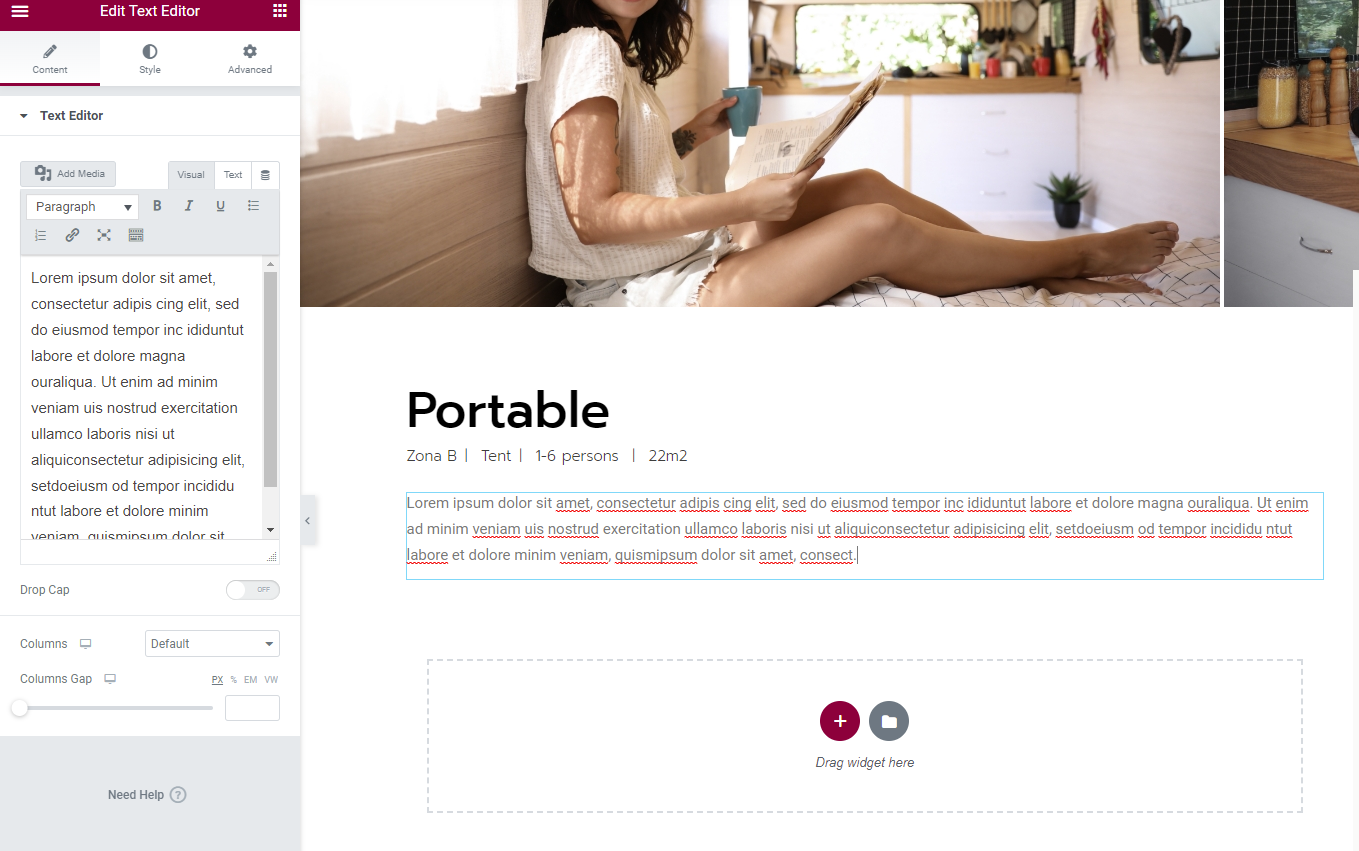
The Kamperen booking system is our own where the reservation form is integrated within the accommodation single pages, however it can be hidden with custom css. Then, you can then adjust description section using Elementor and add your contact form if you want (please see screenshot). Once you purchase any of our themes you will get 6 months free support period and you should know that you can always turn to our support team and they will gladly assist you with this.
For more detailed overview of theme’s options please check the documentation in this link.
If you have any additional questions please let us know.
Support
Edge Portfolio part of
Qode Interactive
Don’t forget to sign up for our newsletter and be the first to find out all the latest news.
Hi all. I’m going to purchase the theme and I’d like to know if it is possible to “control” the booking process. I mean, is it possible to “accept” or “deny” the booking request sending the confirmation “after” this check?
Hello,
Thank you for taking an interest in our theme!
The Kamperen booking system is our own where the reservation form is integrated within the theme and the process of purchasing goes through WooCommerce where we do use their functionality for this purpose, so this means that you can manage orders in WooCommerce settings, for more info check this article.
If you have additional questions, let us know!
Support
Edge Portfolio part of
Qode Interactive
Don’t forget to sign up for our newsletter and be the first to find out all the latest news.
Hi, can I use this theme for a airbnb kind of apartment or resort with more than one room?
Hi there,
Thank you for reaching us!
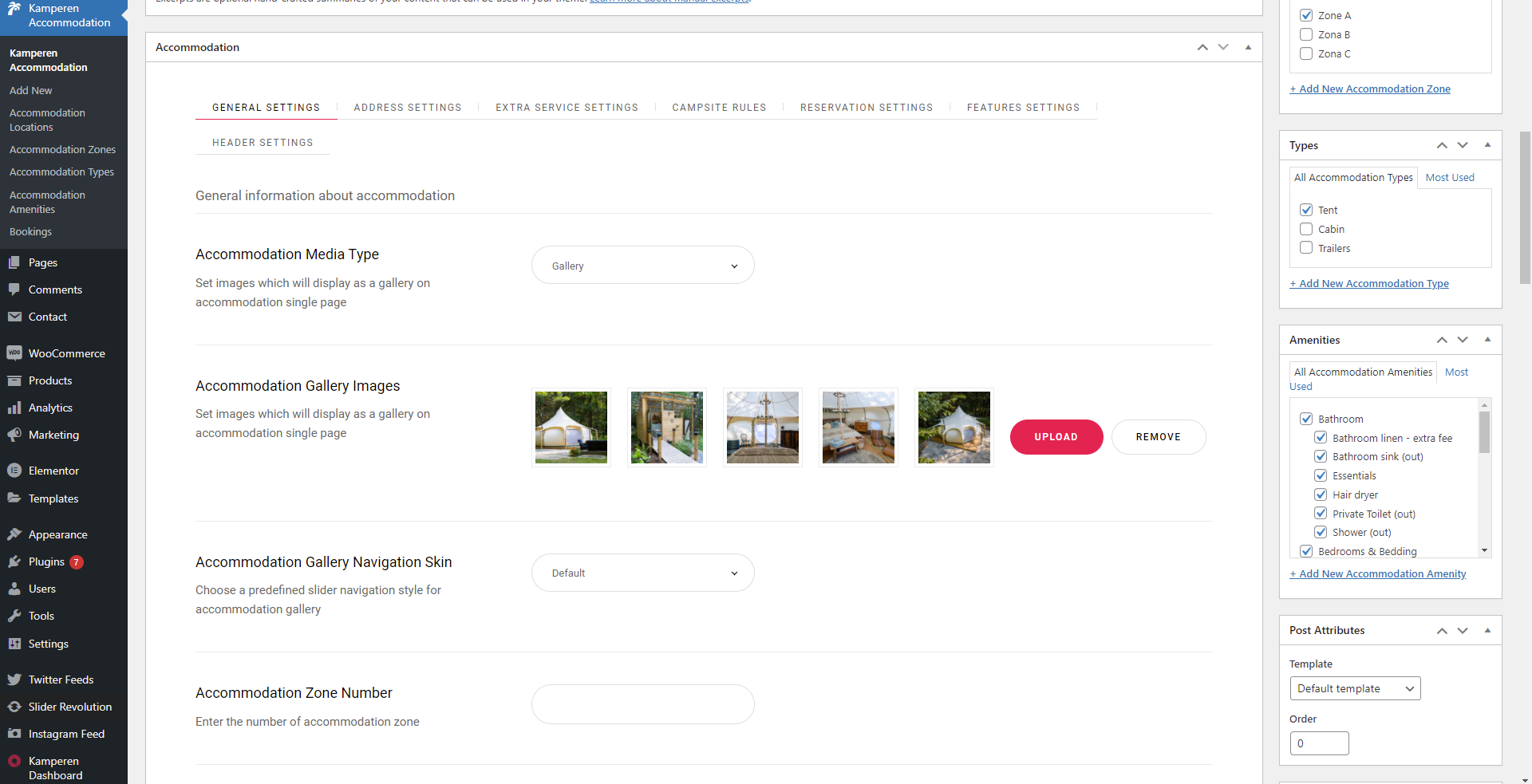
You can adjusts accommodation single pages to suit your needs. They can be adjusted through general settings as shown in screenshot and for more detailed overview of these options please check the documentation in this link. You can also edit description section using the Elementor page builder (please see screenshot).
Do let us know if you have any additional questions.
Support
Edge Portfolio part of
Qode Interactive
Don’t forget to sign up for our newsletter and be the first to find out all the latest news.
How to change currency symbol
Hello,
Thank you for reaching us!
Go to WooCommerce > Settings > change the currency in the Currency options here.
If you have any further questions, please submit a ticket to our Help Center and one of our support agents will assist you.
Support
Edge Portfolio part of
Qode Interactive
Don’t forget to sign up for our newsletter and be the first to find out all the latest news.
Hi, just a couple of pre-sales questions,
1) Is it possible the top bar in mobiles (logo plus menu icon) be sticky?
2) At the demo page https://kamperen.qodeinteractive.com there is the section activity (Wild Life, Lake, Canoeing, Hiking). On the left there is a map with 4 map pin icons, lazy loading. I guess the map would be easy to change, but is it possible the icons to differ each other? For example the first icon to be a walking icon, the second icon to be cycling icon, etc.
Thank you
Hi there,
Thank you for reaching us!
1) Mobile header can be set to have sticky behavior (please see screenshot).
2) Once you import our demo content you will get all the pages and settings which you can adjust to your needs. Map and icons can be adjusted through shortcode options as shown in screenshot.
If you have any additional questions please let us know.
Support
Edge Portfolio part of
Qode Interactive
Don’t forget to sign up for our newsletter and be the first to find out all the latest news.
Support
Edge Portfolio part of
Qode Interactive
Don’t forget to sign up for our newsletter and be the first to find out all the latest news.
Thank you
Regards
Support
Edge Portfolio part of
Qode Interactive
Don’t forget to sign up for our newsletter and be the first to find out all the latest news.