836 comments found.

WARNING: This theme DOES NOT support Facebook Messenger plugin.
If you install the chat (using the official Facebook plugin or directly into the source code) it breaks on mobile devices.
The support refused to resolve the issue (even if I pay them additionally).
Hi,
Thanks for contacting us, but with all due respect, as we have explained, your support request is out of the scope of the Item Envato Support policy – https://themeforest.net/page/item_support_policy
Thanks for understanding.
Kind regards,
BoldThemes team
Hi,
is the theme compatible with PHP 8.1 or PHP 8.0 ?
Hi,
Yes the theme should work on php 8.x without issues. Please let us know if you have any problems with it.
Kind regards,
BoldThemes team
Hello! We are having issues with the Timetable and Event Schedule plugin. We insert the schedule using the Timetable Shortcode button in the text editor, but the Timetable Shortcode form layer lies under the text editor form and does not allow you to customize the schedule. I had to configure it manually in the shortcode, which is difficult with constant editing. Is this bug for everyone or just us? Will you fix it?
Hi,
Please send us the wp-admin credentials, the site url and the url of the page with the issue. Also please provide a detailed description of the use case. We will take a closer look at the issue.
To send the requested data, please use the contact form in the bottom corner of the right hand sidebar on our profile page – https://themeforest.net/user/boldthemes
Kind regards,
BoldThemes team
Sent in the specified form, thank you!
Hi,
Thanks for contacting us.
Our demo is created with the emphasis on visual aspect, we haven’t optimized the images, used caching plugins, combined and minimized the JS and CSS.
With the caching plugin and optimized images, you can achieve significantly better scores.
Kind regards,
BoldThemes team
Hi,
Thanks for contacting us. We are using CF7 forms – https://wordpress.org/plugins/contact-form-7/ throughout the theme for appointment submissions. So, yes, you can easily modify the form structure as needed.
On the other hand, please note that there is not a fully featured appointment management system packaged with the theme. If you need one, you will need to use a third party plugin.
Out of the box, the form content is being sent to site Administrator via email or can optionally be recorded in wp-admin by using a respective CF7 addon.
Kind regards,
BoldThemes team
Hi, I want to purchase this theme and I wonder if you can provide the open-source files(PSD) for the themes.
Hi,
Thanks for contacting us.
Unfortunately, we do not have PSD files available 
Kind regards,
BoldThemes team
I will need the Cardiology theme PSD and Cardiology RTL PSD only can you provide that? it will be great if you can
Hi,
Unfortunately, we do not have the RTL PSD – that version has been made on the basis of the LTR version directly in WordPress.
We can provide the LTR Cardiology theme PSD.
Kind regards,
BoldThemes team
Hello, what has happened to medical icons? After the last wordpress update they are all gone!
Hi,
Please update the theme and the medicare plugin to the latest version.
Kind regards,
BoldThemes team
Hi how to change + icon on news image ? screenshot https://ibb.co/7jHNgxX
Hi,
You can do it by adding the respective code from desired icon font to custom CSS:
.btSingleLatestPost .btIcoHolder[data-ico-cs]:after, .btSingleLatestPost .btIcoHolder[data-ico-cs]:before {
    content: "\e900";
     font-family: btmedical;
}
Kind regards,
BoldThemes team
Hi, how to add Tiktok icon, cant find it in widget list, but I see it on fontawesome site
Hi,
It has probably been added in the newer version of Fontawsome. If that is the case, we will see to update the Fontawsome version packaged with the theme in our next theme update. Anyhow, we will let you know once our developers taka closer look.
Kind regards,
BoldThemes team
Hi, i just received email about Update available for ‘Medicare, but İ can only download it here, I don’t want to reinstall the whole theme, can I somehow update only Fonawesome icons
Hi,
There is no way to update just the fonts – but if you haven’t changed the theme source files in your customization process, there is no reason why not to update the main theme – all content and settings will remain as is.
Kind regards,
BoldThemes team
Hi! How can i add more medical icons for my website? Thanks!
Hi,
Please refer to the following article for instructions:
https://boldthemes.ticksy.com/article/8578/Kind regards,
BoldThemes team
On Archive and Post Pages the ALT text for Featured Images displays the Title where the ALT text should be.
Hi,
We have escalated the issue to our developers and we will get back to you once we get some feedback from them.
Kind regards,
BoldThemes team
Hi,
Can you send us the url to your blog archive?
Thanks in advance.
Kind regards,
BoldThemes team
Website is not yet live and on staging servers. URL should not be required as this can easily be tested on your end. Please keep me updated on an update to correct. Thanks!
Hi,
We were not able to recreate he issue locally – that is why we wanted to take a closer look at your current setup – specifically the post types you are using. Can you tell us which post types are you using – default, one featured image posts or some other specific post type.
Kind regards,
BoldThemes team
Receiving a Critical Error after updating to version 1.9.3.
An error of type E_COMPILE_ERROR was caused in line 3 of the file /[redacted]/wp-content/plugins/medicare/bt_bb_twitter.php. Error message: Cannot declare class bt_bb_twitter, because the name is already in use
Hi,
It seems that you have skipped quite a number of versions. If you are updating the theme by manually uploading files to the server, please make sure to delete all the old files and folders in medicare theme folder.
Older versions of the theme had few folders more than the newer ones – so if you are just overwriting the existing files without first removing the old ones, these folders will remain causing these kinds of issues.
Also, please make sure to update the medicare plugin as well to the same version as the current version of the theme. You should be prompted to do that once you update the theme.
Kind regards,
BoldThemes team
I “skipped quite a number of versions”? That’s an odd statement to make as I updated to 1.9.3 from 1.9.2 (and from 1.9.0 prior to that update). Anyway…
While I had removed the old ones before uploading the new ones, I may not have updated the Medicare plugin. I have since. Looks to have resolved the issue!
Cheers!
Hi, I’m having some problem with the “GDPR Cookie Consent”, I use this plugin for all my websites and it work perfectly on all of them other than the website with this theme, when I click on the buttons the banner should disappear, but it does not. Can you pleas have a look to see if the problem is theme’s related? Thank
Hi,
Can you please share the url of your site so we can take a closer look?
Kind regards,
BoldThemes team
Sure, here the link: https://polimedicalcare.it/ where the plugin doesn’t work
Hi,
Can you please try the following:
open for edit /js/misc.js and locate the function initPreloader() – it should be around line 430.
please replace the existing function code which is:
function initPreloader() {
            $('body.bodyPreloader').off('click').on( 'click', 'a', function() {
                var href = $( this ).attr( 'href' );
                    if ( href.startsWith( 'tel' ) ){
                        setTimeout( function() { window.location = href }, 750 );
                        return false;
                    }

                    if (
                            href !== undefined &&
                            ! href.startsWith( 'tel' ) &&
                            ! href.startsWith( '#' ) &&
                            ! href.startsWith( 'mailto' ) &&
                            ! href.startsWith( 'callto' ) &&
                            ! $( this ).hasClass( 'lightbox' ) &&
                            ! $( this ).hasClass( 'add_to_cart_button' ) &&
                            $( this ).attr( 'target' ) != '_blank'
                    ) {
                            $( 'body' ).removeClass( 'btRemovePreloader' );
                            $( '#btPreloader' ).removeClass( 'removePreloader' );
                            setTimeout( function() { window.location = href }, 750 );
                            return false;
                    }
            });
        }
with the following:
function initPreloader() {
            $('body.bodyPreloader').off('click').on( 'click', 'a', function() {
                var href = $( this ).attr( 'href' );
                if ( href !== undefined ) {
                    if ( href.startsWith( 'tel' ) ){
                        setTimeout( function() { window.location = href }, 750 );
                        return false;
                    }

                    if (
                            href !== undefined &&
                            ! href.startsWith( 'tel' ) &&
                            ! href.startsWith( '#' ) &&
                            ! href.startsWith( 'mailto' ) &&
                            ! href.startsWith( 'callto' ) &&
                            ! $( this ).hasClass( 'lightbox' ) &&
                            ! $( this ).hasClass( 'add_to_cart_button' ) &&
                            $( this ).attr( 'target' ) != '_blank'
                    ) {
                            $( 'body' ).removeClass( 'btRemovePreloader' );
                            $( '#btPreloader' ).removeClass( 'removePreloader' );
                            setTimeout( function() { window.location = href }, 750 );
                            return false;
                    }
                }
            });
        }
Once you do, please regenerate the cached / minimized js files in your caching plugin and see if the issue persists.
Please let us know – if the issue is resolved we will include the new code in out next theme update.
Kind regards,
BoldThemes team
Hi, I just tried to replace that function but it’s still not working unfortunatelly, I’ve also disabled the minification css and minification js feature and cleaned the cache, nothing has changed.
Thanks
Hi,
We think we have managed to pinpoint the issue.
Please edit the functions.php of the theme and locate the lines 1450-1459
$allowed_attributes = array(
            'class' => true,
            'id' => true,
            'class' => true,
            'target' => true,
            'title' => true,
            'src' => true,
            'style' => true,
            'data-ico-fa' => true,
            'data-ico-icon7stroke' => true,
            'id' => true,
            'href' => true
        );
please replace them with the following:
$allowed_attributes = array(
            'class' => true,
            'id' => true,
            'class' => true,
            'target' => true,
            'title' => true,
            'src' => true,
            'style' => true,
            'data-ico-fa' => true,
            'data-ico-icon7stroke' => true,
               'data-*' => true,
            'id' => true,
            'href' => true
        );
note the addition
'data-*' => true,
It should do the trick.
We will add this to the next theme update.
Kind regards,
BoldThemes team
Yes! Now it’s working, thanks a lot
Can i us. Local Fonts and not google fonts? And how can i use it?
Hi,
The most direct way of adding custom fonts in WordPress is by adding the fonts using CSS3 @font-face method. This method allows you to use any font that you like on your website.
The best place to upload the fonts is inside a new “fonts” folder in your theme or child theme‘s directory.
Once you have uploaded the font, you need to load the font in your theme’s stylesheet using CSS3 @font-face rule like this:
@font-face {
    font-family: Arvo;
    src: url(http://www.example.com/wp-content/themes/your-theme/fonts/Arvo-Regular.ttf);
    font-weight: normal;
}
Don’t forget to replace the font-family and URL with your own.
After that you can use that font anywhere in your theme’s stylesheet like this:
.h1 {
font-family: "Arvo", Arial, sans-serif;
}
Kind regards,
BoldThemes team
I accidentally deleted the home page after recovering, the Bold Builder does not show up anymore (see screenshot: https://drive.google.com/file/d/1N1D0RpQ-JBbr8amxJ8CUXRAkFK46duik/view?usp=sharing). But the page is still working (see url:https://mardaloopmedicalclinic.com/). The bold builder works on all other pages. What can I do?
I just noticed that the bold builder also does not show up on a few other page.
I just solved it myself. It was a browser issue. Bold editor works in Chrome now.
Hi,
Thanks for letting us know.
Kind regards,
BoldThemes team
Hello, I looked at your theme and I want to buy it, but I have several questions to ask 1- Does the theme support rtl? 2- I want to use this plugin to make video calls “https://demo.oz-plugin.ru/” Is there a problem with it? 3- I want to work in products like the idea in this link “www.amazon.com/dp/B07MG119KG/ref=twister_B08D7638C8?_encoding=UTF8&th=1” When choosing a specific type of RAM, the price changes according to its price (this is just an example). Can I do this feature?
Hi,
Thanks for contacting us.
Please find the answers below:
1. Yes, the theme supports rtl 2. You would need to use a third party plugin of your choice to implement the video call booking functionality – the theme does not offer it out of the box. 3. You would need to use a third party WooCommerce add on to implement the referenced functionality, the theme and WooCommerce does not offer it out of the box.
Kind regards,
BoldThemes team
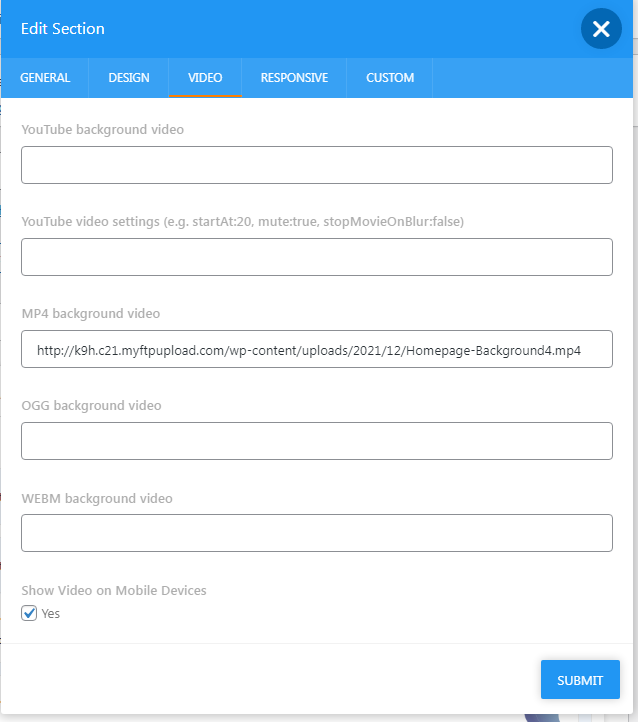
I was trying to add a background video to a section. Docs & Public tickets show a “Video” tab on the “Section Edit” modal. Mine doesn’t show a “Video” tab when editing a section. My Bold Editor Plugin shows version 4.1.7 installed.. Am I missing something? Using preloaded dataset if that makes a difference.
Hi,
Sorry for the confusion, but you can set the video using Background Tab of Edit Section modal – there you can find Background Image, Background Color and Background YouTube Video fields.
Kind regards,
BoldThemes team
My goal was to use a Mp4 playing on loop, and then having text and links over it. I was trying to keep the layout within Bold Builder.
Looking at another public ticket, someone has an image posted: https://ticksy_attachments.s3.amazonaws.com/7105693656.png —This was posted in January 2022… so it must be recent.They have a Video tab on their Section edit. I don’t. I also don’t have an MP4 background box, only a youtube box and that is on the BACKGROUND tab… What do I have to do to get the VIDEO tab on my Bold Builder?
If I use raw code it looks something like this but without the overlaying text.: <style> #video-container { top:0%; left:0%; height:100%; width:100%; overflow: hidden; position: absolute; } video { z-index:0; width: 100%; } </style>
<video autoplay loop muted=”muted”> <source id=”mp4” src=”/wp-content/uploads/2022/02/background.mp4” type=”video/mp4”> </video>Hi,
Do you have a link to the mentioned ticket? It might be related to another theme. Not all the themes have the same Tabs.
Kind regards,
BoldThemes
Here is the ticket I originally found it on but saw it on a few others.
https://boldthemes.ticksy.com//ticket/2943759/Any way to manually add it? its the one missing piece I need to preview my site to managers!
Hi,
Indeed, the ticket is related to other theme of ours, nifty.
Currently you can not add locally hosted videos as backgrounds to Medicare using BB – the easiest option is to upload it to YouTube as a private video and use YouTube Video field.
Kind regards,
BoldThemes team
Hello,
1 – our google map is not working even using a api key, do you know how can we fix that? thanks! https://tatianakerr.com.br/about-us/contact-us/
2 – On the top header we are usng the 3 social media icons as the right widget heared, but it is too small, how can we increase social media icons size?
thanks!
Hi,
As far as the map goes, if you take a look at your JavaScript developers console, you will see the following message: You must enable Billing on the Google Cloud Project at https://console.cloud.google.com/project/_/billing/enable Learn more at https://developers.google.com/maps/gmp-get-started
As far as the social media icons are concerned, you can use the following custom CSS:
.topTools .btIconWidget .btIcoHolder:before, .topTools .btIconWidget .btIcoHolder:after, .menuPort .btIconWidget .btIcoHolder:before, .menuPort .btIconWidget .btIcoHolder:after, .fooWidgets .btIconWidget .btIcoHolder:before, .fooWidgets .btIconWidget .btIcoHolder:after {
    font-size: 32px !important;
}

.topTools .btIcoHolder:before, .topTools .btIcoHolder:after {
    top: 10px !important;
}

.topTools .btIconWidget em, .menuPort .btIconWidget em, .fooWidgets .btIconWidget em {
    width: 43px !important;
    height: 45px !important;
}
Please adjust the respective numbers accordingly.
Should you need additional assistance in the process, please extend the support period and use our support site – https://boldthemes.ticksy.com/
Kind regards,
BoldThems team
Hi support, there are few things. Please respons ASAP 1- Mistakenly the website layout is set to boxed layout. Can you guide how to get full width/screen layout, where in settngs?
2- I need to put phone number, address and email id in the header section right corner of the menu. What code can be applied for that.
3- Also need to add social channel lniks in the header part. Please reply ASAP as it is needed on an urgent basis.
Thanks Priyanka
Hi,
In relation to the template layout, can you please send us the site url so we can take a closer look.
Related to the icons, please add the respective BT Icon widgets in the desired header widget areas on Appearance > Widgets
Kind regards,
BoldThemes team
There is only 2 dashboad 1 customer and 2 super admin
Hi,
We are really sorry, but we do not understand what seems to be the issue. Can you please provide a little bit more details?
Thanks in advance.
Kind regards,
BoldThemes team