12901 comments found.

Hello is there support for RTL online shop ? Is there a pre-installation?
Hello,
Thank you for being interested in our theme. Yes, WoodMart is fully compatible with RTL. You can see our demo here https://woodmart.xtemos.com/home-rtl/?rtl
Kind Regards
Input field for two-factor authentication code not showing when login from ‘my-account’ page. It’s showing “CODE REQUIRED: Please provide your 2FA code when prompted.” but nothing appeared. The login form which appears when hovering on account icon on header, input field for 2FA showing but doesn’t work and redirect to my account page and shows the message above. I am using Wordfence security plugin for two-factor authentication. It works well with WordPress login page. Also working with other themes.
Hello,
Could you please disable all plugins that are not related to our theme and provide us your admin access so we can check it? Use the contact form here https://themeforest.net/user/xtemos
Thank you in advance
I disabled and deleted other plugin. Also checked setting on wordfence. Still same… Please check your contact form/email. There is admin access details on it. Thank you….
We tested this option with a default theme on the my account page and it doesn’t work well also. Could you please check it from your side?
I just tried with Astra, Hello Elementor, and Twenty Twenty-Two. All of them are working perfectly. Astra is currently active so please try again now, it’s working. The website you testing is a staging test site. Please feel free to make any changes as you have an admin account. I added a page name chat on that site. We can discourse there.
Yes, we see the problem. We will fix this issue in our next theme update.
Thanks a lot… Waiting for the update. Hope will get soon
Hello! Product filters by attributes began to work incorrectly in the catalog. They are transmitting the wrong amount of goods. Some products do not display at all, although there are such products. What is the reason?
Hi,
Please, create a topic on our support forum and provide us all the necessary details about the request with some screenshots and including your admin access so we can help you https://xtemos.com/forums/forum/woodmart-premium-template/ If your support is already expired then you need to extend it on ThemeForest first.
Regards
Hi, on one of your most recent major updates you added a new feature called (layouts) to give the ability to completely customise the Single product, Products archive, Cart and Checkout. This is in no doubt an amazing feature and very useful.
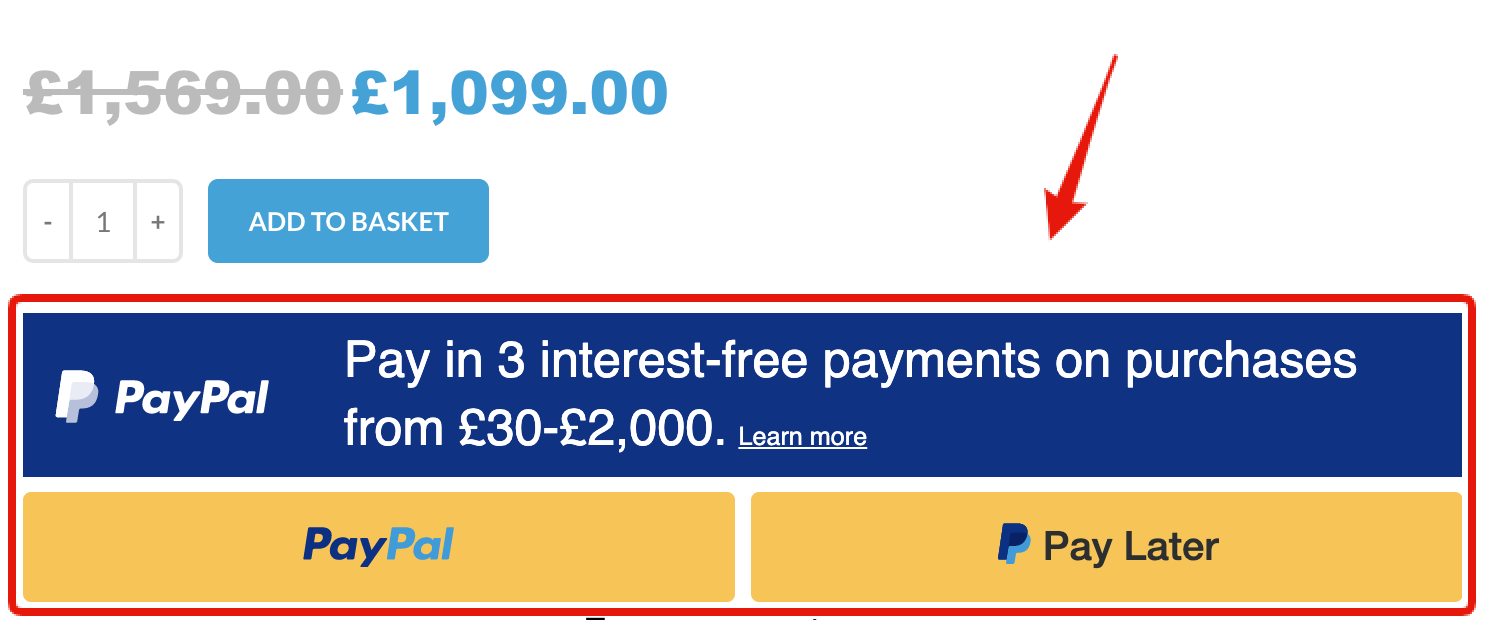
However, I’m having an issue regarding creating a layout for a product, and the issue is as follows. I am using PayPal to retrieve payments which shows up on the bottom of all standard products as seen here https://i.gyazo.com/cba5e1c58d4760e9f621b25c5039d0dd.png but this is not displaying after creating a product using the new layout facility. Some help on this would be most grateful.
Kind regards.
Hello,
It looks like this plugin uses some WooCommerce hook to add its information there. You can use our special element for this called “Hook”. Then you will need to find which hook name the plugin use or contact developers for help.
Kind Regards
Thank you as always for your swift reply and advice on this…
If I may ask one more thing…
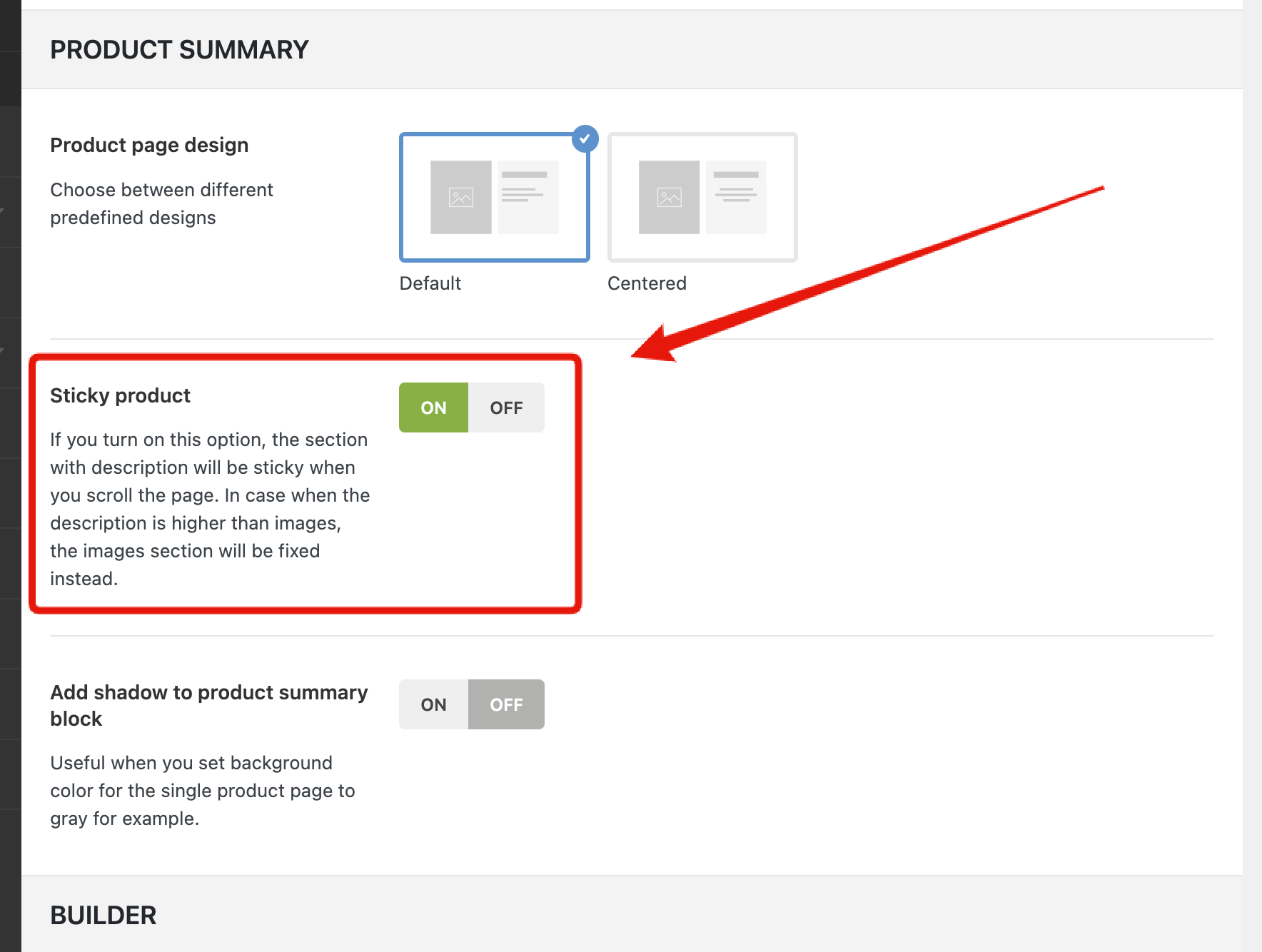
In the theme settings there is an option to make the product image sticky which works accordingly to standard products as seen here https://i.gyazo.com/d7734c53df81c9178a83c94b81ea3cef.png
Is there an option to achieve this when designing a custom product in the custom layout section?
Kind regards.
Yes, you can enable the sticky column option for either right or left column of your layout with WPBakery or Elementor.
Kind Regards
Thank you for your help on this.
It’s most appreciated….
You are always welcome!
Hello,
Please tell me what is the solution to this problem:
https://xtemos.com/forums/topic/slow-category-and-page-load/ https://drive.google.com/file/d/1BdvXnaLLQ6v3WlJLf5zGZxuMvcJR17f6/vieweach page loads for 1 minute and I use wp rocket and relatively powerful hosting.
Hello,
Could you please check how it works with some default WordPress themes like TwentyTwenty or WooCommerce Storefront to understand is it our theme issue or not?
Regards
Hello. The problem is related to Woodmart. With Storefront each category opens as a new page and in woodmart it is like filtering from the layered navigation and it happens very slowly.
Hello,
Could you please disable all plugins that are not related to our theme and provide us your admin access so we can check it?
Thank you in advance
Hello, I have had a small problem:
When creating a new product with the “store manager” user, I got a warning that the content had not been found, specifically: Sorry, the content area was not found on your page. You must call the ‘the_content’ function in the current template
Do you know what could be due? Then I have tried to create a new product with my user and I have not had this problem, but with the product that I created with the Store Manager it gave that error, both with that user and with the administrator.
Hello,
Could you please check how it works with some default WordPress themes like TwentyTwenty or WooCommerce Storefront to understand is it our theme issue or not?
Regards
I’ve tried activating the default Wordpress template, and then when I try to edit that product with Elementor I get the warning to do it in safe mode, and so the editor appears, but if I don’t enable it I can’t edit it either.
Do you want a user with administrator permissions to be able to check the error?
It means that the problem appears with the default theme as well. Probably, there is some plugin conflict or problem with the Elementor. But is not related to our theme.
Ok, so I try to open an Elementor support ticket.
Hello, I have already managed to find the error.
When I create a product that is linked to a layout I get that warning, however if I link that product to that layout with the Goala user (which is the one with which I created that layout) there is no error.
An example, I have put a product tag to a layout, when I remove that tag there is no editing problem, but when the tag is selected the error persists.
We are glad that you sorted it out! Feel free to contact us if you have any further questions.
I have not managed to solve it, I have managed to find out where the error comes from. Now I need your help to fix it.
The error comes from the layouts.
Sorry for misunderstanding. In this case, could you please describe to us your problems in a bit more detail? Attach some screenshots and provide us with a list of steps on how to reproduce them on your website. Use the contact form here https://themeforest.net/user/xtemos
Do you have an email to send the ticket? Since through my account the support expired.
I have another website that also has a layout assigned to it by product and the error is exactly the same, when I try to edit a product that has a tag and that tag is in the layout condition it gives the error.
When I remove that label so that it takes the default product template, it allows editing without any problem, but if it is a product with an associated layout, it gives an error.
You can use the contact form on this page to send all the related information about the issue so we can check https://themeforest.net/user/xtemos
Hello i don’t have a support license anymore, but i want to say there is a bug in the theme or at least i think it is a bug. when i place a simple product to the shopping bag the widget shopping cart at the right is not appearing, normally it does. It only still appears when i place a variable product to the shopping bag.
Oh i needed to activate ajax for add to cart buttons. So problem is solved.
Hello,
Yes, we are glad that you sorted it out. Feel free to contact us if you have any further questions.
Kind Regards
Hi, you don’t have bought together product options ?
Hello,
Could you please send us a screenshot of this option so we can better understand what you mean?
Kind Regards
Is there any function/action to add content after the body tag from the functions.php in the child theme?
Thanks!
Hello,
You can use this plugin to add your custom content https://wordpress.org/plugins/insert-headers-and-footers/
Kind Regards
That’s not what I meant, already found a solution though, I’ll leave it here in case someone else is looking for the same.
function custom_content_after_body_open_tag() { ?> My Custom Content <?php
}
add_action(‘wp_body_open’, ‘custom_content_after_body_open_tag’);
We are glad that you sorted it out. Feel free to contact us if you have any further questions.
Kind Regards
After some updates i checked the english page on the shopping page it don’t shows anymore the WOODMART WooCommerce Layered Nav not anymore. On the parent version (german) it woks wenn i check the english shop page it don’t show anything to filter. I checked twice if all “colors” are translated etc. If i check widget it set to “all languages” before it works. I also install all from patcher – cause I saw there a patch for polylang. Im using here WPML
Hello,
We are glad that you sorted it out. Feel free to contact us if you have any further questions.
Kind Regards
Disculpen se puede cambiar el orden de las pestañas mi web es https://floreriapetalosyhojas.appdata.today/producto/hat-box-9-rosas/ y me gustaria que que la pestañan de delivey vaya primero y la de valoraciones vaya después hay forma de cambiar el orden?
Hi,
Please, create a topic on our support forum and provide us all the necessary details about the request with some screenshots and including your admin access so we can help you https://xtemos.com/forums/forum/woodmart-premium-template/ If your support is already expired then you need to extend it on ThemeForest first.
Regards
Hello,
Is there any already available option on the theme for Shop or Product Archives same as available for Portfolio Archive pages, “Portfolio order by” option such as ID, SKU, Title, etc. ?
I am trying to make Shop pages showing the products in the order by their SKUs.
Thank you,
Hello,
Products order can be set in WooCommerce settings. Find it in Appearance -> Customize -> WooCommerce -> Products catalog.
Kind Regards
When using your “Information box carousel” module we are showing 5 slides but when responsive it is still trying to show 5 and breaking. How can we change owl carousel number of visible slides when responsive? demo https://staging.clickintelligence.co.uk/app/?nowprocket
Hello,
We checked this website and see that the infobox carousel shows 2 items per slide on mobile devices as developed. Currently, it doesn’t have options to set a custom number of items on mobile devices.
Kind Regards
FYI All the boxes were overlapping, I had to use custom CSS to fix the issue
body .info-box-wrapper.inline-element { width: 100%; }
We are glad that you sorted it out. Feel free to contact us if you have any further questions.
Hi there,
Where, in the setting, change the size of text of the items for the Main menu?
Hi,
Please, create a topic on our support forum and provide us all the necessary details about the request with some screenshots and including your admin access so we can help you https://xtemos.com/forums/forum/woodmart-premium-template/
Regards
Excellent Theme!!! Better every time I use it.
1- How do i remove the posts “white Date Stamp”??? Id rather not have the white date box on any of my post images
2- How do I add a main slider or image on the home editorials page?
Much Appreciated Andrew
Hi,
Thank you for your comment!
Please, create a topic on our support forum and provide us all the necessary details about the request with some screenshots and including your admin access so we can help you https://xtemos.com/forums/forum/woodmart-premium-template/ If your support is already expired then you need to extend it on ThemeForest first.
Regards
Hello, How to fix this issue in integration with Facebook
Get Instagram account id :(#100) Object does not exist, cannot be loaded due to missing permission or reviewable feature, or does not support this operation. This endpoint requires the 'pages_read_engagement' permission or the 'Page Public Content Access' feature or the 'Page Public Metadata Access' feature. Refer to https://developers.facebook.com/docs/apps/review/login-permissions#manage-pages, https://developers.facebook.com/docs/apps/review/feature#reference-PAGES_ACCESS and https://developers.facebook.com/docs/apps/review/feature#page-public-metadata-access for details.
Hello,
This error appears when there is something wrong with your APP configuration. Please, follow our instructions step by step https://xtemos.com/docs-topic/how-to-setup-instagram-api/ If it doesn’t help, we need your Facebook and Instagram access to check your configuration.
Kind Regards
I have tried to import the dummy content for the Electronic store. But the below-mentioned issue is coming.
AJAX import error. Try to disable all external plugins and run the import again.
https://xtemos.com/forums/topic/ajax-import-error-try-to-disable-all-external-plugins-and-run-the-import-again-13/Hi,
Please, create a topic on our support forum and provide us all the necessary details about the request with some screenshots and including your admin access so we can help you https://xtemos.com/forums/forum/woodmart-premium-template/ If your support is already expired then you need to extend it on ThemeForest first.
Regards
Last update broke the search function on mobile devices (Android & IOS) – clicking the search field results in the text box appearing for a fraction of a second before quickly dissapearing and the menu closing. A temp fix exists in disabling ‘Combine JS Files’ in theme options > Performance > JS. My support on this theme has expired so I can’t let you know via the support website.
Please update here once the issue has been resolved.
Hello,
Could you please disable all plugins that are not related to our theme and provide us your admin access so we can check it? Use the contact form here https://themeforest.net/user/xtemos
Thank you in advance
Hello, for product variations in front end (for example color): selecting is not possible or if selected and you click on add to cart it always shows popup: please select variation.
What can this be? We have already unactivated various plugins for trouble shooting. No success so far 
Thanks for your help. Ben
Hi,
Please, create a topic on our support forum and provide us all the necessary details about the request with some screenshots and including your admin access so we can help you https://xtemos.com/forums/forum/woodmart-premium-template/
Regards
Hi! I need my menu to be white on transparent header and black when scrolling down and header becomes white. The same with other texts in menu. How can I do it?
Hello,
Unfortunately, there is no option to change the color scheme for the sticky header in our theme.
Kind Regards