12832 comments found.

Hello Team, Mylsiting is an amazing theme, i love it. congrats! Also i have a question: There is some way to insert my work team in every listing (people that work in a restaurant, for instance? something like this https://www.squarespace.com/about/team/
thanks
Hi,
We have a repeater field which you can use for this purpose.
In frontend it would look like this: https://imgur.com/hcR660Q
I can’t get google social login to work! any help? thank you
Hi,
What issues are you having with it? Is there an error showing?
No error shows it just when you click to login it pops open the google then it logins in to google however it just stays on the same page for the login or register and no user is created.
I have replied in your email
Update: Thank you so much for resolving the issue with the google social login. I have tested the function and it’s now working great. Thank you for your help! Note: They help me get this issue resolved fast!
Can I refund this themes? I can’t install the themes because of this problem.
The package could not be installed. The theme is missing the style.css stylesheet.
Hi,
Read here: https://help.market.envato.com/hc/en-us/articles/202821510
hi! You mentioned that a new theme, more flexible and functional, will appear at the end of June. Please tell me when it will be available?
Hi
Join here for updates regarding that https://www.facebook.com/groups/4190348667668957Hello team,
Is it possible to send the contact form on a listing to 2 emails? - the owner of the listing - our main admin email
Hi,
Yes that’s possible. When you configure the contact form under contact > contact form in the “To” field add the admin email. Now it will be sent both to the email of the listing and admin email.
Which email is used in the “contact listing owner” form, field “To:”?
- The registered email of the user account, or - email, placed in the “contact email” field in the add listing form?
Ok, discard my question, I found. But recipient (listing owner) can see website admin emal in the message “To “field. How to place [_site_admin_email] to Bcc field? Or just remove it?
Hi,
Leave the “To” field empty if you want the email to be sent to the listing email only. If you want to add it as bcc you can do it in the “Additional header” section: https://contactform7.com/adding-cc-bcc-and-other-mail-headers/
Use our helpdesk for any other questions you have.
Cheers! All done!
Job Listing, College Listing and Profile Listing like Wikipedia – Can it be done in theme.
Job Listing, College Listing and Profile Listing like Wikipedia – Can it be done in theme.
[Pre-sale inquiry]
1. In my city, there are well-known and quite popular places, such as discos, event centers, nightclubs, etc., that offer concerts of singers every weekend and sometimes during the week. And I will add these places to the PLACES.
2. Is it possible to search for “PLACES” in your theme? For example… that users search for singers to give a concert on X date at VENUE X.
3. Apparently, https://main.mylistingtheme.com/listing/liman-restaurant/#events is similar to what I mentioned in the above points…. According to the page shown above? In that “EVENTS” part you can link to the concerts that the singers will be performing on future dates? Because it would be perfect for the users to know if in that venue there will be concerts of singers in the future.
Can I see a product demonstration? Do you offer login access? I would like to test how events and other internal features can be added.
Hi,
You can have a listing type for events and wehn you add a new event you can select the place to which that event is related. After that it will automatically show in the place listing like in the example above.
We have a feature called related listings to achieve this: https://docs.mylistingtheme.com/article/how-do-related-listings-work/
My listing theme is best from all the listing themes but if you guys add built in booking with live payment system without taking help from any third party systems then nobody can beat mylisting guarantee. If you guys try to add booking system with live payments then it would be good for many mylisting users.
For the lack of this system I couldn’t suggest this theme to many of my clients but I really like mylisting functions.
Hi,
Thank you for your feedback
Can this be used as a pure Events website with different event organisers and is it also possible to add a button on the main even page instead of the store tab?
are we able to book or do we need to do this with an add-on?
Hi,
You need to use booking plugins.
ok, I got a booking plugin that I need 1. so what can we suggest to me ! very important I will buy this app! I would really appreciate it if there is something you can suggest! also I would like to add a home car and caravan! am I going to add these categories from your application or via the plugin?
if you suggest I’ll take the booking! yes, only I will get a committee from the users! 190% sample I need something like this! home car and caravan, they will do the booking and I will get a 10% commission please help thanks
Hi,
For booking alone you can use WC Bookings plugin, if you want to allow users to create their own booking products then you need a vendor plugin as well e.g. Product vendors (that will allow you to take commission as well).
the arrow is the last. i understand perfectly well ! to briefly explain, first I buy your application, then I get the wc bookings plugin, and finally I buy another plugin for users to add their own real estate and other things! then do you have a suggestion for this? The name of the dire who works with you is enough! wc booking ok
to me. sizinn. I haven’t been able to find if you can post links to these two plugins other than your application!
respectively, from the very beginning. 1- i will buy your application. i’ll take 2- wc booking i will get an add-on like 3- vendor actually just like I said, home, car and trailer I want to add the category in the first place then, users will hire , then real estate, car or caravan owners will be able to add themselves to their own things on them and finally 10% commission on all I get is the system !
Hi,
The plugins I mentioned are these two: https://woocommerce.com/products/woocommerce-subscriptions/ https://woocommerce.com/products/product-vendors/These plugins are only used to create booking forms. Users can create listings like you can see in our demo without using any plugins.
Help to solve this problem, I already restarted my system, uninstalled and still the same, please already solve a problem of the only 4 that I have asked you
https://www.youtube.com/watch?v=hYNGBjZMJFkHi,
Click here https://themeforest.net/user/p_27collective and send me an email with your website and login details.
List already sent the accesses check it, greetings
I have replied in your email
Ready and answer the email with the requested
I sent new accesses to the mail, review them and take into account the language so you can enter, Cheers.
Hi, how do I change the color of hyperlinks in my blog post? Currently the hyperlink and non-hyperlinked text look similar and it is hard for users to tell that a link is present in the article.
Hi,
Try this css
.blogpost-section .section-body a {
    color: #f24286;
}
For other questions use our helpdesk
This code does work. Can you also add make the link change color when a user hover over it? Also, I tried using support but it says I have to make an account. Do you guys have a support email?
Hi,
Use this css
.blogpost-section .section-body a:hover {
    color: #f24286;
}
You have to register there using your license key. That’s the only place where we provide support. This section is mainly for pre purchase questions.
Tengo 3 detalles
1.-En el header como cambio la dirección a la que me envía el “Sign in or Register” ya que me envía automáticamente a “www.dominio.com/?page_id=145?register”
2.-Al crear una lista y publicarla tarda hasta 1 hora en aparecer en la pagina principal, como cambio ese tiempo?
3.-Al crear un nuevo Package no me aparece en la lista, En que area los creo o como los activo?
Hi,
Please ask you question in English.
I have 3 details 1.-In the header, how do I change the address to which the “Sign in or Register” sends me, since it automatically sends me to “www.dominio.com/?page_id=145?register” 2.-When creating a list and publishing it, it takes up to 1 hour to appear on the main page, how do I change that time? 3.-When creating a new package it does not appear in the list, in what area do I create them or as the active ones?
Hi,
1. You probably deleted the woocommerce my account page which is required. Go to woocommerce > status > tools > created default woocommerce pages. After that go to settings > permalinks > click Save changes
2. Edit with elementor > click over the listing feed widget in your homepage > Cache results for (in minutes) > change this to a lower number or set it to zero to disable cache completely.
3. Listing types > edit listing type > general > packages
Even though you advertise your theme as Elementor-based, it is actually not! Not even compatible. Could not update my website since a few days after updating Elementor and Elementor Pro and website stopped working, and contacted Elementor Pro team and found out that the problem is with the theme! This is our response, please update your theme, if your team wants more information, they can contact me,
“Hello there,
Thank you for contacting us, my name is Uros, Tier 2 Customer Experience Engineer.
I have inspected your site. I was able to reproduce the same issue you described in your previous message.
After inspecting the issue you are experiencing, I found this is happening due to code conflict with our newest Elementor Core version and Third-party theme My Listing Child.
Kindly review the following video where I have presented how Elementor works when My Listing Child theme is activated and deactivated: link removed
Note that I have left the theme My Listing Child active, you can change it by going to WordPress>Appearance>Themes as shown here: link removed.
First I want to apologize for this experience with our latest release.
Alternatively, you can roll back your Elementor (Core) version from 3.6 to a previous one, which is still compatible with these themes, such as 3.5.6. You can download a stable version from this link.
You can also reach out to your third-party theme support to notify them of the importance of the issue.
If you have any questions, don’t hesitate to contact me again, I will be more than glad to assist you.
I wish you all the best, and have a great day!
Kindest regards,
Hi,
The theme is compatible with the latest version of Elementor. Which version of MyListing are you using? Also in the message above from elementor support it says the issue is with MyListing child-theme so the issue might be caused by customizations you’ve done using the child-theme.
I am using Version: 2.6.6 – I checked and my wordpress doesnt show any updates available.
For child theme, I didnt do any customization, only a demo import, so I dont think problem should be related to child theme.
That version of the theme was release more than ne year ago so obviously it can’t be compatible with plugins that you have updated to the latest version. You can download the latest version of the theme if you go to themeforest.net/downloads/
I tested on a dummy website, with latest My listing, elementor pro and same result, if you wish I can give access to your team or send email to investigate the issue
You can send me an email from here: https://themeforest.net/user/p_27collective
How to remove expiration date from existing listing? At the time of posting all listing have been with the expiration feature active. Then I set it to “unlimited”. However, the listings which set with exp. date before this settings change, can’t be modified even via admin! When I remove date and apply, exp.date is back again. PLEASE, HELP!!!
Hi,
Open a ticket in our helpdesk. We will give you a snippet to remove the expiration date.
Are you still working on the reservation plugin or do you have an update in mind to integrate reservations, payments and availability in the same theme?
Hi,
No we’re not working on a booking plugin for MyListing.
Well it’s unfortunate, it’s an excellent theme that would be much better if it had its own reservation system, internal payment gateway and not depend on other plugins.
It is twice as much work for us to create products, create reservations, modify reservations, slots, modify products, create calendars one by one than to have a whole comprehensive system like Listeo.
Without a doubt, I give a 10 rating to the theme, we have worked excellently with it, but it limits us a lot to expose and sell it, since we are not the only ones that happens to them.
It would be very good if you consider it would be the No.1 theme in Themeforest <3
Also i left an open support ticket… Thank You!
Hi
MyListing is not aimed at that purpose. We have another theme in the works which will include bookings https://www.facebook.com/groups/4190348667668957Hello, is there an android app ? is it planed ?
Hi,
No we don’t have an app and don’t have plans to create one. You can search on codecanyon for apps that work with MyListing.
Hi,
Im having 2 issues with uploading my listings from a csv file to Wp-All-Import.
1. The images don’t load when importing. I tried an image from online and locally and no luck.
2. The weekly opening hours for “closed” not importing properly. Instead of Closed its showing “N/A”
See sample here: https://imgur.com/a/rHPapHP https://imgur.com/a/nEbxqrqDo you have a csv file I can go by to see how I need to upload set the csv file for proper upload?
Thanks
Hi,
Open a ticket in our helpdesk
Done.
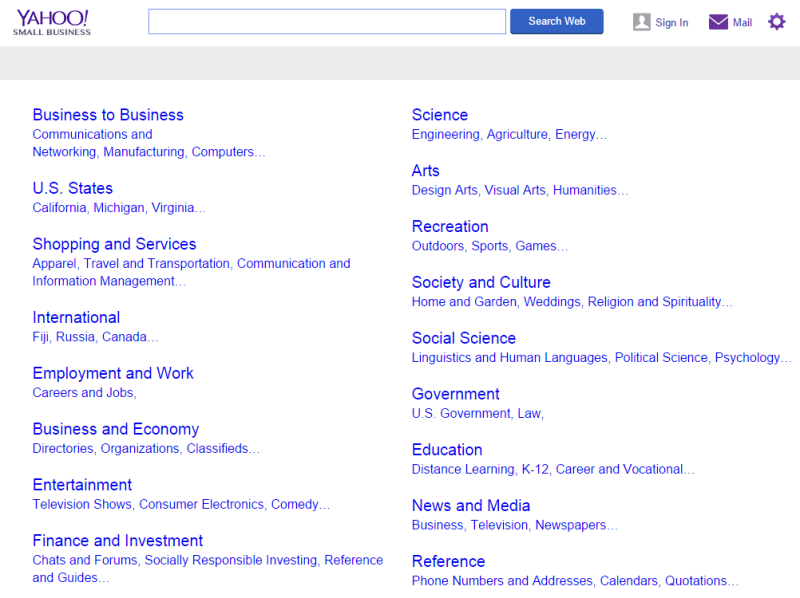
I’d like the have a hierarchical directory that can have the entire hierarchy displayed on one page. For example: 20 categories, each one with 5-9 sub-categories, and each sub-category with 5-9 “sub-sub categories”. To display the entire directory hierarchy on one page, I imagine it would be text-only. Is there any way to do that? I’ve played around with it, and can’t seem to get it to work. (If you are old enough, you might remember Yahoo! directory was something like this but it was 2 levels) https://searchengineland.com/wp-content/seloads/2014/12/yahoo-small-business-800x598.png
Hi,
We don’t have a widget for that unfortunately. You can try finding plugins that allow this e.g. https://wordpress.org/plugins/taxonomy-list/

This item was featured on ThemeForest

Power Elite Author
Contact the Envato Market Help Team