598 comments found.

Hello, I would like to know if the theme is compatible with the Product Video for WooCommerce plugin
https://woocommerce.com/it-it/products/product-video-for-woocommerce/Hello, are you active this plugins and check it?
not yet, it is a paid plugin, before buying I wanted to make sure it is compatible.
I’m do not confirm that it’s perfectly working or not because I’m do not test this plugins. If should be work you need to hire our team members. To support this.
Ok, in case you have something available among your plugins for managing multiple videos in the product gallery?
no only one video
if you need multiple customize our theme?
Hi,
THANK YOU for your great theme Kable!
It came bundled with WP Bakery – which apparently has stopped updating and creates a security threat.
Question 1: Do we have a license to get their support? Question 2: If we don’t use WP Bakery, can we remove the plugin or will certain functions stop on the site?
can you inform me currently which version WP Bakery installed your admin panel
THANK YOU for responding:
- currently installed is V 6.0.5
- without activation of my copy of WPBakery Page Builder there is no updates
- There was a security concern in V 6.4.1
What are my options? Can I remove the app or activate it?
THANK YOU SO MUCH.
Peter
its very old version. its possible to send me login details. i can update the plugins
GREAT, thanks!
URL = https://mycestsibon.com login = provence pw = Provence2019*
i am update the core plugins you can check
THANK YOU SO MUCH for doing that! Best regards,
Peter
This theme is not addressing my client’s expectation. How can I get refund?
Hello, before purchase you see the demo file then you made a purchase. its digital product. client expectation or mind change you cannot get a refund. if you face any problem issue inform me I will happy to help you. thank you
Hello
I need to prepare descriptions for the cookies used on the site to comply with the GDPR. Could you please tell me the purposes for the following cookies?
kable_products_grid_per_page
kable_products_list_per_page
kable_products_mode_view
kable_wishlist
piko_wishlist_created
piko_wishlist_hash
Regards
hello, this nothing nothing need any permission. its just store cookie for layout grid and list. and other hand wihlist you can see the plugins https://wordpress.org/plugins/yith-woocommerce-wishlist/
we just modified some layout wishlist plugins
We need to prepare legal documentation for the GDPR, could you give me some indication on what each of these cookies is for?
hello, this nothing nothing need any permission. its just store cookie for grid and list layout shop page.
Ok, thank you!
hi Team, Something is wrong with your Food Directory demo.
Notice: Trying to access array offset on value of type bool in /home/themepiko/domains/demo.themepiko.com/public_html/kable/food/wp-content/plugins/dokan-pro/modules/stripe/classes/class-dokan-stripe-subscription.php on line 69
Notice: Trying to access array offset on value of type bool in /home/themepiko/domains/demo.themepiko.com/public_html/kable/food/wp-content/plugins/dokan-pro/modules/subscription/includes/classes/class-dps-paypal-standard-subscriptions.php on line 578
and goes more…
hello, i see its dokan plguin issue
Hello, i find a bug: when i move the mouse on the variable product image, the image is the wrong one.
As example: https://francescalucignano.it/negozio/vestiti-etnici/vestito-cotone-organico/Hello, is there any news?
Hello, i see you are using third party plugins! some plugin may issue the variable product. i think need to compatible this plugin our theme.
Hello, thank for your reply. We heard the support of the component and they provided us with a code to reinitialize the image slider once the variation was chosen via the plugin. As a guideline we have provided this code, but it should be implemented correctly in the custom gallery of your theme.
jQuery(document).on( ‘yith_wccl_product_gallery_loaded’, function(){
} );
may this plugins different structure for the reason its do not working
This possible solution was suggested by the assistance, but it must be inserted in the customized product section of your theme. Can you give us directions on how to use it?
may i think you need paid task custom works. if you want custom task our developer this custom task help you
Hello
If you can tell us where to implement that code we can do it for you. In case how much would this modification cost?
We need to implement a function for the colors and labels variations in your theme. Not possible without a code change?
may i think need to change the single page template. this plugins compatible with the theme you need to 60usd
Hello, I’m sorry, I didn’t understand. Isn’t there a compatible component that does what I need? Is the cost of 60 dollars to make the Yith component compatible? In case where should I write to confirm?
currently we maintenance our server you can contact forhad.ferouz@gmail.com
Hello, I wrote to the address indicated, I await an answer.
are you want to take paid service?
No, but as I understand it there is no other solution
you can use default theme and plugin setting
we need to implement visual size and product labels on your theme. To do this we chose the component of Yith, which apparently is incompatible. If the only solution is a code customization let us know. We have sent an email to the address indicated without receiving a reply.
Or can you tell us a component that works the same way but compatible with the theme?
our theme have a variable product gallery plugins include. you can search download folter >main> plguins-> folder
Thank you, we disable the Yith component and install Piko Variation Swatches Plugin (we have already woocommerce active and attributes with different elements in it), but under Setting > Variation Swatches, the Variation Images when select field is empty, did we forget something?
We have activated the component on this product sheet and set the preview images of the attributes. However we are experiencing the same problem: even changing the selected attribute, on mouseover, it always shows the first image of the gallery
https://francescalucignano.it/negozio/bigiotteria/bracciali/cavigliera-maddalena/when i select color image image is changing
When you move the mouse over the image, you see the first image of the gallery, not the current image.
We have rewritten the address indicated and your assistance via your portal, please provide us with support.
Sorry, but what are you talking about?!? That’s not even the page we activated your component on! https://francescalucignano.it/negozio/bigiotteria/bracciali/cavigliera-maddalena/
I’m checking your product link that you send last time .
Checkout this link how to configure variables product https://youtu.be/-wd6hmUc7yw
We had already follow the video instruction, you miss those message:
“Thank you, we disable the Yith component and install Piko Variation Swatches Plugin (we have already woocommerce active and attributes with different elements in it), but under Setting > Variation Swatches, the Variation Images when select field is empty, did we forget something?”
and
“We have activated the component on this product sheet and set the preview images of the attributes. However we are experiencing the same problem: even changing the selected attribute, on mouseover, it always shows the first image of the gallery
https://francescalucignano.it/negozio/bigiotteria/bracciali/cavigliera-maddalena/can you send me login details thought my profile message box i can check it
can you send me login details thought my profile message box i can check it
Thank you, we have prepared the account and I sent you the credentials via the Themeforest profile email panel
Hello, we have sent you the credentials to access the site. could you let us know what problems you encountered and possible solutions?
Thank you for your answer. In the answer I sent there is a pdf with screenshots that explain in more detail the problem I had with the product gallery.
Hello,
I sent my questions twice on your website and here on this site in the last week, but unfortunetaly I got no response. That’s why I ask my questions here now.
I am interested in buying the Kable theme because I like it very much. But I need to ask 5 important questions to make sure if this is the right theme for my project: a price comparison website with much blogging.
1. Can I use the Kable theme with Content Egg plugin? And Affiliate Egg plugin?
2. I saw the products in Kable theme have a comparison button which I need. But I noticed if you click to compare a few products no popup appears that leads customers to a comparison page. Customers are not aware they have to to look for a comparison page themselves unless a popup message appears that leads them to this comparison page. Is there a solution for this problem?
3. For affiliate marketing the blog page is one of the most important pages. Unfortunately I see only 1 single post layout. I would like that page to be slightly different: a bigger image, more like a banner and the post text wider spread over the page. Are there more layouts possible for the single post blog? How can I solve this?
4. Can you use shortcodes in Kable theme? I would like to use shortcodes from Content Egg, but also from other plugins.
5. Is the Kable theme compatible with Elementor (Pro)? Can I use Elementor?
Thanks for your answers. Regards,
3. Compare do not come popup it’s page. If you need popoup then you need to delete one file that is store woocommerce folder
4. It’s compatible Gutenberg you can easily manage its large content
4. You need to use wpbakery then all shortcode you can use
Yes it’s support elementor and pro also
Thank
Hello,
Thanks for your reply. But I didn’t understand what you were explaining about the popup. Also not all questions are answered.
1. Can I use Content Egg plugin and Affiliate Egg plugins? Is Kable compatible with both plugins?
2. Are there more single blog post layouts? Now there is only 1. I would like a top banner as an image and I want the text wider than it is now. How can I do that?
3. And please explain to me once again how I can get a popup after hitting the compare button? A popup that leads to the comparison page. Your explanation how to do that was not understandable. Also I don’t have a technical background.
Thanks!
Hello,
Thanks for your reply. But I didn’t understand what you were explaining about the popup. Also not all questions are answered.
1. Can I use Content Egg plugin and Affiliate Egg plugins? Is Kable compatible with both plugins?
2. Are there more single blog post layouts? Now there is only 1. I would like a top banner as an image and I want the text wider than it is now. How can I do that? Here is an example how I wanted the blog single layout page: a banner and the text much wider. See here on one of your pages in Kable http://demo.themepiko.com/kable/default/portfolio/handkerchiefs-air-cool/3. And please explain to me once again how I can get a popup after hitting the compare button? A popup that leads to the comparison page. Your explanation how to do that was not understandable. Also I don’t have a technical background.
Thanks!
Hello,
Can you please answer? For 3 days I am waiting for your reply. I want to purchase the theme, that’s why I need the answers first. Thank you. Regards,
edd not.
Hello team,
What is ‘edd not’? What does that mean? And after one month waiting I still have no answer to my questions.
You need to know despite the poor support, no answers to my questions, waiting long for a response from you, I still purchased the theme. I hope the support will be better now I purchased it with extende support.
i mean edd plugin do not tested your theme and officially its not supported our theme
Hello,
I have trubble to deactivate the slider. If i deactivate the plugin there is a line with text.
How can I deactivate it completle? In the moment i don’t want to purchase a licence key to change the demo pictures and update the version. Is this the only opportunity to change the demo pictures without buy an licence key?
Thank you in advance
You do not need to purchase we sooner update the plugins
thank you
Hello I purchased and installed Kable theme, in the installed plugins section, however, it asks me for a version of the wpbakery page builder plugin updated to 6.8, the installed version, however, reaches 6.6
is there any way to fix it? If I try to proceed with the update it tells me that the component is already installed at the latest version
Regards Alessandro
Thank you so much I’m sooner updated the plugins
I can see black screen after installing theme and activated it. Please check what’s the issue and i tried if before and getting the same error so update your theme with solution.
Thank you waiting for asap solution.
Hello, can you enable error display. go to wp-content->wp-config.php WP DEBUG true then please send the error report.
It’s JS file script not loaded warnings in console and the reason it fails to load proper CSS.
Can you please check your mail so i can forward wp-login details?
Hi. I have a problem with the page. I bought support. I can’t find where I can write. Open a support ticket. Thanks for the advice.
hello, Thank you so much. can you inform which type problem you face?
Warning: The magic method OCDI\OneClickDemoImport::__wakeup() must have public visibility in…
And System status Kable theme: https://prnt.sc/26tyn96i think you need to send login details thought my profile message box.
Can i use this theme on multiple wordpress installations or not?
Hello, you can use sub doman and Main domain 2 site
any way we can use it on multiple domains ?
yes
how can I do this?
Both my Cart and Checkout page have the table squeezed – they are all scrunched up in the center and icons are on top of each other. Is this a bug ? How can it be fixed ?
Hello, can you send me your web link need to check it.
solved it – I removed
by mistake in the shortcode, thanks.
Hi!
I’m searching for a new theme and I like Kable, but I’ve seen the latest version is from August. Are you working in a new update?
Thanks, Sergio
hello, its compatible lates version wordpress and woocommerce plugins. if you face any problem we are here to fix your issue
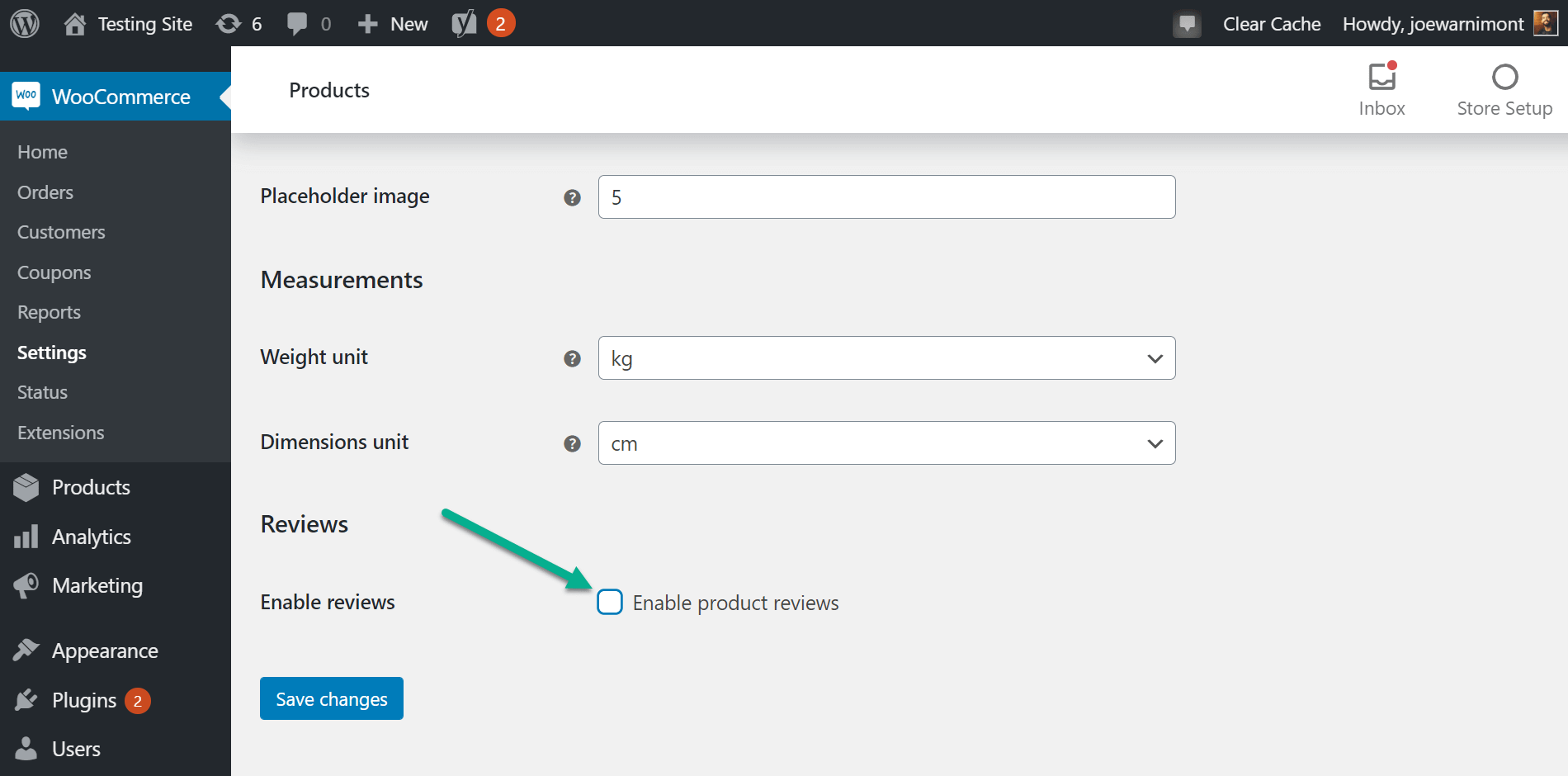
Hello, i brought from you a time ago 2 themes from you. nice themes, also, piko from kable. its the first time i ve sent you a message. Need help pls! wich button activates the review tab from the whole woocommerce? i ve found that all single products have each one a tab, but i dont have the general button for this. thank you, i need this information fast. regards, cristian.
hello please see the screenshort : https://mllj2j8xvfl0.i.optimole.com/Lsv2lkg.cHDL~36fa1/w:1900/h:940/q:98/https://s15165.pcdn.co/wp-content/uploads/2020/12/enable-s.png
Any idea how to fix it?
hello, your screenshort link doest not working… you send me again. also send your web link then am check quick view button
Check this page: www.supersznurowki.pl
if you want use custom css view view button disable
.quickview{
display: none !important;
}
It works, but it look awful. Proper code is: .quickview{ display: none !important; } .action_bottom .btn-ac{ flex-basis: 100%; max-width: 100% !important;; } .action_bottom .btn-ac + .btn-ac { border-left: 0 !important; }
What about buttons? Why after setting custom collors gradient stops working?
if you which button need to select each button inspect browser then you see every button has different class name
I choosed menu template with centered logo and menus on both sides. I can edit menu on left side (its called primary menu), but cant find menu on right side. Any tips how can i edit it?
Hello, you can use Secondary Menu style 4 this menu show your right side menu
Здравствуйте, установил шаблон, но не появляется страница интернет магазина с сайдбаром в левой стороне. Что делать?
Hello, can you send me your web link i can check it
Good morning, I installed the Kable theme on the vapery.it website. I try to sort the products by insertion date but the option doesn’t work. can you help me?
Hello, first go to appearence > widget> shop filter widget and add available filter or legacy widget
hello, available widgets are for sidebars only: Sidebar, Page Sidebar, Footer Inner, Footer inner top, Footer inner top 2, Shop sidebar, Shop filter sidebar, Shop catalog sidebar, Page. I dont’ find Shop filter.
my main problem is in this page: https://www.vapery.it/novita/ i want to sort products by date, but I can’t do this because in product category setting if i select order by DATE, sort order DESCENDING doesn’t work.you only filter shop page and category page. you cannot get this type option when you use a short normal page.
i see you use here shortcode
I think we are not understanding each other. can i send you a pic to show the problem?
I bought the theme because I thought it was totally compatible with wpbakery and its functions. how can i solve my problem? it’s possible?
hello, sorry for delay replay. its its compatible wp bakery . this feature not available our sortcode and wpbakery shortcode