440 comments found.

Why all of the demo images corrupted?
Hi.,
Images used in the demo are not included for download, these images are copyrighted, if you are planning to use the photos we can provide the links to buy license.
Image Purchase link : http://docs.wedesignthemes.com/image-link/kriya.txt
But we do provide gray images as placeholders for any image that is on our demo, so users can simply change them out for their own. Most of our demo images came from https://www.shutterstock.com/ or from https://www.bigstockphoto.com/
Open Source Images :
https://unsplash.com/s/photos/yoga https://unsplash.com/s/photos/wellness https://unsplash.com/s/photos/workout https://unsplash.com/s/photos/zen https://unsplash.com/s/photos/spaAll image changes : https://www.wpbeginner.com/plugins/how-to-bulk-upload-wordpress-media-files-using-ftp/
How can I append a privacy policy message only to the registration forms, but not to the login forms?
Hi.,
It seems that your support has expired., Please renew the support if you need any more help from us. Please follow the instructions in the below knowledge base link for extending the theme support.
Please refer :
https://help.market.envato.com/hc/en-us/articles/207886473-Extending-and-Renewing-Item-SupportPlease send your request to us directly at this email support@wedesignthemes.com
Dear Team, Pre-sales question Whether this theme support the latest version of WordPress, since you have updated the theme on December 2021 and its more than 7 months, kindly confirm
Hi Udilip.,
Thanks for contacting us and showing interest in our theme !!
Absolutely, Kriya is tested and 100% compatible with WordPress 6.x
You can go ahead and purchase our theme. If you’re facing any kind of difficulties in setting up or configuring the theme, please get back to us. We are happy to help you.
how to show login for woocommerce on home screen?
Hi Sciecore.,
Please refer:https://prnt.sc/thteZ0Pd5Wp0
If the issue persists, please more details about your issue, help us have a better understanding of it by getting back with any Screenshot / Video like references to our support team and we will gladly assist you.
Note: Your support period has expired. Kindly renew the support period again if you need further support from us, more about support extension can be read here.
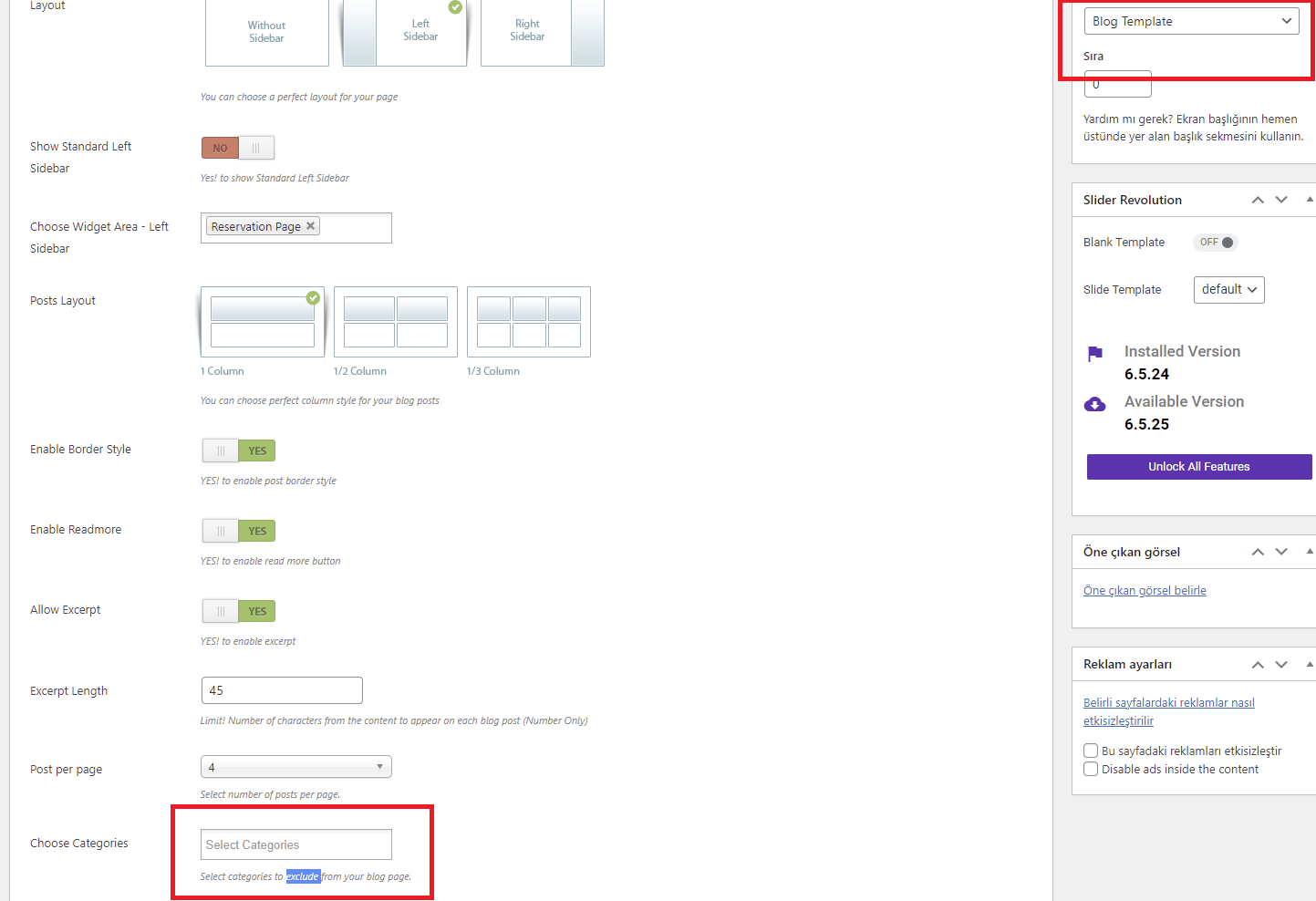
https://help.market.envato.com/hc/en-us/articles/207886473-Extending-and-Renewing-Item-SupportHello there. I created a page with a blog template. and I want this page to show only one category. but it only has exclusion feature. How can I include a single category?
https://republicaadv.com/demos/ss.pngHi Eliferman.,
It’s a theme default functionality, the categories which you have chosen here will not display in the front end.
Refer: https://prnt.sc/F9bU6PO8-IFe
Thanks!!
Regards., DesignThemes Support.
I use the theme since long time. But somehow the thumbnails for blogposts and Events are not automatically aligned to same size. always the original image in full size is loaded in Browser. (i would expect some thumbnail will be loaded) I tried already different tools to resize thumbnails…. but no success, because they are not used. The usage of sull size images is also bad for performance of the page. Maybe somebody can check and help. BR Dirk
problem seems missing columns=’”.$column.”’ as parameter in dt_sc_recent_posts when calling single post display in shortcodes.php
same problem with tribe events… always full image loaded and not croped to same size. Fix for 3 column layout: $out .= get_the_post_thumbnail($e_id, ‘kriya-blog-iii-column’, $attr);
here always all events are shown, missing filter for old events
Hi!.,
Please mail us your site credentials (WP &FTP access logins) immediately via the right bottom form located @ http://themeforest.net/user/designthemes So that, we can check and have a clear look form our end.
Note : It seems that your support has expired., Please renew the support if you need any more help from us. Please follow the instructions in the below knowledge base link for extending the theme support. Please refer : https://support.wedesignthemes.com/knowledge-base/how-to-extendrenew-your-support-period/
for me its fine now, but would be nice fixing the bugs to use the right images. i use the latest version of the theme. all bugs related to shortcodes.php, search for the code snippets. For blog entries the column parameter is not transferred and thumbnail always determined with default value (which is full size) For tribe events check get_the_post_thumbnail method call. parameter for thumbnail size is alway ‘full’ and not related to the columns choosen.
Hi Dirk_gans.,
Share your issue details along with some screenshots, it will be easy for us to get a clear understanding of your issue. Kindly mail your WordPress and FTP Login Credentials through the right bottom form @ http://themeforest.net/user/designthemes so that we will check your query and let you know the solution.
Note: Your support period has ended. Kindly renew the support period again if you need further support from us, more about support extension can be read here.
https://help.market.envato.com/hc/en-us/articles/207886473-Extending-and-Renewing-Item-SupportPlease follow the instructions in the below knowledge base link for extending the theme support.
Please refer: https://support.wedesignthemes.com/knowledge-base/how-to-extendrenew-your-support-period/
Thanks!!
Regards., DesignThemes Support.
Hi nice theme i like to buy this theme before some question
1-can i add possible to class Schedule https://prnt.sc/GS3M-J1qqFIn 2- can i add possible to class details https://prnt.sc/ANjm0nX3oSxFHi Thileepkumar.,
Thanks for contacting us and being interested in our theme.
It is not possible to schedule the class in our theme. We can show the course in the theme and the particular course user can able to purchase and use it.
This theme is compatible with WooCommerce, so it will perform all WooCommerce functionality in the theme.
Thanks!!
Looking forward to help you!!
Regards., DesignThemes Support.
Hello! The Menu is not aligned – You have bugs, I don’t ask for customization support! Broken css for menu…/etc.
Hi Mihvas .,
From our side, we haven’t faced any issues. For that, you need to assign the menu in the proper format. If you want to check those issues from your end, We need your purchase code, so that we can move forward.
If you need your Purchase Code you may download it from your Theme License certificate & purchase code. Kindly refer to the following links for getting a clear idea https://help.market.envato.com/hc/en-us/articles/202822600-Where-Is-My-Purchase-Code-
Thanks!!
Regards., DesignThemes Support.
HOW to assign the menu in the proper format? no such options in Theme
Hi Mihvas.,
Kindly confirm your purchase code so that we can proceed further, we don’t provide support for the users who are not having a purchase code.
Thanks!!
Regards., DesignThemes Support.
Error: Options page dttheme not found in the allowed options list. – seeing this when trying to save Kriya options after theme update.
I want to upload custom font, its also not supported
I have already updated theme with latest version
Hi Kooldensocialmedia.,
Kindly mail your domain URL, WordPress, and FTP Login Credentials through the right bottom form @ http://themeforest.net/user/designthemes so that we will check and resolve your issue as quick as possible.
Thanks!
We are happy to help you!!
Regards., DesignThemes Support.
Hi Team,
How do I update the Details at the bottom of the Page. I mean WORK HOURS, Kriya and Contact Us
Hi.,
Thank you for contacting us.
Please install Classic Widgets https://wordpress.org/plugins/classic-widgets/
Please refer: http://recordit.co/j5500wQzaP
Another Question: How do I change the Kriya Logo from the Top Menu Bar
Another point – how do I change the Location in the Google maps of the Location Tab
Hi.,
1) Can you please more details about your issue, and help us have a better understanding of it by getting back with any Screenshot / Video like references to our support team and we will gladly assist you.
2) Google MAP :
Please refer : http://docs.wedesignthemes.com/dt_articles/google-maps-to-wordpress-codestar/
After importing from tools demo import one backgrounds are not showing. Please check the url https://shoolinnature.com/. If so then how to change the background image
Hi.,
Images used in the demo are not included for download, these images are copyrighted, if you are planning to use the photos we can provide the links to buy the license.
Image Purchase link : http://docs.wedesignthemes.com/image-link/kriya.txt
But we do provide gray images as placeholders for any image that is on our demo, so users can simply change them out for their own. Most of our demo images came from https://www.shutterstock.com/ or from https://www.bigstockphoto.com/
All image changes : https://www.wpbeginner.com/plugins/how-to-bulk-upload-wordpress-media-files-using-ftp/
Open Source Images :
https://unsplash.com/s/photos/yoga https://unsplash.com/s/photos/gym https://unsplash.com/s/photos/workout https://unsplash.com/s/photos/meditation https://unsplash.com/s/photos/stretchIts ok you dont have to provide any stock images. I like to onw how to change the home page background. please find the photo in url it showing my exact problem. https://ibb.co/ydBz3s7
Hi.,
Please refer : http://recordit.co/JOuX6461c0
If the issue persists, Please mail us your site credentials (WP &FTP access logins) immediately via the right bottom form located @ http://themeforest.net/user/designthemes
So that, we can check and have a clear look form our end.
Need to change the footer details and header details as well , I am not finding any options after going through kriya option -layout. Please help how to change it.
Also need to change Course Price in Rupees , not finding any option to change
Hi Sutanughosh.,
1) You have the option to change the header and footer content in the Kriya Options. Navigate to Appearance > Kriya Options added screenshots for your reference, kindly have a look https://prnt.sc/hcHTyYHxWggM and https://prnt.sc/XcRU29vDeaow
2) To update the currency symbol in the course list need to update the currency in the Buddha Panel navigate to Appearance > Kriya Options > Paypal > update currency. Kindly have a look on screenshot, https://prnt.sc/NWjUyGLD5KHK
Let us know if you have any further queries or issues. We are happy to help you!
If you are happy with our support, kindly rate us. Have a look at the video for the rating process. http://recordit.co/YqdTBuEJRm Hoping for a 5-star rating from your end
Thanks!!
I have purchased your theme I am not finding demo import option in buddha. And also how to put the purchase code.
Hi.,
Thank you for contacting us.
You can import the demo content via the unyson plugin. Kindly refer our knowledgebase link for how to import the demo contents using the unyson plugin http://docs.wedesignthemes.com/dt_articles/import-demo/
Please check your server requirements., Please refer the below link for server requirements http://docs.wedesignthemes.com/dt_articles/requirements-for-theme/
If still facing any of issues Please mail us your site credentials (WP & FTP access logins) immediately via the right bottom form located @ http://themeforest.net/user/designthemesSo that, We import demo data for you.
Hi, i have a problem with this theme but in the support i dont find the solution, its possible have a mail where write?
Hi.,
1) Please send your request to us directly at this email support@wedesignthemes.com
2) Please send your purchase code details to support@wedesignthemes.com. We create a user login and get back to you
Hi! Tell me please, can I use this theme without WP? Or if you could provide such version? Thanks!
Hi.,
We have two versions both WordPress and Shopify version
WordPress : https://themeforest.net/item/kriya-yoga-health-yoga-wordpress-theme/17016584
Shopify : https://themeforest.net/item/kriya-yoga-shopify-theme/23461214
I bought this theme few years ago. Yesterday i got a fatal error; i did removed all plugins and my website bug when i do install DesignThemes Core Features Plugin. COUld you help please ?
Hi!.,
Please mail us your site credentials (FTP access logins) immediately via the right bottom form located @ http://themeforest.net/user/designthemes
So that, we can check and have a clear look form our end. Then we’ll help you to get rid of it ASAP !!
Quick question; how do I hide the page titles on each page. I have found how to turn off breadcrumbs.
Hi.,
Get into Admin panel > Appearance > Kriya Option > Layout > Custom CSS > Enable Custom CSS > Yes > Pasted the below css code inside the text area > Save All.
.main-title-section-wrapper { display: none;}
Thank you, we look forward to helping you!
Thanks, but that didn’t work? You can see the page header on this page: https://susanhorwell.com/deck-chairs/
I have some css code in the box already.
main-menu ul li.menu-item-simple-parent.with-box-shadow ul, #main-menu .menu-item-megamenu-parent.with-box-shadow .megamenu-child-container { box-shadow: 0 0 0 1px #a58251 inset; }
footer { background-color: #d4ad76; }
.footer-copyright .vc_separator .vc_sep_holder .vc_sep_line { border-color: #a58251; }
.footer-copyright, .footer-copyright a, .footer-copyright.dt-sc-dark-bg, .footer-copyright.dt-sc-dark-bg a { color: #a58251; }
/—*— << Responsive >> —*—/
@media only screen and (max-width: 767px) {
main-menu ul li.menu-item-simple-parent ul, #main-menu .megamenu-child-container { border: none !important; }
main-menu .menu-item-megamenu-parent.menu-title-with-bg .megamenu-child-container > ul.sub-menu > li > a, #main-menu .menu-item-megamenu-parent.menu-title-with-bg .megamenu-child-container > ul.sub-menu > li > .nolink-menu, #main-menu .megamenu-child-container ul.sub-menu > li > ul li a { padding-top: 7px; padding-bottom: 7px; }
main-menu .menu-item-megamenu-parent.menu-title-with-bg .megamenu-child-container > ul.sub-menu > li > a.dt-menu-expand { right: 15px; top: 0; }
main-menu ul li.menu-item-simple-parent ul li { padding-right: 15px; }
}
.main-title-section-wrapper { display: none;}
Hi.,
Please refer : https://prnt.sc/21cwror
Get into Admin panel > Appearance > Kriya Option > Layout > Custom CSS > Enable Custom CSS > Yes > Pasted the below css code inside the text area > Save All.
.split-header.boxed-header #main h1.simple-title { display: none;}
If the issue persists, Please mail us your site credentials (WP &FTP access logins) immediately via the right bottom form located @ http://themeforest.net/user/designthemes So that, we can check and have a clear look form our end.
Amazing theme, thank you. Would love to buy. Just some quick questions before I do that…
- Especially on mobile, it looks quite boxed. Is there a way to change some universal settings so it takes up more of the width on a mobile automatically instead of being boxed?
- Is there a way to universally change font size for text?
- The text in the slider doesn’t seem to fit well on a mobile. I understand this can be changed?
- Is it possible to add a donation plugin and use it with paypal/stripe?
- Can the events list be changed to 2 columns? At the moment its a big picture with single column format
- Can the preloader icon be changed to something else we prefer? (that currently is a guy with chakras, etc)
- Can I upload my own fonts, or does it support only google fonts?
Thank you for your help so far.
Best wishes
Hi.,
Thank you for contacting us.
1) Yes its Possible.
2) Yes its Possible.
3) Yes its Possible.
4) Yes its Possible.
5) Yes its Possible.
6) Yes its Possible.
To check backend option : http://kriya.themessupport.com/request-demo
Hi, thank you for your swift reply. I understand it’s all possible, but is it included as part of theme settings? Or will you help with this as part of your support? Because I don’t know how to code and stuff. Also I tried to request a demo but it says “An error has occurred. Please notify the website Administrator. Security error!”
Hi.,
Please send your request to support@wedesignthemes.com. We create a user login and get back to you
Hi there, thank you. Got the demo and just had a look. A few questions -
- Looks like in the demo at least, the visual composer, slider revolution and all other plugins are really old versions. Will i get the theme with the latest versions, and regular updates?
- The mobile version seems boxed, with a lot of space around the text… is there a way I can change settings so it takes up the full width of the phone? I couldn’t find any settings under theme settings. Would you help with this as part of the support?
- Is it possible to change currency to £? couldn’t find this option too
- I found the change font size box, but it didn’t change the size. Is that because it’s a demo and it will work properly in the purchased version?
Please let me know, thank you. And thanks for your help so far!
Hi.,
1) Plugins are included in our theme package, there is no need for you to purchase them. However if you want premium features of the plugin and premium support, only then you need to purchase a separate license for it. More info can be read here : http://docs.wedesignthemes.com/dt_articles/how-to-get-updated-theme-premium-plugins/
2) We already fixed in new version
3) Yes., its Possible
4) Font Option : http://docs.wedesignthemes.com/dt_articles/fonts-options/
You can go ahead purchase our theme. If you’re facing any kind of difficulties in setting up or configure the theme, please get back to us. We are happy to help you.
hello im trying to install the democontent but for some reason i get this error. able name is more than 64 characters: _fwbk_wp_wholylife_se_woocommerce_downloadable_product_permissions
Hi.,
Please mail us your site credentials (WP & FTP access logins) immediately via the right bottom form located @ http://themeforest.net/user/designthemes So that, We import demo data for you.
im sorry cant seem to find the button you are talking about :/
Please send your request to us directly at this email support@wedesignthemes.com
Hello there!. I am installing the theme following the instructions here -> https://www.youtube.com/watch?v=8PkoyLDR2BI There are two plugins that are nowhere in the zip file that I downloaded when I bought the theme and they are not in the list of plugins shown in Installing Plugins. The missing plugins are: Visual Composer and Kriya Demos Importer. Where can I get these plugins? The wordpress where I am installing the theme is the latest version 5.8.1
Hi.,
Thank you for contacting us.
You can import the demo content via the unyson plugin. Kindly refer our knowledgebase link for how to import the demo contents using the unyson plugin http://docs.wedesignthemes.com/dt_articles/import-demo/
Please check your server requirements., Please refer the below link for server requirements http://docs.wedesignthemes.com/dt_articles/requirements-for-theme/
If still facing any of issues Please mail us your site credentials (WP & FTP access logins) immediately via the right bottom form located @ http://themeforest.net/user/designthemesSo that, We import demo data for you.
Thanks for your quick response. I am installing the theme in a local wordpress to make the appropriate adaptations and later upload it to a hosting service. I am using xampp as a web server, the PHP version is 8.0.10 and MySQL is 5.1.1. I already made the recommended changes to the php.ini file.
When installing WPBakery Page Builder it gives me the following error:
Fatal error: Uncaught Error: Undefined constant “DT_VC_CATEGORY” in C:\xampp\htdocs\wordpress\wp-content\plugins\designthemes-core-features\visual-composer\modules\google_map.php:8 Stack trace: #0 C:\xampp\htdocs\wordpress\wp-includes\class-wp-hook.php(303): dt_sc_google_map_vc_map(’’) #1 C:\xampp\htdocs\wordpress\wp-includes\class-wp-hook.php(327): WP_Hook->apply_filters(NULL, Array) #2 C:\xampp\htdocs\wordpress\wp-includes\plugin.php(470): WP_Hook->do_action(Array) #3 C:\xampp\htdocs\wordpress\wp-content\plugins\js_composer\include\classes\core\class-vc-manager.php(219): do_action(‘vc_before_init’) #4 C:\xampp\htdocs\wordpress\wp-includes\class-wp-hook.php(303): Vc_Manager->init(’’) #5 C:\xampp\htdocs\wordpress\wp-includes\class-wp-hook.php(327): WP_Hook->apply_filters(NULL, Array) #6 C:\xampp\htdocs\wordpress\wp-includes\plugin.php(470): WP_Hook->do_action(Array) #7 C:\xampp\htdocs\wordpress\wp-settings.php(578): do_action(‘init’) #8 C:\xampp\htdocs\wordpress\wp-config.php(96): require_once(‘C:\\xampp\\htdocs…’) #9 C:\xampp\htdocs\wordpress\wp-load.php(50): require_once(‘C:\\xampp\\htdocs…’) #10 C:\xampp\htdocs\wordpress\wp-blog-header.php(13): require_once(‘C:\\xampp\\htdocs…’) #11 C:\xampp\htdocs\wordpress\index.php(17): require(‘C:\\xampp\\htdocs…’) #12 {main} thrown in C:\xampp\htdocs\wordpress\wp-content\plugins\designthemes-core-features\visual-composer\modules\google_map.php on line 8
Ha habido un error crítico en esta web.
I installed a version of visual composer from hereI appreciate your attention in advance, if with this information that I provide you can guide me to know what is wrong. Or if necessary I open the ports of my server and provide you with the credentials so that you can check it yourself and help me install it well and import the demo content.
Hi.,
Can you please host your site and let us know then only we can help you in a better way.
Regards., DesignThemes Support.
Thank you very much for your attention, I have already contacted you by this means -> http://themeforest.net/user/designthemes I have provided my credentials, wrodpress username and password as well as ftp username and ftp password, as indicated. I thank you in advance for the prompt solution to this problem. Any situation regarding I am pending
Hi!.,
Please mail us your site credentials (WP &FTP access logins) immediately via the right bottom form located @ http://themeforest.net/user/designthemes So that, we can check and have a clear look form our end.
Thanks… It took so long to hear from you that I made changes on our menu layout.. Thanks anyways