

51 comments found.
Please give a discount
Hey. We made a discount recently on black friday and we don’t have plans to run discounts in the near future.

Hi I installed wordpress version 6.0.3 on hostgator. I installed the theme and plugins. I have not installed any additional plugins.
when importing a demo it keeps loading and nothing happens, can you help me?
Hey,
When you import the demo, you have to install all plugins. You can disable it after the demo import is completed.
If the demo import will still fail, please, try to import it using the manual way – https://nkdev.info/docs/wordpress-themes-basic/demo-import-manual/
Regards, nK.
Hello, where can I change the favicon? My website shows just the wordpress default one. I imported demo 1. Thank you
Hey.
You can change it in Admin Menu → Appearance → Customize → Site Identity → Site Icon.
Regards, nK.
Hi, today I purchased the CyberPulse template, it seemed to fit the content I want to bring to the website. Very nice style, in fact I didn’t think twice and purchased it, only I encountered a problem in some situations. The registration form appears separately and does not have the same style as the login and forgotten password form. This happens both having the BuddyPress/Youzify plugin active and also without having it activated. The registration form appears all white.
Couldn’t you put a full page option for content? I had to work a little bit with custom css, also to change the color of the menu and footer which were appearing transparent to me.
After 4 days still no comment from the author to receive support, it is okay that today is Christmas Eve and tomorrow is Christmas. However, 4 days ago was not a holiday, I am quite disappointed.
I noticed that Login with Ajax does not work well with this template, at least not the “Legacy” version. I had to remove it and put Classic as the default template.
Thanks again for the support.
Hey Vladislay.
I apologize for the delay in our reply. We’re currently on vacation and support may require more time than expected.
To get support, better to create a support ticket here – https://nk.ticksy.com
1. We don’t have BuddyPress (Youzify?) plugin support. The only login/registration form available is from the Login With Ajax plugin.
Please, use the “Default” template of the Login With Ajax plugin with disabled Legacy mode https://shot.nkdev.info/QCQQ94FPJxP8FLX7P2BV . This template is optimized for our styles and works with the latest Login With Ajax plugin features. And the Registration form will also work.
2. We have support for the FullWidth content size. You can find additional Page options here – https://shot.nkdev.info/kLPNTQGSt2XLWmrLVd8w
Regards, nK.
Merry Christmas. I’m sorry I sounded like a bad person, now the community and those who appreciate your work will hate me. I appreciate it too, I like the template and after seeing and reviewing the demo I decided to buy it. I didn’t expect to run into some problems, I even tried to look in the comments if there were any problems I had already encountered. For the things I had listed, I put Default for login with ajax. Again I apologize, I thought it was a template plugin, but instead it is separate, not your fault. Sorry again. About the fullwidth, I use classic version for writing articles and elementor for page layout, I had to put a custom css because all pages had to cover the whole page.
Hey Vladislay.
Don’t worry about it, your feedback sounds honest. Anyway, if you will have any troubles with the theme features, just create a support ticket, and we will try to help. The only thing we can’t provide – is code or style customizations.
Regards, nK.
First of all: Awesome Theme! Loving it so far! My question: where do i disable the offcanvas menu? I can’t seem to find it either in the customize menu, nor the “edit page” page. I bet i’m missing something.
Hey.
You have to remove all widgets from the Offcanvas widgetized area in Appearance > Widgets.
Regards, nK.
Alright! Thanks for the reply! Imma add another question regarding the navbar (the iOS-esque bar at the bottom in the mobile view) How can i deactivate that? And is there an option to enable specific navbar-features on specific sites? E.g.: I want to disable the whole navbar on the homepage etc, but enable it on blog posts so users can enable/disable dark mode for a better reading experience.
Hey.
There are no such possibilities. I think you can try to hide navbars using custom CSS or disable the templates in our theme with custom PHP. But these customizations you will need to make these on your own or with 3rd-party help.
Regards, nK.
Great theme. But don’t waste your time now. It’s completely broken (as of 30th October 2022). 5 of the plugins that are required for it to work are in constant conflict. No, I’m not kidding. It will just not resolve. Not even if you rollback the plugins. Not even if you use the most up to date plugins. I purchased this theme a while back for a side project (because it was so good). Now that I’m ready to use it, nothing works. Not even the most updated theme.
I have tried out everything. Fresh install Swap plugins Full demo import Followed all instructions I barely give bad reviews (if at all). But this one, best to warn new buyers. Oh, and it says to pay for new support. Oh no…! Support can’t fix this one. It’s a complex combination of plugins that the author did not write. (oh, and Gutenberg’s rating continues to drop). What are y’all saying?
Nope nope nope.>!
Update – Theme is still great. Found a long workaround. Plugin conflicts finally resolved after extensive work. All looks good but for some minor works. Appears one has to clear cookies from time to time. If you can handle a couple errors from time to time, everything should work great. It’s still my favourite theme amongst almost 10 themes that I reviewed.!
Hey.
Why have you never contacted us in support? We can check it for you because all bundled plugins are tested and working correctly on all our servers. Most of the plugins we developed by ourselves and it is working flawlessly together.
There may be conflicts with 3rd-party plugins, which are not listed as recommended by our theme, but you can still ask for help from our support system.
Just create a private support ticket in the “Bug Reports” category with the proof of your purchase (attach your purchase code) and with a description of the issue and we will look at it and try to resolve it if any conflict exists.
Regards, nK.
Thank you for your response. I was initially frustrated. However, my confidence is restored. I have worked extensively with the theme and everything works fine. Only 1 issue that I’ve been unable to resolve – pagination returning 404 errors. All plugins have been double-checked and there are no conflicts. Permalinks seems to be the culprit but nothing I have done so far works, and there is nothing about pagination issues in the documentation. Can I still get support without buying Envato support? I purchased the theme a year ago but just got around to using it. Thank you
Hey.
The support has limited time in order not to overload authors. This is the whole market rule, not only do our themes have limited support but all themes on ThemeForest. Nobody wants to provide lifetime (!) technical support for $59.
However, sometimes our products contain bugs, which we should fix to whether or not you have a valid support package. This is why we added the “Bug Reports” category in our ticket system, where a license key is not required.
Since you have never contacted us, we are more than happy to help you even if the license is expired.
p.s. please let’s continue with resolving your issue in the ticket system.
Regards, nK.
Hello guys and thanks for making this breath taking theme!
I wanted to ask, what font is used for the logo? I want to make my site name using the same font and style because.. it’s perfect for the job.
Hey.
Thank you for your kind words.
The logo is using Inter font, but we customized it in Figma manually by adding artifacts. So, in other words, there is no such font available, you will need to draw such a logo manually using Inter font as a base.
Regards, nK.
Hello there whats going on with this theme? Usually when you install a new theme, it works fast, then with the time when you add content and plugins the site will be slower and slower.
In my case, i installed your theme and my plugins i need and 850 WooCommerce products and the website is still fast as before adding content and plugins. How come? This is the first time that a website works without caching plugin LOL
I want to ask you, did the theme come with caching function or how is that possible? This is crazy for me and dont make sense…
Thank you
Hey.
Nothing special, just black magic 
Thank you for your kind words, but seriously, I think it’s just a coincidence because we don’t do anything supernatural. We just use official WordPress features and guidelines when developing themes and plugins.
I think that heavy plugins such as WooCommerce, BuddyPress, bbPress, and the like can slow down your site, when your site will have a large number of members and customers, which will generate additional posts, comments, orders, etc…
What about 850 WooCommerce products – I don’t know. Maybe it is just because of WooCommerce itself because this plugin is improved every day by talented developers.
I think you may need to load your site with real traffic, install plugins for caching, and firewall, and then you can feel the slowdown of the site, but it will most likely not be because of the installed theme.
Regards, nK.
Hey yes i agree. But i worked with many themes and it was always the same issue, slower and slower. But i know, you use black magic LOL .
I have now +850 Products and since i use youre theme i dont need other plugins to make it fancy, your theme is special and i love GLITCHES. Perfect combination.
But yes later when everything increase, it will slow down, Dedicated servers and oll that stuff will be the solution. Now i installed a caching plugin, not because the website is slow, but with my shared hosting its better to use cache, so the server may handle all that stuff.
Thank you man and keep it up, i have my eyes on your portfolio.
PS: What i mostly like, you dont use those dumb WPBakery or Elementor stuff, i hated to work with those stupid editors. The gutenberg editor is not my fevorite, but its from wordpress, works fine.
Have a NICE DAY
.
Hi I left a support ticket, please respond.
Hey. Answered in the ticket system.
Hey. I have a problem with translating ghostkit blocks. Phrases like time units in countdown block are not appearing in wpml string translation – https://wp.nkdev.info/cyberpulse/blocks/countdown/. Neither units work nor other interface phrases like ‘Number Font Size’ or ‘’End Date’. Phrases that are normally embedded in PHP are being detected, but the ones in JS files not. Thank you in advance for your answer!
My ghost kit version 2.22.3 Ghost kit pro 1.7.1 WPML Multilingual CMS 4.5.5 WPML String Translation 3.2.1
Hey.
These strings are available for translation using the wp.i18n function https://github.com/nk-crew/ghostkit/blob/8d89d62d9e60c77a1b4a7d3be4a0e56014f9f907/src/gutenberg/blocks/countdown/api.js#L699-L719 And you can translate it usong the JSON translation file https://github.com/nk-crew/ghostkit/blob/master/src/languages/readme.md
Regards, nK.
Before purchase question, what plugin does your theme use for Matches and Tournaments?
Hey.
We are using our own plugin CyberPress https://wordpress.org/plugins/cyberpress/ You can test it for free.
Is it possible to have plain images in a post open in a light box or popup? For example I made a blog post and on the page I have just a basic image but if I try to click it there is no popup for a bigger view.
Hey.
You can enable this option in Visual Portfolio plugin. Look at the setting named WordPress images in Popup section https://visualportfolio.co/documentation/settings/popup-gallery/
Or use another 3rd-party plugin.
Regards, nK.
Hello! Loving the theme! However, I am having one issue. I can’t add a featured image to posts. I created one blog post and was able to add the featured image, once I created another post the option is missing from the bar post sidebar. This is also now missing from my first post, but my first post is still showing the featured image when I view my site.
I figured it out. I forgot that the featured image is in the blocks and not the page section. Apologize for the inconvenience.
Good job
Do you have HTML only version?
Hey.
No, we only have plans to make React version of this theme in the future.
Regards, nK.
Good day! I plan to purchase your theme – https://wp.nkdev.info/cyberpulse/shop/ We will only use the online store. Used WoodMart -Multipurpose WooCommerce Theme (Elementor, WPBakery) for a very long time. You did not find support for these modules in the description, is it possible to add them and use them in the future? Is it also necessary that you add them to the update and be able to receive updates of these modules after updating the main template?
p.s. a page builder is also required
Hey.
We use WordPress’s native page builder (Gutenberg) and all blocks, which you can see in pages content are styled for this builder only.
You can use Elementor or WPBakery, but our theme does not provide any custom stylings for elements of these builders. We don’t have plans to add support for these builders in the future.
Regards, nK.
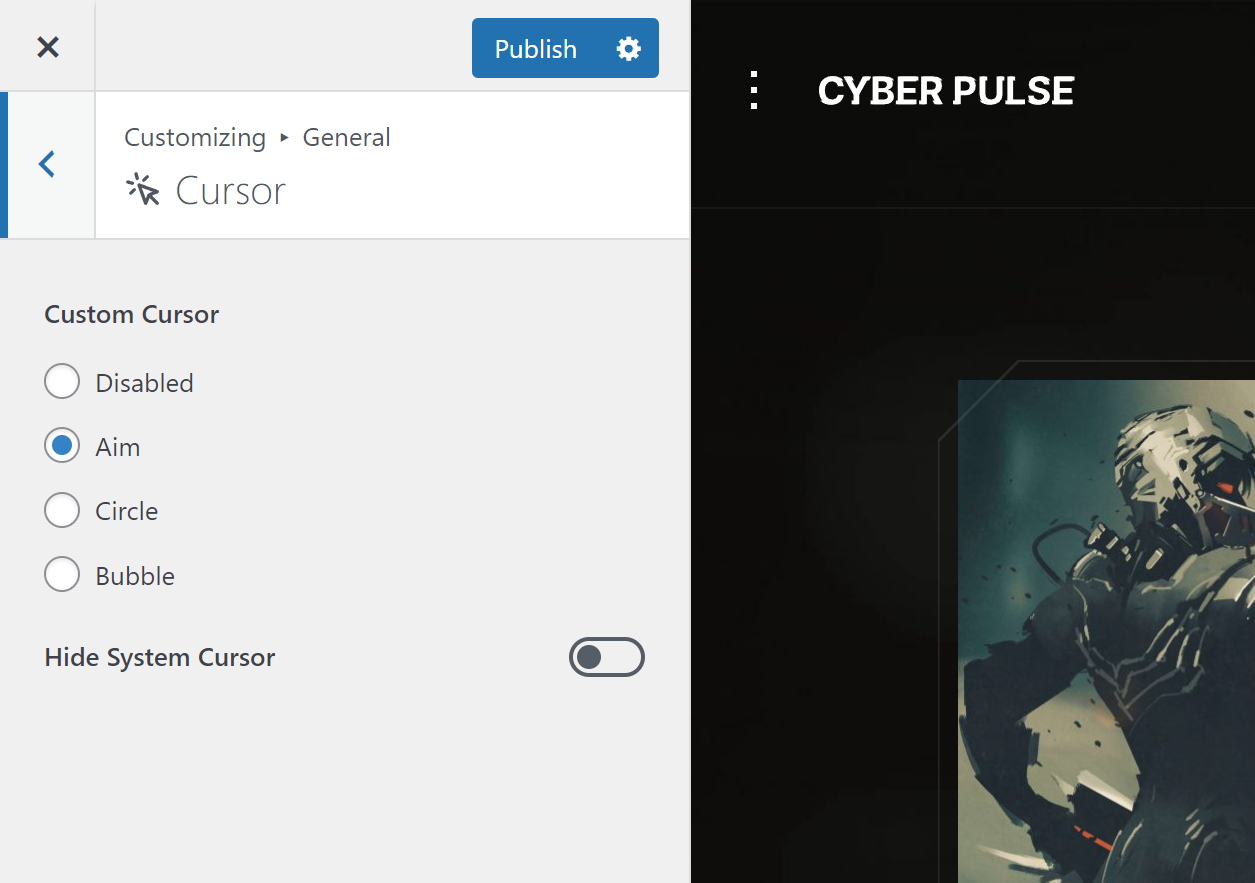
is it possible to hide the standard mouse cursor?
Hey. Yes, there is the option to hide the system cursor:
Hi, I am interested in buying your theme, I have a few questions though. Am I able to put a full width video (not a youtube video, my own upload) that plays automatically (and loops) when someone comes to site, as header? Could I set it to the background (so person can’t pause or interact with it) so I can have text or a graphic displayed over it too?
Also, is it possible to have a normal styled menu that is placed opposite the logo (on desktop at least, mobile would be fine the way you have it)
Thanks!
Hey.
You can use your own background videos, hosted on your site on the header backgrounds. We use this plugin for backgrounds – https://wordpress.org/plugins/advanced-backgrounds/, you can test it before purchase.
I don’t quite understand what do you mean by “normal menu”? Menu items on the demo site are centered (https://wp.nkdev.info/cyberpulse/), you can put them to the left or to the right using theme options.
Regards, nK.
Thank you! Just bought the theme!
Hi, i recive error 0 and error 2 when tryng to import demo.
Hey. Please, look at the workaround in the documentation – https://nkdev.info/docs/wordpress-themes-basic/errors/demo-import-problem/
Hi, i managed now install it.. But im missing web font.. It looks like default wordpress font.. Do i need to add it manually?
Answered in the ticket system.
Nice theme, couple of Qs: Are the fonts flexible, can I select from Google fonts for example? Can the section dividers be changed, is it simple enough via css or an image to use a different shape to divide the sections? Is the imagery packed with the theme?
Hey.
1. Yes, you can select different Google Fonts. We are using our free Ghost Kit plugin, which supports Google Fonts. https://ghostkit.io/extensions/typography/
2. There is a predefined list of dividers https://ghostkit.io/blocks/shape-divider/ + some from the theme in Cyberpunk style. You can only add new shapes using custom code https://ghostkit.io/docs/php-filters/gkt_shapes_list/
3. Images are not included in the theme package.
Regards, nK.
Great! Can I also ask is it possible to have a separate CSS for different pages? We’re trying to incorporate two brands in one site.
Hey.
I think it is better to use WordPress Multisite with 2 different installations and theme settings.
Regards, nK.


