994 comments found.

Hi, is there a easy, plugin-less way to set og:image (facebook sharing the right image) to page’s cover image? Thank you. Lukas
Hi,
If you are familiar with coding and ACF Pro plugin you can just register a new option and add its output using child theme. If not, using a third-party plugin will be required.
Sincerely,
the Colabrio Team
Help Center | Docs | Colabrio
✉️ Sign up for our newsletter and be the first to know about all the latest news.
Where can I find options for related posts and related projects?
Hi,
Thanks for reaching out.
Navigate to Theme Settings > Blog Settings > Post Page and there will be related posts options. As for the Related Project, all the available project option are located under the Theme Settings > Portfolio Settings menu.
Sincerely,
the Colabrio Team
Help Center | Docs | Colabrio
✉️ Sign up for our newsletter and be the first to know about all the latest news.
Registered posts are filtered by tags so we don’t show them, I have corrected this code. about the catalog project i added 1 display filter to the code source and it worked perfectly. I think you should have this option.
Thanks for notifying us.
I’ve reported this to our dev team who is going to check it.
Sincerely,
the Colabrio Team
Help Center | Docs | Colabrio
✉️ Sign up for our newsletter and be the first to know about all the latest news.
I know my support has already expired – just wanted to ask a question I guess many might have coming from Germany that would require to know before purchasing:
Our law system now requires local googleFonts on the websites instead of remote access. I’ve already downloaded the fonts and included a ”@font-face {.. ” with the location for the fonts to the CSS. Still the website seems to access some remotely from google. Any suggestions on this topic?
Thanks and I would be very upset to have to redo my website with another theme from somewhere else as I really like it so much! 
Hi,
Thanks for reaching out.
You can use OMGF WordPress plugin to localize Google Fonts. After installing the plugin, OMGF will automatically start looking for Google Fonts whenever a page is requested on your website. So you have just to install and activate the plugin.
Sincerely,
the Colabrio Team
Help Center | Docs | Colabrio
✉️ Sign up for our newsletter and be the first to know about all the latest news.
This is AWESOME!!! Thank you so much for your bonus support on that! It worked instantly as I activated it – and I didn’t even had to purchase the ProVersion (as I assumed first). Again: deeply appreciated reply!
You are Welcome!
I found this bug in your Demo, responsive broken
happen with tablets
https://www.youtube.com/shorts/cKcQ6iPgi2wHi,
Thanks for reaching out and notifying us of an issue.
I’ve reported this to our dev team who is going to check it.
Sincerely,
the Colabrio Team
Help Center | Docs | Colabrio
✉️ Sign up for our newsletter and be the first to know about all the latest news.
any way for fix it? i have my customer that request the fix
https://tppr.me/UTPtT
https://tppr.me/jMZcP
Sincerely,
the Colabrio Team
Help Center | Docs | Colabrio
✉️ Sign up for our newsletter and be the first to know about all the latest news.
from tablet the responsive isnt too good because when you scroll with your finger there is a bad effect of moving, not a great experience imho
here one video that allow you to simulate the issue from desktop (audio on)
https://youtu.be/ecwkP9o-q5Ithe main problem is you need to reload the page for get the correct resizing desktop->mobile and mobile->desktop. By the way the desktop version isnt good for tablet because you have that problem of movement, you cant scroll without every element move itself. Further more the elements in tablet vanish or the images are distored or the text is too big.
same problem happen with ohio theme.
https://ohio.clbthemes.com/demo12/homedemo12-elementor/try to do the same test with one ipad probably in this case the problem is more deep because it happen both portrait and landscape tablet version
https://youtube.com/shorts/ZH2nEMkaoNc?feature=shareThanks for the reporting.
We will take a look.
Sincerely,
the Colabrio Team
Help Center | Docs | Colabrio
✉️ Sign up for our newsletter and be the first to know about all the latest news.
any way for fix the problem? i have one customer that require the fix
btw i see that demo4 isnt affected by this issue and resize good
I’d kindly ask you to send us a personal message and provide your temporary WP credentials. So that we will be able to check that.
Sincerely,
the Colabrio Team
Help Center | Docs | Colabrio
✉️ Sign up for our newsletter and be the first to know about all the latest news.
message sent
Thanks, we will check that out.
no reply, if you post here the code to edit is better, also other ppl can fix the problem
We are going to add an improvement with our next update.
Sincerely,
the Colabrio Team
Help Center | Docs | Colabrio
✉️ Sign up for our newsletter and be the first to know about all the latest news.
Hi! Sorry to bother: I’ve just tried to update the Plugin “Advanced Custom Fields PRO” but the purchase licence key does not work for it. How am I able to update the plugin now?
Hi,
Thanks for reaching out.
Just follow this guide to get the latest versions of bundled plugins:https://docs.clbthemes.com/ohio/#bundled_plugins
Sincerely,
the Colabrio Team
Help Center | Docs | Colabrio
✉️ Sign up for our newsletter and be the first to know about all the latest news.
Thanks Colabrio Team, to inactivate before updating did the trick!
You are Weclome!
Hi, i see that the “numbers” of the slides change the permalink everytime i update the demo page, seems are dynamic.
Before i buy i want say: is possible to create one menu that link to the slide?
Example
Menù:
Slide 1 Slide 2 Slide 3
on click i go to correspondent slide.
With the dynamic permalink is impossible to create one menu
Hi,
Thanks for reaching out.
Unfortunately, that would require an additional theme’s customization.
Sincerely,
the Colabrio Team
Help Center | Docs | Colabrio
✉️ Sign up for our newsletter and be the first to know about all the latest news.
Hello, using your theme I have a problem with rev slider, i can’t see it completely at the begining, only when I clic something, the theme have a problem to recognize the slider at the first navigation and I have a white band at the right, the first time I go into the website: https://www.quesoslavega.com, can you solve this?
Thank you
Hi,
Thanks for reaching out.
Unfortunately, we are not able to check the issue since your site is down, please check our SS below:https://prnt.sc/uk_0qui2xElR
Please check that and get back to us.
Sincerely,
the Colabrio Team
Help Center | Docs | Colabrio
✉️ Sign up for our newsletter and be the first to know about all the latest news.
Maybe your ip is blocked, because the site isn’t down. So can we resolve this?
We’ve been trying to use a proxy server but got the same results well.
Ok but I have a problem with your theme and revolution slider, my slider have troubles with the theme, and I can’t see it completly, I have a white band at the right
I would kindly ask you to open a ticket with your inquiry at our help center and we will do our best to help you.
Sincerely,
the Colabrio Team
Help Center | Docs | Colabrio
✉️ Sign up for our newsletter and be the first to know about all the latest news.
Hey — ive been using your Ohio theme for a while now and love it — amazing work!
Just wanted to see if you guys plan on adding Elementor builder capabilities to this theme (or any others for that matter)?
Thanks and keep up the good work, cheers!
Hi,
Thanks for such kind words, really appreciate that 
Currently, we are not working on its compatibility. However, we’ve added this option to our ToDo list and will check if that would be possible to implement in the future.
Sincerely,
the Colabrio Team
Help Center | Docs | Colabrio
✉️ Sign up for our newsletter and be the first to know about all the latest news.
Hello, when I use the “centered logo” header layout, the cart icon is not showing. It is showing well in other header layout. How can I show the cart icon?
Hi,
Thanks for reaching out.
Can you share the link to your website? So that we will be able to check that.
Sincerely,
the Colabrio Team
Help Center | Docs | Colabrio
✉️ Sign up for our newsletter and be the first to know about all the latest news.
Other pages using different header layout is fine
Thanks,
The cart icon is missing in the source code. I’d kindly ask you to send us a personal message and provide your temporary WP credentials. So that we will be able to help you.
Sincerely,
the Colabrio Team
Help Center | Docs | Colabrio
✉️ Sign up for our newsletter and be the first to know about all the latest news.
This theme isn’t documented very clearly for the sidebar menu option. I’ve installed it, with demo images, projects and portfolio – the menu font attributes are completely unresponsive to changes to the theme. And, there is no way to remove your proprietary information which appears by default on the bottom of the sidebar (the same info which by default goes into the copyright bar as well). Can you explain how to do these things please? See my ticket.
Hi,
Thanks for reaching out.
I would kindly ask you to open a ticket with your inquiry at our help center and we will do our best to help you.
Sincerely,
the Colabrio Team
Help Center | Docs | Colabrio
✉️ Sign up for our newsletter and be the first to know about all the latest news.
Hello, I’ve using your theme for a while, but now the rev slider doesn’t work properly, I see a part of it untill I clic en a place into the website,... at the right there is a blank gap
https://www.quesoslavega.com/Can you tell me why is that? Thank you
Hi,
Thanks for reaching out.
Seems like your website is down or there’re some restrictions to visit it. Check my SS below:https://prnt.sc/XR_1_nTSIPyr
Please, check the site availability and get back to us.
Sincerely,
the Colabrio Team
Help Center | Docs | Colabrio
✉️ Sign up for our newsletter and be the first to know about all the latest news.
Hi there! I am facing a problem with my breadcrumb navigation on the blog page. The blog overview page works just fine, the breadcrumb navigations says “Home / Blog”. Unfortunately the blog post pages dont work too well for me:
Firstly it says “Home / Allgemein (=category general) / title of the post”. I am missing the word “Blog” in the navigation. Is it possible to include it?
Secondly I really would love to delete the category in the breadcrumb navigation. Ideally it would look something like “Home / Blog / blog post title”.
Is it possible to change the settings in this way? I tried to enter the word “blog” in the theme settings under “Blog settings – Breadcrumbs slug – Enter custom text for breadcrumbs slug”, but this only changes the word “Home” to “Blog”, altough this worked to change it for my portfolio.
Thanks a lot in advance, Julia
Hi,
Thanks for reaching out. Send us a personal message and provide your temporary WP credentials, so that we will be able to help you.
Sincerely,
the Colabrio Team
Help Center | Docs | Colabrio
✉️ Sign up for our newsletter and be the first to know about all the latest news.
Hi I purchased the theme and just extended my support and it won’t let me submit a ticket. Please address this as I need help immediately with a glitch in the portfolio template.
Hi,
Thanks for reaching out.
We are really sorry for the inconvenience you have. Sometimes, there might be an insignificant delay between the license code being processed. I would kindly ask you to repeat the action again.
Sincerely,
the Colabrio Team
Help Center | Docs | Colabrio
✉️ Sign up for our newsletter and be the first to know about all the latest news.
Hello, team!
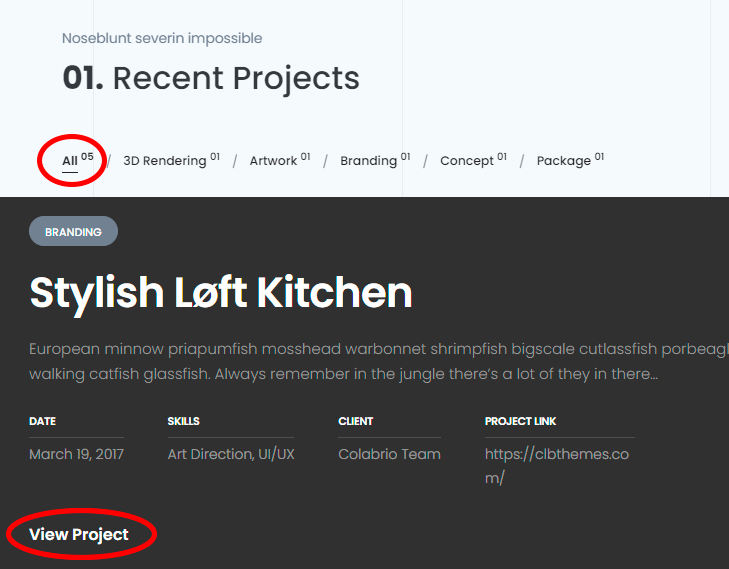
How do I translate the word “view project” in the portfolio page and the word “all” in the portfolio highlights.
I attach the screen print for you to understand better what I’m saying.
https://i.postimg.cc/CMqpGfwF/translator.jpgThanks!
Hi,
Thanks for reaching out.
Please, check the following guide:https://docs.clbthemes.com/ohio/tips-tricks/#strings_translate
Sincerely,
the Colabrio Team
Help Center | Docs | Colabrio
✉️ Sign up for our newsletter and be the first to know about all the latest news.
Thanks for the feedback.
I used this plugin to translate the theme, however, the two words mentioned above (‘All’ and ‘View Project’) are not translated.
Could you tell me how I can translate manually?
Most likely that you are using the Portfolio Shortcode to showcase your projects, so you have to search for the mentioned strings in the Norebro Shortcodes and Widgets plugin:
Sincerely,
the Colabrio Team
Help Center | Docs | Colabrio
✉️ Sign up for our newsletter and be the first to know about all the latest news.
I am currently getting a ‘There has been a critical error on this website.’ when updating to PHP 8, is this still not compatible? Or is there something else I need to modify.
Thank you
Hi,
Additional links, screenshots, console errors where we will be able to check that will be much appreciated for us to proceed further with your inquiry.
Thanks!
hi admin, how i fix the product images showing up on desktop not croped? in mobile works great but on desktop and ipad the product galery is croped as hell thank you:)
or its possible to change to standard woocommerce single product design?
Hi,
Additional links, screenshots where we will be able to check that will be much appreciated for us to proceed further with your inquiry.
Thanks!
Sincerely,
the Colabrio Team
Help Center | Docs | Colabrio
✉️ Sign up for our newsletter and be the first to know about all the latest news.
Hello, is there any way to put logo in a side panel (top-left)? I have small square logo that would look fantastic on that position.
Hi,
Unfortunately, we are not able to see the issue.
Additional links, screenshots will be much appreciated for us to proceed further with your inquiry.
Thanks!
Sincerely,
the Colabrio Team
Help Center | Docs | Colabrio
✉️ Sign up for our newsletter and be the first to know about all the latest news.
Hey once again No issues here, just a question.
I’m sending you the screenshot that’s explaining my question, please check it on the following link: https://im.ge/i/FtyPtf
I would like to place the logo inside additional side panel, is there a way to do that?
Thanks in advance, Rockit
Hi,
Yeah, we will be able to help you with that using child-theme solution. I would kindly ask you to open a ticket with your inquiry at our help center and provide your temporary credentials.
Sincerely,
the Colabrio Team
Help Center | Docs | Colabrio
✉️ Sign up for our newsletter and be the first to know about all the latest news.
Hi there! I have some problems with the theme, some items don’t show (ex: brand color, links color, button color… on theme settings) :/
Hi,
Thanks for reaching out.
We are really sorry for the inconvenience you have. I would kindly ask you to open a ticket with your inquiry at our help center and we will do our best to help you.
Sincerely,
the Colabrio Team
Help Center | Docs | Colabrio
✉️ Sign up for our newsletter and be the first to know about all the latest news.
Hi, is possible to custom a bit of functions with extra pay?
Hi,
Unfortunately we don’t provide such a service.
Sincerely,
the Colabrio Team
Help Center | Docs | Colabrio
✉️ Sign up for our newsletter and be the first to know about all the latest news.
Hello there! Portafolio layout (content) have a defined structure or can I manage it with WpBakery as I want?
Hi,
Thanks for reaching out.
Yes, you can use a Portfolio Shortcode instead of using a Portfolio Page Template.
Sincerely,
the Colabrio Team
Help Center | Docs | Colabrio
✉️ Sign up for our newsletter and be the first to know about all the latest news.