116 comments found.

I like this theme, but i really hate the fact that every time I am editing or updating a page, there is always a problem, I didn’t have this initially but now a common occurrence.
I was updating the contact section of the page, as sections are created separately but after saving, the section disappeared rom the front page. I can still see the page on www.domain.com/contact but no Background.
I look everywhere how to get a fix but nothing, the homepage is on onepage template and I also tried to restore the page to the previous edit and still not working.
Please let me know how to get this fix and how to get that section on all pages.
Thank you.
I have no idea What went wrong my home page is not scrolling.
Please help this is Urgent…
Thank you.
Hi,
Without website URL I can not help you. So, please open a support ticket and leave there a URL to your website.
What you can check yourself?
- Check if the “Homepage” is set to be “OnePage”
- If you have installed some additional plugins recently – try to disable them (maybe there is some conflict).
https://cocobasic.ticksy.com/Thank You for you reply.
I just deleted and theme and installed new Download, working now again.
Thank You.
Hello, i have just bought the nice template and i am having problems enabling the one page. I followed the manual and imported the demo content but still doesnt use the # href it just loads that page.
thank you
Hi,
Probably you have not set OnePage to be the front page. Also, check if you are using “custom menu” from Dashboard > Appearance > Menus as your main menu (all that you have in installation guide video and in Documentation file).
If you still have some questions – please use our support forum. Thank you.
Actually i havent change anything after the import and indeed its using Menu 1 and it has for example for Home the /home/ should i change it to #home? thanks
i found it, i had to set the main menu on the theme settings
I like this template. It’s nice, but also dangerous:
I have been using the beautiful template for about a year. I am localized in Germany/European Union. Today I received a letter from a lawyer who fined me a three-digit euro-amount €  The reason: Because I use Google Fonts with the template, his client feels disrespected in his personal rights. No joke! They even send me Screenshots and parts of the source code …
How can I host fonts myself with the template? Where is the function to do this? I didn’t find anything about this very important setting in the description and changelog. Help would be appreciated because I have enough problems los. Thank you!
Hi,
“Dangerous” is not a right word – I will try to explain (and provide you a solution).
First, I am sorry because of your situation. My country is not in European Union and no one knows all laws/rules of all countries all around the world.
The thing is that couple years ago, Envato/ThemeForest has forced us (theme authors) to link fonts only directly from the Google website – we where not allowed to downloads fonts and share them inside our theme because of license/rules of sharing some other work.
So, all my themes are using Google Fonts directly from the Google website. I can tell you/show you where to disable this (which lines of code to remove) but then your website will use the “wrong” font and you will need to upload it manually on your own server/host and to link them.
BUT that is just one side of your problem. I don’t have control about additional plugins which you are using in your theme. One of them is also Elementor page builder (that is not my plugin). That plugin can also link directly to the Google Fonts website if you include some new font which is not by default included in my theme.
So, to keep it short – solution for you should be this plugin: https://wordpress.org/plugins/host-webfonts-local/
That plugin will detect all Fonts which are loaded directly from Google Website and will remove links and also download those fonts and use them from your own host – it will do all the job for you.
So, I recommend that plugin (not only for my theme – for any other) but after you finish that – check again with someone from your country who knows the law/rules. I want to say – there are also other website from which you can load fonts directly (not only Google). Probably you are not using fonts from other website but I want to let you know that is also possible.
Hello and thank you for your prompt reply.
Indeed, it is an unfortunate circumstance as the General Data Protection Regulation (GDPR or in German: DSGVO) causes unresolved issues in the European Union. But I also completely understand your reasoning as a theme author. All the better that you quickly took care of my comment, it shows your good quality as a creator.
After some research, I went the route you also suggested and used the plug-in to avoid Google Fonts reloading. It seems to have worked well, so no more fonts are being sourced from the Google API.
I’m sure your tip will also help many other users of your themes. Thanks again and a lot.
Hi,
I’d like to get rid of the default header menu, and use my own Elementor menus.. how to do so?
Hi,
I have a lot of OnePage themes but have never using the header build with Elementor. I have used my custom solution for that.
But, maybe it is possible to use Elementor builder for that but probably you will need to set for each Menu item (section) a custom link in this format: https://demo.cocobasic.com/cardea-wp/demo-1/#services (not to use the default menu which is imported with the demo content). But also I think the menu item detection for current section may be disabled (the active menu item will not be highlighted).
I will try to test that tomorrow and hope I will find some solution.
Chat soon.
Yeah the issue with using a full link is the active link highlight which would highlight all links on the homepage
Hi,
I have check and I can not fix that part quick and easy (there should be made a lot of changes/custom code to make it work and also it depends which plugin you are using for custom Header – there is no universal solution) – sorry.
So, too sum – you can use the custom header + full links but you will lose “indicator” which section is active at the moment.
Hi,
This is actually really easy to fix.
Instead of having a theme hard-coded header as a template file, totally remove that from the template and re-create it as an Elementor section template.
You can then make that section template appear site-wide on all pages.
For one-page layout, two header templates will be used (to get around the active highlight), one would used on the homepage only, and one for the rest of the website
Hi,
Is it possible to remove permalinks to individual pages, for instance /contact/ need not to be served as a separate page, but only through the homepage (#id)
I have managed to serve the pages as https://website.com/#contact but https://website.com/contact/ still loads which serve no purpose
Thanks a lot
Hi,
First version of Cardea was created without Elementor Page builder and the only way to have a long one page was to use separated pages which will create a OnePage (otherwise there will be a lot of shortcodes and all will be a “mess” of codes) – that is the reason why there are separated pages.
There are 2 options:
- You can redirect from individual page to OnePage + section For example from mydomain.com/service to mydoain.com/#service
The redirection from one URL to another can be done also with a plugin (search on Google – there are a lot of tutorials about that and which plugin to use). One example – https://webdesign.tutsplus.com/tutorials/how-to-redirect-a-page-or-url-in-wordpress--cms-35373
- The second option it to try to disable individual pages from Search indexing. As I know, Yoast seo plugin has that option but some indexing website may skip that and still indexing page.
If you have more questions, please use our support forum. Thank you
Thanks for the speedy reply.
I will try these options.
As a side note, I think it would be much better to convert these pages to Elementor section templates (which I have tried to do with no success) as they really complicate things.
Best
Cardea tested up to latest Elementor / Elementor Pro? PHP8?
Hi,
It is tested with latest Elementor (free) version (on our live demo is the latest version). You don’t need a Pro version to edit the default demo content but of course, if you need some more widgets – you can use a Pro version (I have not tested the Pro version but it should work fine).
Also, it must work with PHP8 – on my live demo is still PHP7 but it next month or two I will also switch to PHP8 – if there are some troubles with PHP8 let me know and I will try to fix that in no time. Thank you.
Hi Guys,
the Template is since 2 years allready great. So great work.
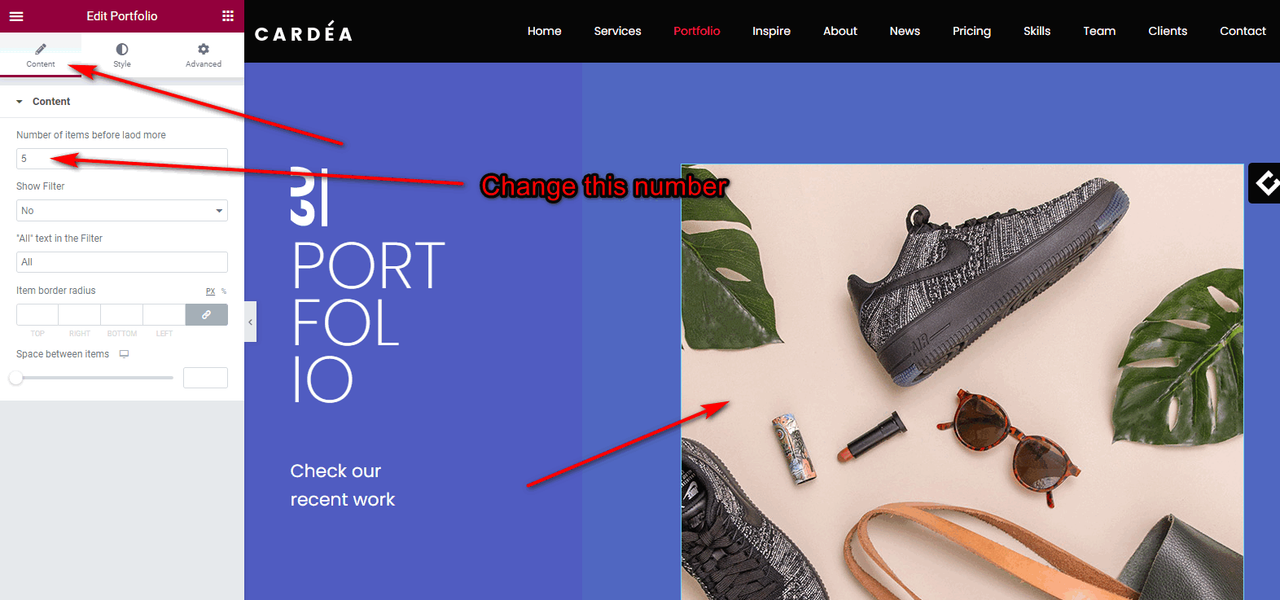
i have a question about loading the items. it is possible to load 4 Items instead of 3 in the portfolio scetion. I could not change any Javascript because i could not read it. But i think a question could be possible  Thanks in Advance Guys
Best Regards
Thanks in Advance Guys
Best Regards
Hi,
Thank you for the kind words.
I am not sure if you are using Shortcode or Elementor Widget to show your portfolio items.
If you are using shortcode, then you can control how many items to be visible + how many to load using shortcode like this:
[portfolio show="4"]
So, with that code, by default it will be visible 4 items and when you click load more – 4 more items will be loaded. There is no option to set for example to be visible by default 2 items and when you click load more – to load more 4 item. The visible number of items by default must be the same as the number of items which will be loaded when you click on load more.
In case that you are using Elementor Widgets for that, you can change that number in few clicks (check image).
https://i.postimg.cc/cH7xCTRf/num-Of-Portfolio-Items.pngIf you still have questions, please use our support forum. Thank you.
https://cocobasic.ticksy.com/When I try to edit the one page page in Elementor I always get an error that “the_content” is missing. I can only work with the template editing individual pages.
Hi,
You don’t need to edit the OnePage – that page has no content it self but includes content from all other pages which are included in one page (the first version of Cardea was without Elementor and that was the only way to have a long one page theme but not to have 100 shorcodes all just on one place/page – it will be very hard to edit/control all parts).
You need to edit each Page (which represent one section in OnePage).
If you have more questions, please use our support forum – https://cocobasic.ticksy.com/
Thank you.
Ok thanks. Interestingly it worked to edit the OnePage and switch between parts in the beginning. After a bit of editing, when I removed some pages it stopped working.
Can I delete OnePage?
I mean is the composition done in template code or in the (now inaccessible) OnePage?
If I understand you correct, this is the answer to your question:
https://cocobasic.ticksy.com/ticket/2332436/Some more instructions – https://demo.cocobasic.com/documentation/MANUAL-CardeaWP.pdf (on page 17 – “Home Page”).
In short – you can control which page will be a part of OnePage (you can have unlimited sections there). Also, you can have unlimited Separated/Stand Alone pages (for cookies page or some other if you need).
Also, you can change order value for Pages and on that why you will change the order in OnePage.
Also, you can remove the pages from OnePage totally by using status “Draft”.
Hope I have answered to your question. If you need more help – please use our support forum.
Thank you.
To hide a section the page can be deleted. But what about ordering, of the one pager parts? I need for example the contact to be higher. I tried to use simple ordering drag and drop plugin, and change order in menu. Not sure where else I can look.
Btw. When one of the pages is put into draft the editor on the startpage does not load anymore with an error.
Hi,
To change the order inside the OnePage – you will need to set a “order” value for each page (section). Check image in our documentation on page 17 – https://demo.cocobasic.com/documentation/MANUAL-CardeaWP.pdf
If you set the page to be draft – it will not be loaded anymore in OnePage and also will not be visible anymore as standalone / separated page. But, if you need still to be loaded in OnePage and not to be visible as standalone / separated page after you set a page to be draft – maybe I can make that modification for you. Please open a support ticket on our forum – https://cocobasic.ticksy.com/
Thank you.
One question.. the pages are also individually accessible for google with their own URL. I tried to set them as private and let only onepage public. But that does not work. Is there a way that the onepage pulls that information but is “isolated”. I think that would make most sense here.
Hi,
There are 2 options:
- You can redirect from individual page to OnePage + section For example from mydomain.com/service to mydoain.com/#service
The redirection from one URL to another can be done also with a plugin (search on Google – there are a lot of tutorials about that and which plugin to use). One example – https://webdesign.tutsplus.com/tutorials/how-to-redirect-a-page-or-url-in-wordpress--cms-35373
- The second option it to try to disable individual pages from Search indexing. As I know, Yoast seo plugin has that option but some indexing website may skip that and still indexing page.
I am suggesting the first option.
If you have more questions, please use our support forum. Thank you
Loving your theme
Thank you
Hello, loving your theme!! I have a question tied to the portfolio section.
I am trying to avoid having the user click and open the portfolio item. I love that when you hover over each image, it shows the text of the portfolio item and a brief description. That I want to keep because it is perfect. But I would like to prevent the user from then clicking on the item and it opening a new tab/page/image.
I see you have it to open the page, open an image, video, or external url. I would prefer to not do anything when someone hovers over.. I just want them to see the portfolio box hover and show the text but not open any pages.
Thank you for your time and I look forward to using this theme for a long time!
Hi,
Thank you for supporting us!
Try to add this CSS in Dashboard > Appearance > Customize > Additional CSS :
a.item-link {
    pointer-events: none;
    display: inline-block;
}
.grid-item:hover .portfolio-text-holder,
.grid-item:hover a:after{
    opacity: 1;
}
If you have more questions, please use our support forum – https://cocobasic.ticksy.com/
Thank you.
Thank you so much!!! Perfect!! I replied to you in your support forum with a followup question tied to the portfolio, but I appreciate this code that fixed my issue here!
Hello, I followed all the instructions to install Demo 7 correctly, but it seems that the custom colors are incorrect in the menu
Hi,
It looks like you have found a solution.
It was in Dashboard > Appearance > Customize > Colors.
Also, there you can set a different preloader Dashboard > Appearance > Customize > Images (you have in media library the “blue” preloader gif animation).
If you have more questions, please use our support forum – https://cocobasic.ticksy.com/
Thank you.
Is there a way to receive the new demos .xml because I think mine are damaged and failing to work out?
Hi,
- Re-download the theme from ThemeForest to get again the demos files
- If you have troubles with some of them – use our support forum https://cocobasic.ticksy.com/
p.s. there was a WP update 2 days ago to 5.9 – maybe that has something to do with demos – I will check that also next week.
Does the template supports RTL??
By default no, sorry.
I saw some customers are using my Themes in RTL language but they have done all modification them self (without my help) to make them RTL.
Hi,
I would like to purchase this theme.
Can I put a video on the main One Page home screen?
Thank you
Hi,
Yes, you can.
Please open a support ticket on our forum when you are ready and I will help you with that.
https://cocobasic.ticksy.com/hi, I need to ask before buying the theme. The license fee is yearly? and future updates are free for a year?
Hi,
You will pay just once and you will get updates lifetime – so, it is not for a year – it is lifetime.
But you can use it just on for 1 website. If you need to use it on for example 3 websites – you will need to buy 3 license.
Best
I love this theme! Design is clean and modern. Thank you for theme update.
Thank you for kind words!
Hi,
will Cardea be compatible with Elementor 3.10.x / Elementor PRO 3.10.x soon?
Thank you in advance,
Rgds. Thomas
Hi,
On my live demo is already Elementor 3.10 (few days ago updated) and until no one has reported anything broken. It looks for me like it works fine.
I am not testing with pro version sorry (not required).
But if you find any problem after update – I will try to fix it in no time (all my themes must always be up to date – all must work on latest plugins/WordPress/Php versions).
Hi CocoBasic, super quick answer! Wow. Thank you very much. I confirm, that there are no problems with Elementor 3.1.x / WP 6.1.1 (but with PRO … removed it from plugins)
Actually, I do not know how to edit header menu fontsize :eyeroll Thougt, it is theme builder / header / edit. No way. PRO is deactivated. How do I change the header section resp. Menu typography? Think, I have to renew support 
Hi,
Header is not created with a page builder, so, you can not edit it with a builder (you can create a totally new one, but not edit the default one).
To change font size, try to add this CSS in Dashboard > Appearance > Customize > Additional CSS :
.sm-clean a,
.sm-clean a:hover,
.sm-clean a:focus,
.sm-clean a:active {
    font-size: 16px;
}
If you have more questions, please use our support forum. Thank you.
https://cocobasic.ticksy.com/How do I access the “Page Preference” referenced in your PDF documentation on page 18?
Hi,
Take a look on page 17 (page above).
Go to Dashboard > Pages > Home and edit page with default editor (not with Elementor) and you will see below the editor the Page Preference part.
Thanks, I had some plugins that were interfering with the pages, but it works now.