103 comments found.

Great template but very bad idea that you used different style sheet for demo1, demo2, demo3 … etc and different style sheet for subpages. Do you have simple solution to merge those styles in one style sheet. It is no sense for me after many days to fight with styles and find it what is responsible for in demo and in subpages, useless ….
Hello, @mickey0,
You have to do it manually, unfortunately, this is not possible to directly merge all, you have to add the files in the folder and then set the path in the code and then you can use the classes.
Regards, P-THEMES.
This way it will double the same code and it will double transfer of css file.
Hello, @mickey0,
Yeah right, so its better to copy the only code you want to use on your site from those files or write by yourself.
Regards, P-THEMES.
wolmart has Admin panel?
Hello, @pgirard3n1,
First of all, thanks for showing your interest in our template 
This is the pure HTML template and you can use it with any CMS as per your requirements, It includes HTML, CSS and JS files, and no admin panel, if you want to change/modify anything, you have to change into the Core files.
Regards, P-THEMES.
What version of bootstrap does this theme use?
Hello, @michaelt05,
Our template is using bootstrap version 4.
Regards, P-THEMES.
I wan to use demo15.min.css for the entire of the website. That means for both home page and product detail page. I see that I can use it for home page, however, for Product Default page, it is using style.min.css, if I use demo15.min.css for Product Default page, some of the styles are not working. How do I use demo15.min.css on Product Default page?
Hello, @michaelt05,
No need to worry, All you have to do is to link the CSS style file on the demo header part like this for example https://i.is.cc/2fazv8bo.png by linking the file it will load the style from the file, and the result will appear on the page.
Thanks for understanding.
Regards, P-THEMES.
I replaced style.min.css with demo15.min.css on page product-default.html and the Zoom on image is not working and the format under SPECIFICATION is broken here https://www.screencast.com/t/68MC3ZQF also the Review form layout is not working https://www.screencast.com/t/32xisIYiNiNY Here is the link to my code https://www.screencast.com/t/gXaObCLWsIXr
Hello, @michaelt05,
Alright, Please contact us via our support forum by creating a ticket so that our customer support team member will help you to solve your issue.
Regards, P-THEMES.
@PT-Support2, I just submitted a ticket #10487. Please look into it for me. Thank you
Hello, @michaelt05,
Great!! Now please be patience, once your support ticket will be resolved, you will get the reply to your support ticket accordingly.
Regards, P-THEMES.
Totally no help, purchased 10 days ago, asked 8 days ago, two requests through the seller’s support system, zero response. Maybe this support system does not work ? Ok, I will try ask question here: I need Quick View changes to work it like Gallery, it means it should be with with arrows “next” and “previous”. I am almost sure that this script named Quick View has this possibility. Example is here: https://opencart.opencartworks.com/themes/so_emarket/index.php
Hello, @mickey0,
Sorry to say, dear but it is a HTML template and there is no such functionality added in it. Making it as per your request requires huge customization. You can customize the template and add the functionality in it according to your need. You can hire a developer for this or contact our customization team at pthemes.developer@gmail.com or ptheme.customize@gmail.com for their paid service.
Regards, P-THEMES.
How do you deal with unequal width and height of product images? I have multiple products and each of them has different size of width and height images. So for the Product Listing page, right now it is showing very uneven boxes.
Hello, @michaelt05,
As it is the HTML template there is no logic/condition set to fix it. There is only 1 way to deal with it and that is uses the equal size of images for products. If you added images of various sizes you will face the sizes issues on the site.
Regards, P-THEMES.
Thanks
You’re Most Welcome!
Can the sidebar shopping cart be scroll up and down when the list of products in the cart is long?
Hello, @michaelt05,
You have to add the CSS code on the demo CSS file you are using. You can find all the demo CSS files in the template main folder >> assets >> CSS. Below is the code you need to add so that it will start scrolling when I items increase.
.cart-dropdown.cart-offcanvas.opened .dropdown-box{overflow-x:scroll !important;}
Regards, P-THEMES.
Thank you
You’re Most Welcome!!
Question for the QuickView popup. How do you make it to popup for different product? For example, Product A has Quickview Popup A, Product B has Quickview Popup B, etc. On a page, I have many products, so how do I make those Quickview popups dynamically?
Hello, @michaelt05,
Making the popup dynamic for quick view requires extra customization because it is an HTML template with dummy content you have to add customization in the template core files to make it work as per your need.
If you are not able to customize it you can hire a third-party developer or contact our customization team at pthemes.developer@gmail.com or ptheme.customize@gmail.com for their paid services.
Regards, P-THEMES.
Hello, @bpeason,
Thanks for sharing your site access I am able to check your issue and you are right about the icon.
In order to solve your issue you can remove the font files from the demo file you are using and try to use the font icons by following this document: https://fontawesome.com/docs/web/add-icons/how-to as your site is live on a server you don’t need the local files fonts. Using a live font files will also increase your site speed score as well.
I hope you understand.
Regards, P-THEMES.
Hi, Do you have a way to view of the w-icons or a list, so we can see what is available with this template? For example, we are looking for an icon what would represent “Log In” vs “Account” to use in the sticky footer (w-icon-home).
Also, so you have documentation with this template somewhere (there were none in the download.
Thanks. Submitted a ticket also.
Never mind, he list of icons in the template…Another question. Is there a way to show the up arrow to navigate back to the top of the page on mobile devices and tablets? Thanks.
Hello, @LetsDezign,
Actually, Yes, you can show the back-to-top icon on mobile devices and tablets. All you have to do is open the CSS file of the demo you are using like “demo1.min.css” file in this file you will see the code ”#scroll-top” which is set in the media query like this: https://postimg.cc/JtKr6j3V simply remove the code and save the file your issue will be resolved.
I hope you understand.
Regards, P-THEMES.
Worked perfectly. Thanks for the assist.
You’re Most Welcome!!
Hi, We’d like the very top of the header (gray area with welcome message, My account, etc.) to show along with sticky menu when we scroll down the page (but not the logo and phone area). Possible? Thanks.
Also, in Firefox, the drop-down for the categories in the top search is gray, not white like in Chrome. Can that be fixed so it is white in Firefox too? Thanks.
Hello, @LetsDezign,
Can you please contact us via our support forum by generating the support ticket and describe your issue in detail with some screenshots of your issue and share your site URL so that our customer support team member will help you with a proper solution in order to solve your issue.
Regards, P-THEMES.
Will do, thanks.
Can you confirm what this script is used for: assets/vendor/animate/animate.min.css?
Is it for the animated text for the top welcome message in phone view? (we want to make sure we can safely remove the link to this script as we don’t want the animated text and want to streamline the site pages for faster download).
Thanks.
Hello, @LetsDezign,
Yes, This file is for the animated text and style only on the vendor’s pages of your site. If you are not using the vendor functionality on your site you can remove this link from the script.
Regards, P-THEMES.
Okay, thanks. Questions on the two cart widgets, mobile and desktop. In your demo, you have only two items in the cart. How will it handle the way it displays the items if you have 10 or 15 items in the cart? Will it show all of the items in the cart with a way to scroll, or only show a certain number of items? Please let me know for each cart, mobile and desktop. Thank you.
Hello, @LetsDezign,
Actually, it is the HTML template and there is no such functionality added. In the cart mobile and desktop there are two products appear which are dummy we added in the template. Now, if you add another product to the cart it will not appear in the cart you have to customize the template as per your need. I hope you understand.
Regards, P-THEMES.
But when we add more items to the cart, the buttons View Cart and Checkout go right through the items…we though we were getting a working template. I understand programming is not included, but you should be able to add more than two items to cart without it breaking the template…
Could you please help us fix the layout so that when there are many items added to both carts (desktop and mobile), there are no layout issues. I created a ticket with screenshot. Thank you
Also, how can we make the top gray bar (Welcome message, etc.) part of the sticky menu so it also scrolls down the page? Thanks.
Hello, @LetsDezign,
I am sorry but can you please contact us via our support system with your site URL and Credentials, and explain your issues one by one there, so that our support team expert will check and help you out in solving your issues.
Regards, P-THEMES.
I created a ticket yesterday with screenshots. It’s an issue you can fix in your template first. I post here also because no one seems to get back to me on your support ticket. Anyways, we just need to be able to have many items in cart (both desktop and mobile) and not have the bottom buttons to View Cart and Checkout go right through them. You can test and your template pages and let us know the fix. Also, how can we make the top gray bar (Welcome message, etc.) part of the sticky menu so it also scrolls down the page? Thanks
Hello, @LetsDezign,
One of our support agent already replied to your support ticket, so please check back to your support ticket reply now and reply to it accordingly.
Regards, P-THEMES.
Hello, theme has scss files or css? Thanks!
Hello, @catamc90.
First of all, thanks for showing your interest in our template
It has the CSS and also SCSS files as well.
Regards, P-THEMES.
Hello What is the best Admin panel compatible with the template?
Hello, @upfotonl,
Unfortunately, we have not tested any of the third party admin panel with our template officially, so we are unable to suggest you on it, so you can try with any one which better meets your requirements.
Regards, P-THEMES.
How to Close or Remove newsletter-popup ?
Hello, @recepseyis,
Actually, the popup settings are set in the js files when the page load’s the popup auto trigger after few settings here is the complete guide document link about all the popups our theme have: https://preview.themeforest.net/item/wolmart-marketplace-template/full_screen_preview/32807563?_ga=2.100612126.1498687331.1659327417-288932620.1659327417&_gac=1.223804649.1659345845.Cj0KCQjw852XBhC6ARIsAJsFPN2fvR3ewNjS_g-oRh2-n9UowTUAhHM6TKOKxQfCfElLEDsrXy4vRk0aAqZfEALw_wcB In the template folder >> js >> main you will see the file named “popup.js” and “minipopup.js” check these files for the popup settings and customize the code as per your need.
Regards, P-THEMES.
Hi,
I have a question on how to combine demo1.css and the main style.css.
I want to have an opened dropdown category on homepage, like on the demo1.html. And on other pages want to have it closed as on product-default.html for example. Is this achievable? Or I have to code this manually.
Hello, @vstruhar,
Actually, it is HTML Template so you have to code this manually. There is no other way to do it. I hope you understand.
Regards, P-THEMES.
Yes, I understand that this is a html template. I’m developing the backend for it, but the question was how to combine demo style with the main style.
I will just post my solution here if somebody needs it. This solution works only with sass compiler.
In your main scss/sass file use the main style with the custom demo file, like this:
@import './theme/style.scss';

body.home {
    @import './theme/demos/demo1/_demo1_custom.scss';
}
Now category dropdown will be opened only on page that has a home class on body tag, otherwise it will be closed.
Hello, @vstruhar,
Sound’s Good
Thanks for sharing the solution here with others, it might help someone else will have the same issue.
Regards, P-THEMES.
Hi
I really like your theme https://portotheme.com/html/wolmart/demo8.html and was seeing if it’s possible to make the theme/design into a opencart 2.3.0.2 version theme please
Hello, @ianbwsolutions,
First of all, thanks for showing your interest in WolMart HTML
It is pure HTML template and you can customize use it with any CMS as per your requirements.
Regards, P-THEMES.
Hello. On Browse categories, is there a way that ul megamenu could be positioned always a the top, same level of the first categorie? thanks
Hello, @martinvare,
Can you please share the URL of your live site and the screenshot what you want exactly so that I’ll check and help you out.
Regards, P-THEMES.
Hi, Does the Wolmart template allow you to setup your own shopping cart or do most people hand it off to a 3rd party shopping cart?
Hello, @Metrail,
First of all, thanks for showing your interest in our template
It is pure HTML template with included HTML/CSS/JS files so you can use/modify/customize it as per your requirements.
Regards, P-THEMES.
Hi, how can I set (widget widget-collapsible) to collapse by default? I only want some of the filter opened and others closed.
Hello, @sickoo0,
Actually, We didn’t add this kind of feature in the template. But as you know it is a HTML template so you can make it as per your need. To make collapse by default you need some JS code you can find from Google once you find that code add the code in the demo file you are using and I hope your issue will be resolved.
Regards, P-THEMES.
Do you gonna update to bootstrap 5? if yes I will buy.
Hello, @sickoo0,
Our template is already bootstrap5 ready, so you can use with it.
Regards, P-THEMES.
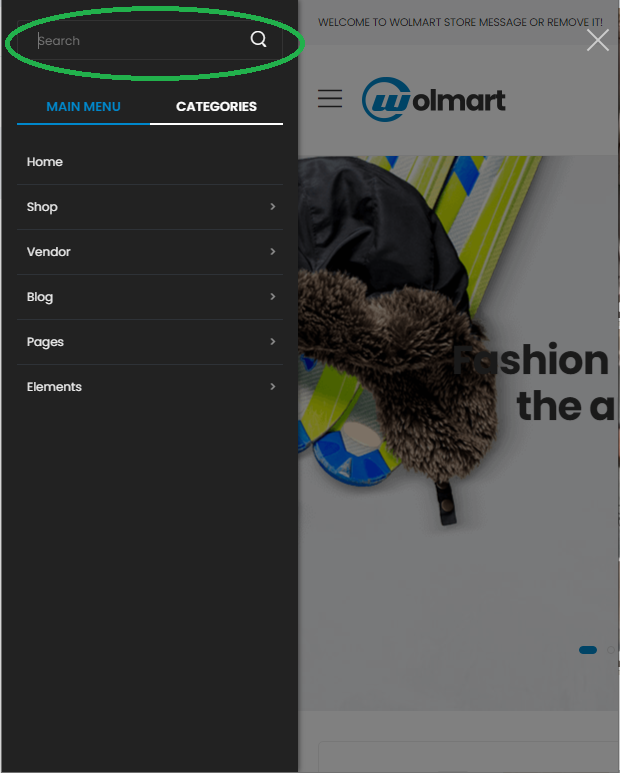
Hello, About the search box problem reported by user TN_Plugin 1 day ago, I have seen it too. For view this problem only use real mobile device (Please do not look at it on PC only open by mobile device) and open one of Wolmart template like demo2, and open menu bar to use search box, when touch on search box, Sidebar close automatically and user can’t type anything. please view this screenshot https://i.postimg.cc/Dz8wxFdM/Capture11.png
Hello, @rebingroup,
I have just checked it now and found the same issue at my end, I am very thankful to you for notifying this issue to me, I am forwarding this issue to our development department for testing it in deep and fixing it with the upcoming update of the template.
Regards, P-THEMES.