39 comments found.

Hi, it probably is but is your elsey theme compatible with the aliexpress dropshipping plugin?
Hi,
Thanks for reaching out about our Elsey theme. Here’s what we know about compatibility with the aliexpress dropshipping plugin:
- We’ve not checked with that plugin, yet.
- However, if it is developed based on WP standards, we hope it should support our Elsey theme.
Thank you.
On the Full Width theme, there are elements that are not full width. Is it possible to make the entire website 100% full width?
Hi,
I think you’re talking about the shop full-width page. You can make a section full width through the Visual Composer row settings. Screenshot
Thanks.
Hi Team,
1. When I click on the 3 bars in the top right corner. My website doesn’t display Recent Posts like your original theme.
2. When I minimize the site in Tablet and Smartphone view, my site doesn’t show the menu and doesn’t show the 3 lines menu bar like in your original theme.
3. When I scroll through the website, my menu bar is pinned to the top.It is not pinned. Scroll scrolls down as you scroll like your original theme.
4. My home page Slide doesn’t display the same as your original theme.
How should I fix all of this?
You have already mentioned the same set of questions in the support center. We have already replied. Please follow up there.
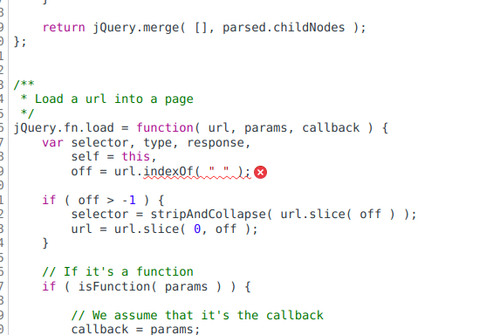
Hi team, We are facing issue in the theme Jquery. When i checked it says new version of JQuery the use of .load is deprecated. Do we have an updated code for this? PFA.
IMG #1: https://iili.io/H7vcnlp.md.png IMG #2: https://iili.io/H7vcQdN.md.png
Hi,
Please let me know which theme version you’re using and share your website URL.
& open a support ticket at:https://victorthemes.com/my-account/support/
Regards,
VictorThemes
Hi, I have bought download from envato element subscription. That’s is same version and all or not?
Hi,
Both are the same versions, I’m just asking for your current Elsey theme version number and Elsey core plugin version.
Here are the current versions and how to update them:
Elsey (Theme) 1.9.6
Elsey Core (Plugin) 1.6.5
Change Log
How to update the Elsey theme?
How to update the Elsey Core plugin?
How to update the WPBakery Page Builder?
Regards,
VictorThemes
Hi VictorThemes,
Thanks for your answer. But I have some question. So, I have bought subcription download this theme from element. But I try can’t update theme on envato market.
After create token follow your step. System can’t see this theme in. So, for resolved this problem. How can I do that?
Or I need bought this theme from envato market only?
Envato Market plugin only works if you purchase it from the themeforest. Not on Envato Elements.
You can redownload it from the elements download page and delete the old theme and add the new theme.
Thank you.
Hi VictorThemes
Thanks for ans. I have some problem about try checkout page. Because after add cart and try checkout. It checkout page don’t processed that.
In theme I have update all latest version already and all plugin update already too. Could you please share idea for fixed this problem?
https://bit.ly/themecheckoutRegard, tridento
Hi,
Please let us know what is the exact version number you’ve on your website.
- Elsey (Theme)
- Elsey Core (Plugin)
Regards,
VictorThemes
Elsey (Theme) is version 1.9.6.1
Elsey Core (Plugin) is Version 1.6.5
Hi,
Ok, currently we’re looking into the Elsey theme to release the update.
Also, we recommended some points to you on our support ticket. Please follow up there.
Thank you.
How can logo give a better size, that only being small.
Hi,
You can control the logo width size from: Elsey Options > Logo > Retina & Normal Logo Width.
Thank You.
Hi guys, could you pls tell me how to speed up the counter? Best, Micha
Hi,
Unfortunately, there are no options or settings for customizing the counter speed.
But you can customize it easily from the direct edit or coding files.
wp-content/themes/elsey/assets/js/scripts.js
Line number 387
We set that for 4000 means 4 seconds. (1000 means 1 second)
Regards,
VictorThemes
GREAT. Many thanx!!!
You’re Welcome! 
Hello VictorThemes. I have a question about blog page in your theme. Please have a look at this picture: https://imgur.com/e8NwkSZ
Thank you!
Hi,
You can add more blog widgets from:
Appearance > Widgets > Main Widget
Please read each widget title and add the widgets that you’ve wanted.
I hope this helps!
Regards,
VictorThemes
Thank you. And please help me one more time. Can I embed YouTube link into website like this: https://imgur.com/undefined
This may be very simple, because this is the first time I use a WordPress website and theme. So, you don’t need to show me how, just answer “Yes” if I can do it in admin box, and then I will find the way by my self.
Sorry, I post a wrong link. Here is the right one: https://i.imgur.com/DvayqaW.jpg
I hope you will have a look at this. Thank you very much VictorThemes!
Hi,
Just use the embed code from YouTube and paste that within that product page description.
Please confirm themeforest purchase details to get further support.
Thanks.
Ah sorry, I got your theme as a gift after buying hosting, so I don’t have purchase details. Thank you for your support!
Hi,
Which hosting you purchased? We’re not providing any of our theme as a gift for hosting provider companies.
Explain more?
Regards,
VictorThemes
It’s just a local hosting provider in my country. I guess they bought your theme on Themeforest with Extended License.
No, it’s not within that license of use!
Wow, so I have to think again about buying from this company. Because I have not purchased yet (I just pretend to do). They say they have some themes as gifts for me, so I am trying to have a look at them to find which one is suitable for me. But now I have to make sure that their themes are legal.
Thanks for your attention and sorry for this inconvenience!
Hi, I am using your template for shop fullwidth but when i am trying configure slider, i see it isn’t the same like demo: https://victorthemes.com/themes/elsey/shop-fullwidth/ I see in code you are using revolution slider… Could you send me slider zip for import it? Thanks.
Hi,
In your download package itself you’ll see the Demo Data > Sliders Folder.
Check the following screenshot: https://i.imgur.com/fWBXdvI.pngI hope this helps!
Regards,
VictorThemes
Thanks.
You’re Welcome!
Hi
I would like to know how i can update theme plugins (for example: WPBakery Page Builder)
I bought it a years ago and i need updated it…
Are you going to update the theme soon?
Thanks!
Hi,
Thanks for purchasing our theme!
1. How to Update Elsey theme?
Please install the “Envato Market” plugin in order to updates within your WordPress Dashboard itself.
Guide: https://www.wpexplorer.com/envato-market-plugin-guide/
2. You can update the “WPBakery Page Builder” plugin using the following video simple steps:https://www.youtube.com/watch?v=9vTP2fPb4II
3. How to Update Elsey Core plugin?
Can you please update our Elsey Core plugin using the following steps. It’ll not show any update notice, so do what we did in that video. In the video, we’ve updated the WPBakery/Visual Composer plugin. Apply the same steps to the Elsey Core plugin. The latest version has these fixes.
I hope this helps!
Regards,
VictorThemes
I have a bigger business name and have used yours from off the elements. if i have to buy it on here i will but is there a way to edit the width of the logo. other than the options cause it doesnt seem to be working.
no matter what i do with options or the options within the page itself. It just doesnt work to make the logo bigger than 130 width before it shrinks the height.
I cant submit a ticket cause i dont have a purchase code either. Ill buy it one here if you guys can assure me a fix.
Hi,
Unfortunately, themeforest customers only get support. That’s why you can’t able to submit a ticket.
We also do not offer support in themeforest sales page, since your purchased sales page from different marketplace.
Use following CSS code at : “Appearance > Customizer > Additional CSS”.
.default-logo {max-width: 180px;}
Change the 180px value in order to increase it.
I hope this helps!
Regards,
VictorThemes
Thank you so much that fixed the issue. You guys are amazing Im gonna buy my next theme with you guys for sure.
You’re Welcome!
Thanks.
hi. is it possible to show old price before sale price? i notice the theme commerce doesn’t show the old price. how to enable it?
Hi,
You’ve asked same question in mail. We replied.
Regards,
VictorThemes
Hi team,
I have right now one small issue that I have try but I don’t know yet how to fix, and It is in the responsive part.
When it goes in Mobile mode, the Icon of the page that is supposed to be in the left top part of the page, just disappear. It disappear and I don’t know yet how to tell him that in Mobile mode the webpage should still show the Icon of the web page. Even de favicon I think is not showing.
In case that you have for me any recommendation, thank you so much for your time again team victor.
Hi,
Thanks for purchasing our theme!
https://i.imgur.com/Sw6OXYb.png
Which loads just fine as expected.
Hope this helps!
Regards,
VictorThemes
Hmm ok thank you, well maybe For me is not working good as a mistake. Could it be maybe because I give more size to the icon with:
.default-logo { max-width: 200px; }
How can I fix it so that It can be also visible with the responsive for mobile?
Hi,
Can you please able to contact us via profile page with your site exact URL? So, that we’ll understand about your point more clearly.
Or open a support ticket at : https://victorthemes.com/my-account/support/
Thanks!
Hey thank you for answering ! Yes I will, I believe that it will be something small for fixing it
You’re Welcome!
Done.
Hi One More Time VictorThemes.
I am here one more time saying hi! jeje I have a small question, maybe you can tell me please how to change something in less than 30 seconds.
In the Demo https://victorthemes.com/themes/elsey/You can see that in the slide Bar that there are the 2 buttons called “PURCHASE NOW” “VIEW COLLECTION”
How can I change the one that is transparent, so that I can see it more clear when the background is not that clear.
Thank you for this help, I can really not find how to make it not transparent in my website..
Thank you so Much
Hi thank you, I figured out how to pass this problem.
By the way, I’m trying to make bigger the main manu in the top of the web page. But this code is not working.. can you please tell me what could be wrong?
els-main-menu li a, .slicknav_nav li a { font-family: “Hind”, Arial, sans-serif; font-size: 25px; font-style: normal; font-weight: 300; }
I am trying to put the font size from 15 to 25, but in Additional CSS, it is not receiving the changes ..
any Idea how to increment the main manu in the top size?
Thank you once again
Hi,
Hope all of your doubts fixed. And for the last point.
You can change font size for the main menu from the Elsey Options itself.
Elsey Options > Typography > Title: Menu Typography.
I hope this helps!
Regards,
VictorThemes
thank you one more time!, sadly I got an issue while saving, but well.. in case that you guys know what could it be, it is in the last ticket. Thank you really always for your time.
Hi,
What type of saving issue you’ve? Please explain more with your site url and login credentials.
In a support centre:https://victorthemes.com/my-account/support/
Regards,
VictorThemes
Thank you, you guys solve everything (y)
You’re Welcome!
That’ll make us happy, to provide better support and theme! https://themeforest.net/downloads
Regards,
VictorThemes
Hi Victor Themes,
Hey Can I hide the Shopping Cart icon that is in the Menu?. Is it possible? I have try but it is not working yet.
Hi,
Thanks for purchasing our theme!
You can hide cart widget for global pages using : Elsey Options > Header > Menu Bar.
Or from each page edits.
But, quick solution is “Appearance > Customizer > Additional CSS”li#els-shopping-cart-content {display: none;}
Regards,
VictorThemes
Ohh thank you I did it yesterday but thank you anyway for the answer.
You’re Welcome!
Hi one more time Guys or Victor,
I have one more question, sorry for disturbing in basic things, but is it possible to modify Footer? is there any option for this in the wordpress menu?
I want to modify such details:
Your Online Store.
95, FF3 Creative Street, California 035, USA.
T: +1 (800) 433 544
I want to put my client details
Thank you so much one more time!
I found it, jeje Thank you
Hi,
Hope you find the solution. Thanks for replying and clarifying!
Hi Victor Team,
I have a small question, I hope that I dont disturb that much over there. The question is, how can I increase the logo size of the webpage. I manage to upload the logo in the elsey options -> Logo categories, But the logo did upload in a really small size. Also the actual picture has 3461×977 pixels dimension.
How can I in a effective way upload that logo, and give him a better size that only being small.
Thank you team
You guys will think that Im joking.., But one more time, it is fix. Sorry for disturbing over here.
Hi,
No problem!
Hope you find the solution. Thanks for replying and clarifying!
Regards,
VictorThemes
Hi there we are configuring the elsey theme but not sure how to configure the ‘Mega menu’. There is no document for it
Hi,
Please edit the parent menu and child menus. You’ll see all of the options in it. No need documentation to understand. It’s straight forward in the settings title itself.
See the following image:https://i.imgur.com/E7p5r8E.png
Regards,
VictorThemes
Hello thank you but we cannot customise the width / height of the menu .
Also another question we added the Envato api and username to the options but how do we update the theme ?
Where do we go to ?
Hi,
We’ve default minimum height. If you add more menus, it’ll adjust based on it. Width is from the column you choose.
You can also control it by CSS code if you want to customize.
Update:
How to Update our theme?https://www.youtube.com/watch?v=DwpG13TXUA0
Or
Please download all source files from the themeforest downloads page. And extract it to see a “kroth.zip” file.
So, delete our old theme and install this new theme.
Note: This will not affect your existing content and structure of your database. The theme only gets updates without any changes.
Hope this helps!
Regards,
VictorThemes
Hi i tried to update using the video instructions and pressed ‘update’ but it says:
An error occurred while updating Elsey: Download failed. A valid URL was not provided.
Hi,
Then do the second option? We already explained above?
Please download all source files from the themeforest downloads page. And extract it to see a “elsey.zip” file. So, delete our old theme and install this new theme.
Note: This will not affect your existing content and structure of your database. The theme only gets updates without any changes.
Hope this helps!
Regards,
VictorThemes
Hi! I have tried update your theme but i have a lot of errors an i cant. Please can you help me?
Hi Paulo,
Please download all source files from ThemeForest downloads page. And extract it to see a “elsey.zip” file.
So, delete our old theme and install this new theme.
Note: This will not affect your existing content and structure of your database. The theme only gets updates without any changes.
Hope this helps!
Regards,
VictorThemes
Thanks! I did it manually in FTP and it works… but in panel it isn’t possible with envato api.
Yes, we’ll check and update that fix.
Thanks.
RTL support?
Hi,
No RTL support for elsey theme!
Thanks!
Hi thank you for your answer. I think that this screenshot may help to understand our issue. Please see http://www.lacicognastuder.it/test/wp-content/uploads/2018/07/yith.png
Maybe the problem is the absence of the post_thumbnail_html hook. Can you add this hook to fix this issue. Thank you in advance M.
Hi,
Ok, we’re taking a look at this issue. Since, we’re using lazy load and other functionality in same hook. It’s hard to implement their structure also within our product image area.
We’ll check and let you know, if we’ve any development improvements on it.
Hope you understand!
Regards,
VictorThemes
We solved it by ourself. Thank you for your support. Best regards Mario
You’re Welcome!
I i bought elsey theme and my customer is happy. We have a problem with Yith Badge management. Badge are not showed on shop page and in some other view. In shower on product page only. We sow on Yith suppor page and the issue semm to be generated because some woocommerce hook are missed.
Can you help us cause in this way we’re non able to show “on sale” and with other badge very important for us. Thankyou Mario
This is Yith comment:
“Hi, and thank you for writing in!
Your theme probably doesn’t use the standard WooCommerce hooks and functions: for this reason you don’t see any badge on products. YITH WooCommerce Badge Management uses the following hooks to add the badges on product images:
woocommerce_single_product_image_html (WooCommerce < 3.0.0)
woocommerce_single_product_image_thumbnail_html (WooCommerce >= 3.0.0)
post_thumbnail_html"Hi,
Thanks for purchasing our theme!
You can see WooCommerce removed following hook from their latest 3.0x versions : woocommerce_single_product_image_html
https://github.com/woocommerce/woocommerce/wiki/2.6.x-to-3.0.0-Developer-Migration-Notes#deprecated-filters
Also, please make sure to have latest version of our theme : 1.5.1 to the latest version.
Refer following video for updating our theme : https://www.youtube.com/watch?v=DwpG13TXUA0
Regards,
VictorThemes
Hi thanks for reply, I already have 1.5.1 version. Con you provide a fix for this “hook-less” issue? Thank you M.
Hi,
Ok – Let me explain more clearly!
woocommerce_single_product_image_html – This hook is offcially removed by WooCommerce. And this is not even in WooCommerce plugin and our theme!
You can see directly here :https://github.com/woocommerce/woocommerce/search?q=woocommerce_single_product_image_html&type=Code
woocommerce_single_product_image_thumbnail_html – We’ve this hook in 5 places from our theme code :
https://i.imgur.com/lzC5pFC.png
post_thumbnail_html – This code hook available under WooCommerce files. Not from our theme file.
https://github.com/woocommerce/woocommerce/search?utf8=%E2%9C%93&q=post_thumbnail_html&type=Code
I don’t know, how to explain even further.
May be open a ticket at : https://victorthemes.com/my-account/support/
And mention your site URL with temporary administrative login credentials. And, please share the area you’ve a issue – with screenshots possible.
We’ll try to dive more into your issues.
Hope you understand!
Regards,
VictorThemes
Pre-purchase question: is it translation ready ? Compatible with WPML ?
Hi,
You can able to translate our theme. But, WPML is not officially supported.
Regards,
VictorThemes
Hi there just a question how do you show review stars in the shop? We cant seem to see how to enable this?
Thanks
Hi,
Please update our theme in order to fix review star issues. https://www.youtube.com/watch?v=DwpG13TXUA0Regards,
VictorThemes