945 comments found.

Is it possible to add a CTA button to add properties in the header?
Hi,
Sorry, the theme doesn’t have this feature.
Best regards!
Hi, I need to edit the contact form email address of receiving party and I can’t find a way to do it. (ones we submit the “Contact Us” button to which email it forwards the email? I need to edit that email address) Please advise.
https://odiliyahomes.wpdevcloud.com/contact-us/Thank you ! Rukshan Gunaratne
Hi,
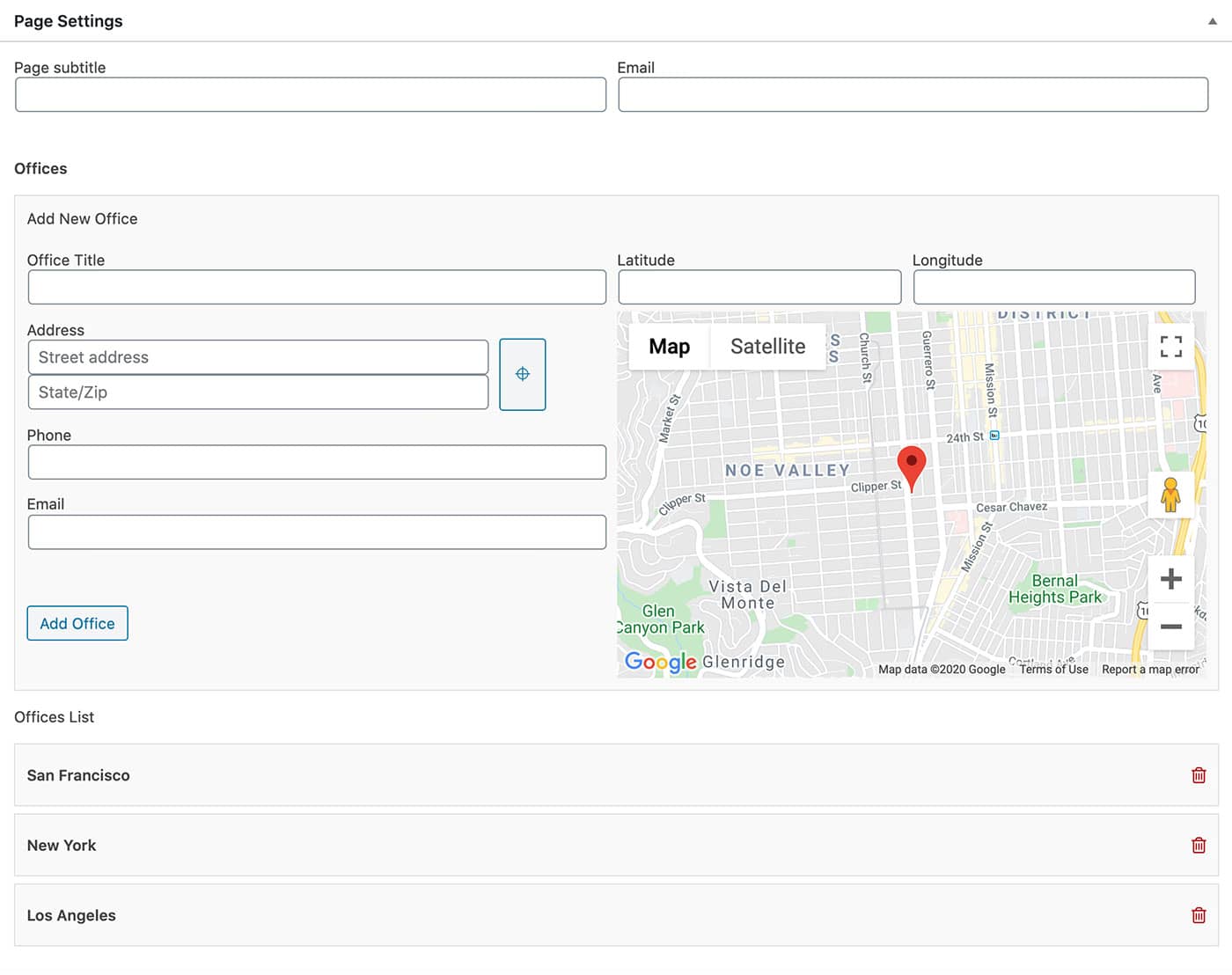
When you edit the Contact Us page, you’ll find the “Page settings” section down the the bottom, you will find the Email address setting there, please see this screenshot: https://pixelprime.co/themes/resideo-wp/documentation/assets/images/56.jpg
Best regards!
Hi, I have already updated that email. but when I submit Messages it does not deliver to the email address that I mentioned. Thanks.
Did you also check the Spam folder?
Yes I did, but was not there.
Hi,
Please send a private message ( using the contact form on the profile page: https://themeforest.net/user/pixel_prime ) regarding this issue and also mention your website URL and admin credentials.
Best regards!
Hi there, I’ve got a problem with the resideo theme. When I modify or build a page by elementor a few issues appear on the web site. For example I can’t see anynmore the social in the widget in the footer, again the small man in the button of login disappear and I can see circle colored only. These problems only if a page hasa been create by elementor. Can anyone help me to understand the problem and fix it? Thanks so much about it. Web site: www.eaglebeakproperty.co.uk
Hi,
Please check now, I have added support for FontAwesome 4 in Elementor settings on your website. You gave me access before.
Best regards!
Good Morning, Checked just now. It works. Many many thanks. I appreciated that.
Can I now update the plugin or better leave it that? Thanks again
Hi,
You can leave it as is.
Best regards!
Ook, thanks again. Have a nice day!
Hello,
Can you make a refund, please? The theme do not support any page template. I need to use the Resideo plugging so I can’t use this template for my website. I do not do real estate and we can’t edit any slug on your theme.
Sorry about that Regards Eva
Done!
Hi,
I did setup Resideo theme then import Demo 1 Elementor. Page showed fine on both preview and Elementor editor but I cannot edit content module. Please help.
Regards, Vinh
Hi Vinh,
Please send a private message ( using the contact form on the profile page: https://themeforest.net/user/pixel_prime ) regarding this issue and also mention your website URL and admin credentials.
Best regards!
Hi pixel_prime,
I was trying to layout ‘resideo’ template to my client website here: https://thatsvlifed.wpengine.com/. The point is I cannot control the height of any widget (such as promo widget) via Elementor. Could you please check this dev site (where ‘Review by Robert and Marsha’ section – background is too high) and give me best solution to control it (by overwrite code or something similar).
Sorry that I cannot give you admin credentials because this site is not mine. Thanks.
Regards, Vinh
Hi Vinh,
Please check my email reply.
Best regards!
Hello, can you help me with the default interest of the calculator please…
Please check your email.
I thought I’d install the theme, and plugin, and demo – and it would look like the demo! so far not even close
Hi,
Please make sure to follow the exact steps from “Import demo” and “Setup” sections from documentation: https://pixelprime.co/themes/resideo-wp/documentation/#import-demo
Best regards!
Hello, two questions.
1. Can I make for sale the default on the home page?
2. Can I remove the for rent entirely from the search on the homepage?
Hi,
1. What is “the default on the home page”? Please be more specific with the location, area, widget, menu item…. Or maybe you are referring to the search field?
2. You cannot choose which of the property types are being displayed , but if you want to remove this specific type, you can do so by going to the Properties > Property Types section in admin dashboard and remove the “For Rent” type. It will not be displayed in the search field.
Best regards!
if a want to change the interest of a mortage calculator how can i do it?
Hi,
Users can change the value on the page, do you want to change the default value?
Best regards!
Hi, yes i want to change the default value
Ok, I will tell you where to make the edit, but I need to know which Layout Design did you use for the Property Page. All the best!
Hi,
Please see my email reply.
Best regards!
Hi, I am wanting to make changes to the mobile menu but I don’t know where to go to make those edits. I want to toggle the menu so that it does not show every subheading on mobile straight away.
Thank you!
Hi,
Please note that the menu is generated by WordPress and you won’t find the code that generates the menu in theme/plugin code. You can use javascript to manipulate the menu and add your script in main.js file.
Best regards!
Thank you! I tried to change the colour of the subheadings in the css file. When I test it in developer tools it changes the colour so I know I’m targeting the right headings ,but when I change it in the actual file it doesn’t update anything.
.pxp-nav > div > ul > li > ul > li > a { display: block; padding: 7px 20px; text-decoration: none; font-size: 0.8rem; font-weight: 400; color: #5CC9E7; -webkit-transition: all .2s ease-in-out; -o-transition: all .2s ease-in-out; transition: all .2s ease-in-out; }
The colour is supposed to be blue but it stays black when I save the changes.
Do you know why?
Hi,
Do you have your own style css file? If yes, please make sure to include your file after the main style is included. Check the order of execution in browser console, so you know which style is overwriting which.
Best regards!
I imported the demo and everything looks good but there is nothing there when you click to submit a listing. Is there another plugin needed?
Hi,
Could you please provide your website URL.
Best regards!
athleterealty.com
Hi,
Please send a private message ( using the contact form on the profile page: https://themeforest.net/user/pixel_prime ) regarding this issue and also mention your website URL and admin credentials.
Best regards!
hello, I just bought your theme, I did the demo installation, but it doesn’t look like the example, I couldn’t perform the full installation, can you help me with this?
Hi,
Did you follow the exact steps from Import demo and Setup sections from documentation?
https://pixelprime.co/themes/resideo-wp/documentation/#import-demoBest regards!
hello i got it thanks
Hi, is there any way to edit the grey text that’s in the Google powered search engine box? It says “Search by City, Neighborhood, or Address” and I wanted to take out one of the words..
Hi,
You can use the translation feature to modify any text. I recommend using Loco Translate plugin, which is easy to use.
Best regards!
I’m having problems translating the main theme, with the plugin the “Loco translate” plugin works perfectly but not with the theme.
Hi,
Please send a private message ( using the contact form on the profile page: https://themeforest.net/user/pixel_prime ) regarding this issue and also mention your website URL and admin credentials.
Best regards!
Hi,
I have already replied to your gmail address, please check.
Best regards!
Hi
Can every new user user frontend submission or does they have to an agent?
Thanks
Hi,
They need to have an agent/owner account assigned to the user. You can achieve this by enabling agent/owner registration.
Best regards!
Hello! This is a presale question. Does the theme support video in the gallery of the property page? If not, where is it placed on the layout?
Hi,
The property page have video feature, but it will not be displayed inside the photo gallery. It’s a separate sections, just like the other sections of the page (Overview, Key Details, Amenities), and you can choose the order.
Best regards!
Thank you! I’ll mention that to my client.
One more thing, my client would like to allow searching not by address but by type of property on the search bar on the homepage. Does the theme support such customization?
Kind regards!
Hi,
Yes, you can disable the address field and enable whatever field you need.
Best regards!
Excellent. Thank you very much for your prompt reply.
Best regards!
hi dear ! how are you? i need to changing on the header and footer on the template but i didn’t show from where i can change ..
Hi,
1. Header infoLogo -> Appearance > Customize > Site Identity Navigation -> Appearance > Menus2. Footer info
Appearance > Widgets > Column #1 - #4 Footer Widget Area
Best regards!
i have been trying to set a widget in the main widget but it is not displaying on my site. but when i tried in the footer widget it working perfectly, unfortunately that is not where i want it
Hi,
Which widget are you referring and where in the page? Could you please be more specific.
Best regards!
i have installed a currency a currency convertor plugins. which i want it to display on the home page as a widget.
Hi,
Please send a private message ( using the contact form on the profile page: https://themeforest.net/user/pixel_prime ) regarding this issue and also mention your website URL and admin credentials.
Best regards!
I want to put a responsive image in my header for phones but I don’t know how to edit it, it only lets me put one that only looks good on desktop, how can I put my responsive image?
Hi,
Please send me your website URL.
Best regards!
Hi,
Is this the image you want to have? I would like to see the page with the image that you want to use. The one that is now looks good. And also please keep in mind that the images are set as background cover in order to wrap all the header area.
Best regards!
Yes i want to use that image, how can i edit to use in responsive?
It is already responsive. Like I said before, image is set as cover, and its proportions are changed with the view, I don’t see any issue.
There is no way to put a specific image for responsive? I wish it looked different
But it is responsive, the image container for which the image is set as background cover IS responsive.
Hi, I’d like to remove the Login icon (head outline) from the header in order to avoid random people/bots creating accounts, and just have a specific private link for login users.
Hi,
You can do this with a minor modification in code.
1. Open this file: /themes/resideo/js/services.js and add these lines:
if (urlParam('action') && urlParam('action') == 'signin') {
    $('#pxp-signin-modal').modal('show');
}
at the end of the file right before this line:
})(jQuery);This way you will be able to access the signin popup using this URL format:
https://YOUR_WEBSITE_URL/?action=signin2. Go to admin dashboard > Appearance > Customize > Additional CSS and paste the following css:
.pxp-header .pxp-signin-trigger {
    display: none !important;
}
Best regards!