114 comments found.

Hi. The blog page on my site displays the entire blog posts in three columns. It should show and except and a ‘read more’ or similar. I’ve looked through all the settings but can’t fix this. Can you help? https://gocasa.me/blog-posts/
You should set it by WordPress settings. It’s not my theme related issue.
Fixed – thanks
Good Job!
Thanks!
Hello, some years ago I’ve downloaded this theme, but for free on a special offer: Sena – Creative MultiPurpose WordPress Theme, but for today I can’t update my theme to the latest version. There is a way to upgrade it?
Thank you.
You should buy it for the update.
Hi, I’m using the Sena theme and I just updated WooCommerce. Now I’m getting a warning that your theme includes outdated WooCommerce template files. Will you be releasing an update to fix this?”
I’ll update Sena theme in a few days including WPBakery plugin, too.
Is it compatible with RTL languages ?
I added it. But, not tested again.
Please help. As this is the 2nd time I bought the theme, I like it but dont remember having problems like this.
I think, there was a server issue on my side. You can try to import again.
If you face the same issue, I can help you to install it if you PM your WP admin login info.
By the way, you should use PHP 8.x.
Hi. Yes that worked now, and yes I was updating my server also to PHP 8+.
How do you change the navigation #- to which section it points to? ie: CONTACT in the navigation goes to #contact section?
Thx
You can add/remove Site Sections.
Hello. https://www.loom.com/share/65d98a6f0e7e4372b3b8680210acc91d?sid=f7248859-0cca-4c95-805d-6ada304b711c
I was wondering if we can remove the image slider in the main hero section?
You just need to set Single Image Page as Home page via WordPress settings.
Got it thanks!. Is there an easy way to get rid of the black area: https://www.lendingwell.ca/2025/
The intro header area? or do I have to adjust the code in the css?
You should add a background image. I can’t see it in HTML source code of your website.
I don’t want an image, that was the question. I want to remove that section if possible.
Sorry! I didn’t try it so.
You can edit “templates/front-image.php” file by opening Appearance / Theme File Editor.
Ok thanks!
Hello, is there a way to not make the images in the PROJECTS section clickable: https://www.lendingwell.ca/2025/
I just want the rollover on the image but not click or link to another page. Thanks.
Hi. Is there a quick way to remove the social media icons on the rollover effect on the images? www.claudebain.com —its on the music/support section. Love the theme very much, and if I have any more question, I will definitely renew my support.
There is not social media icons on image rollover on my theme. You can check if you used a social media plugin.
Like on this example: https://www.athenastudio.co/themes/sena-wp/
On the Team section, when you rollover… the social media icons appear? I can’t find anywhere how to adjust that
Open Appearance / Customize. Copy following style into Additional CSS:
.team-member .team-social-inner {
  display: none !important;
}
Hi, I would like to use Polylang to translate my site multilanguage, however, “Site Sections” page shows up empty when activating the plugin and I am unable to organize it for other languages. Am I missing something or should I try using WPML instead? Thanks!
I used WPML for translation tests.
I’ve been pulling my hair out with this step, can you help me? The instructions make no sense, it wants me to fill in a huge form with my credit card number to enroll into some sort of Google BS: Finally, visit https://developers.google.com/maps/documentation/javascript/get-api-key and follow steps to create a Google Maps JS API key. Then, open Sena / General option. Copy the key into Google Maps JavaScript API Key field and Save.
I can do nothing about it. You should register Google in order to use Google Maps. It wants you to add a credit card which can be a VBC, too.
OK thanks for the reply. I forgot to ask also: Is this theme (Sena) supposed to come with WPBakery? When I go to edit a page, I see a bunch of shortcodes in a text editor, but there is no WPBakery, even though I installed all the required plugins as per the instructions.
Yes. I use WPBakery as page editor.
If you sure that you installed it, after opening the edit page click on “WPBakery Editor” button.
Check this out, I followed your instructions in the index.html file, but this is what it looks like and I don’t have a “WPBakery Editor” button: https://i.ibb.co/SmX4hp2/what.jpg
Do I have to buy a 59$ USD WPBakery licence?
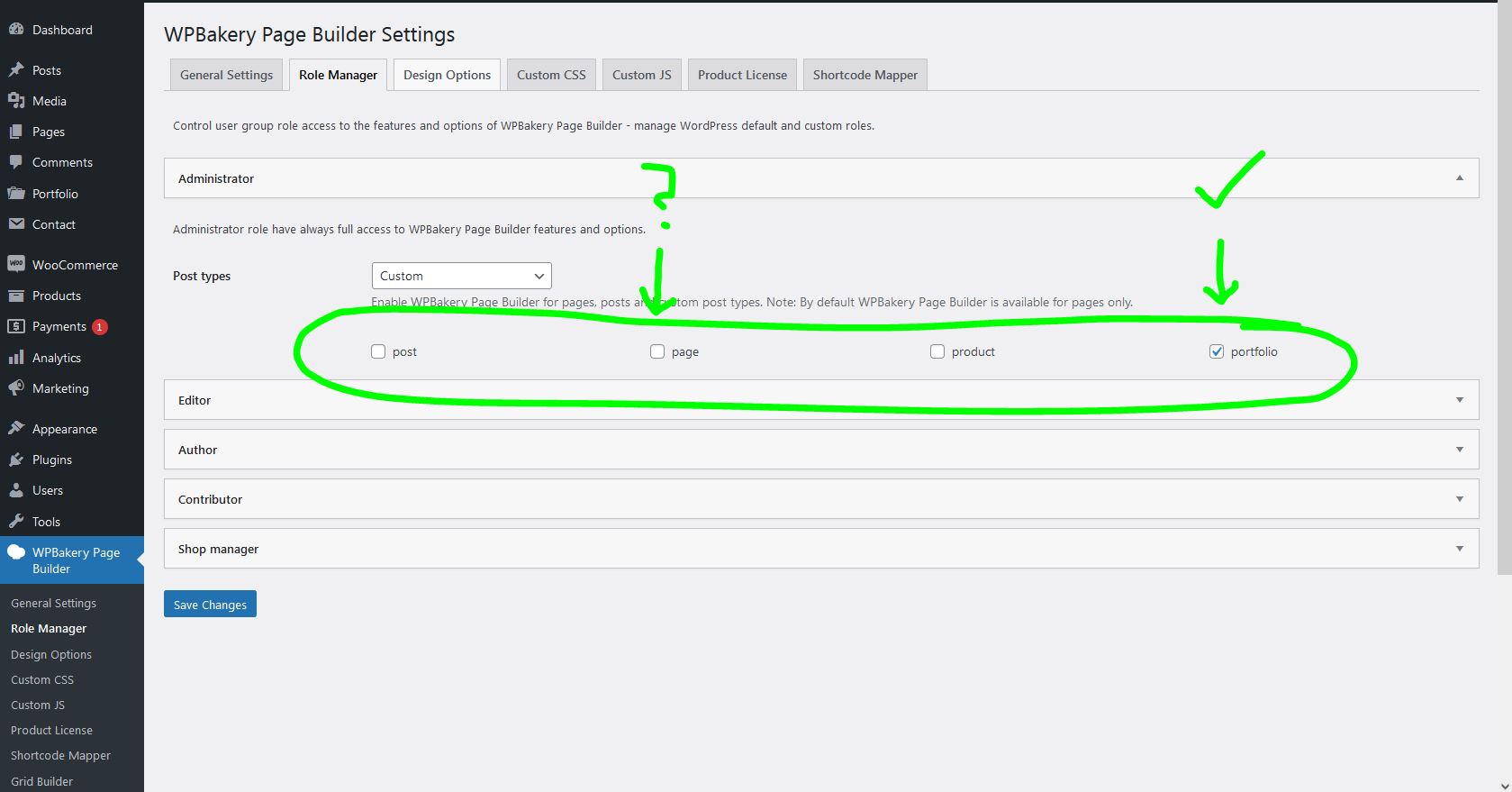
I think I found the issue. Is it possible that your instructions are missing to check the WPBakery role checkboxes for “page” ? Also, which other types should be checked? This is what it looks like on a clean install and your instructions only tell to check “portfolio”. https://i.ibb.co/C2m2sGv/roles.jpg
Please, PM me your WP admin login info to make sure you installed WPBakery plugin.
Also, please check PHP version which must be 8.x.
Yes of course WPBakery is installed, you can see it in the nav menu on the screenshot that I attached above. Also, I’m under PHP 8.2 so no issue there. As I wrote above, if I check the “page” role, then the editor correctly shows the WPBakery button. You should add that to your instructions. What other role checkboxes should I check in WPBakery roles? There are: post - page – product – portfolio
“page” and “portfolio” roles must be checked.
This is GREAT! Thanks for your time, it works perfectly fine now! (You should add this to your instructions, because it only asked me to check the “portfolio” role checkbox)
I wrote to check portfolio in the help file. Because, “page” should be come as checked normally.
Ok, if you issue resolved.
I’ll be happy if you rate my service and theme.
I can assure you that “page” does NOT come checked by default in newest WPBakery release. I installed WP from scratch yesterday and followed all the instructions. This is why you should add it to the instructions to help n00bs like me in the future! 
Ok. I’ll add it, too. Thanks!
Hi. I am using Sena. Here is my site – haagbrownag.com for some reason the parallax backgrounds don’t scale on iPhones – they look horrible when using a mobile. It looks correct on android. Is there a fix for that?
I used CSS styles to fix the BG images. I’ll have a look soon.
Installation is finally working – I had to repackage the zip folder in another zip after unzipping…
I have another issue working from the demo content : when i change the styling option to get a purple theme for exemple, it is only working when I navigate on the Header – slideshow and not on the other pages, Do you have a clue on how propagating this style to all pages ?
regards,
I set color options for home page styles. You can find and change its setting to Default in the page editing sceeen which is Color Schema.
I’m having a heck of a time trying to find how to edit the footer. See https://energetix.health
At the bottom left, I need to update the logo and change the descriptor text below it. Help?
You can edit by Appearance / Widgets. I suggest you to install “Classic Widgets” plugin.
That did it. Thanks!
Ok. I’ll be so happy if you rate my theme.
I’m struggling with a few things…
1. I need two separate pages to show recent posts. Each one should show only one author. standard shortcode for that is not working. For example, the current code is: “vc_row equal_height=”yes”blog limit=”50”[/vc_row]” Normally I would change it to be like this: author=”Name” limit=”50”]/vc_column and it would show posts only those that were created under username “Name”. But, that is not working. What would be the correct syntax for this, or how do I do that differently?
2. I need the option to hide the author’s name and date where the latest posts are presented and also within the post itself. I used a plugin for this “WP Meta and Date Remover” but it is not good enough, it hides only the date on the main page, nothing else.
3. When I open a post, at the end of a post there is the shape of a heart so that visitors can click to like. I can’t find any option to remove or hide that. I need to remove or hide that.
4. When a page is showing recent posts, if they are presented in multiple rows, the “READ MORE” option has no space between rows if the visitor is watching on a desktop computer. However, if one was to watch it on a mobile phone, space is adequate. I need a way to make some adequate space to be shown on a desktop computer, not to have the “READ MORE” from the post above glued to an image of the post in a new row.
Can you help with these?
Now when I’m checking my comment post, I see that my writing about shortcode in issue no.1 has changed. I don’t know why this happened. Perhaps computer did some weird auto-correct, or something went wrong while I was pasting the code. Anyhow, no.1 issue is author=”Name” is not working. I hope you’ll know what I mean.
Ok, I solved issues no.2 and 3 with Additional CSS. For anyone who needs the same:
—-—-—- this hides author name and date:
.blog-about { display: none; }
these two will hide heart like and remove some extra space before footer:
.post-footer { display: none; } .post-navigation-wrapper { display: none; }
Again, for reason unknown to me, previous post is not formatted as it should be. But, for those of you who know how to add Additional CSS, the syntax is correct.
While I was at it, I solved issue no.4 as well with Additional CSS:
.blog-wrapper { margin-bottom: 40px; }
Ok. You should enable WPBakery Page Builder as I wrote. If you’ve another issue, you can write here.
WPBakery Page Builder is enabled. Without that theme doesn’t work. That is obvious. However, you didn’t answer my question regarding issue no.1. So, I’ll type it again:
I need two separate pages to show recent posts. Each one should show only one author. standard shortcode for that is not working.
The current code is:
title="Reference"]/section_title/vc_rowvc_column/vc_columnUsually when I want to display only some author, let’s say his login name is “Name”, I would write this code instead:
title="Reference"]/section_title/vc_rowvc_column/vc_columnHowever, that shortcode is not working. So, how would I do that?
These codes are not what I wrote, I don’t know why when I click reply codes are changed??? Disregard both codes from previous question. Is there a way I could post a picture of those codes? Or do you understand my question without examples of codes?
You can PM me your site info to have a look.
How do I do that? How do I PM you?
I’ll try another way to give you current blog post code:
//vc_rowsection_title title=”Projekti”/vc_columnvc_row equal_height=”yes”blog[/vc_row]//
that is not the code. anyhow… in a part of a code where a shortcode is -blog limit=”50”- Usually I would just put in -blog author=”Name” limit=”50”- and that would limit blog posts to a certain author, that which username is “Name”. With your theme that doesn’t work.
I think you understand the question, I want a page that would present only blog posts from a certain author, and then another one to present another author’s posts.
I know this is possible with your theme because if I click author’s name, then I get a page with posts only from that author. So, my question is how can I do that to be presented like that at the latest posts? What is the shortcode, or how would I do it in any other way?
Other than strike-through, text for a part of a code this time is correct. This is probably because I used only part of a code. So, yes, now you know what I mean.
Because, there’s not a parameter for blog author in my theme about blog post query. It must be included by “Sena Addons” plugin.
shortcodes/blog.php
I don’t have folder shortcodes and I don’t have a file blog.php. I found post.php inside templates folder so… templates/post.php is that what you mean?
And also what would be the code? How do I define shortcode?
Sorry for that, found it. In Sena Addons plugin, like you wrote.
So, I got shortcodes/blog.php . Where and what code do I put in?
It must be done by a WP pro.
No carga el contenido de ejemplo.
You should buy it!
Hello. I’m having a hard time with this theme. If I try to use a video background block, for example, media will not play. The same thing happens for all header styles—I can’t edit them and if I try, it just displays a blank screen. additionally, I can’t customize the demo content on the homepage
Can you share a demo url?
please hold
I can’t see your homepage on your site. But, I think, you didn’t enter Google Maps API key on Sena / General options which causes bg image JS not to work.
Why did I install the Sena theme but after installing the Sena demo, it is not fully displayed as the webpage I viewed on Evato market? This is my website: https://thanhnhastudio.com
You should install a working SSL certificate.
I installed Sena theme demo data. I’ll be happy if you rate my theme from Downloads.
Hi. Sorry I have a quick question. I have been using your beautiful theme for 3 years now but a problem came up.
https://www.torontowestdistrict.com – it used to operate like a one page style website, scrolling up and down on the one page. But now for some reason it switched without me doing anything to page by page.So the navigation menu, each link goes to a separate page now and does not scroll up and down? It seems like there is no anchor anymore?
Any thoughts?? This theme is amazing by the way.
Thank you!
You should make the page as Homepage from WordPress Settings.
Great thank you. One last thing. And if I need more support I will renew—for the counter image… I can’t seem to change it because it is pointing to: https://www.athenastudio.co/themes/sena-wp/wp-content/uploads/2021/09/counters.jpg
new test site: http://www.hanzmarc.com/torwest23/
You can change background images by Site Sections> https://prnt.sc/9COAdhoNm8pj
Hi. Quick question. How do i update my site will your latest update… do I just go into wordpress?
Yes. You can use Envato Market plugin. After theme update, remove WPBakery plugin. You will see its installation notification with latest version.
I remove WPBakery? or just deactivate? Don’t i need that plugin. Thank you by the way for your reply and help.
Remove it. After theme update, you’ll a notification about to install it again. Click on the link and reinstall.
does this installation come with WP Bakery Visual Composer
Yes. If you follow installation steps written in help file or below links, after theme setup you’ll view required plugins notification on top of WP admin panel. You can start installing them which includes WPBakery plugin, too.
https://themeforest.net/item/sena-creative-multipurpose-wordpress-theme/26282371/faqs/43017 https://themeforest.net/item/sena-creative-multipurpose-wordpress-theme/26282371/faqs/43018Plugin says update available when i update it fails as it says invalid license – any ideas?
I’ll update Sena theme. After getting the update remove & reinstall WPBakery plugin to get the update.
great, thank you
How do I control the width of the headline copy in the header image slider?
Can you write which style of intro and where?
If you visit energetix.health, the headline on the first image of the slideshow at the top is an example. “A personalized analysis and action program…”
Your site isn’t accessable as a result of IP blocking.