12923 comments found.

I can’t download the file, I’ve tried several browsers
could already
I want to purchase this theme, But first i want you tell me what is the plugins that i need to buy it to build a website with this features
Online store for accessories The store has points of sale in Turkey and the rest of the world
We want to establish a website selling their products online in all countries where they have points of sale
In each country, the site will be in a language, according to the customer from which country he enters “GEO IP”. Prices will be different according to each country.. Each country has its own currency, but it will be a custom price, not an exchange Each country has its own shipping methods and payment methods.. and tracking methods
the question.. Is it better to have a single website? Or more than one in sub-domains? What is the difference between the two?
So please if you can send me all the plugins that I need to purchase it and compatible with this theme. What are the plugins that already available in this theme that support my requirements, and what is the best plugins that i have to purchase it To make the site start with the specifications that I mentioned earlier
Hello,
Thank you for contacting us.
We think that the WPML plugin should work well with these requirements. And it is fully compatible with our theme. But we recommend you contact WPML developers and clarify these questions before purchasing.
Kind Regards
How does the maintenance page access key work? https://mywebsite.com/?suppress_maintenance=myaccesskey but it didn’t work. I also tried https://mywebsite.com/?suppress_maintenance It all doesn’t work. The documentation doesn’t explain how it works either.
Hello,
If you set your key in Theme Settings to “myaccesskey” then the link to suppress the maintenance mode will look like https://website.com/?myaccesskey
Kind Regards
Thank you; it works now. However, I think it needs some improvement; when I navigate to a new page, I will have to manually append the access key again to view it. How about you make it such that when I access it using the key, a cookie is created that allows access to all the other pages?
Yes, it is how it works now. We will consider your feedback as a feature request. Thank you
Vulnerabilities have been detected for versions latest and less we need a patch yesterday.
Please proceed with a security fix asap
Hello,
We have already fixed these issues in our 7.2.2 update. Please, update the theme and WoodMart core plugin to the latest version asap.
Kind Regards
Mega menu Shop side bar missing not getting like demo, my website: https://prnt.sc/whetK4dy4FWE your original demo: https://prnt.sc/VJ-FsFWJMv-l
Hello,
We have added this menu in our latest update 7.2.2. You can try to update the theme, remove your old content and run the import again.
Kind Regards
Hello. Is it possible to change the background of the lower mobile menu in the theme? Retail theme.
By default, it is white. Is there a setting to replace the background of the mobile bottom bar?
Hello,
Yes, you can do this with a custom CSS code. You can contact our support and we will help you to achieve this.
Kind Regards
Thanks. Tell me how to replace the icon for the bottom mobile panel, for example for button 1 (with content: ”\f146 or \f124…). PS Customizable buttons Button [1] Button [2] Button [3] Button [4] Button [5], they don’t work well with images. The image freezes.
Hi,
Please, create a topic on our support forum and provide us all the necessary details about the request with some screenshots and including your admin access so we can help you https://xtemos.com/forums/forum/woodmart-premium-template/
Regards
WP Toolkit has detected new vulnerabilities on WordPress sites under your care: - WordPress Woodmart Core plugin <= 1.0.36 – PHP Object Injection - WordPress Woodmart Core plugin <= 1.0.36 – Privilege Escalation - WordPress Woodmart theme <= 7.2.1 – Broken Access Control vulnerability
Hello,
We have already fixed these issues in our 7.2.2 update. Please, update the theme and WoodMart core plugin to the latest version asap.
Kind Regards
Hello Thank you for this wonderful theme
1- In product archive, is it possible to choose a certain Product Archive style for desktop and and another style for mobile?
2- Also, In product archive, is it possible to make the product shape as square as on desktop and rectangle on mobile?
3- In product page, is it possible to hide the main product image? When using [Bottom (2 columns)] Thumbnails position, It looks hug above the 2 column grid of the gallery images.
4- I want change the term [Cart] into [Bag] across the shop, is it possible without a plugin? If not, what is the most compatible and fastest plugin you recommend for this purpose?
5- I want to changed the term [Related Products] into [You may also like] what is the best way to do it?
Thanks in advance, Ben.
Hello,
Thank you for reaching out to us with your question. We appreciate your interest in our product and are happy to help you in any way we can.
To ensure that we are able to provide you with the best support possible, we encourage you to create a new topic on our support forum with your question or issue. Our support team actively monitors the forum and will be able to provide you with a prompt and thorough response.
To create a new topic on our support forum, please follow these steps:
1. Visit https://xtemos.com/forums/forum/woodmart-premium-template/ and sign in with your account.
2. Click on the “New Topic” button and provide a descriptive title and detailed description of your question or issue.
3. Click “Submit” to post your question.
Once you have posted your question on the support forum, our team will review it and provide a response as soon as possible.
Thank you for your cooperation, and we look forward to hearing from you on the support forum.
Best regards
Done! Thanks
Question on new feature ””Quick shop” type “On variation click”” in Woodmart 7.2
https://woodmart.xtemos.com/theme-settings-tooltips/quick_shop_variable_type_variation.mp4-> nice feature as it improves shopping speed
i tried to configure it in your wonderful demo “https://woodmart.xtemos.com/megamarket/”
where is the quantity field? if i click on a attribute to select my varation the button changes its caption from “SELECT OPTIONS” to “ADD TO CART” but the quantity field and the plus and minus buttons are missing. So i can only put 1 into cart and have to adjust the quantity in the off canvas shopping cart layer. But if this off canvas layer is disabled because i dont need it to be shown each time i put a product into the cart -> what then?
so how needs this new feature to be configured to see the quantity after clicking on a variation?
-> you can see this behaviour also on your demo site, homepage, block “Featured Products” -> Product “Granite Wall Tile”
Thx for your feedback
Kind Regards
Hello,
Yes, you are right. We will add quantity input for variable products with this quick shop type.
Kind Regards
g
Remove second search from search result page
Hello 
if there are not search results this page is appearing. see screenshot:
https://ibb.co/r5TfS11there is search bar with another search layout. it’s enough for a customer to search again using the search bar in the header.
so how can i remove that search bar?
Thanks a lot for your feedback,
Kind Regards
Hello,
Try to use the following CSS snippet to remove this form
.no-products-footer .wd-search-form {
    display: none;
}
Kind Regards
Hi everyone. I have a problem with the “Frequently Bought together” feature. When I add the bundle products to the cart, the total amount is incorrect, it appears a figure lower than the real total. Does anyone else have this problem? what could this be due to? Thanks
Hi,
Could you please send us a link to your website where we can see this issue?
Kind Regards
Hi and thanks for the quick reply. You can see the problem at this link: https://taurasidocg.com/shop/bistrot-del-principe-11-12/
Hello,
Please, disable all plugins that are not related to our theme and provide us with your admin access. We will log in and check what is wrong there. You can leave only the following plugins that are required for our theme: WoodMart core WooCommerce Elementor/WPBakery page builder
Use the contact form on this page https://themeforest.net/user/xtemos
Thank you in advance
Hello and thanks for your reply. I understand, but I can’t disable all plugins because the site is live. As soon as I have a solution for your request I will let you know. Thank you
API intergration section google recaptcha is not available. any plan to add this ?
Hello,
We will consider this as a feature request. Thank you!
Kind Regards
Is it possible to select dropdown option for Header Builder. therefore we can select header based on category
Hello,
Unfortunately, there is no such ability at the moment. We will consider implementing it in our future updates.
Kind Regards
Please try to implement this. better if you release earliest updates. if you think this is a good option for this theme
Thanks
Hi, i opened a ticket on the support, i try to Show attributes on the product page and shop the product with specific attribute (size for example)
Hello,
Thank you very much for contacting us.
We have answered your topic on our support forum so feel free to continue the conversation there.
Kind Regards
Then we divided it into 2 with the help of a tab. In the 1st area, we ran the filters with the Product filter widget. In the 2nd part, we ran the product filter and filters in the same way.
These filter selections we want to ask here do not work in sync with each other. So what we want to do is to automatically update the other fields after selecting the first field. In other words, if there are products in which options, only those options are shown. Likewise, updating the other fields after selecting the 2nd field.
In this way, when there is a filter that is not connected to each other, the product is not found at the end of the selection and a blank page appears. If we can run such a function, we will prevent blank pages. Thanks.
Hello,
Thank you for reaching out to us with your question. We appreciate your interest in our product and are happy to help you in any way we can.
To ensure that we are able to provide you with the best support possible, we encourage you to create a new topic on our support forum with your question or issue. Our support team actively monitors the forum and will be able to provide you with a prompt and thorough response.
To create a new topic on our support forum, please follow these steps:
1. Visit https://xtemos.com/forums/forum/woodmart-premium-template/ and sign in with your account.
2. Click on the “New Topic” button and provide a descriptive title and detailed description of your question or issue.
3. Click “Submit” to post your question.
Once you have posted your question on the support forum, our team will review it and provide a response as soon as possible.
Thank you for your cooperation, and we look forward to hearing from you on the support forum.
Best regards
hi, question how can i make html block show upon product variation selection thanks in advance
Hi,
Please, create a topic on our support forum and provide us all the necessary details about the request with some screenshots and including your admin access so we can help you https://xtemos.com/forums/forum/woodmart-premium-template/ If your support is already expired then you need to extend it on ThemeForest first.
Regards
Please help me am using elementor and I seem not to get the related product to work on the woocommerce store and single product
Hi,
Please, create a topic on our support forum and provide us all the necessary details about the request with some screenshots and including your admin access so we can help you https://xtemos.com/forums/forum/woodmart-premium-template/ If your support is already expired then you need to extend it on ThemeForest first.
Regards
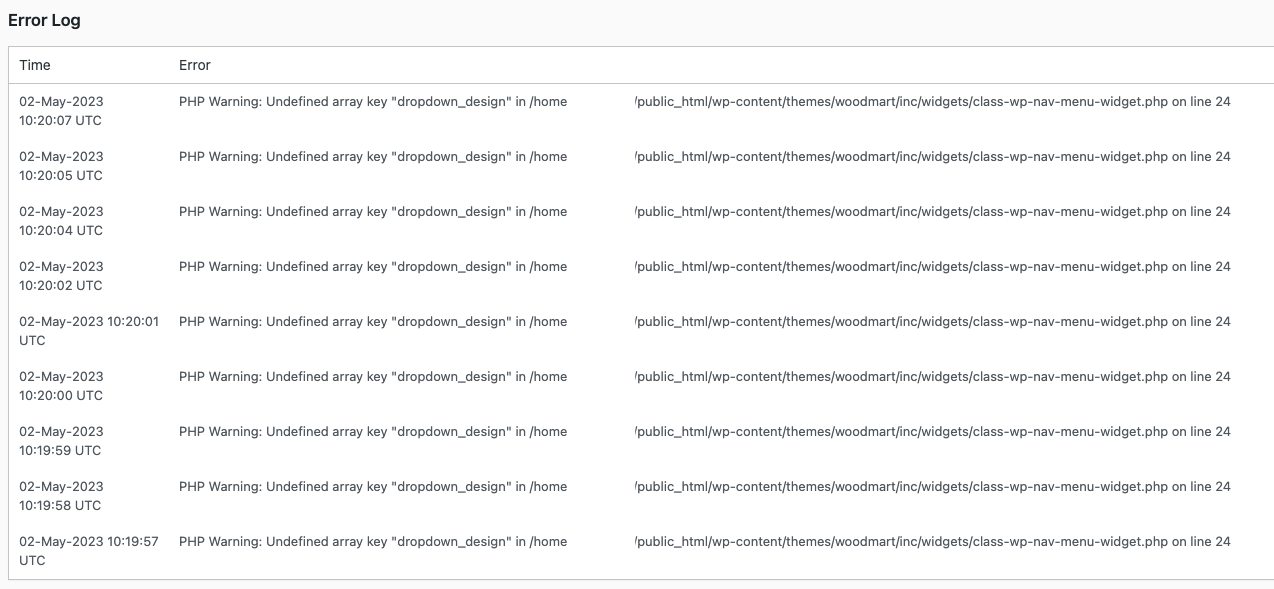
Hi.
There seems to be a small issue here
public_html/wp-content/themes/woodmart/inc/widgets/class-wp-nav-menu-widget.php on line 24
https://i.gyazo.com/7f7e22a77f1d33a5887d97cee9730b3d.pngThis is in the error logs…
Regards
Hello,
Try to resave the WOODMART Sidebar Mega Menu widget in Appearance -> Widgets.
Kind Regards
why is the “related product” block not shown on my website on the product page.
https://smb-spb.po-almash.ru/product/19s21nzh-mezhflantsevyy/ https://skr.sh/sJdOFwZozSa What else do I need to do?Hello,
Thank you for reaching out to us with your question. We appreciate your interest in our product and are happy to help you in any way we can.
To ensure that we are able to provide you with the best support possible, we encourage you to create a new topic on our support forum with your question or issue. Our support team actively monitors the forum and will be able to provide you with a prompt and thorough response.
To create a new topic on our support forum, please follow these steps:
1. Visit https://xtemos.com/forums/forum/woodmart-premium-template/ and sign in with your account.
2. Click on the “New Topic” button and provide a descriptive title and detailed description of your question or issue.
3. Click “Submit” to post your question.
Once you have posted your question on the support forum, our team will review it and provide a response as soon as possible.
Thank you for your cooperation, and we look forward to hearing from you on the support forum.
Best regards
OH !!!
Very disappointed…
Your theme WoodMart has been detected VIRUS..
Hello,
Could you please clarify what kind of virus you are talking about? And where did you see it in our theme?
Kind regards