114 comments found.

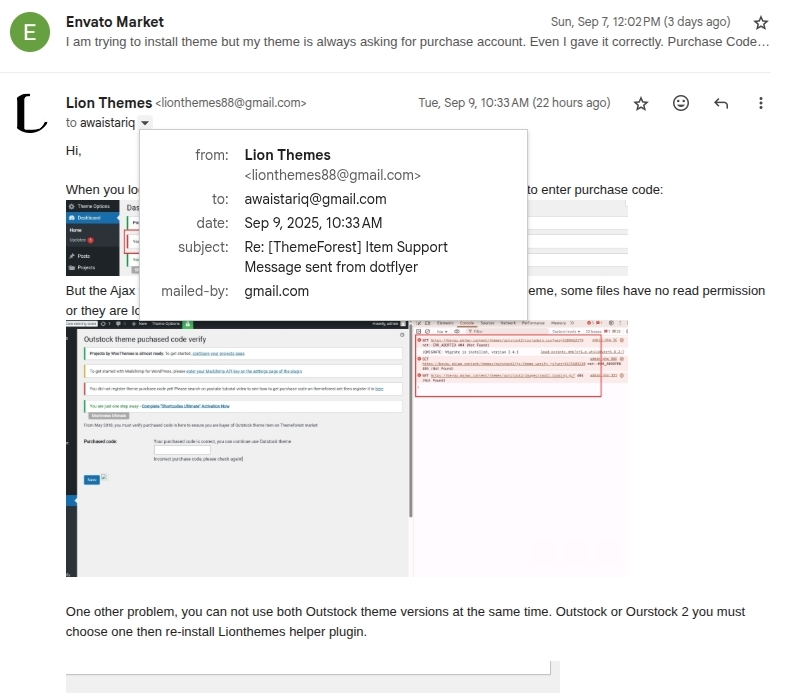
While saving the purchase code to verify the theme, theme couldn’t save the purchase code with the error the code is incorrect. I already emailed you 2 days ago with credentials for this.
Hi,
We replied to you about your problem, here is the pic of the email content: https://lion-themes.net/screenshots/Selection_033.jpgThe reason because of you uploaded the theme by incorrect web server owner permission. You should setup in Php.ini to allow upload max file size up to 16M , then use WordPress admin to upload and install theme.zip file.
add to cart button is shown when we mouse over. Is this possible it always visible?
Well it looks different our demo site ? Can you send a support ticket with your site url ? we will take a look on it for you.
How do I disable the hover add to cart option. I just want it to always show
Add to cart is base function of woocommerce, it has no option to disable it but if a product have no price it will be disappeared.
Are you planning on updating the theme to support Woocommerce 8.x.x ?
The theme still working fine with WooCommerce latest version 9.x
how can we remove the hamburger menu at the header extension area? and display menus directly in the header
Hi,
Did you buy our theme item ? If it is outstock theme the hamburger menu on mobile only can hide it by css:
.nav-mobile .toggle-menu { display: none; }
will this hide the hamburger menu icon at header extension area and display its content inside hamburger menu in header section.
Well, No that only hide the hamburger menu icon, the content of menu you want to display inside header same as desktop version, you must add more customize css.
Please provide me the code. We have bought outstock theme and used in zonult.com
That is not simple and no more customers switch the mobile menu to display the list menu items on mobile view. We should reduce header spacing on mobile screen minimum possible.
we are just planning to add language selection option there.
Well,
Language switcher you should add it from widget to header top area, should not in menu links. Please reply in support ticket of your mail box, and send your site admin account we will check how to setting it for you.
How can we connect so that we can solve this problem by showing screenshot
Please reply us in your support email, can you receive our email on this mail : marketing@zonult.com
yes i have just replied
Hi, i’m looking for a theme for my B2B business that has the following feature:
1 – Prices hidden 2 – User must Register an account for our approval 3 – User must then log in to see prices and place orders
Here is a website (uhp.com.au) that has the feature I’m looking for. Can you please advise?
Thanks!
Hi,
Please try to research about WordPress + WooCommerce to have overview about the Shopping Cart site. Our theme is designed on that system. But I think the B2B business should use another open source as well, the WordPress only consist for small shopping cart store. Hard to extends many features for B2B business.
This theme and its demo content is not working at all. I have sent question to support a week ago and no response.
I have sent it by “email contact form” from here :/
I have just sent it again now
Well, We still did not receive new support ticket email. What is your email ?
Well,
I can send email to you, but I can not receive your replied email. That is strange.
https://imgur.com/aRO03gSDo you have a Whatsupp? telegram or any working communication method. email me pls, asap. need support.
I will send you my individual skype contact.
Great work!
Using outstock1 theme, I tried to import the xml file using wordpress import, however after clicking upload it goes to a 404 page with the url step=2. Outstock1 does not seem to have a one click import option in the theme options. how can i import demo data into outstock1, can i give you logins so you can see the issue?
Hi,
We replied in your support email. Please check inbox and reply us when you have more questions.
Hi, I have problem. Any variant of Home page not working. If I select Home page 2 or another – I get 404 error.
404 error, that is not correct url follow your domain. You can check htaccess working on your server or not, also check the permalink settings format it is correct friendly url as we set on demo. The home 2 , 3 or more that is static link not dynamic from wordpress url.
Hello, I have installed the theme with a demo and when customizing I get a 503 service error every time I refresh the page, could you help me?
I tried to rename the page “shop” to “catalog” and it doesn’t work.
Hi,
Can you tell us how did you install our theme and send your site url in a support ticket? The shop page follow url setting as Shop from WooCommerce -> Settings. Please send support ticket we can take a look on your site.
Hi,
we have difficulty translating some strings.
Items in this page: https://arredamentidaniele.it/prodotti/
Share This Product in this page: https://arredamentidaniele.it/camera-da-letto-completa-wenge/
Can you help us please ?
Thx so much, Gweb
Hi,
Please use Loco translate plugin to translate theme text. You can search that text in Loco translate -> Theme -> Outstock
Hello, my client purchased your theme. I have one question. Blog is your theme default styling. And blog content is showing in your default theme styling. Is there a way to show links with different blog categories. Because I can use my styling for blog grid but when clicked on indivudal blog it is opening with your default styling.
Hi,
Sorry your commented account is not purchased account, please send us a support ticket with correct purchased account and send your site url and your idea about the blog & post category layout. We will give you solution.
Hi Team Leon,
The following is because I am having problems with my website (https://jepmobiliari.com/), I got a message that says: “There has been a critical error on your website” I have activated the debug display and I see several errors, try deactivate the plugins and identify which ones caused me the damage and I found that Woocommerce and Lion-Themes Helper when the assets were all deconfigured, I would like you to give me a hand.
I am very attentive.
Thank you
Hi,
Can you create a support ticket and send some information as PHP version, WordPress version, also please provide one admin account in there, we will have a quick fix for you.
Hi, i have issue as, [categories short_desc=”” categories=”bathroom-deco,creative-lighting,creative-tables” style=”carousel” columns=”3″ showon_effect=”” rows=”1″ autoplay=”false” playtimeout=”5000″ speed=”250″ desksmall=”3″ tablet_count=”3″ tabletsmall=”2″ mobile_count=”1″ margin=”20″ custom_style=”style_2″] displayed as plain text in home page 12 while using outstock 2 theme, what’s the problem here ??
Hi,
Seems, you did not install the Helper plugin it is required for theme to has many features as in shortcode.
We received your support email, please reply your site url and admin account in it.
We will check on your site for this problem.
I have issue while saving purchase code to verify the theme as the theme can’t save the purchase code and always show the code is incorrect, so what’s the problem here ?
Hi,
Please create a support ticket and send us your site url & a admin account and the purchased code. We should check your current theme version and check it compatible with verify purchase api service.
Does it support RTL ?
Sorry, our theme does not support RTL, but you can try some plugin to help that we also not open support for RTL issues.
Hello , have this error the theme not update It contains some WooCommerce template files. These files may need to be updated in order to be compatible with the current version of WooCommerce. Suggestions for fixing this:
Update your template to the latest version. If an update is not available, contact the developer of your theme inquiring about compatibility with the current WooCommerce version. If you copy to another copy,
also the WPBakery Advanced Editor not update
Hi,
That only the warning from WooCommerce about out of date template file in theme. But it still working fine. To update theme you must download the new version on this themeforest then overwrite all main theme files to your current main theme version on server.
The WPBakery Page Builder plugin is purchase plugin and we bought it as regular license, it can not automatic update on your site. To update it you can deactivate it and remove it then install it again from Appearance -> Install plugins.
 Install Plugins option is not showing in Appearance Tab. Anything manually can I do?
Hi, After active theme if you have already all plugins it will not show that menu. Do you see the message on top of dashboard to say install, active or update plugin recommended for theme ?
I already installed/updates all recommended plugins, so no.. However on Dashboard > Updates. Do you mean if I delete WPBakery plugin then Install option will show with WPBakery?
Yes, If one plugin need to install, active or update. The menu will show on.
I just need to re-install site and theme. I am getting following error on page load.
Slider with alias outstock2 slider 2 not found
Hi, Please import the slideshow from full package download file. Or you can find it in helper plugin : wp-content/plugins/lionthemes-helper/wbc_importer/demo-data/Outstock2/outstock2-slider-2.zip
To import: go to Revolution Slider plugin manager and find import button.
I restored old backup and now this works fine.. More WPBakery refusing to update and show following error.
An error occurred while updating WPBakery Page Builder: To receive automatic updates license activation is required. Please visit Settings to activate your WPBakery Page Builder. Got WPBakery Page Builder in theme?
Well,
WPBakery Page Builder plugin just only copy licence, we only buy for regular licence, if you want to update automatic you must buy it again for your domain.
Other trick, you can delete that plugin and install again from Appearance -> Install Plugins. It will download newest version from our server.