116 comments found.

I would like support with changing the images on the Portfolio page. I tried to contact you through the ticket system at https://cocobasic.ticksy.com/submit/#100021843 , but I can’t find any option for this theme. What should I do?
Hi,
The name of the theme on support is “Cardea WP” – there you can open a support ticket.
To change the images in the Portfolio page, go to Dashboard > Portfolio and edit the Portfolio item with default WP editor (not Elementor) and you will get an option to change the featured image.
Check here – https://demo.cocobasic.com/documentation/MANUAL-CardeaWP.pdf “Add/Edit Portfolio Item” part on page 26.
If you have more questions, please use our support forum and Cardea WP category. Thank you.
i have two lang (arabic-english) website when i try to change the Page Custom Title, Page Description, it only updated once, i mean it still the same in arabic and english
Hi,
Sorry for late reply – it was holiday/vacation time.
Have you found a solution for this or you still have problem?
Hi! Does it support RTL? i know it wasn’t in the past
Hi,
Sorry, no. Best
Hello my Friend About Cardea vers 8. How easy is to change the basic Colour and img background ( spheres ) Without using Elementor – And, besides, can I built a whole site Without using Elementors and that awful blocks thing ( I’m going dor a plug to bring it back to olde times ) or, even better, will it work with classicpress.net ?
Cheers
Hi lorenzocoffee,
I have Cardea with shortcodes only (no Elementor or any other page builder) but only for demo 1 and demo 2 (ver 1 and ver 2).
Sorry, I don’t have any versions/demos from 3 to 8 – all that is made with Elementor only and there is no easy/quick way to transform that in shortcodes only, sorry.
Best
It’s OK, Thanks for Reply
And Merry Christmas if we don’t get in touch earlier
Ciao
Just purchased, issues with importing all the media. I use the import tool, it imports the xml pages and stuff but fails on the media. Do you have a link to the media files so I can upload it manually since seems like the import tool doesn’t work with the media uploads. I really need the second demo media that supposed to come with the demo 2
Hi,
I saw your support ticket – later today I will be back with answers (I am out of town). Chat soon.
Hi,
You have answer on support forum.
I have been having this issue from the beginning and it is start to be a big issue now.
The password reset link is redirected to login page. After Clicking on the lost password, you receive and email with a link like this:
https://mydomain.com/my-account/lost-password/lost-password?key=TGZduKC9DRgAcQ6RJI6x&id=1850But when you click on it, it just redirects you to the login page.
https://mydomain.com/my-account/How to resolve this issue, or where do I replace this link?
/my-account/lost-password/lost-password?key=TGZduKC9DRgAcQ6RJI6x&id=1850
Thank You!
Hi,
The reset password is a default WordPress function and I am not changengin that part in any way (I don’t have code for that part).
Maybe some additional plugin has to do with that part. I am suggesting to try to install the theme on some temporary domain and to test the reset password (without any additional plugins and on a new fresh WordPress installation).
The other way to change the password is to do it directly in the phpmyadmin (database) – https://ie.godaddy.com/help/change-my-wordpress-password-in-the-database-26920
I don’t have problem changing password, I am not sure if you did get my Issue.
I have to change password for clients all the time as they are not able to do it themselves. Because the link they receive take them to login page and not to password reset page. https://mydomain.com/my-account/lost-password/lost-password?key=TGZduKC9DRgAcQ6RJI6x&id=1850
But I am able to change password for them on user page.
Hi,
I have just installed a new fresh WP installation with Cardea theme and have tested using this steps:
When I go to link https://mydomain.com/wp-login.php and click on “Lost Your Password” I get this page https://mydomain.com/wp-login.php?action=lostpassword and there I enter my email address/username and on email I get the link which looks like this:
https://mydomain.com/wp-login.php?action=rp&key=BA6lf8Xh6MTC2ZRaHMv2&login=temp_Admin&wp_lang=en_USand that link works fine for me – when I click on it I get an option to enter a new password but the page is again wp-login and the link looks like this:
https://mydomain.com/wp-login.php?action=rp&wp_lang=en_USAgain, try on a new/fresh WP installation and without any additional plugins. And as I said before – I have no custom code for that part in my theme.
If you have more questions, please open a ticket on our forum – https://cocobasic.ticksy.com/
Thank you.
Any plans to update this theme? Feb 2023 looks like the last update. Thanks.
Hi,
All our themes must always stay up to date and must always work with the latest version of WordPress and PHP. So, I will update all our items “forever” but we will not add new features. So, what you get now it will be the same which you will get for a year – but all must always work.
For the long time no one has reported any bug/bigger problem and that is the reason why the last update was in 2023.
Hi, I have a question, If I have two sites and I want to combine them into one site, and one of them has purchased Cardea, is it against your copyright if we flip the site that has purchased Cardea to the site that does not have Cardea purchased?
Hi,
If you have one license purchased – you can use it for 1 live website at the time. So, if only 1 website is using the Cardea – you are ok.
For example, you can start a website A and use the Cardea theme. After some time you create a website B and stop using website A or just change a theme on a website A – you are ok to use the Cardea on the new website B.
Just don’t use it at same time on website A and B – in that case you will need 2 copies of Cardea (or any other template from ThemeForest).
Thank you so much
Hi, I have a question before buying your theme. Is it possible to use the demo 1 and to have a white background at the top? Regards
Hi,
Yes – you can have a solid color as a background, image, image pattern or a video.
Thank for your answer. The theme has been purchased by my client 
Hi theme was running awesome… we didnt work on the website for more than 6 month.. now we need to do some changes on our landing page and i´m getting this message every time on every page when i want to edit the page in elementor:
<?php the_content(); ?>
Any idea how to fix this?
Hi,
No one has reported such an error. What can you do/check:
- Check if you are using the latest version of Cardea (ver 2.3 is the current one)
- If you want to edit some section in OnePage you need to change that Page with Elementor (not directly the OnePage). For example, if you want to edit Service page in OnePage you need to go to Dashboard > Pages > Service and edit that page.
- If you still have troubles with the theme – please open a support ticket on forum – https://cocobasic.ticksy.com/
Hello, How do I add and delete pages without ruining the links?
Is Cardea compatible with latest Elementor / PRO?
Hi,
On our live demo is latest version of Elementor (3.17.3) – I am not testing the theme with the PRO version but I think it should be fine.
Great! Will check and come back to report.
Hello! I love the Cardea theme perhaps the website works great for an year…but now, with any change, the portfolio doesn’t work. When I click on the images appear the text “undefined ”. I don’t understand the problem. I tried to update everything in the website but anything works. Best regards Mary
Hi,
Probably you have a old version of Cardea and Cardea required plugins (that is an “old” bug which is already fixed).
Hrere is a changelog where you can find info about latest version – https://cocobasic.ticksy.com/article/14786
So, you need to re-download the Cardea theme from your dashboard and re-upload it on your website to get the latest version of Cardea. After updating the theme you will also get alert for required plugins which need to be updated.
If you have more questions or need some additional help, please use our support forum – https://cocobasic.ticksy.com/
Thank you.
Hi! im having some problems trying to change the label that is link to the menu, how can i change it? like: #services to #projects or #aboutus to #knowus ?
And i almost forgot! is an amaizing theme! love the design!
Hi,
You need to change also “slug” field for the pages. For example in Dashboard > Pages > Services you have changed the page name (Service) to your own page name but also you need to change “slug” value (“service” in this case).
If you have more questions – please use our support forum – https://cocobasic.ticksy.com/
Thank you.
Hi,
Thanks for your job, the theme is really cool ! 
I have just a little question, I didn’t find where I can modify all the text dedicated for the portfolio section (Number of section, OUR LATEST WORK
Check our super awesome portfolio) ... Could you help me on that ?
Thanks in advanced
Best Regards,
Hi,
Sorry for my late reply – I was out of town/office for several days.
You need to edit the page (for example Services) with default WordPress editor (not Elementor) and below the content area is placed Page Preference part – there you will find that text and some other options.
If you have more questions, please use our support forum – https://cocobasic.ticksy.com/
Thank you.
Hi, just purchased these theme and .. elementor editing for some reason is not working. the editor just keeps loading with spinning wheel and nothing happens. I have tested this on the site I would like to work on today (unfortunately I can’t..) and on a fresh WP installation, so no down to plugins, etc. Also tested in different browsers, cleared cache, same result. I have tried to send you a request on your support site but https://cocobasic.ticksy.com/ is now down (500 error).
Any chance you could look into this in a timely matter? I really hoped to work on a new project today but i’m stuck. thank you.
Hi,
Probably the server/support was temporary down. You have your answer there.
You should check this (probably it has to do with PHP/memory limit configuration on the server): https://elementor.com/help/elementor-widget-panel-not-loading/
Best
Hi,
I would like to change the font color of the header there. How to edit?
Hi,
In Dashboard > Appearance > Customize > Colors you have several color pickers (for menu background, menu color, menu active/hover item color).
In case that you need some additional help, please open a support ticket – https://cocobasic.ticksy.com/
Thank you.
Hello there.
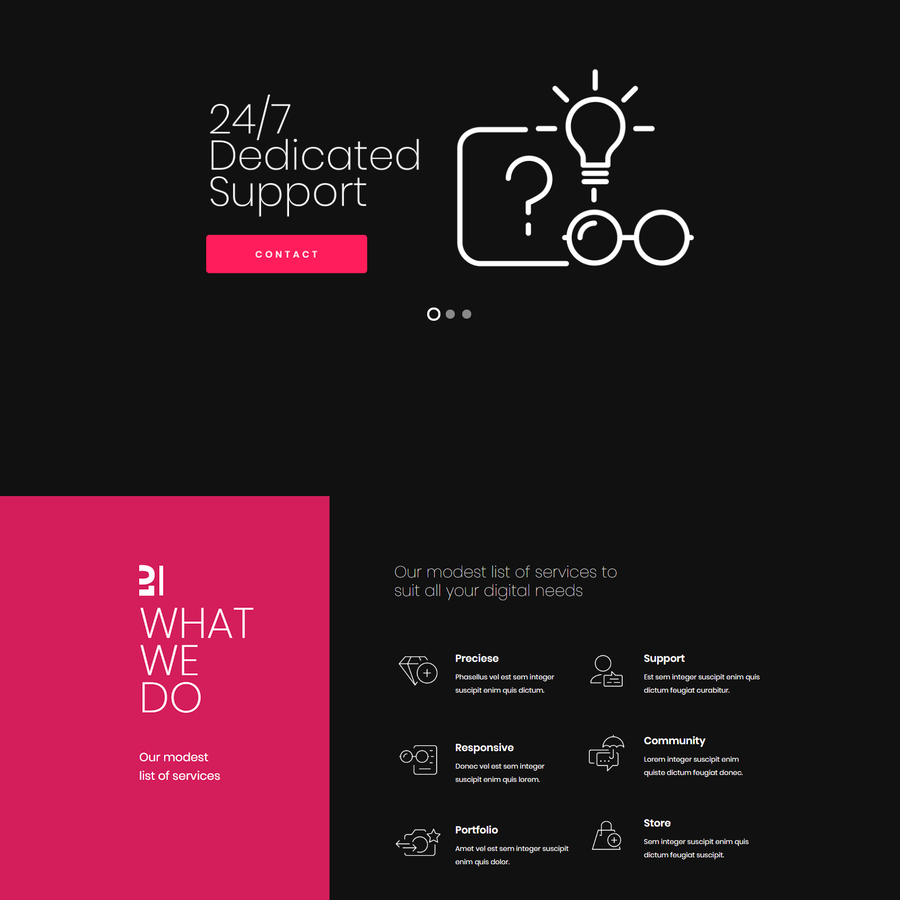
I am not sure how to edit the left section of the page with color background. I am suppose to click on the element and be able to edit but it’s not passible.
how and where do I edit this section
https://s3.envato.com/files/269488389/preview/03_cardea.pngWhat we do and Our Modest list of services.
How to I change that?
Thank You.
Hi,
Edit the Services page with default editor (not Elementor) and below the Content part is a “Page Preference” part – there you will find settings for that text.
If you have more questions, please use our support forum – https://cocobasic.ticksy.com/
Thank you.
Thank You.
I like the fast Response..
hello, could you tell me if there is any compatibility problem between the theme and Safari. Customers logging in from Safari cannot see the website. thank you
Hi,
No one has reported such problem with the theme until now. I will try to test the theme tomorrow in Safari.
In mean time – make sure you are using the latest version of Safari and there is no some additional plugin/add-ons in browser which may blocking/broke the website.
Hi,
I just tested with safari 16.3 (the latest version) and all works fine. I can provide you a printscren on our support forum.
If you have more questions, please use our support forum – https://cocobasic.ticksy.com/
Thank you.
Hi, thank you. Unfortunately, however, the problem is presented by site visitors who have old versions of safari. I can see it with latest version safari. it would be bad to have to put a banner that everyone would see with the message to update safari. I tried disabling all the plugins, one by one to check the problem, but it seems to be Elementor the main problem. Thank you
I like this theme, but i really hate the fact that every time I am editing or updating a page, there is always a problem, I didn’t have this initially but now a common occurrence.
I was updating the contact section of the page, as sections are created separately but after saving, the section disappeared rom the front page. I can still see the page on www.domain.com/contact but no Background.
I look everywhere how to get a fix but nothing, the homepage is on onepage template and I also tried to restore the page to the previous edit and still not working.
Please let me know how to get this fix and how to get that section on all pages.
Thank you.
Sorry Themeforest is having login issues lately.
Hi,
Open your page with default Editor (not Elementor) and in Page Preference part (which is below the editor) you have a option (Page Structure select box) to include or not to include some section (page) in OnePage.
If you still have troubles there, please open a support ticket – https://cocobasic.ticksy.com/
Thank you
*update – I will check for this part also:
“I like this theme, but i really hate the fact that every time I am editing or updating a page, there is always a problem, I didn’t have this initially but now a common occurrence.”
Until now there was no problems at all – maybe something has changed or maybe that is because of some of your additional plugins (if you have any).
I will check that during the weekend.