185 comments found.

Hi Quick question
I just posted my first blog post but it’s showing up on every blog category instead of simply the one I selected.
Is there a setting I need to enable or something I missed?
Hi there,
Please contact us with the contact form (here) here: https://themeforest.net/user/RivaxStudio
And send your site address. I will assist you.
Thank you
Hi Roxeen,
I wanted to say thank you so much for your help so far, I love the theme, and your help is saving me when it comes to getting this done.
I have a quick question: is there a way to edit how a blog post format looks?
Specifically, if I want the standard not to have a huge picture or if I want to embed the featured image.
Another thing while on the topic, can I have a featured image and not have it show up as a big picture on the blog?
Thank you, Omar
Hi there,
You can enable post format icon in posts list by editing the post widget in the Elementor. In Post settings section > Enable post format icon. Also you can change its style in style tab.
I will add this feature in the next update to disable the featured image in single post
Thanks
Dear RivaxStudio,
I am finished designing my site (financialfreedompursuit.com) and have a few questions I would like your support in.
1. How can I edit my category pages/ “archive” pages? 2. When a user searches on the site, how do I edit the search result page – decoration on the title is on the original color palette 2. Why are none of my categories in my site map, due to this I am unable to get them indexed.
Hi there,
1. You can edit the “Archive” template in Roxeen > rivax templates. There is a full tutorial on our YouTube channel about it. https://www.youtube.com/channel/UC1iKOJwetdLzhcFBbDAhoRg/playlists
2. You need to change it by custom CSS. Please add this code in Appearance > Customize > CSS.
.blog-archive-title .title { border-bottom: 2px solid red; }
3. Our theme does not have any code for sitemap. You need to create it with SEO plugins
Kind regards
Hi,
Thank you for your assistance so far.
I am using home 09 – trying to reduce the space between the “post konzo” and the recent posts right below it.
Also, the decorators I am applying are automatically going to black or white instead of the blue I am trying.
Any help would be greatly appreciated.
Thank you, Omar El-Mestkawy
Hi there,
Please contact us via email form in below link and also please send your site address to check your problem.
https://themeforest.net/user/rivaxstudioThank you
This theme template is quite exquisite; however, I’ve encountered some issues. After recently migrating the site to another host, the header section has developed a loading malfunction. My wordpress blog: https://pomwe.com 8a79d31b-0975-4284-906b-8bb9d8fbdf3d – 18 Oct 2023 REGULAR LICENSE
Hi there,
Please go to Elementor > Tools > Click on the Regenerate assets button. Also in Elementor > Settings > Features > Disable Inline Font Icons
If not resolved, please contact us via the form here: https://themeforest.net/user/rivaxstudio
Thanks
Is it possible to use the template for a shop without WooCommerce?
Hi,
If you don’t need a shopping process, yes. You can do it with the Elementor, using grid columns and an image box or a posts widget as a grid.
Thanks
Hi there,
I thought you meant the shop page and its layout! If you need this style for a single post, please wait for the next update. We are developing this theme and will add this style and some other styles for the single post. It will be released in a few days later.
Thanks
This is great news. Good luck and thank you! 
Hi! How are things going? Will there be a new release very soon?
Hi there,
Sorry for the delay. We updated Roxeen and added some new features and layouts for posts but have not uploaded it in themeforest yet because we want to do something before releasing it. The new update will be released this month.
Thank you for your patience
Thanks a lot for the update! I read that there are three new layouts for posts, but I don’t see them Where can I see it?
Hi there,
From theme settings > Single > Post layout, you can change the post layout.
Thank you
And another question: is there a widget that shows a collection of pages (not posts)? Like, for example, Post Modern, but for pages
We don’t have a page widget because pages use for another purpose. There is a “Page” widget in Elementor that shows pages. Please check it. Thank you
Hi, I can’t find where to undo the column height alignment. How can I make two columns next to each other not be the same height? Thanks!
Hi, Thanks for the great template. Is there any way to translate the text below the post: Follow Me and WRITTEN BY?
Apologise for the inconvenience. Got it. Loco
Glad to hear it. Thank you
Thank you so much for your help so far, it has been instrumental in setting up my website.
I had another thing pop up, for the subscribe button on the top right corner (specifically for home 09), how do I connect it to mailchimp? or how do I make it function as a subscribe button. All i see from my end is a regular button that makes it so it requires a link to redirect.
Hello,
It is for demo purpose. You can change its text and link. For example change to “contact us” and link to contact page.
Kind regards
Hi,
I was reaching out to inquire how to change the decoration on the “other articles” section below each article independently.
I am already aware that I can change the accent color on theme settings but that also changes the color of the menu decoration. The issue is I need them to be different colors because currently, the decoration on the “other articles” section makes it so it’s invisible when hovered.
Hi there,
It has accent color on hover and you can change it by CSS, You can use this code. Please add it in Appearance > Customize > CSS
.single-next-prev-posts .post-wrapper .title a:hover { color: #F44336; }
Thanks
How do I add a tiktok icon to social media icons?
Hi there,
Currently our social widget does not have custom icon and this icon. You can use the Elementor’s social widget.
Hi,
I am working on finishing up my site but am having issues with some last minute details
a – My side bar seems to be squished (compared to your demo its smaller) I have the site width to default and content width to 100% unsure why that is happening
b – The title decorations on my home page aren’t working, they always default to black or white whne I hover a link instead of the grey I set them too.
Your advice to fix there issues would be greatly appreciated, thank you
Hi there,
Please give us your site address to check it to see your problem. Thank you
My purchase code is a5ae2f15-9edc-429e-a5f2-0dbb33c33695
I recently wrote back to you changing the color of the button and got a reply to change in the oxen settings. I have changed every colour and noe changed the pink buttons. Talking specfically about the “read more” buttons and the number circles.
Also i want to know how I can upload a costum font to the theme.
thank you
Hi there,
Please edit the page or archive template with the Elementor, and edit the post widget. In the style tab, you can change the read more style and color.
For the custom font, you can use this plugin https://wordpress.org/plugins/custom-fonts/
Thanks
Hi Rivax,
How is your day going so far, I purchased your theme and am trying to go through the installation process now. Purchase code: (a5ae2f15-9edc-429e-a5f2-0dbb33c33695)
I am running into an issue with changing the color palette for the website, specifically the buttons and the “pink-red” secondary color. I have gone through the steps in your documentation but that seems to be more geared toward background/text color and they are all cleared out initially anyway.
I am more wanting to change the global color pallet (Sticky bar, buttons, and such)
Any guidance would be greatly appreciated.
Thank you, Omar
Hi there,
You can change it from theme settings > Styling > Accent Color. Also for somewhere like the menu background, you need to edit it (header template) with the Elementor.
Here are some video tutorials: https://www.youtube.com/channel/UC1iKOJwetdLzhcFBbDAhoRg/playlists
Please contact us via the contact form in the below link for support. https://themeforest.net/user/rivaxstudioThanks
Hello,
The text color in the search field of the sticky bar is set to #4f535e, same color as the background I think. You can see this bug on my web site: https://turtle-blog.fr/2024/01/05/utiliser-sass-scss-dans-un-projet-maven/
Another problem is about the translation. I translated the main texts in french. But on the home page, I still have “x Min Read” when in the post page the translation is correct: https://turtle-blog.fr/
Please, can you fix these problems in the next update ?
Thank you.
Regards, Stef
Hi there,
There is no problem with the theme. Please edit it with the Elementor and change the color for input.
Please edit the post widget with the Elementor and change this text in the post settings.
Thanks
Hello, 1. How to assign different header to different pages?
Thanks
Hi there,
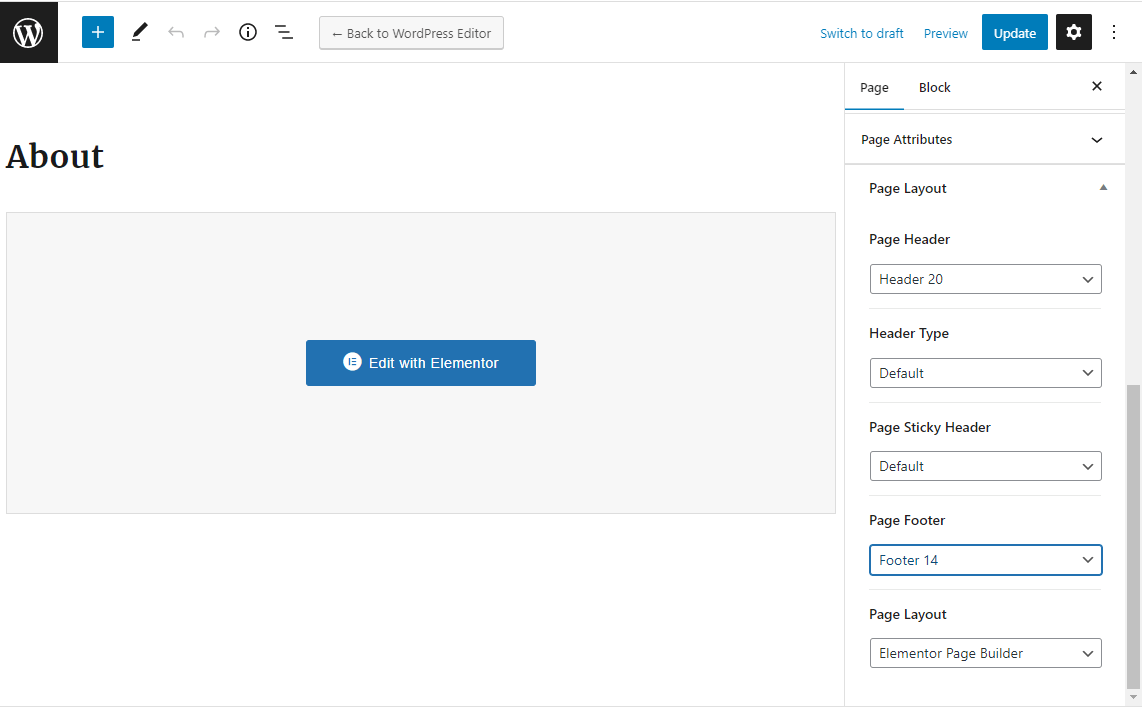
Please edit the page and choose the header template in “Page Header”. Please check this: https://docs.rivaxstudio.com/raveen/assets/images/page-header.png
Thanks
Hello,
I followed the instructions here https://docs.rivaxstudio.com/roxeen/ to install the theme. I also installed the Modern demo content.
I’m trying to use the simple “last post” page but I can’t update the “Default Header” with my logo and title: it’s always the Roxeen logo: https://turtle.blogsyte.com/
How to update the header ? Can I edit it using Elementor or must I custom the header.php file in the Roxeen Child template ?
Regards, Stef
Hi there,
It is easy. Please check our video tutorials here: https://www.youtube.com/channel/UC1iKOJwetdLzhcFBbDAhoRg/playlists
There is a video for changing the logo.
Thanks
Hello,
I am writing to you regarding my recent purchase of the WordPress theme Roxeen, made on 22/12/2023. After spending time setting up and exploring this theme, I find myself compelled to request a refund.
Although the product description did not explicitly promise customization without coding, I find the theme extremely limited in terms of customization options. Specifically, on the articles page, I am unable to modify the layout to my liking. For instance, the size and position of the article image are fixed, which does not meet my requirements.
Furthermore, setting up the imported demos has proven to be complicated. I am faced with multiple templates, which makes the installation and customization process difficult and unintuitive. I have also encountered display bugs, such as issues with the off Canvas menu not correctly displaying the icon or sometimes not opening.
These difficulties and limitations make the theme unsuitable for the use I had in mind. Therefore, I am requesting a refund in accordance with your sales terms and in the interest of customer satisfaction.
I am available for any additional information needed for the refund process.
Thank you in advance for your understanding and cooperation.
Sincerely, Kevin.
I would also like to point out that one of the plugins recommended for optimal use with this theme has not been updated for over 2 years. This raises serious concerns about security and compatibility, especially considering the rapid evolution of web standards and WordPress.
Furthermore, I have noticed a significant decrease in my website’s performance since installing this theme, compared to my current theme, “Jnews”. This reduction in site speed is a major issue for user experience and search engine optimization, and contradicts my objectives in terms of web performance.
These additional elements, combined with the issues already mentioned, reinforce my request for a refund for this purchase.
Hey there,
No template has unlimited settings for all sections. Even the best-selling template in themeforest. But each template may have different settings for different sections. Usually, choosing a template for purchase is done after seeing the online preview, and this means that you like the look and features of the template and you intend to have a site similar to the online preview. Roxeen is a light template with many features and a very beautiful design, and many users like it. You can design a very beautiful site with good SEO and great speed with it. The design of the post page, in terms of placing the thumbnail image, is the same as in the online preview. Plugin CMB2 is fully compatible with WordPress 6.4 and PHP 8.2, and there is no concern about its performance, and no problems have been reported about it so far. We are aware. If necessary, we will replace this plugin with another plugin and provide you with an update. Do not worry. This plugin has a very good performance and you can rest assured about it. Thank you
Hello,
Thank you for your response. I understand that no template offers unlimited settings, and I appreciate the design and features of Roxeen as presented in the online preview. However, the key issue is that an online preview doesn’t always provide a complete picture of a theme’s flexibility and customization options in a real-world setting.
After purchasing and working with the theme, I found that the customization limitations were more restrictive than anticipated. This realization came only after trying to adapt the theme to my specific project needs, which was not apparent from the online preview.
Regarding the plugin CMB2, while I appreciate your assurance about its compatibility and performance, my concerns are more about its lack of updates in terms of long-term viability and security.
I respect the quality of your product, but it simply does not align with the specific requirements of my current project. Therefore, I kindly request you to reconsider my case for a refund, as the theme, despite its merits, is not a fit for my particular needs.
Thank you for your understanding and looking forward to your consideration.
Sincerely, Kevin.
Hi dear Kevin,
I understand you and I expect you to understand us. This is a digital asset and I can not refund it easily like a physical product. Because you have it and can use it even after the refund! So the refund must be for a reasonable problem like an installation problem, error, working issues, etc. Themeforest doesn’t allow us to refund without a reasonable problem. If we do it, everyone can buy an item and send a refund request and use it. Actually, you are not allowed to buy a theme and play with it to check if it is suitable for you or not. You must check the live preview and decide whether to buy or not. Please directly contact Envato if you need any assistance with a refund: https://help.market.envato.com/hc/en-us/requests/new So they will decide about the refund
Thanks for your understanding.
Hello, I don’t have the option to modify Rivax Templates using Elementor, can you help me please ?
Hello,
Please go to Elementor > Settings and check Rivax Templates to enable Elementor for it.
Thanks