12912 comments found.

Space between header and content. Also between footer and content. Please help. https://emojistickers.com
Hi,
Please, create a topic on our support forum and provide us with all the necessary details about the request with some screenshots and including your admin access so we can help you https://xtemos.com/forums/forum/woodmart-premium-template/
Regards
Hi, my theme is reger the registered with a valid reg code we don’t remember the e-mail so I can’t open a support and purchase support separately.
My problem is like this.. When I open an order and/or create a woo commerce product I got this error.
I can also send my purchase code I a separate e-mail. How can I solve this registration and the problem below ? Thanks.
[23-Feb-2024 18:13:04 UTC] PHP Fatal error: Uncaught ValueError: Unknown format specifier “S” in /home/xxxxxx.com.tr/public_html/wp-content/themes/woodmart/inc/integrations/visual-composer/maps/brands.php:71 Stack trace: #0 /home/xxxxxx.com.tr/public_html/wp-content/themes/woodmart/inc/integrations/visual-composer/maps/brands.php(71): sprintf() #1 /home/xxxxxx.com.tr/public_html/wp-content/plugins/js_composer/include/classes/core/class-wpb-map.php(920): woodmart_get_vc_map_brands() #2 /home/xxxxxx.com.tr/public_html/wp-content/plugins/js_composer/include/classes/core/class-wpb-map.php(345): WPBMap::setElementSettings() #3 /home/xxxxxx.com.tr/public_html/wp-content/plugins/js_composer/include/classes/core/class-wpb-map.php(370): WPBMap::generateData() #4 /home/xxxxxx.com.tr/public_html/wp-content/plugins/js_composer/include/classes/shortcodes/core/class-vc-shortcodes-manager.php(173): WPBMap::getAllShortCodes() #5 /home/xxxxxx.com.tr/public_html/wp-includes/class-wp-hook.php(324): Vc_Shortcodes_Manager->buildShortcodesAssets() #6 /home/xxxxxx.com.tr/public_html/wp-includes/class-wp-hook.php(348): WP_Hook->apply_filters() #7 /home/xxxxxx.com.tr/public_html/wp-includes/plugin.php(517): WP_Hook->do_action() #8 /home/xxxxxx.com.tr/public_html/wp-admin/admin-header.php(139): do_action() #9 /home/xxxxxx.com.tr/public_html/wp-admin/edit-form-advanced.php(425): require_once(’...’) #10 /home/xxxxxx.com.tr/public_html/wp-admin/post.php(206): require(’...’) #11 {main} thrown in /home/xxxxxx.com.tr/public_html/wp-content/themes/woodmart/inc/integrations/visual-composer/maps/brands.php on line 71
Hello,
As we can see, this account doesn’t have a “Purchased” label. We can’t verify your license if you don’t have a purchase code, unfortunately.
Kind Regards
Hi, i go to the theme settings and modify one option and press save button i recibe a 404 error page
Hi,
Please, create a topic on our support forum and provide us with all the necessary details about the request with some screenshots and including your admin access so we can help you https://xtemos.com/forums/forum/woodmart-premium-template/
Regards
Hello,
How can I hide/remove the sticky navigation menu and the wthite space of a certain page?
Thank you
Hello,
Thank you for reaching out to us with your question. We appreciate that you use our theme and are happy to help you in any way we can.
To ensure that we are able to provide you with the best support possible, we encourage you to create a new topic on our support forum with your question or issue. Our support team actively monitors the forum and will be able to provide you with a prompt and thorough response.
To create a new topic on our support forum, please follow these steps:
1. Visit https://xtemos.com/forums/forum/woodmart-premium-template/ and sign in with your account.
2. Click on the “Create New Topic” button and provide a descriptive title and detailed description of your question or issue.
3. Click “Submit” to post your question.
Once you have posted your question on the support forum, our team will review it and provide a response as soon as possible.
Thank you for your cooperation, and we look forward to hearing from you on the support forum.
Best regards
Well, I don’t have premium support activacted. This is a request to hide a new element of woodmart. Could you give some help or some ligths for which class should I look? Thank you
You can do this using our Theme Settings presets. Refer to our documentation on this page https://xtemos.com/docs-topic/theme-settings-presets/
Do this theme have login with OTP system?
Hello,
Regrettably, the option you are looking for is not available in our theme or WooCommerce’s default settings. Enabling it may necessitate additional customization of the code or the installation of an extra plugin, but we do not have instructions for either of these options. Please note that this issue falls outside of the scope of our theme’s support.
Best regards,
Requesting for Web Hosting template
Hello,
Thank you for the feature request. We will consider it for our future updates.
Kind Regards
Hi,
Please, create a topic on our support forum and provide us with all the necessary details about the request with some screenshots and including your admin access so we can help you https://xtemos.com/forums/forum/woodmart-premium-template/
Regards
543293
543293
Hi, Can you please advise where in the dashboard to find the settings to change the website logo please? The main logo above the navigation menu. Thanks
Hello,
Thank you for purchasing our theme and contacting us.
You can edit your header as well as your logo element in our Header builder. Find all the instructions in our documentation here https://xtemos.com/docs-topic/how-to-setup-a-logo-image/ If you still have any difficulties, please, create a topic on our support forum and our specialists will help you https://xtemos.com/forums/forum/woodmart-premium-template/
Kind Regards
Hello, I have a question regarding the element “product meta value”. How does it work exactly? What key do I have to enter there? And can this be automatically connected to an interface?
Hello,
Thank you for reaching out to us with your question. We appreciate that you use our theme and are happy to help you in any way we can.
To ensure that we are able to provide you with the best support possible, we encourage you to create a new topic on our support forum with your question or issue. Our support team actively monitors the forum and will be able to provide you with a prompt and thorough response.
To create a new topic on our support forum, please follow these steps:
1. Visit https://xtemos.com/forums/forum/woodmart-premium-template/ and sign in with your account.
2. Click on the “Create New Topic” button and provide a descriptive title and detailed description of your question or issue.
3. Click “Submit” to post your question.
Once you have posted your question on the support forum, our team will review it and provide a response as soon as possible.
Thank you for your cooperation, and we look forward to hearing from you on the support forum.
Best regards
Good day, its very nice theme!
I have two problems with translation: 1: https://iili.io/JGH21cv.jpg This text can´t find. Not in Contact Form 7. 2: https://iili.io/JGH2ESR.jpg I translated it but always the old text is there: https://iili.io/JGH2M9p.jpg*I forget: Don´t have cache or CloudFlare DNS. Just creating the site without anything.
Hi,
Please, create a topic on our support forum and provide us with all the necessary details about the request with some screenshots and including your admin access so we can help you https://xtemos.com/forums/forum/woodmart-premium-template/
Regards
Hi, I would like to buy woodmart but I want to know why there’s no attribute dropdown option that allow to select which variation type to display for all attributes terms for example: image, color, text, button… Actually this option work for attribute terms only but if we have a large attribute terms and we want to display all terms as text swatch, what should we do? kindly check this plugin for better understanding: https://wordpress.org/plugins/woo-variation-swatches/
Hello,
Thank you for contacting us. Our theme has both text and color/image swatches functionality built-in (no plugins needed). Check this example on our demo https://woodmart.xtemos.com/mega-electronics/product/apple-macbook-pro-16-m1-pro-2/
Kind Regards
I love the theme! and have no issues except with the latest version of Woo 8.6.1. I get the error msg ‘could not copy file woocommerce/templates/content-php so it will not update either through plugins page or the Woodmart area. Is this an issue with you as the content file states:
“(the theme developer) will need to copy the new files to your theme to maintain compatibility.”
Thank you.
Hi,
Please, create a topic on our support forum and provide us with all the necessary details about the request with some screenshots and including your admin access so we can help you https://xtemos.com/forums/forum/woodmart-premium-template/
Regards
Hi, how can i buy a support? I just see the option to buy an other license.. My question is how it is possible to delay the rendering of images as on you demosite, in order to speed up the loading time of the header. I tried with your lazyload option, but it didnt help. Know I am running wp-rocket with with defferd and delayed options, butit still loads header and images in the same moment..
Hello,
To be able to extend your support period you need to visit our theme’s page with the account you used to purchase the theme. As we can see, this account doesn’t have any purchases of our theme.
Kind Regards
Why Wishlist promotional emails may not work? All system (transactional) emails work, but the ones associated with a wishlist do not. Neither emails with a promo code nor emails about a product discount.
Hello,
Please, disable all plugins that are not related to our theme and provide us with your admin access. We will log in and check what is wrong there. Use the contact form on our profile page here https://themeforest.net/user/xtemos
Thank you in advance
Hello, I have a question regarding the comparison function. Is it possible to set a maximum of 5 products to be displayed in the comparison view? And can you change the design in the comparison view, i.e. make the tables wider or the images smaller?
Hello,
Thank you for using our theme and contacting us.
Currently, there are no such options in our theme, unfortunately.
Kind Regards
Hello.
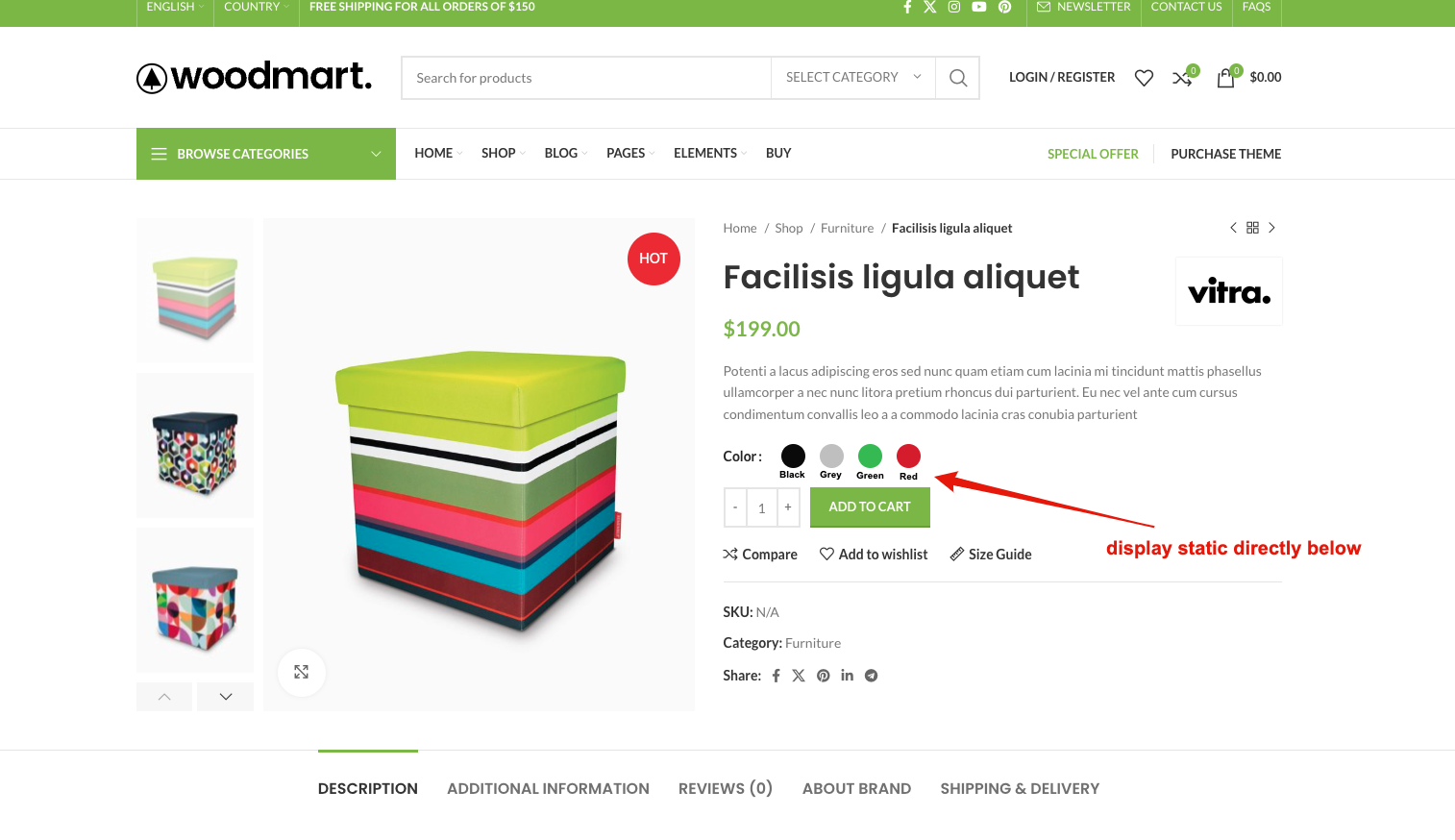
Is it possible to have the actual attribute name’s display static directly below or above the attribute image swatch’s on the main product at all times? Rather than just appearing when you highlight over them.
Regards
Hello,
Could you please send us a screenshot so we can better understand what you mean?
Kind Regards
Here you go…
https://i.gyazo.com/5c07109c9f9eee5ce828dbad5173f7a2.mp4 https://i.gyazo.com/26e039b35c00e2fdaba601390d51b84f.pngHope this clarifies things for you.
Regards
Unfortunately, there is no such ability in our theme at the moment.
Hi. On the category page I don’t see the title but the menu with the subcategories. How can I modify? Thanks
https://drive.google.com/file/d/1bqiPr5kduSuT6b9-WCpTAvaMuygTlkSi/view?usp=sharingHi,
Please, create a topic on our support forum and provide us with all the necessary details about the request with some screenshots and including your admin access so we can help you https://xtemos.com/forums/forum/woodmart-premium-template/
Regards
How to remove quantity count from cart icon in header?
Hi,
Please, create a topic on our support forum and provide us with all the necessary details about the request with some screenshots and including your admin access so we can help you https://xtemos.com/forums/forum/woodmart-premium-template/ If your support has already expired, you must extend it on ThemeForest first.
Regards
Hi, Can you - please - recommend me a plugin a add custom fields to the Registration form with a good integration with your theme?
I tried this one but it not working with your theme: https://wordpress.org/plugins/profile-extra-fields/
I also tried this one but the field is not showing up: https://wordpress.org/plugins/advanced-custom-fields/
Hello,
We have answered your questions on our support forum. Please, continue the conversation there.
Kind Regards
In the mobile version, if we click on filters it slides out from left, can we make it like it slides from down, which will give more legit feel of a mobile, is that option available or we need to modify it?
Hello,
Could you please send us a screenshot so we can better understand what you mean?
Kind Regards
Please check that in mobile and click on filter, this filter style is so much better..just a suggestion to make this theme more awesome
Thank you for your suggestion. We will consider this for our future updates.
Any update on updating mobile menu style ??
Hello,
We have added your suggestion to the feature requests list. Currently, we don’t plan to implement this for the nearest update.
Kind Regards