427 comments found.

If I can get support it would be awesome!!
Hello Windpomp01,
First of all, I’m sorry for the delayed response.
We’d be happy to assist you! Could you please create a support ticket and share your issue there if you haven’t already? This will help us track your request properly and provide you with dedicated support.
Once you’ve submitted the ticket, please let us know, and we’ll take care of it as soon as possible.
Thank you for your patience and understanding!
Regards don-themes.
Support System
Documentation
Good day.
Support eventually reached out to me today. I hope they can fix this ASAP because I am behind schedule. On the Molla Theme no changes in customiser prints to front end. Accept for logo upload. How ever changes displays in Customiser window, it does not print to front page once published. Meaning I have to do everything with css, which is not good. Ticket Id #4171688> If you can maybe hurry this a bit. I have untill friday to finish up.
Hello Windpomp01,
Thank you for your message.
We have already replied to your support ticket. Could you please check our response there and follow the suggested steps?
If anything is unclear or the issue persists, feel free to reply to the ticket and we’ll be happy to assist you further as quickly as possible.
Regards don-themes.
Support System
Documentation
Support Articles
hi i have purchased this theme very long time and its showing some issue like ‘Item purchase code already_used’ error while using now. please me how to resolve this problem!
Hello, @sujan09,
I have reset your purchase code, please try to re-register the theme again with the same purchase code on your desired domain and let me know the result.
Regards don-themes.
Support System
Documentation
Hi
can I add advertisement banners in shop page?
Hello @sanayar2008,
Hi! Yes, it’s possible to add ad banners on the shop page, but we’d need a bit more info to guide you properly. Could you let us know where exactly you want the banner (e.g., top, sidebar, between products), what type of banner it is (image, HTML, AdSense, etc.), and if you’re using a page builder like Elementor or WPBakery? Also, should it show on all shop/category pages or just specific ones?
Regards don-themes.
Support System
Documentation
Between products in all products page using Elementor (image, HTML) only
Hello @sanayar2008,
In our theme, it’s currently not possible to insert content directly between products on the shop (all products) page using Elementor, as the shop layout itself is not editable via Elementor.
However, here’s what is possible based on the theme options:
You can add Elementor blocks either above or below the products on the shop page using the built-in theme options.
For single product pages, our theme does support creating custom layouts using Elementor — so if you’re looking to include ad banners on individual product pages, you can do that freely within the custom layout builder.
You can check our documentation here: https://d-themes.com/wordpress/molla/documentation/
Regards don-themes.
Support System
Documentation
what about banner ad as ‘slidebar’ ?
Hello @sanayar2008,
Yes, you can absolutely add the banner as a slider. You have two options:
Using the Molla Studio Library: You can import a pre-designed banner slider layout directly from the library for quick setup.
Creating a Custom Slider: Alternatively, you can create a custom banner slider using Elementor to match your specific design needs.
Regards don-themes.
Support System
Documentation
OK , the issue is that the demo is not importing. And the widgets for better customization not working as well.
any ideas ?
Hello @yerbadose,
We’ve already replied to your support ticket #61259. Please review our response there and reply directly to the ticket.
Thank you!
Regards don-themes.
Support System
Documentation
Can this theme be used normally without a license?
Hello @sktattoo,
Thanks for showing your interest in our theme 
No, you can not use the theme without a license.
Regards don-themes.
Support System
Documentation
Hello,
I upgraded from PHP 7.4 to 8.1, but your theme and its plugin are displaying PHP error messages (fatal error). Please make it compatible.
Hello @osformation,
Please contact with us via our support system and provide your site wp-admin URL with us there to check the issue and provide you a proper solution.
Regards don-themes.
Support System
Documentation
I bought the theme a long before. I want to use it now, and I have installed theme and downloaded the demo but I do not see the setup wizard in my admin
Please disregard this comment, posted on wrong site
Hello @Bruce1,
No problem! Let me know if you need any assistance with anything else.
Regards don-themes.
Support System
Documentation
not able to disable newsletter popup at the start of the website..i cant find edit with elementor setting in Popup menu under molla builders
Hello @ashii_001,
Please contact with us via our support system and provide your site wp-admin URL with us there to check the issue and provide you a proper solution.
Regards don-themes.
Support System
Documentation
Hello, I have been using your theme since 2020. I had bought 1 extra license. Now I wanted to install it on my new website but I am struggling with many endless problems. I somehow managed to install the theme. I successfully installed the demo but the “molla” website infrastructure does not work at all. The demo does not appear on my website. I wonder what php version your theme is running on, maybe the problem is related to this.
I just solved my problem, Molla team. no need for help. best regards
Hello @zeynka,
That sounds good.
Please feel free to reach out to us with any further comments, concerns, or suggestions you wish to share. We would love to make things right if you give us another chance.
Thanks and have a great day!
Regards don-themes.
Support System
Documentation
I thought I had solved my problem but still struggling with chronic issues. I cannot install my Molla theme on my website. The plugin keeps giving me an error. I also tried to upload the content of my other website with my other license code to my new website. The content is completely copied but when I click on deactivate to change my license code everything breaks down again. And I cannot access anything. just could not overcome this issue and hope you can help me. I have sent all my login information to your support channel by opening a ticket. thank you for your help guys. ticket code is #55114
Hello @zeynka,
We are very sorry for any inconvenience this may have caused. We’ve already responded to your support ticket. Please take a moment to review our reply and respond directly to the ticket if needed.
Regards don-themes.
Support System
Documentation
they solved my issue quickly and helped a lot. I don’t know what to say. dthemes is a team that stands behind their products.
Hello @zeynka,
Yes, we are also working on the support forum.
Sounds Great! That your issue has been solved.
Thanks for contacting us.
Have a great day
Regards don-themes.
Support System
Documentation
hi i tried to install Woocommerce plugin but its not installing while setup the theme
Hello, @sujan09,
Please try installing it manually or by uploading it directly. If the issue persists, could you kindly reach out to us through our support system? Be sure to provide your site’s WP Admin URL and credentials so we can investigate and assist you further.
Regards don-themes.
Support System
Documentation
Hello, I like your Molla | Multi-Purpose WooCommerce Theme.
But before I purchase, I found the landing page of all demos got a same problem. All the images disappeared about 10 seconds after the landing page is shown.
I tried different browsers, and tried mobile version.
The problem persist.
Would be great if you can take a look and check.
Thank you.
Hello, @eddengan,
Apologies for the inconvenience. We have recorded a video featuring demonstrations highlighting the absence of any issues. Please take a moment to watch it and let us know if there is anything we’ve missed or misunderstood regarding your concerns: https://uploadnow.io/f/bgKbZXB
Regards don-themes.
Support System
Documentation
I bought the theme a long before. I want to use it now, but I get the “Item Purchase Code already_used” error. I couldn’t find where to create support. Can you help me please
Hello, @vijuse,
I have reset your purchase code, now you can use the same purchase code for activation of your theme.
Regards don-themes.
Support System
Documentation
Hi Team… getting this error when uploading my theme demo…
Demo 32 installation is failed! reactivate
Hello, @LIKEAWINDY12,
Please go to Molla >> Theme License, unregister the theme, and then re-register it using the same purchase code. After that, try again.
If the issue persists, please reach out to us through our support system, providing your site’s WP Admin URL and credentials, so we can investigate and assist you further.
Regards don-themes.
Support System
Documentation
Icons display like this: https://i.imgur.com/yzakjJq.png What’s causing this error?
Ok, SOLVED, Fast Velocity Minify plugin causing that issue.
Hello, @s_maduranga,
Thank you for the update! We’re glad to hear you were able to resolve the issue. The Fast Velocity Minify plugin can sometimes conflict with certain elements on the site, including icons, when it’s minifying or combining files.
Regards don-themes.
Support System
Documentation
Hi, how can I remove the zoom function on product detail page? Should be the class zoomImg? Thanks
Hello, @deepcoding,
To remove the zoom function on the product detail page, please follow the instructions in the WordPress ticket linked below:
https://wordpress.org/support/topic/disable-woocommerce-zoom-image/
This will guide you through the necessary steps to disable the zoom feature.
Let me know if you need further assistance!
Regards don-themes.
Support System
Documentation
Hi,
I just tried to update my website and its showing already_used. What can i do?
Thanks.
Hello, @SirNick,
I have reset your purchase code, now you can use the same purchase code for activation of your theme.
Regards don-themes.
Support System
Documentation
I am getting this already_used error when I want to update the theme, please help!
Hello, @tonybun,
I have reset your purchase code, now you can use the same purchase code for activation of your theme.
Regards don-themes.
Support System
Documentation
Hello, I purchased this theme sometime back, it is currently being used on my website, but I’d like to redesign using another design. It keeps telling me already_used.
Hello, @similawson,
I have reset your purchase code, now you can use the same purchase code for activation of your theme.
Regards don-themes.
Support System
Documentation
Hi I bought this theme a long time ago and I am trying to activate it to build my new store, but it keeps telling me already_used
is there somewhere I might be able to fix this one?
Thank you.
Hello, @BabeeBird,
I have reset your purchase code, now you can use the same purchase code for activation of your theme.
Regards don-themes.
Support System
Documentation
oh you’re amazing, thank you!
You’re Most Welcome!!
Hi, could you explain me how can I translate Footer Bottom area in Molla Options? I’m using WPML and this area isn’t recognized for translation.
https://www.screencast.com/t/UNZs9TWniCm5Thank you in advance.
Hello, @milosebxhub,
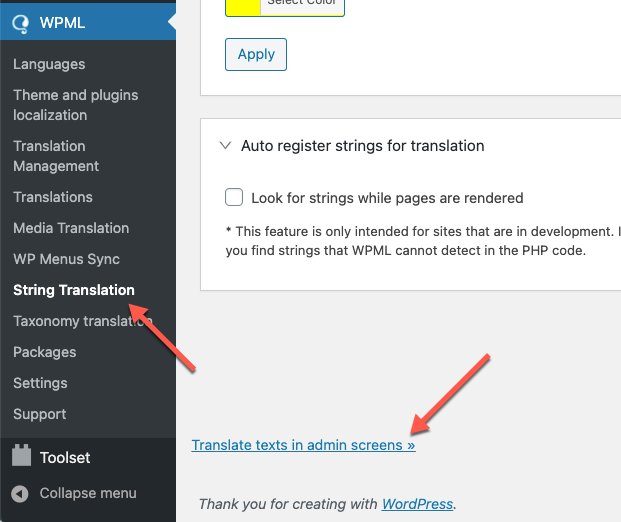
Please go to WPML >> String Translation >> Click the scroll to the bottom of the page and click the Translate texts in admin screens link. https://cdn.wpml.org/wp-content/uploads/2021/03/translate-texts-in-admin-screens.png
This will take you to a searchable list of admin strings. Find the Words that you want to translate and then select those words and add them to the string Translation then you will go to the WPML >> String Translation >> then find and translate them into other languages.
Otherwise, If the issue still exists then please provide us the WP admin login details of your site through our support system so we will check and solve the issue for you.
Regards don-themes.
Support System
Documentation