2024 comments found.

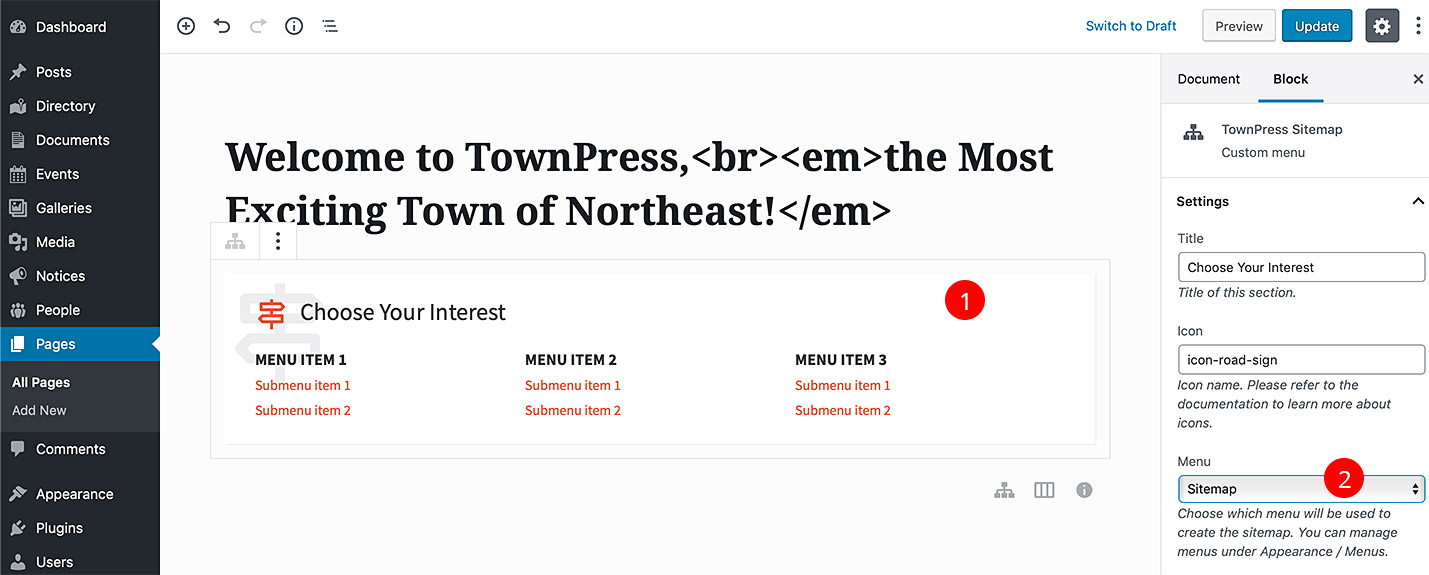
Where do I configure “Choose Your Interest” and “Latest News”? I see them in the frontend but not in the backend…
Hi,
edit the front page, click on each block and change the title in the right panel, see this screenshot: http://docs.lsvr.sk/townpress.wp/content/front-page-40.jpg
Please make sure to read through the documentation: http://docs.lsvr.sk/townpress.wp/#introduction
Lubos
We have some version from 2016. How can we upgrade to latest version but wothout loosing any documents? Posts and pages can be copied/exported to new instalation, but files cant – or…?
Hi,
you can use a plugin like Post Type Switcher to try to convert old document/event posts to new ones, but it won’t convert meta data like event start/end date and document attachments. That has to be manually reassigned to the new posts. https://wordpress.org/plugins/post-type-switcher/
Lubos
Hello,
is it possible to upgrade from v1.x?
Hi,
yes, but you will lose all your custom posts like Events or Documents, they will have to be created from scratch, and you will have to rebuilt your home page from the scratch
Lubos
Hello,
A few days ago, I encountered a bug with the LSVR Documents Attachments Widget. The dropdown menu, which previously allowed me to select document categories to display, is now empty. There are multiple categories on my website, so I believe the issue might be with the plugin, although I’m not entirely sure. Please see the attached screenshot for reference: https://ibb.co/1YVhsTSc .
Thank you and have a great day, Andrei
Hi,
that is a known bug in the new version WPbakery plugin, please check out this older comment for a temporary solution: https://themeforest.net/item/townpress-municipality-wordpress-theme/11490395/comments?page=1&filter=all#comment_31273747
Lubos
Hello, souria.help
I followed the documentation and I asked a developer to have a look without any result, I believe there is an issue in your theme when it applies to RTL, I can provide you credentials for the website…
Hi,
can you please be more descriptive what kind of RTL issue are you experiencing?
Lubos
Hello, souria.help
On this website, I can see the main menu on the mobile but not on the desktop… I need to see the main menu on the right side, not the left side…
What is the issue, please?
Hi,
have you set up your menus as per the documentation? http://docs.lsvr.sk/townpress.wp/#menus
Lubos
How do I set the map (Google Maps) to show as satellite view by default on the directory page as shown in your demo? I already have the API key and have restricted it as outlined in the documentation. Please advise?
Hi,
you can set that under Appearance / Customize / Directory via Archive Map Type option
Lubos
Hi,
I installed the theme in Arabic and started to localize it… I selected the green color but noticed the main menu is still red on mobile. What is the issue, please?
Hi,
please share your URL where I can see it.
Lubos
Hello, after updating the LSVR plugins, the “LSVR Event Widget” no longer works. No events, locations and categories are displayed for selection in the dropdown.
Deactivating and uninstalling cache plugins did not help.
What could be the problem? Where can I update the “LSVR Event Widget Plugin” manually?
Thank you very much Michael.
Hi,
are you using the latest version of the theme (3.8.10), latest version of WordPress and PHP 7 or higher? You can enable the WP Debug mode which may reveal the issue https://developer.wordpress.org/advanced-administration/debug/debug-wordpress/
You will find all the bundled plugin sin the full package in the “plugins” folder.
Lubos
Hello Lubos, thank you for the answer.
We are using PHP 8.3 and TownPress Version 3.8.10. i have reinstalled all LSVR plugins from the package individually. unfortunately without success.
In the LSVR Featured Event Widget Settings there are no Events in drop down list. (800 events are available and can be called up individually) Screenshot: https://postimg.cc/mPGBkwF4
unfortunately i have no success with the debug mode of wordpress either …
the widget does not seem to find the event list. what could be the reason?
I see, there is something wrong in the WP Bakery, it is not just this widget, but all widgets where you are selecting post or a taxonomy, this will require deeper investigation. However there are workarounds.
The easiest workaround would be to simply switch to a Gutenberg editor (you can use it just for this particular page), the widget appears to be working fine there. It would require rework of the whole page in the Gutenberg of course which may not be an option.
In that case, the second solution is like this:
- First open the event in the admin and get its ID from the URL. For example if your URL is like “yoursite.com/wp-admin/post.php?post=13&action=edit”, the ID is 13
- Go back to editing the page and add the widget without selecting the event and save the page
- Switch the editor to the “Classic mode”
- Find the widget’s shortcode, it will look like this
[lsvr_event_featured_widget title="My title"] - Add the id to the shortcode, like this:
[lsvr_event_featured_widget title="My title" id="13"] - Save the page. Take care when you will be saving this a page in the future when switched to the WP Bakery interface, I am not sure if the ID won’t be removed from the shortcut.
I will try to address this i the next update
Hello, there is still the same problem. Also with version 8.4.1 of WP Bakery. Can you solve it with the next update? Thank you and wbr Michael.
Have, have you updated the theme and LSVR plugins to the last version (3.8.11)?
thank you very much for your reply. yes, plugins and theme are up to date.
problem solved!! “LSVR 3rd Party Toolkit” was the problem – i reinstalled it and everything is well. Thank you!!
Glad you sorted it out!
Hello,
Lately we have been experiencing some issues with our template.
For events, files will embed on the back end, but don’t display as embedded on the public end
Lately events don’t expire (and disappear) until a few days after the event has ended.
News (category) linked to tenders (sub-category) – News article expires, tender stays active on tenders & quotations page
Thanks,
Jason
Hi,
are you using the latest version of the theme (3.8.10)? However
this sounds like some caching issue, please check the configuration of your caching plugin, or temporarily disable it to see if it helps.
Lubos
Hello,
I would like to ask you about future updates to the theme in relation to the European Accessibility Act (EAA), which comes into effect in June 2025.
Since this regulation will require websites and digital applications to be accessible to all people, including users with disabilities, I was wondering if you plan to release updates to ensure that your theme complies with the accessibility requirements outlined in the legislation.
Thank you in advance for your attention, and I look forward to hearing from you.
Regards
Hi,
the theme was build with the accessibility in mind, if you come across anything which is not in the line with the new legislation just let me know and i will try to address it.
Lubos
Before buying, do you have a link to your RTL customization?
Hi,
I am sorry but I do not have RTL demo.
Lubos
Thank you, upon installation of your theme there is a dump for the demo or I should build it by myself?
Dobrý den,
při zobrazení seznamu Person je řazení abecedně dle toho, co je vidět, resp.:
- Bc. Zezula
- Dobrovolny
- Ing. Bohacek
- Ing. Novacek
- Ing. Werich
- JUDr. Adam
- MUDr. Vomacka
- Sekyrka
- Turecek
Toto řazení se mi zdá poněkud nešťastné, kdy tituly nejde sice vynechat, ale “abecedně” to tedy není. Zkusil jsem u jednotlivých osob toto ošidit tvarem trvalého odkazu bez titulu (/adam /bohacek atd.), ale na řazení to bohužel nemá vliv. Zkusil jsem i 01-adam, 02-bohacek, ale taky nepomohlo. Neuvažuje autor o nějaké úpravě pluginu?
Dobry den,
skuste tento plugin, umozni vam to zoradil posty manualne https://wordpress.org/plugins/intuitive-custom-post-order/
Lubos
Dear support, I want insert my own code for swithcher language on the website header. What file must I custom for insert the code on the mobile and desktop version? Best regards, Nuria Benaches
Hi,
copy the template-parts/header/toolbar.php to your child theme (under the same path) and put your code after the line 13, or use “lsvr_townpress_header_toolbar_top” hook (action) via your child theme, here is an example: https://www.hostinger.com/tutorials/wordpress-add_action
Lubos
I am using in the languages option of the theme, the custom links. I am using a thrid plugin for switcher from one language to other. I am using Qtranslate. The problem is that the switcher on the header always redirect me to the home page and not redirect me to the translate page that I am using. Please, can you help me? Regards, Nuria Benaches
Hi,
I am sorry, but the switcher has no ability to redirect you to the particular page, that would have to be coded specifically for the translation plugin.
Lubos
E compatível com elementor ?
Hi,
there is basic Elementor support, but the theme was primary optimized for the native block editor.
Lubos
Dear support, How can I export the directory, events, documents and notice from TownPress v1 to other WordPress with TownPress v2 Best regards, Nuria
Hi,
it is not possible 1:1 but you can use a plugin like this to partially convert old post types to new ones https://wordpress.org/plugins/post-type-switcher/
Basically, only the title, content and maybe categories can be converted. You can’t meta data like event start/end, document attachments etc.
Lubos
Where do I go to work on seo for pages like events and the directory? I can’t seem to find the section to edit these pages. Thanks!
Hi,
those pages are auto generated, same as default blog archive page for example. You can change their settings under Appearance / Customize / Directory. Events, etc…
Please make sure to read through the documention http://docs.lsvr.sk/townpress.wp
Lubos
Hi, when clicking on menu items with sub-items in the mobile version, you are redirected to a blank page. Is there a solution for this? Thanks!
Hi,
are you using the latest version of the theme (3.8.9)?
Lubos
Yes, all updates have been completed.
Please share your URL
I’ve tested it out, but haven’t encountered any blank pages. Do all menu items do it for you or only some?
You mean page without the main content but with sidebar a header? That has nothing to do with the menu. The content of those pages just appears to be blank. Does it have any content?
Exactly, there is no content on the main pages, only on the subpages.
Is it possible to configure the main page so that clicking on it simply expands the menu and it doesn’t open the page without content (in the mobile version)?
Every menu item has to link to a page, but you can just link it to a first page in the submenu. So in case of TEPEKÖY just link it to Allgemeines page
Wordpress just Updated to 6.7, I can’t upload any documents, pages are blank.
Hi,
are you using the latest version of the theme with PHP 7 or newer? I’ve just tested it on my end, with PHP 8.2 and it worked fine.
Lubos
Thank you
So what was the issue, the PHP version?
Yes it had to get to 8.2, not 8.1