12916 comments found.

Hello,
on the home page where there is the ajax product tab, where do I go to change the titles “NEW, FEATURED and TOP SELLERS”? I already searched everything and couldn’t find it, and a second item, where to modify the results of these tabs?
Hello,
Thank you for reaching out to us with your question. We appreciate that you use our theme and are happy to help you in any way we can.
To ensure that we are able to provide you with the best support possible, we encourage you to create a new topic on our support forum with your question or issue. Our support team actively monitors the forum and will be able to provide you with a prompt and thorough response.
To create a new topic on our support forum, please follow these steps:
1. Visit https://xtemos.com/forums/forum/woodmart-premium-template/ and sign in with your account.
2. Click on the “Create New Topic” button and provide a descriptive title and detailed description of your question or issue.
3. Click “Submit” to post your question.
Once you have posted your question on the support forum, our team will review it and provide a response as soon as possible.
Thank you for your cooperation, and we look forward to hearing from you on the support forum.
Best regards
Your demo website does not work. Let me know when you fix it. Thank you.
Hello,
Thank you for letting us know.
As we can see, there are no problems with the demo website. Could you please send us a screenshot of the error you get? Also, try to visit it using a direct link https://woodmart.xtemos.com/
Kind Regards
Hello,
I have turned on the “Show attribute label on products” in the brands attribute, but if a product has both a sale and a new label, there are many labels stacked under each other. Is it possible to position the brand label to the right side?
Thanks,
Hello,
Thank you for reaching out to us with your question. We appreciate that you use our theme and are happy to help you in any way we can.
To ensure that we are able to provide you with the best support possible, we encourage you to create a new topic on our support forum with your question or issue. Our support team actively monitors the forum and will be able to provide you with a prompt and thorough response.
To create a new topic on our support forum, please follow these steps:
1. Visit https://xtemos.com/forums/forum/woodmart-premium-template/ and sign in with your account.
2. Click on the “Create New Topic” button and provide a descriptive title and detailed description of your question or issue.
3. Click “Submit” to post your question.
Once you have posted your question on the support forum, our team will review it and provide a response as soon as possible.
Thank you for your cooperation, and we look forward to hearing from you on the support forum.
Best regards
i have dowloaded your theme and setting up, now i still get 2 main problem…the website is really slow, as a lot of your customer saying, and the second problem is that doing a backup there is now way that the backup on another domain will works….so considering that i think is a good work and a good template i would like to receive info about this problem.
please let me know
thanks a lot
Hello,
Thank you for reaching out to us with your question. We appreciate that you use our theme and are happy to help you in any way we can.
To ensure that we are able to provide you with the best support possible, we encourage you to create a new topic on our support forum with your question or issue. Our support team actively monitors the forum and will be able to provide you with a prompt and thorough response.
To create a new topic on our support forum, please follow these steps:
1. Visit https://xtemos.com/forums/forum/woodmart-premium-template/ and sign in with your account.
2. Click on the “Create New Topic” button and provide a descriptive title and detailed description of your question or issue.
3. Click “Submit” to post your question.
Once you have posted your question on the support forum, our team will review it and provide a response as soon as possible.
Thank you for your cooperation, and we look forward to hearing from you on the support forum.
Best regards
so i update my support with 44 euro…i post the problem on yout forum support but i didnt get any feedback for now. waiting for your solution about this two problem…thanks
Thank you for posting your question on the forum. It will be answered by our specialists asap.
so in the end u ask me the renewal just to suggest me a plugin for my problem ….i don’t really think this is fair …i mean stolen 40€ just for this i think is too much.
Hello,
We are sorry that you are not satisfied with our theme or service. You paid not only for this topic but for 6 months of support service. If you still have any unanswered questions regarding our theme let me know and I will do my best to help you. Otherwise, we can return your money back for the support extension.
Sorry for the inconvenience and thank you for understanding.
I have a problem that it doesn’t show me the “sale” badge with woodmart style, it’s just text. and I have a problem that it doesn’t show me the woodmart mini cart but the regular one. I use Woodmart header and footer, all from woodmart. Can you help me? my email: nikola@artelekt.com
Hello,
Thank you for reaching out to us with your question. We appreciate that you use our theme and are happy to help you in any way we can.
To ensure that we are able to provide you with the best support possible, we encourage you to create a new topic on our support forum with your question or issue. Our support team actively monitors the forum and will be able to provide you with a prompt and thorough response.
To create a new topic on our support forum, please follow these steps:
1. Visit https://xtemos.com/forums/forum/woodmart-premium-template/ and sign in with your account.
2. Click on the “Create New Topic” button and provide a descriptive title and detailed description of your question or issue.
3. Click “Submit” to post your question.
Once you have posted your question on the support forum, our team will review it and provide a response as soon as possible.
Thank you for your cooperation, and we look forward to hearing from you on the support forum.
Best regards
What is the checkout URL structure for WooCommerce products (Woocommerce product direct checkout URL, so shoppers can go directly to checkout page).
Here is screenshot of Google Merchant Center URL structure form https://prnt.sc/M2bkbVnUMUZ7 Info regarding checkout URL for product of Google Merchant Center https://support.google.com/merchants/answer/13580732?hl=enThank you so much for your kind help.
Hello,
Thank you for reaching out to us with your question. We appreciate that you use our theme and are happy to help you in any way we can.
To ensure that we are able to provide you with the best support possible, we encourage you to create a new topic on our support forum with your question or issue. Our support team actively monitors the forum and will be able to provide you with a prompt and thorough response.
To create a new topic on our support forum, please follow these steps:
1. Visit https://xtemos.com/forums/forum/woodmart-premium-template/ and sign in with your account.
2. Click on the “Create New Topic” button and provide a descriptive title and detailed description of your question or issue.
3. Click “Submit” to post your question.
Once you have posted your question on the support forum, our team will review it and provide a response as soon as possible.
Thank you for your cooperation, and we look forward to hearing from you on the support forum.
Best regards
Sorry my support expired and I cannot “create new topic”. Hope you can provide answer. Thank you so much.
As we understood correctly, your question is more related to the WooCommerce plugin and not to the theme itself. In this case, you need to refer to the plugin’s documentation or contact the plugin’s support for help.
Do you have any plans to make the theme PWA? Would be great if the customer could get an app like experience with splash screens and possible push notifcation?
Hello,
Thank you for your question. Currently, we don’t have plans to make our theme PWA.
Kind Regards
Hello.
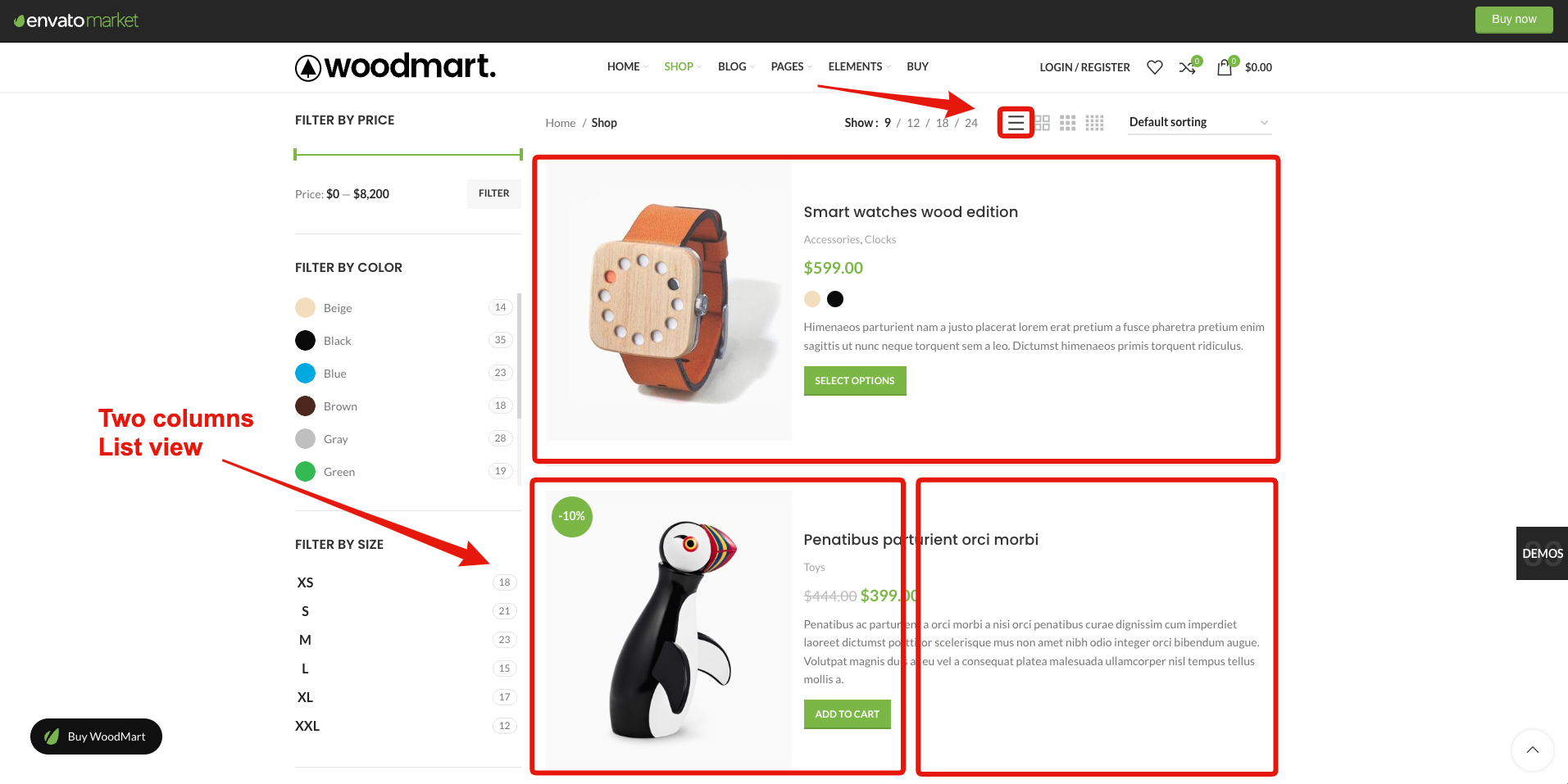
Question, is there any simple way of having the list view display in two columns?
As seen here https://i.gyazo.com/a5b8ba09a5f7aed903d5cae36cbf0dea.png
If not, I think this would be a really good feature to have as no one else offers it.
It’s just that it would be nice to have list view in two columns so that the add to cart and all other available content is to the right hand side of it.
Regards
Hello,
There is no such option at the moment, unfortunately. But yes, we will consider this as a feature request.
Kind Regards
Is it possible to have 2 columns list view template in the near future?
Magenta themes seem to have this option which is very useful for shops.
Please….
Hello,
This feature is not on the list of the nearest updates, unfortunately.
Kind Regards
Can I ask what custom plugin you used for your Knowledge Base?
Hello,
Thank you for contacting us.
We don’t use any plugins there. We have our own module developed for WoodMart’s documentation.
Kind Regards
Can i use it only for catalog?
Hello,
Thank you for contacting us. Yes, you can use our theme in catalog mode. We have a special option for this in Theme Settings.
Kind Regards
I’ve been writing to you since yesterday, you respond very urgently
Hello,
As we can see, all your forum topics are already answered. Feel free to continue the conversation there.
Kind Regards
??????????????
answer and solve the oriflame that I said
Sure, thank you for your reply. Your topic will be reviewed and answered by our specialists soon.
Hi, What’s the method for centering the logo within the header builder for the Furniture 2 Demo? (I’m switching the positions of the logo and search form). The CSS doesn’t seem to be effective.
Additionally, is it feasible to modify the text of the ‘Hot’ label, or do I need to provide a translation for that (Loco)?
Hello,
Thank you for reaching out to us with your question. We appreciate that you use our theme and are happy to help you in any way we can.
To ensure that we are able to provide you with the best support possible, we encourage you to create a new topic on our support forum with your question or issue. Our support team actively monitors the forum and will be able to provide you with a prompt and thorough response.
To create a new topic on our support forum, please follow these steps:
1. Visit https://xtemos.com/forums/forum/woodmart-premium-template/ and sign in with your account.
2. Click on the “Create New Topic” button and provide a descriptive title and detailed description of your question or issue.
3. Click “Submit” to post your question.
Once you have posted your question on the support forum, our team will review it and provide a response as soon as possible.
Thank you for your cooperation, and we look forward to hearing from you on the support forum.
Best regards
Hi,
I will buy one more licence and I will develop the site on a development domain. Will I be able to modify the domain when I finish?
Thank you
Hello,
Thank you for using our theme.
Of course, you are free to install our theme both on the development website and live without any license issues.
Kind Regards
Thank you, just purchased
Great, thank you for purchasing our theme. Feel free to contact us if you have any further questions.
Hello, I have a quick question
Its about the color of the drop down menu: https://ibb.co/GHxHSPz
on my website (the one that my public sees it works fine, normal colors of the theme.
But on my dashboard the hover text of drop down menus is always WHITE, I can’t find any option to change it, please.. only on the fancy drop down, the old drop down menus its the classic blue background with white text.
I had this problem since the day 1 I bought this theme, but never asked because wasn’t important for me at the time, but now i’m using more drop down menus and it’s a big problem  Thanks
Hi,
Could you please send us a link to your website where we can see this issue?
Kind Regards
Hi I just wanted to let you know that on your website demo under Shop > Shop Pages > Custom Layouts: Custom shop pages #7, #8, #9,#10,#11, & #12 are not currently working. I tried on both Safari and Chrome and same problem.
Hello,
Thank you very much for letting us know. But we just tested these pages and they work correctly for us. Could you please check one more time and send us a link to some of the pages that don’t work for you?
Kind Regards
As I said above it is happening on 6 different custom shop pages (see my above comment for the exact numbers).
Could you please try to test it using a Private tab? Also, send us a screenshot of the JS console with errors. Thank you in advance.
Hello,
Is it possible to prevent variation swatches from being disabled? Thank you in advance!
Hello,
Could you please clarify your question? What exactly do you mean by disabled swatches? Send us a link to the product example, please.
Kind Regards
I mean this https://share.cleanshot.com/hd9x9hfL . Is it possible to keep it clickable (enabled) instead of disabling the variation, and have it display “Out of stock” (or something similar) as standard WooCommerce?
Thanks in advance!
You can find this option in WooCommerce settings to not hide all products that are out of stock.
I think you’re misunderstanding me. I want to do the following: https://share.cleanshot.com/KCX8jfkx (but with swatches instead of a dropdown). I want the variation to be clickable regardless of whether it’s in stock or not. I don’t see this option in the settings because they remain disabled.
Thank you!
Make sure that this “Hide out of stock items from the catalog” option is turned off in WooCommerce settings.
Hello, is possible to use woodmart template library? I cannot import….
Hello,
Thank you for reaching out to us with your question. We appreciate that you use our theme and are happy to help you in any way we can.
To ensure that we are able to provide you with the best support possible, we encourage you to create a new topic on our support forum with your question or issue. Our support team actively monitors the forum and will be able to provide you with a prompt and thorough response.
To create a new topic on our support forum, please follow these steps:
1. Visit https://xtemos.com/forums/forum/woodmart-premium-template/ and sign in with your account.
2. Click on the “Create New Topic” button and provide a descriptive title and detailed description of your question or issue.
3. Click “Submit” to post your question.
Once you have posted your question on the support forum, our team will review it and provide a response as soon as possible.
Thank you for your cooperation, and we look forward to hearing from you on the support forum.
Best regards
hello i have big problems
Hello,
Thank you for reaching out to us with your question. We appreciate that you use our theme and are happy to help you in any way we can.
To ensure that we are able to provide you with the best support possible, we encourage you to create a new topic on our support forum with your question or issue. Our support team actively monitors the forum and will be able to provide you with a prompt and thorough response.
To create a new topic on our support forum, please follow these steps:
1. Visit https://xtemos.com/forums/forum/woodmart-premium-template/ and sign in with your account.
2. Click on the “Create New Topic” button and provide a descriptive title and detailed description of your question or issue.
3. Click “Submit” to post your question.
Once you have posted your question on the support forum, our team will review it and provide a response as soon as possible.
Thank you for your cooperation, and we look forward to hearing from you on the support forum.
Best regards
I have a crazy translator installed to translate into Spanish. I already translated https://ddariems.pe/my-account/?action=register Your personal data will be used to support your experience on this website, to manage access to your account, and for other purposes described in our privacy policy.
but when I enter the website it is still in English but in crazy translation and in exchange, I already deleted the cache of the website and the server but it does not change
Hi,
Please, create a topic on our support forum and provide us all the necessary details about the request with some screenshots and including your admin access so we can help you https://xtemos.com/forums/forum/woodmart-premium-template/
Regards
I´m using latest version of theme, but none of the Filter by price widget is working. Doesn´t display in frontend. I checked doc available but found nothing that could help on thius matter
Hi,
Please, create a topic on our support forum and provide us all the necessary details about the request with some screenshots and including your admin access so we can help you https://xtemos.com/forums/forum/woodmart-premium-template/ If your support is already expired then you need to extend it on ThemeForest first.
Regards