804 comments found.

It support last 8.4 PHP?
Sorry, but it’s not fully compatible yet.
Hello, very nice work actually I am considering buying this product, I need to integrate the DHL API with this. can you help me doing it?
Hi,
This theme uses the WooCommerce plugin. You can learn how to integrate the DHL API into WooCommerce. https://woocommerce.com/woocommerce-dhl-shipping/ https://wordpress.org/plugins/a2z-dhl-express-shipping/Hi, I just installed the latest version of the theme, but the demo sliders are not importing. Do you have any suggestions for how to fix this?
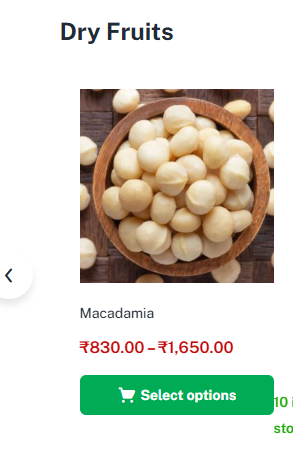
Hi, My stock availability is showing like this https://storon.shop/wp-content/uploads/2025/12/1stimage.png
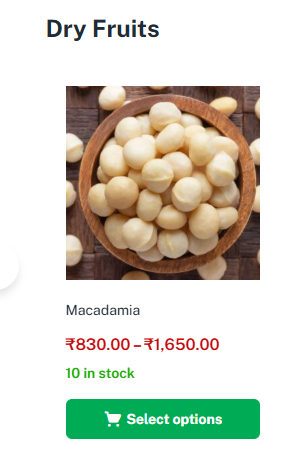
But i want it to be like this https://storon.shop/wp-content/uploads/2025/12/2ndimage.png
can i get quick CSS code to fix this please
Resolved never mind
Sorry for the late reply. If there are any other issues, please let me know.
Good morning, we have a website with your theme, but when we now install the wpml plugin, the header and footer do not translate. According to wpml plugin support, the problem is actually with the theme, is there any way to resolve it? At this moment we no longer have support, because the site has been live for some time, it is only now that we feel the need to add other languages and we are faced with this incompatibility. But you have an indication that it is 100% compatible from version 3.1.0 – May 27, 2021 – Fully compatible with WPML.
Hi,
Please send the tickets here: https://tickets.thembay.com/
Our Support Team will help you.
You don’t need to renew your support for this issue.
Thank you, I will send it.
How to display product count for leaf categories in the Shop page? Hi, I’m trying to display the number of published products next to each leaf product category (categories without children) in the Shop page and product category archive pages.
I tried using the standard WooCommerce filter:
woocommerce_subcategory_count_html
But it seems the theme does not use this filter in its template. Can you confirm whether your theme supports this filter for showing product category counts?
If not, which theme file should I override (via a child theme) to customize the output and display a custom product count?
Additionally, I’m using WCFM Marketplace, so I need to count only published, approved, and catalog-visible products.
Do you have a solution or snippet that works with your theme?
Thanks in advance!
Importing demos doesn’t work!
Sorry we have fixed the import error please update the last version
Hi,
It’s a theme issue. We are releasing a fix. Please wait.
Hi. i tested with the new version (you released yesterday), the demo is not importing. Demo 1 (Elementor). After 1 minute, it shows the message (Demo imported successfully), but when viewing the site, nothing is added. Actually, the demo import is not working.
Hi,
I tested with version 4.2.8 and it worked.
If it doesn’t work for you, please send us a ticket to check.
Can demos be imported on localhost (virtual emulator)?
Hi,
You can import it into virtual emulator.
I sent you a screenshot and a video of the problem. Via (send profile message). Please check.
I want to use this with Woocommerce and Dokan. Is there any other plugins I have to install to use this theme? Is there any design functions I can’t use if I don’t install for example Elementor?
Hello,
Thank you for your interest in our theme.
You can install the theme and use it normally with Dokan and WooCommerce.
You may not need to use Elementor, but when you build the homepage, you will not have the widgets that we have built. Other features on the shop page, product details, ... still work well
Hello, I bought this script a long time ago. Now it is time to use it, i am trying to see a live preview but cloudfare is loading for hours. Almost for 1 week I am trying to see it in live preview. Can you please check?
Hello,
Preview still displays fine, please check again => https://www.youtube.com/watch?v=AYdAvKwKog4
It’s tiring to work with this theme. Everything is good on the demo, but in practice you encounter some kind of flaw at every step.
I set the main 3. From Greenmart Option – it didn’t change the header at first. It turns out that the global parameter on Page + Header 3 set it to main 3 instead. Then I change the Header Color again from Greenmart Option and it doesn’t reflect in the design. I understand that it’s easy for a developer to interfere with alternative CSS code, but it costs money and these functions should work. ...
Now I have a problem with Blog.
No matter what I change in the Blog Article section in Greenmart Option, it does not appear on the site.com/blog link.
If I go to a specific category, it appears there.
In the settings, Reading, I have selected Post Page – the field should be.
I don’t want my comment to sound like I’m giving a bad recommendation. On the contrary, I have purchased two of their themes, this one and aora.
They respond to problems in the shortest possible time. In this case, this happened and we solved it the next day. Thanks to this team
Thank you very much 
is it possible to use other ajax search plugins ? not YITH as you provided in the theme. How to change the search bar?
Uncaught Error: Call to a member function get_price_html() on null in /home/476910.cloudwaysapps.com/xvtrhhpvrz/public_html/wp-content/themes/greenmart/inc/skins/organic/functions.php:318 Additional context { “error”: { “type”: 1, “file”: ”/home/476910.cloudwaysapps.com/xvtrhhpvrz/public_html/wp-content/themes/greenmart/inc/skins/organic/functions.php”, “line”: 318 }, “remote-logging”: true, “backtrace”: [ ””, ”#0 /home/476910.cloudwaysapps.com/xvtrhhpvrz/public_html/wp-includes/class-wp-hook.php(324): greenmart_tbay_autocomplete_suggestions()”, ”#1 /home/476910.cloudwaysapps.com/xvtrhhpvrz/public_html/wp-includes/class-wp-hook.php(348): WP_Hook->apply_filters()”, ”#2 /home/476910.cloudwaysapps.com/xvtrhhpvrz/public_html/wp-includes/plugin.php(517): WP_Hook->do_action()”, ”#3 /home/476910.cloudwaysapps.com/xvtrhhpvrz/public_html/wp-admin/admin-ajax.php(207): do_action()”, ”#4 {main}”, “thrown” ]
Hi, is the cart icon customisable? Would this theme be a good fit for a site selling online from bulk stock? As well, I have email you.
Hello,
Thank you for your interest in our theme.
1. You can customize cart icon easily.
2. I think WordPress is not for large warehouses
I want customer should login with social accounts. How to do it, please guide.
Hi,
You can use the plugin https://wordpress.org/plugins/nextend-facebook-connect/
Thanks
Hi,
The demo content is in Arabic but you need to use a plugin to translate the theme language into Arabic. https://thembay-docs.gitbook.io/greenmart/translations/loco-translateI need to know if this theme provides dashboards for vendors, admin and customers separately for the multivendor option.
Hi,
Theme we use plugin using Dokan Multivendor Marketplace.
You can refer to the vendor dashboard here https://dokan.co/docs/wordpress/vendor-guide/seller-dashboard//home/476910.cloudwaysapps.com/xvtrhhpvrz/public_html/wp-content/plugins/woocommerce/includes/class-wc-shipping-zone.php on line 130
after new update i got this error greenmart/woocommerce/myaccount/my-address.php version 2.6.0 is out of date. The core version is 9.3.0, greenmart/woocommerce/single-product/product-thumbnails.php version 3.5.1 is out of date. The core version is 9.5.0,
Everything Updated
We have a notice to delete 2 files in version 4.1.11, you can delete those 2 files in the theme
Version 4.1.11 – March 22, 2024 – Compatible with Woocommerce 8.7.x + [REMOVE] Remove the file “greenmart\woocommerce\myaccount\my-address.php”
Version 4.1.21 – December 19, 2024 + [REMOVE] Remove the file “greenmart/woocommerce/single-product\product-thumbnails.php”
Still showing /home/476910.cloudwaysapps.com/xvtrhhpvrz/public_html/wp-content/plugins/woocommerce/includes/class-wc-shipping-zone.php on line 130
Bonjour !
Pour l’extension <<Slider Revolution>> je vois qu’on me demande d’activer la clé de licence.
Je pensais qu’après avoir acheté le thème, je n’aurais pas d’autres licences à acheter .
Dites-moi ce que je dois faire.
Hello,
It is the Bundled Plugins. You do not need to activate it and can still use it normally. Read more here: https://help.market.envato.com/hc/en-us/articles/213762463-Bundled-Plugins
why woocommerce > status ->templates>
Your theme has a woocommerce.php file, you will not be able to override the woocommerce/archive-product.php custom template since woocommerce.php has priority over archive-product.php. This is intended to prevent display issues.
What’s the problem?
I bought Greenmart. It works well. but on the home page and shop page, it show rating star on every product. I don’t want it. I want to hide it from the home and shop pages but keep it on the single product page. Is it possible? Please help