341 comments found.

Hi, I can’t seem to get the background images to show up on pages with the “Default Template” setup. Is there a setting I’m missing?
Thanks
Can you post a link to the page where it doesn’t work?
Regards, TC
Hi TC,
Love the theme. Still trying to work out a few issues. I want to use a calendar plug in, but there are a few color conflicts with some of the text boxes. Since “Storm” has a built in options panel for CSS, are there any remedies you might suggest?
Specifically, the white text boxes with white text is a problem I’d like to resolve. http://www.classiccarshowshq.com/events/upcoming/
Trying to fix it from the plugin side is an option, but would rather use the tools inside “Storm” if possible. Perhaps a text color change through the options panel if you could provide instructions.
Hi,
I’m not sure that this is part of our remit 
Anyway, here is the CSS to override the colors for those tables – you can add the following to Storm Custom CSS. My advice for these styling issues; use the Firebug addon for Firefox or Ctrl + Shift + i in Chrome, with these you can find out which selector is adding the class then copy it and add a new style to override it in the options.
.tribe-events-event-list-meta td {background: transparent;}
.events-archive .entry-title a, .tribe-events-event-meta-desc, .tribe-events-event-day {color: #eee;}
h2.tribe-events-cal-title {color: #fff;}
Regards, TC
Thanks TC. You nailed it.
Hi Theme Catcher I just purchased this theme a couple of days ago and in less than 1 day I had my site up and running with no glitches at all, plus I also noticed how fast it loads compared to other themes i have tried. I am a part time amature photographer and have decided to put some of my work online and I have to say this theme made it very easy and the result is very impressive.
So thank you! and for anyone considering purchasing this template it is well worth the $40 indeed, and I can highly reccommend it for any portfolio website.
Cheers Clinton – http://clintonrandallphotography.ca/
Hi,
Thanks, and we are glad you enjoyed the process. Nice site and nice pictures!
There is a little CSS bug when using the transparent background (visible on the portfolio page). If you would like to fix it, add this CSS to Theme Options – Advanced – Custom CSS;
.full-width-transparent #content, .full-width-transparent #sidebar {background: transparent;}
Perhaps we can also use your site in our showcase that I will be putting together soon – with your permission?
Regards, TC
Hi,
first of all sorry for my english 
i’ve bought your template…awesome….i’m trying to set up my website but I can not create the galleries where I can post my pictures. I have read the documentation, but after creating the portfolio do not know how to insert pictures. I tried directly from the menu of wordpress but does not create any gallery.
Even with the shortcodes I did not succeed.
thanks for your help
Hi,
You need to add your images in the WordPress Portfolio section, then on your chosen Page use the Storm Portfolio Shortcode to choose which images to display and how to display them.
It should be straight forward, but if you are still having problems. I can have a look for you if you send your details.
Regards, TC
Tks for your reply…i’ve tried following your suggest but i’m stil havig problem. This is the url of one gallery http://www.emanuelemusolino.it/galleria/civita-di-bagnoregio/ i’ve changed slug also as write in documentation.
Thank you so much!!
Could you please send over administrator login details and your admin URL to the contact form on my profile page.
If you’d prefer not to send us the main account login, you can create a temporary user account just for us with the “Administrator” role, which you can then delete when we have resolved your problem.
Regards, TC
Another issue is that the navigation bar is disabled after the contact page is opened.
Could you post a link to the page?
Regards, TC
I’ve resolved the issue with the quform plugin and navigation bar/contact page conflict. I still would like to be able to display a page with the nav bar but without the text block. It would also be nice to have the ability to adjust the placement of the text box within “Left Note Blank”.
www.classiccarshowshq.com
You can use the page template “No Content Style” to have a page with the nav bar with no text block.
To move the “Left Note Block” box, go to theme options panel, Advanced -> Custom CSS, enter this code:
margin-top: 10px;
margin-left: 10px;
Increase the numbers to move it down and right on the page respectively.
Regards, TC
I would like to use a static page as my home page without "Left Note Blank" but with the menu bar. I've set the bar to sticky and used the "intro page" format but the menu bar doesent display. Do you have another page format that will allow for this? btw the QuForm plugin won't upload for me. I get a "destination folder already exists" message.
Try the “No Content Style” page template.
Does the plugin not show in the WP Plugins page? To resolve the error you may need to connect to your server via FTP and remove the wp-content/plugins/iphorm-form-builder folder, then try installing the plugin again. If that fails, extract the plugin .zip file on your computer and upload the iphorm-form-builder folder to wp-content/plugins/.
Regards, TC
Ignore my comment above.
My page name and gallery slug were the same.
Thanks and keep up the good work.
Hi, love the theme which I have installed on a test server here: http://www.ynwa.org
Child/sub pages seem to bring up a 404, see: http://www.ynwa.org/portfolio/food-drink/
Any ideas what might be happening?
Tayler
Hi,
I’ve been on your site and I can not see the 404 errors. Have you resolved this issue?
You site is looking good  There is one small bug in the CSS file with transparent full width pages. If you would like to fix it… add this CSS into Theme Options – Advanced – Custom CSS:
.full-width-transparent #content, .full-width-transparent #sidebar {background: none;}
Regards, TC
i there i want to translate the storm widgets contact-details, how i do. it’s possible to change one menu button text color
You can edit that text in storm/includes/widgets/contact-details.php.
To change one menu button color, inspect the menu item in the browser and you should find a class on it such as menu-item-456, enter the code below with your class into Theme Options -> Advanced -> Custom CSS:
ul.primary-menu li.menu-item-456 a {
    color: #123456;
}
Regards, TC
Hello,
By the time (if) someone was planning to support, I figured out my previous question partly. That’d be great if some could help with the following issues:
- How the have main navigation bar fit the menu items with same widths? like, if the main navigation menu includes ” About Us | Services | Projects | Contact Us” , i.e. setting navigation bar width to be 400px (which I’ve done) and setting width of each box being 100px (which I could not figure out)
- Having borders for each navigation bar item (i.e. “About Us” , “Services” , etc) OTHER THAN setting a background png image
hoping to hear back from someone.
Thanks!
T.
Tekant, our designer is currently travelling. I’ve asked him to get back to you as soon as he can.
Regards, TC
Thanks, I am looking forward to hearing back from you, hopefully in the nearest time.
Regards,
T.
Hi,
Add this CSS to Advanced – Custom CSS, to change the nav style as requested.
#nav-wrap, #nav-wrap-inner {
background: none transparent;
border: none 0;
}
ul.primary-menu > li > a {
background-image: none;
padding-right: 20px;
background: #121212;
border: 1px solid #222;
margin-right: 3px;
width: 100px;
text-align: center;
-webkit-border-radius: 3px;
border-radius: 3px;
}
ul.primary-menu > li > a:hover {
background-image: none;
}
ul.primary-menu ul {margin-top: 8px;}
The header is a repeating background image in Storm – images – header.png, you would need to alter this image to change the color. The menu order can be adjusted in WP – Appearance – Menus.
I think you said have figured these out OK anyway.
Regards, TC
Hello,
Thanks for the reply, but regarding navigation bar – unfortunately it did not help in the sense that I tried to explain.
The code should be able to do the following: Let’s say we have 5 categories “About Us | Services | Products | Partners | Contact Us” , and if we chose the Navigation bar width as 600px, then each group shall have 125px. If we add another category i.e. “References”, and hence the total number of categories changes to 6, each should have 100px width.
Likewise, even without adding / removing anything, when the nav bar width is changed, the width of each item shall be automatically adjusted.
Please share how to do this.
And once giving a question, +1 more : how about drop down menu? I added new pages under services and assigned “Services” page as the parent page but in the navigation drop-down does not appear.
Looking forward to receiving feedback.
Thanks.
T.
Hello,
Could you please provide a feedback about above if possible?
thanks,
T.
Hi,
There isn’t an easy way to set the width of each nav button based on how many are there. You would need to add PHP to be able to do something like this; were the width is calculated based on the number of children. It would be easier if you added the width amounts in manually in CSS. Is this a problem?
Make sure you have Main Menu selected from the drop down on Theme Location – Primary Menu in the WP Menu section. Watch this video on creating sub section (drop downs) items on the nav.
If you have done these things and there is still a problem, you will need to send me your site details to have a look for you.
Regards, TC
Hello,
Thank you for your reply and support.
Regarding the widths of Nav buttons—> Agree, it’s easier as you have mentioned, with manual adjustments in CSS.
Regarding Menu—> I was not aware that the Menus created in regular manner are integrated with the Nav bar, thanks, this is OK.
One, I hope, last question: In the content part, where the text is, i.e. “Services” , I’d like to have a left (or right) sidebar where the breakdown of “Services” is visible, i.e. “Consulting, Engineering, Manufacturing”. I couldn’t find a page template doing this. Is this available or what should be created for having such a template?
Thanks,
T.
Hi,
Here is a custom sidebar plugin, this will allow you to add a Custom menu widget to any page so you can show the related menu items for that section.
Hope that helps. If you need help styling the menu like the Storm vertical menus, I can help you with that.
Regards, TC
very good template, I have a question how to translate the storm opening time days
You can edit the file storm/includes/widgets/opening-times.php file to change them near the top of the file. Otherwise you’d need to translate them with a translation of the admin .pot file.
I’ll move them to be translated in the theme options panel or use the WordPress translations, in a future version. Thanks for bringing it to our attention.
Regards, TC
Hi,
I bought the theme, seems to be a nice one but struggling with the navigation bar. Why there’s no practical way to customize it? (or if there, is where?)
One of the MUSTs to be done with navigation bar is: - Setting a fixed tab width within the navigation bar regardless of the text, i.e. the width of “References” should be equal to “Contacts” regardless of the difference in word length, how to do this?
Another thing, which I assume shall be more easily possible but that I haven’t figure out is changing the color & width of top bar (the thick black bar by default)
Thanks in advance for support.
T.Hi,
I answered your other comment. Let me know if I have missed anything that you require and have not figured out yet.
Regards, TC
Sorry to bother you again, boys… After I replaced the file “jquery.fullscreen.min.js” to work in fullscreen mode in Google Crome, it seems to appeared a thin gray stripe, with transparency, at the bottom of the every page of the site, behind the footer. I tried to find its source and nothing … Can you help me guys again? PS: I know I’m a pain in the …. for you, but I don’t want to be like this… I’m also tired to have problems…
Hi, our developer is on a much deserved break at the moment. We invite you all to visit and post on our forum and support site. If anyone can help provide assistance to others with technical issues in the meantime, please do. Otherwise Ally will be in touch when he is next available. We apologize for any inconvenience.
Regards, TC
If you go to Theme Options -> Backgrounds and set “Show breaker” to OFF, does it fix it?
Regards, TC
Thanks, man! It worked. I’m a little ashamed that it was so easily to fix this problem and I never figured out how to… Thanks again!
good afternoon I want to ask a help, bought the template a few months ago and everything was fine, a few days ago that the photo is from the portfolio stopped appearing as if they had lost the route, but again and insert the picture is still missing .. . appreciate if you can help me greetings! (http://tallerd3.com.co/diseno/) STORM IS GREAT
$ALLOWED_SITES = array (
    'flickr.com',
    'staticflickr.com',
    'picasa.com',
    'img.youtube.com',
    'upload.wikimedia.org',
    'photobucket.com',
    'imgur.com',
    'imageshack.us',
    'tinypic.com',
    'i0.wp.com',
    'i1.wp.com',
    'i2.wp.com'
);
Regards, TC
Hi. I have as problem with showing video in my portfolio. I have this site here: http://3d-vizual.dk/ Under “portfolio” I have a categori which is interaktiv 3d model. This is a video (youtube). But it does not show up with a image of the video. only a small button if you can see it. if you push this button the video appears. Why can I not get this to appear when I push “interaktiv 3d model” in categori.???
If you upload a “Featured image” for this portfolio item it will create a thumbnail that when clicked will open the video. The “Read more” button will only link to the full portfolio item page.
Regards, TC
This don’t work for me.
I have another problem. I can not get google analytics to work, even though I have placed the google code in the place which is described. What can be the problem. ??
Could you please send over administrator login details and your admin URL to the contact form on my profile page.
If you’d prefer not to send us the main account login, you can create a temporary user account just for us with the “Administrator” role, which you can then delete when we have resolved your problem.
Regards, TC
Sorry, my site adress is www.mcristea.ro
Hi TC! I’m wondering if is possible to get rid of the limitations of the size of photo gallery of the page mode “No content style”. Now is limited to the footer size. I want to put photos in the gallery at the sizes larger than 900 pixels. Initially I wanted to go on fullscreen version, as background slideshow, but in Google Chrome the transition between photos is deteriorating after 6-7 images and then everything freezes. In all other browsers is working perfectly, but I wanted to work in Chrome also, so I quit. My photos do not exceed 400-500 Kb at a resolution of 1920×1080 dpi.
Another question is: can I change the transition of pictures in Lightbox (Fancybox)? Changing pictures through gray is disturbing to the eyes… I want a simple direct fade between photos. Thanks a lot!
PS: Sorry for my english… 
I will ask our designer to get back to you regarding increasing the content area size.
I investigated the Chrome problem and have a fix. If you download this file and upload it to your site to the folder storm/js/ to overwrite the file that is there it should fix the problem. Make sure to do a force reload (Crtl+F5) or flush any JS cache you may have, so that it picks up the changes.
There isn’t an option for a cross-fade between images in Fancybox. However, you can try lowering the changeFade option to reduce the time of the effect. In the file js/scripts.js find this line (3 occurrences):
$this.fancybox($.extend({}, {
Below this line, add this code:
changeFade: 50,
Experiment with different numbers until you are happy with it.
Regards, TC
Thanks for all your support, TC! You are gold!
Hi Guys! Great theme. I’ve purchased this and installed this and was wondering if there is a way to get the header menu flush to the top of the screen? Cheers
Hi,
In the Theme Options – Advanced – Custom CSS add this CSS: (This is assuming you are using the other default header settings.)
#header-outer {background-position: left top;}
#nav-wrap {margin-top: 25px;}
#header-inner {height: 125px;}
Regards, TC
I am interested in this theme also. Is there a way to set each page to have a different background image?
For example on the home page I would like 2 or three rotating image like you have on your demo.
However on each interior page I would like one unique image in the background for each page on the site (no rotating image)
Hi,
Yes, this can be done, no problems. You can set the default site background image(s) in the Theme Options panel. Then for any other page(s) you wish to override this (to only have one image in your case), you can set the new image in the Storm page options.
Regards, TC
Hi, I’m really interested in your theme, but before the purchase, a simple question, is there a way to have a video in the background, as the image, in full size playing in all the pages? Just instead the image to have the video? Thanks so much!
Hi,
Yes you can do this. There are two examples in the Preview, here is SD and here is HD.
Regards, Allan
Sounds great, last question for the moment, that background with the video, can be present in all pages? Thanks!
Hi, yes you can either set a background video on a per-page basis (in page options), or globally in the Theme Options.
TC
Thanks so much, last question, promise, the fonts you are using, are they being pulled from a service like google fonts or embedding them or using cufont? What font are you exactly using? Thanks so much!
Hi,
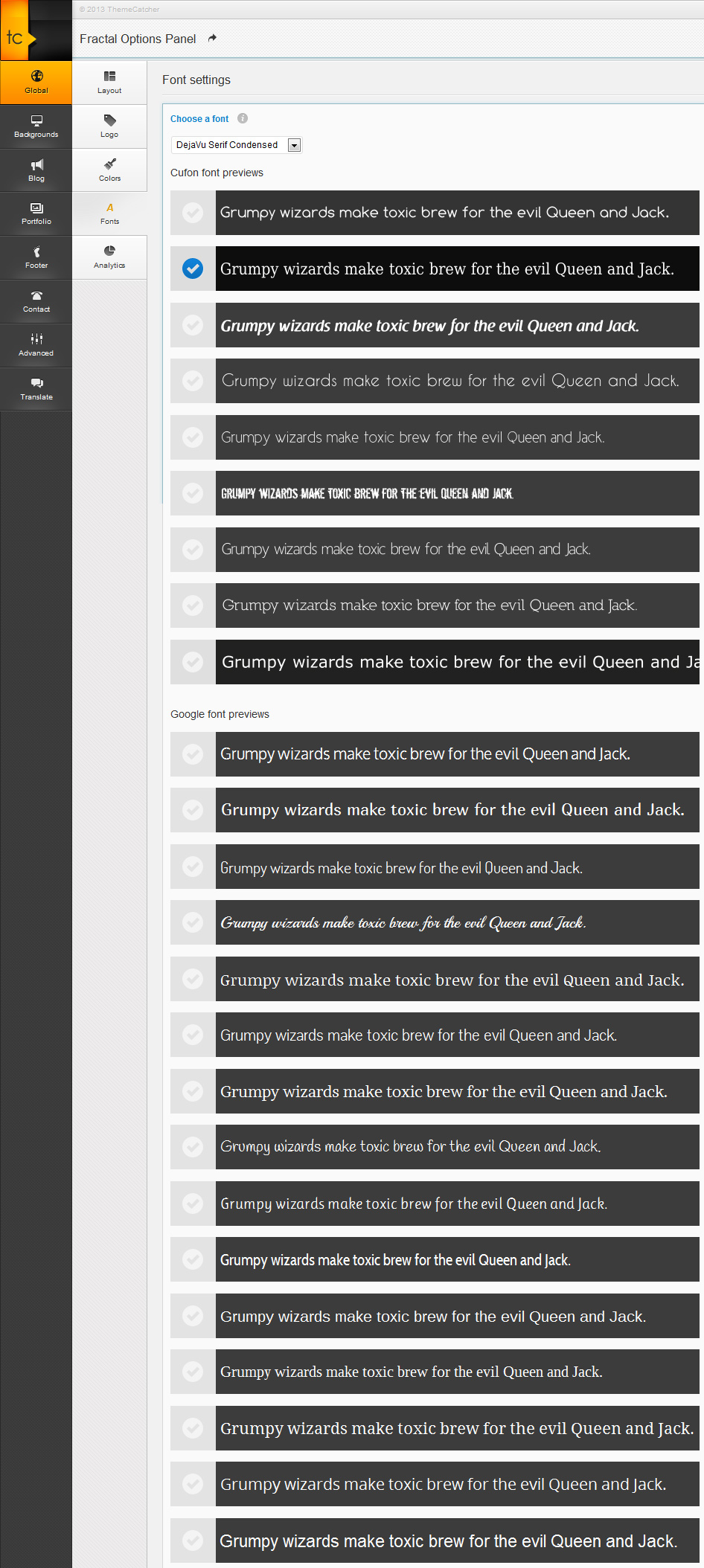
In the example we are using a cufon font, however we have lots of Google fonts ready to use also. I have made you a screenshot of the Fonts settings page., you can see the previews and the font types.
Regards, TC