

773 comments found.

Hi support, I would like to be able to reduce the width of the .navtabs but can not remember where to change. you can get some help?
thanks
Hello,
It’s in the ‘vbulletin-chrome.css’ template of your theme. Find the following line -
.navtabs li a.navtab {
I Love this theme, I have it running for the last few months on VB 4.2 Will this run on VB 5 ? Any plans to update it?
Hello,
Yes, we plan to create a vB5 version of this theme, but we want vB5 to become more stable. It’s so unaccomplished yet…
Amazing theme. We’re very happy with it. How can we change it from “metro” in the header to our website name instead?
Hello,
Thank you for the purchase and for the good words!
“Metro” is an image logo. So you should just create own logo. Here’s a video tutorial how to do it – http://www.youtube.com/watch?v=z9tsMHO4R_w
How do you configure a CMS page as Homepage so that the CMS navtab is not selected when you view?
Hello,
Try to create a new tab and link it to the CMS page. It should work.
Try to add this code to the ‘additional.css’ template of your theme -
#vbtab_cms.selected > a {
    background-color: #43A6DF !important;
}
It works for the home, but unfortunately it also makes the CMS tab unhighlighted when visiting the CMS.
Tried editing to specify the tab of the homepage: #tab_odcz_809.selected > a { background-color: #43A6DF !important; }
Did not work. Any ideas? Thanks so much!
The problem is a tab assigned to a page will be highlighted anyway if you’re visiting the page. It’s set as ‘selected’ and it’s selected for both pages in your case. Unfortunately vBulletin doesn’t give any additional classes or id’s depending on a certain page…
hmm… Seems like we’re close. Your first recommendation turned it off. Any way we can make that one tab aware or page aware? Thanks again for all your help, such a massive product, really awesome stuff!!
Any way we can make that one tab aware or page aware?The best thing to do is to have only one tab per page. If we create two pages with the save location, we can have problems and conflicts.
Thanks again for all your help, such a massive product, really awesome stuff!!Thank you for the good words and feel free to contact us if you still have any questions!
Hi can this theme work on vb5? interested in buying this theme. Thanks
Hello,
No, it’s only compatible with vB4. But we are planning to create a vB5 version as soon as vB5 is more stable.
Hello
The style color chooser we see on the demo is it only for the demo or can we have it somehow to our forums?
Hello,
It’s for demonstration purposes only. It’s just a piece of raw html-code. But if you’ll need it, we could send the code to you.
Thank you very much! It looks nice theme and I’m considering buying it. Your style chooser, although you have used it for demonstration, is a nice alternative for the current style chooser which is old and boring. It will be good to reconsider its use. 
Another thing I would like to ask is if there are going to be future updates or will that happen only if a new vb version comes up?
Yes, we are going to support the theme as long as it’s popular. And we are planning to create a vB5 version too.
Can we add .jpg/ .png type logo? how to add logo?
Hello,
Yes, you can add any type of logo image (jpg, png etc).
Can anyone recommend some image libraries for the Navigation that are in the same style of the theme?
Hello,
You can use some of the shapes from Font Awesome. They fit well!
Pulling my hair out here… How do I change the URL of the header logo? It points to the forum by default and I want it to point to the homepage.
Tried changing {vb:link forumhome} to {vb:raw vboptions.homeurl} in Header, no luck. Any ideas?
Figured it out.
Style Manager >> Variable Editor >> Modify User Option Templates >> Navbar
Using mod above, success!!
Hello,
Thank you for the purchase! And feel free to contact us if you still have any questions
Hi, great theme 
I have 1 problem. The forum icons, non displayed in the title. Why? In the acp, “Forum Icon Configuration” path to the icon image is ok.
Thanks.
Hello,
Can you show a screenshot of the issue?
Is this an addon?
I am having a hard time with the icons on the navbar tabs. The only vBulletin tab that is standard is the Forum Index tab, but my other four are custom. On those four the Plus Icons is displayed.
How can I change those to the other ones you have?
Hello,
The icons are stored in the following file -
images/metro/COLOR_THEME/misc/nav-icons-bg.png.
It’s a sprite (http://www.w3schools.com/css/css_image_sprites.asp). The PSD-file containing the icons is called “nav-icons.psd”. You can add own icons to the sprite and assign them to the tabs you want using css-rules. All the css-rules for the tabs can be found in the ‘additional.css’ template of your theme.
That is you should just add extra 120px (for each icon) into ‘nav-icons-bg.png’ and then assign it via css.
Thanks, it worked!
Awesome theme. I really dig it though I have an issue I can’t figure out. For some reason my social icons aren’t showing up when every other image is.
http://f.cl.ly/items/0q28340P2o043w022N3Y/Screen%20Shot%202013-08-23%20at%204.13.09%20PM.png
Hello,
Thank you for the purchase!
Can you contact us via our profile page and send a link to your forum? I need to have a look at the code.
For some reason it showed up this morning when I logged on
OK! Feel free to contact us if you get the issue again!
Hey, how do I change the icons in the main menu navigation? I want to switch out the standard “plus sign” with something else.
Hello,
Please contact us via our profile page!
Absolutley Love youre theme/work youv done!!! Testing it for about three days,will buy it after you can make some func.
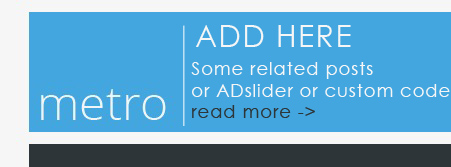
Someone edit my message,i asked to customise youre theme before buying
Hello,
The arrows can be easily replaced. As for the header modification – do you want to place additional information into the header or you just need to add some addons to the theme?
Thanks for reply!You did a greate work! like way of thinking and organizing space!Hope to pay you for well done job! I think space near LOGO can be used more effective!!!Now there is no any >div< but you can put there somthing as slider or link list or else usefull content
The point is that the header has white space depending on number of tabs and the logo. Because some people use quite wide logo images, so there could be problems with enough space in the header.
Hi! Just bought this theme and I can’t find instructions on how to install on my wordpress hosting account!
Please help!
Daniel
Hello,
The theme is for vBulletin 4.2.1 (http://vbulletin.com/ ). You should install it first.
guys, How here to write from BIG letter?
Only small now
Hello,
Please contact us via our profile page.
hi support, congratulations for this template vbulletin (metro) question: How can I increase the font size on the index and the list topic? add screen shot with arrow indicating which fonts I would like to modify (sub-forum and its list + title and author of last post)
thanks
Hello,
You should just edit some of the StyleVars – http://www.youtube.com/watch?v=peLoqA_i_Rk
But if you still need help in that, contact us via our profile page, we’ll explain how to find those particular font sizes.
Very nice style! guys, make please vk.com in Social Network Links
Hello,
Thank you for the purchase! Ok, we’ll try to add it in the nearest update.
THANKS!!!!!!!
Hello
How can i add navigation menus and sidebar areas ?
Hello,
How to add a sidebar – http://www.youtube.com/watch?v=GkiYDDeVK98
How to add navigation menus – http://www.youtube.com/watch?v=sSlO7rVJJRk
Thanks
and i changed at ftp my logo but it still doesnt change . im becoming crazy ))
im using red so i changed /public_html/forum/images/metro/red/misc/vbulletin4_logo.pngbut it still doesnt want change ))
Can you send me a link to your forum? You can use it by the contact form on our profile page.
Hello,
Loving the mobile version but for some reason it does not display groups as an option. How can i make it so that the options page includes groups? Willing to replace it with articles if needed.
Beverly
Hello,
Unfortunately, vBulletin doesn’t allow to see ‘group’ page in mobile view. This page is only available in full view. You can test it with the default theme. You can ask this question on the http://vbulletin.com/. If there is a way to show the page, we could help you to style it.





