754 comments found.

Hello, thx for great theme, but some question about next update. What about date and plans for that?
We’re planning to release the new update by the beginning of February.
Thanks for your patience,
Art.
Great theme, one of the best admin theme that I bought.
Just a need a bit of help of this. How do I do a modal confirmation box for a link. E.g. User click on delete link, modal confirmation box pop and ask for yes|no. Yes, delete link based on the href tag. No, close box.
The theme includes the modal box but I need the javascript for confirmation procedure. Do you have it?
Laborator must be on Holiday!! 
Anyway, I found the way to do the confirmation.
Is there anyway to force the footer stay at the bottom? Without it staying at the bottom, there will be a “Flash of unstyle content” which doesn’t look nice.
Hi Seraphimlord,
Sorry for the late reply, its true that we were on weekend break and couldn’t reply and till today we were busy with our work and couldn’t get back to support.
For your second question, I am not quite sure what exactly do you mean, can you explain me with screenshot and the scenario to see this error.
Arlind
You take a look at ui-navbars.html
When you do a refresh, the side navigation bar will be incomplete and will have a white area appearing at the beginning. I not sure whether this is consider “Flash of unstyle Content”. Its actually much worst when you are dealing with data tables.
Aha, yes I understand,
Thats because of the height of the document, I will try to fix this in the next version.
Thanks for this reporting.
Arlind
Hey, I bought the theme and I’m loving it. I did found out that you’re including different scripts files on each page. Could you email me the list of all the script files that are needed for the whole site in the right order. I’m converting this into a laravel blade template so I can’t include separate items each page. I need to include all of them for every page.
I would really appreciate such a list. I’m even willing to pay for it if you find it necessary. You know the theme far better than I do.
Hi iProScopesQuick,
Each file has ONLY needed scripts list that will be used to that page, so in this case, “Image Crop” page -> http://themes.laborator.co/neon/extra/image-crop/ Has these scripts:// in Header <script src="assets/js/jquery-1.10.2.min.js"></script> // In Footer <link rel="stylesheet" href="assets/js/jcrop/jquery.Jcrop.min.css"> <script src="assets/js/gsap/main-gsap.js"></script> <script src="assets/js/jquery-ui/js/jquery-ui-1.10.3.minimal.min.js"></script> <script src="assets/js/bootstrap.min.js"></script> <script src="assets/js/joinable.js"></script> <script src="assets/js/resizeable.js"></script> <script src="assets/js/neon-api.js"></script> <script src="assets/js/cookies.min.js"></script> <script src="assets/js/jcrop/jquery.Jcrop.min.js"></script> <script src="assets/js/neon-chat.js"></script> <script src="assets/js/neon-custom.js"-></script> <script src="assets/js/neon-demo.js"-></script> <script src="assets/js/neon-skins.js"-></script>
So to make it simpler, each file in the footer has its own needed scripts.
The standard scripts that will be “always” included I suggest:
<script src="assets/js/jquery-1.10.2.min.js"></script> (in header)

<script src="assets/js/gsap/main-gsap.js"></script>
<script src="assets/js/bootstrap.min.js"></script>
<script src="assets/js/joinable.js"></script>
<script src="assets/js/resizeable.js"></script>
<script src="assets/js/neon-api.js"></script>
<script src="assets/js/cookies.min.js"></script> (if you use js cookies)
<script src="assets/js/neon-chat.js"></script> (only if you use chat)
<script src="assets/js/neon-custom.js"-></script>
Thanks for purchasing Neon, and I am sorry for the late reply.
Arlind
Hello,
It seems you validation is broken for min length and max length in the form validation area. Just check and fix.
Hi linkodev,
http://d.pr/i/iYlDAs you can see the validation works fine, the rules for the first input is
number + minlength4 length
Second input:
maxlength2
I don’t see any error here, but if you think I am wrong, tell me what the exact the issue is.
Arlind
Hi, I was using the theme i wanted to include popver on text input. The popover comes but it has formatting issues. Below is the code that i am using
<input type=”text” class=”form-control btn-white” id=”Campaign_name” placeholder=”Campaign Name” autocomplete=”on” data-toggle=”popover” data-trigger=”hover” data-placement=”right” data-content=”Your campaign name comes here” data-original-title=”Title”>
Hi dhavalyours,
This is the code:
<input type="text" class="btn form-control btn-primary popover-primary" data-toggle="popover" data-trigger="click" data-placement="top" data-content="It's so simple to create a tooltop for my website!" data-original-title="Twitter Bootstrap Popover">
This worked for me.
Hey thanks admin, you are the best 
You are welcome buddy,
Thanks for purchase
Hello Laborator,
First of all, great theme! Now, a bug report: 1. Open the fixed sidebar page 2. Hide (reduce size) of the sidebar 3. Now, the menu items don’t do anything when hoover over them and the sidebar becomes unusable.
If possible, please fix this for next version.
Thanks Joao
Hi Joao,
Many thanks for this bug report, this will be surely fixed in the next version.
Arlind
Firstly, best in class customer experience. Super template. Secondly, are there plans to update libraries / plugins to the latest version as found on nuget. Some libraries are outdated. e.g. jquery Thirdly, modals give a jquery object not found error. Fourthly, can you expand form components to include advanced drop downs and remote fetching of data. See conquer template which has a plethora of form controls e.g. List hierarchy control
Look forward to the next version.
Hi zgers,
We have updated jQuery to the latest version and will be available in the next release, but you can upgrade to the newest version by yourself too.
On my end, the Modals work fine they do not throw any error. Can you check your script if there is any misspelled name so modals can’t access it.
Yes we are continuously extending the theme with new components and we will add more features in the upcoming versions.
Thank you for your very kind comments!
Arlind
Hi there,
Is it possible to integrate Google Analytics data or input data from excel in this theme?
Thanks, Leo
Hi LeoPro, we haven’t tried to implement it, but it should work properly if you can implement it.
Art
Thanks for your quick reply Art. Will try and let you know.
Regards, Leo
Still struggling with the mixed menus. Could it be that you just can’t do mixed menus on mobile? i.e. Bootstrap can’t collapse two different menus properly? The demo doesn’t seem to do work correctly for that either… Mobile only shows the top menu…
Hi pcarroll,
I have replied to your email and send you the directions how to implement the sidebar menu in your case after seeing the demo page.
Please note that in mixed menus page, the sidebar menu is not visible on mobile, so just the top menu is available.
Hopefully you can manage to fix this issue.
Arlind
Love this theme! It’s helping me make my dashboard so quickly and easily. Would love to see maybe a search results page added? (I know, I’m being too needy). Really this is an amazing tool and just what I needed. Keep up the outstanding work!
Hi salbinda,
Thanks for your suggestion,
We have added this to features list and will be implemented on v1.1.4
Thanks for your suggestion and kind comments
Arlind
JUST out of curiosity, when might v1.1.4 be available? Thank you guys for your great work!!
Hi salbinda, the new update of Neon (1.1.4) will be available by the beginning of February, this time we have more work to do because we’re also designing and developing the front-end theme.
Art
Live Demo doesnt work!!
I don’t know why, but on my browser it opens and works perfectly good.
Is it possible to add RTL support? Thanks!
Hi ramigg, RTL is on the top of the to-do list for the next update which will be available soon.
Art
Hi ramigg, we have finally published the new update, with RTL Support:
http://themes.laborator.co/neon/dashboard/main/?rtlArt
Hi, great theme, well done. Any chance of adding to your todo list a “Forgot Password” and “Registration” widget to be added to the login page. I assume you would do something fancy with animations as you have in all other areas of your theme!
Thanks again!
Hi tzarger,
Thanks for your kind comments, we have added these suggestions to our todo lists and we will surely add them in the next update.
Arlind
Great admin theme! The best I’ve used by far. Really easy to implement and customize. Great job!
Many thanks for this wonderful comment! We are happy to hear this, and another reason to take forward Neon theme with new features.
Arlind
BUG! Well, not a bug but a request…
Can you please default set all folders to 755 and all files to 644.
Right now it’s a bit all over the place, and some of the permissions on certain files and folders are too restrictive.
I had to force uniform permissions on all files and folders to get my server to be happy!
Thanks!
Hi alicam,
I use these default compression commands (Mac OS)
zip -r neon-theme.zip neon-html-folder/
Maybe this alters the CHMOD of the files, but I will try to do something on this way and then in the new update you will be able to see if its fixed. Thanks for this reporting.
Arlind
Hi there! Is it easy to remove all the animations? And make custom colors? Thanks
Hi thierrioliveira, it’s not that easy as you have to edit all the files and remove the animations for each of the classes, to create a custom skin there is a function we have built to create custom skins.
Cheers,
Art
Hi!
I just want to know if I can use this theme in a web service using a regular license.
Thanks
Hi viniccus, hmm I don’t know what the type of the web service is but the rule is for every site you build you need to buy the theme.
Art
Excellent theme. I do have one concern regarding the login file : I do have read your example of neon-login.js to process the user login: http://pastebin.com/GCreKUcB but I still can not make it work (I usually use php only and no communication between php and js..) Do you have any exemple of php file to transfert validation connection to neon-login.js ? Thank you again for your work.
Hi fbrip,
In the next update I will add an example of real-time login with PHP validation and sessions. Its on the todo list.
Thanks for your kind comments!
Arlind
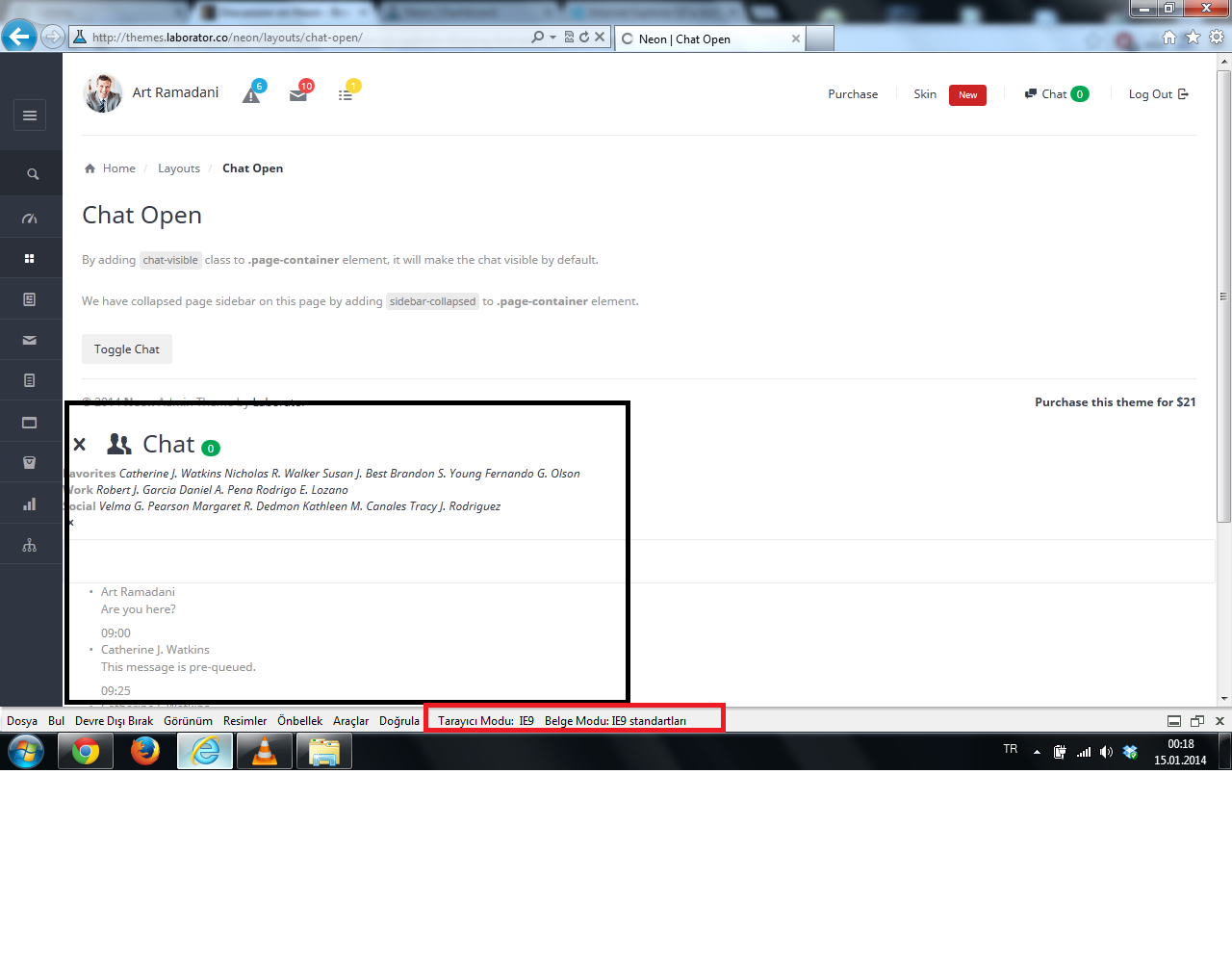
Hi,
I try ie9 chat section is not working. Please check screen shot link :
Pic Link
Hi berkansahin,
Thanks for this report, we are going to fix this in the next update. We will make Neon compatible with IE9+
Arlind
Hi,
I downloaded the theme and it has worked great on all of the browsers I’ve tested it in, but when I tested the theme in Internet Explorer 10 the log in form from the login.html page disappears, as well as the line and pie chart widgets on another page that I used them on. They worked in the other browsers I’ve tested though, including Safari, Chrome, and Firefox.
Is there a way that I might resolve this problem?
Thanks, Tim
Hi insiteadvice,
Yes, also other purchasers have addressed these issues, now we are going to fix them in the next update. Unfortunately we are Mac users so we don’t have IE installed on our systems but we will find the solution for this.
You’ll get an email when update is ready.
Arlind