630 comments found.

Hi again 
Can I make the product item page full width? I checked the full page item layout from page option, but I would like the related items to be stretched to full layout. Is that possible? thanks
link to the produc page: http://clickndrink.ro/product/elephant-vanilla/Hi ,
Ofcourse, please find that option in Themeoptions/woocommerce/product-detail page.
Hi there!
I would like to change the text of the buttons like “view more”. Can you help me with this?
Thanks
echo '<a class="readmore" href="'. get_term_link( $category->slug, 'product_cat' ) .'"><span class="view-more">' .__('View More', 'templatation') . '</span></a>';
Thanks
Hi,
I want to ask you if I can translate the site (breadcumbs / widgets / buttons) and also the woocommerce plugin (all names and buttons) using the .po files – (I don’t want to use wpml plugin) ? I want to do this after I finish the whole site (add all products and create all pages).
Thanks!
Hey,
Ofcourse you can, every string in the theme can be translated. And woocommerce plugin is translatable as well. Let me know if you face any trouble doing it. Here are the instructions : http://templatation.com/documentation/justshop/#!/translations
Hi dinesh
Thank you very much u av been so helpful. Couldn’t wait to write a review on u. I will certainly do biz with u over and over. Your support is d best av had since av been shopping with theme forest.
Guys this guy deserves an award. His support is out of this world
Thanks alot. Your so deep appreciation is itself an Award
HI….this is such an incredible theme, great job!
I have searched and done my best to figure this out but I can not get a picture to display in the three product categories on the homepage. I have: ) Make sure you have “Custom homepage” page template selected for the home. 2) Theme-options/Homepage make sure you have enabled the product categories to show up. 3) Make sure you have no widgets in ”Homepage” widget sidebar in Appearance -> Widgets. 4) Make sure you have woocommerce plugin installed , and it has atleast 3 categories with products and thumbnail assigned to them. ....and still nothing.
Can you help please?
www.prissybritchesboutique.com
Sorry, I figured it out…I’m an idiot! Great theme!
Is there any way to make the about us part on the homepage span the whole length with viewing it on a responsive device (iPad)?
Sorry I dont understand what you mean, I saw your website and it looks good. Why would you want it to go full width, it should be inside the website viewport like it is currently. No ?
Hi!
I’m sorry I do not have a good English first.
I’ll try to support my questions with screenshots.
1) “You are here:” I want to delete the line. Where is the relevant file. header.php not found in the file? SS : http://prntscr.com/2mg4uz
2)”Few of Awesome Products from our store” section found in the product “Read More” entry “Incele” I want to change. Which file can I do? SS: http://prntscr.com/2mg64k
I hope you can understand me
Thank you!
Hey,
Please add following 2 functions in your child theme functions.php file. If you are not using child theme, you can place them in Justshop theme’s functions.php but they will get overwrite when you update the theme. (Yes its very imp however it doesnt seem to be at this moment.)
// Change the add to cart text
add_filter('add_to_cart_text', 'js_custom_cart_button_text', 11);
add_filter('out_of_stock_add_to_cart_text', 'js_custom_cart_button_text', 11);
function js_custom_cart_button_text() {
    return __('Incele', 'templatation');
}

// Customise the breadcrumb
add_filter( 'woo_breadcrumbs_args', 'js_breadcrumbs_args', 11 );

if (!function_exists('js_breadcrumbs_args')) {
    function js_breadcrumbs_args( $args ) {
        $textdomain = 'templatation';
        $title = get_bloginfo( 'name' );
        $args = array('before' => '<span class="breadcrumb-title">' . __( 'You are here :', 'templatation' ) . '</span>', 'separator' => ' ', 'show_home' => sprintf( __( "%s", 'templatation' ), $title ));
        return $args;
    } // End simone_breadcrumbs_args()
}
Hi! great work
I’m in trouble with menu. I’ve changed, removed, tried all things, but my menu don’t change.. Any idea?
Oh forget.. I figured out. Thnak you
I’m interested in buying this template for a cafe. Can all cupcake images be replaced? and is there a way to add a side bar to the home page? Can the color scheme be changed?
Hey,
Thanks for your interest.
Yes, cupcake images can be replaced easily. Yes, there is a way to turn on sidebar on homepage.
Yes, theme comes with 5 prebuilt color schemes, but if you want to make custom , here is how you can do it : http://themeforest.net/item/justshop-cake-bakery-drinks-shop-wordpress-theme/4747148/faqs/17545
FYI: New version v3.1 is in the review queue where I fixed an imp bug in visual composer styles.
Great, thank you! And last question is there a way to add buy now cart button to the menu card ? I like the features you provide but this is a key element. I’m comparing it with this other template http://themeforest.net/item/agritourismo-responsive-woocommerce-theme/full_screen_preview/5923413
Is Sarah’s shipping section that can be modified to our needs for delivery and pick up at the store?
Hi,
Currently, menu card items doesnt have provision of adding add to cart button automatically, but you can manually insert add to cart button using a shortcode easily. I will help you accomplish it.
I dont understand the last question.
I purchased and installing now, but the index instructions have most of the pictures mixing.
Oh, i will check it, till then you can see the online documentation where images appears. http://templatation.com/documentation/justshop/
If you have any other issue , please email me from my profile page.
...figured out my question…sorry
Hi, I am interested in buying this theme tonight, but i want to find out from you if there is a video tutorial for me to install the theme, i also want to find out from you if i run into a problem, if i could send you me wp-login details, and you help with the installation.
Thank you.
I look forward to your reply
Hi,
Thank you for your interest, I have detailed documentation listed here http://templatation.com/documentation/justshop/ , I am in process of creating videos here http://www.youtube.com/watch?v=k6pUN0K2c8k&feature=share&list=PLwvDLtX5sHQFUSJ0Nbwgn21UpNiF2NEVz they are not perfect yet though.
And yes, incase you run into any problem I can setup it for you within 24 hours just like my demo.
Thanks again.
I have Bought and installed the theme, but i have not been able to make it look like the sample page. Please can i send you my wp-login details, so that you could help me in the set up.. look forward to hearing from you
Sure, I got your email. Setting it up now.
Hello,
Thanks for such a robust and well documented theme!
I have two questions about the Cakes/Portfolio functionality:
1) How can I remove the date so that it doesn’t display on the portfolio items?
2) How can I remove the “comments off” text on portfolio items?
Thank you!
Hi,
Thank you for appreciation
Unfortunately, Both things that you want can not be currently switched off using a button , but I will suggest you styles to do it. Can you please share your website URL please
Thanks.
Hi, it is: keskipan.com.au
The menu item ‘Products’ is the cakes/ portfolio
Hi,
You can do it by adding this code in Themeoptions/general/display css box
.portfolio-meta { display: none;}
Thanks
Worked perfectly, thanks so much!
Hi,
First of all, congtrats. for the theme. I want to ask if I can rearange the items from “Cakes/Portfolio” . Right now the items are auto arranging and its from first to last one. At least a solution from last one to first it wold be good.
Also, I’m facing this problem with Portfolio header list: there are too many items for one row, I tried to fix it but only by adding a small value for font. Can I decrease the space between categories?
http://clickndrink.ro/shop-2/This is the account with the puchased theme
Thanks!
Hello,
Thanks alot for appreciation.
If you want to change the sort order, please edit THEME/loop-portfolio.php Line no: 103 . Please add as mentioned here : http://templatation.com/justshop-wordpress-theme/images/portfolio-order-change.png
To decrease the space can be done by adding small css code in Themeoptions/general/display css box..
#portfolio-gallery ul.port-cat li {
margin: 0 7px 0 0;
}
Thanks again
Thanks for the help. I solutioned the problem with the space, but the image link is broken 
Try this , http://prntscr.com/2l6xt9
Thanks a lot!
if I want to remove the “All” tab, shoul I search in code and just delete it?
No, that will messup the functionality. I can suggest you css code for it, It seems you already sorted it out though.
Hi,
First of all, congtrats. for the theme. I want to ask if I can rearange the items from “Cakes/Portfolio” . Right now the items are auto arranging and its from first to last one. At least a solution from last one to first it wold be good.
Thanks!
Hi,
Thanks for appreciation, we will need to change the ORDER in the query, I can do it for you once you purchase the theme.
Thanks again.
Hey Buddy,
Got one question about the contact page:
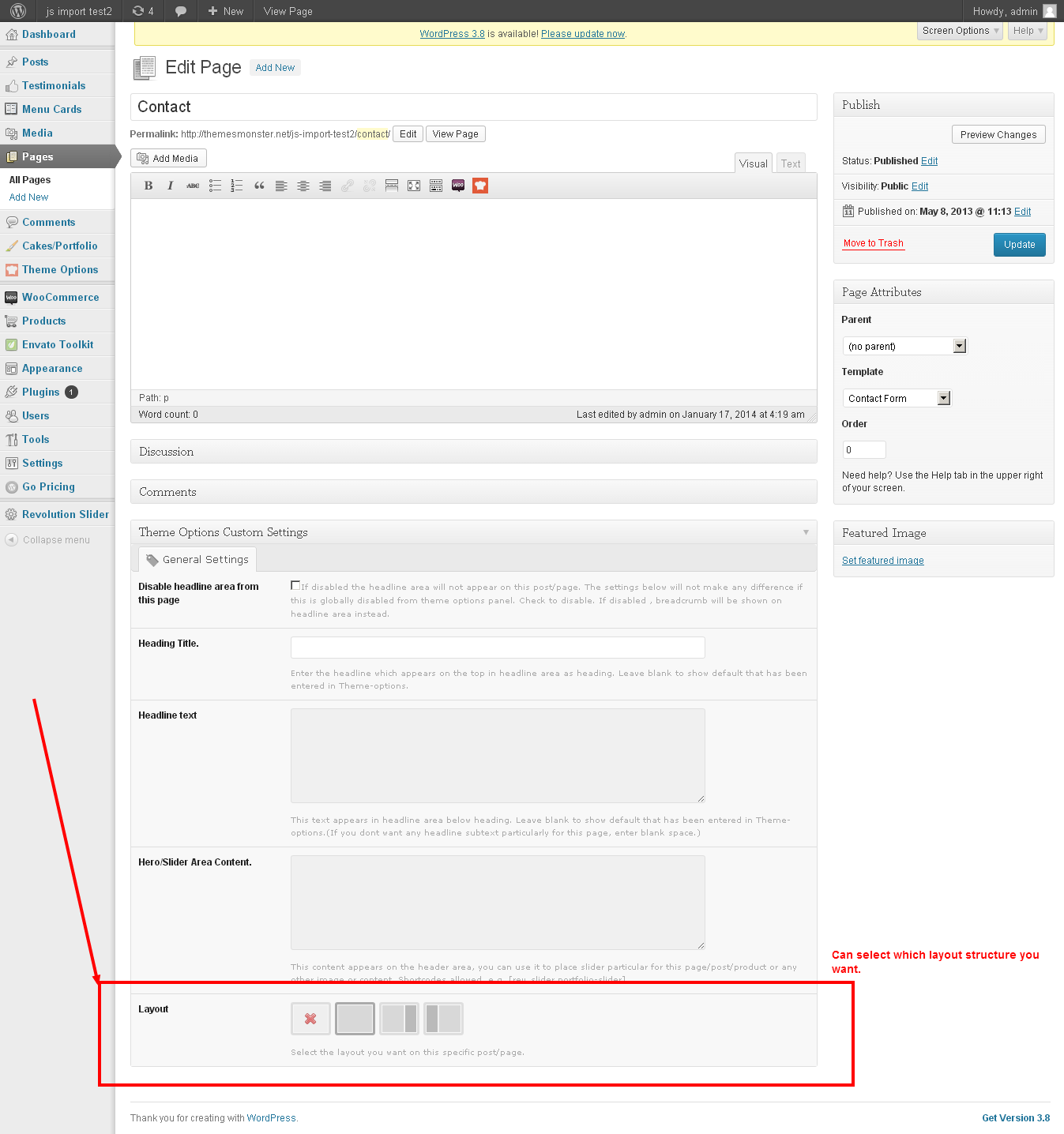
How can I get the contact page full width. If i choose for contact form page is not full width? Also, how can i only use the googlemap and under the map the contact details. So, pretty much without the contact section above the map and I want to change the contact form (read: adjust language)
Thanks in advance,
Cheers,
Robin
NVM figurewd it out already
Hello Robin,
Its great you figured it out, but I will still reply for other people who might have same issue.
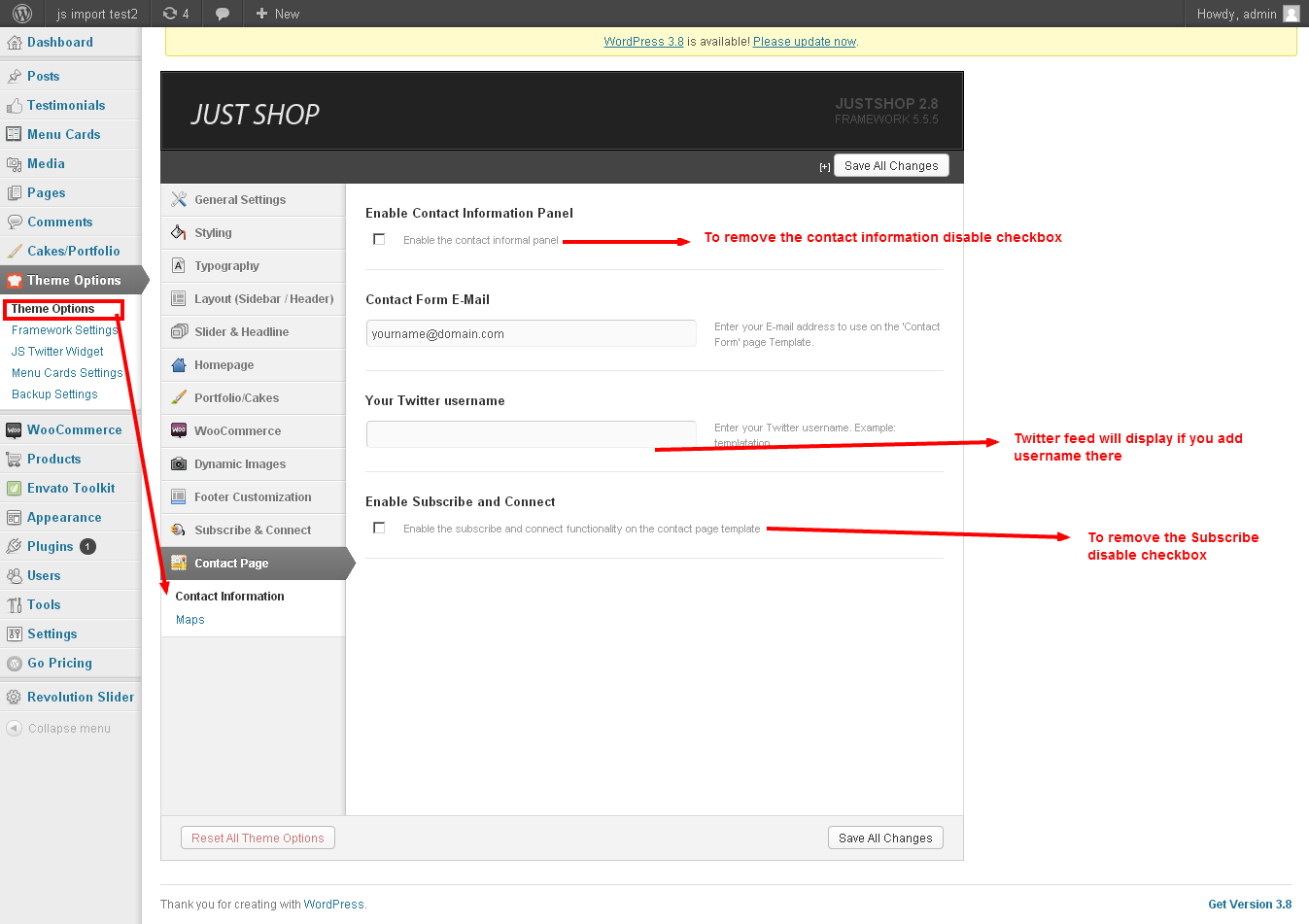
To remove contact information. Please do settings as detailed here.. : http://cdn.templatation.com/images/justshop/comments/js-contact-settings.png Thanks
Hi, I have just bought the theme and i did not find the Layout 5 PSD: http://templatation.com/justshop/layout5/
Can you help me?
Hi,
Layout 5 only has the header different from the main PSD I attached with item, so I uploaded header PSD for you here : https://www.dropbox.com/s/kvpjfs18g12k4at/headermods.psd (I will delete it soon)
I hope it helps you
Thank you!!!
No prolem, feel free to let me know if you need help with any other issue.
Can you help me with the header layout? I’m using Layout 5 with a 454×82 logo size.
I’m looking to do the same thing user “sharlapatrick” asked for their site http://newgraphicdesignsga.com/ (Posted 2 months ago)
I played around with the settings but the logo gets cut off on the left and right side.
Thanks in advance.
Hey,
It seems your logo is wider than the normal, Please share your website URL and I will suggest you the styles you can use to fix the issue.
Thanks
I finally got it to work. When I choosing layout5 in my setup, it gave me the small “JustShop Logo” centered above the nav bar. I downloaded the “Cupcake Logo” from your demo layout5 page to get it setup the same way.
So what I did was uploaded the cupcake logo (large) and made these adjustments: -75 Left / 10 Top / 365 Header Height. Maybe that will help someone else out.
Thanks for your involvement.
Hello,
First of all, congratulations for this amazing theme.
I have a few questions, though:
1. There are a some Theme Colors. Is there any way to add new ones, or modify the existing ones? If so, how?
2. my Portfolio Items Link To “lightbox” but when I click on a portfolio Item it just opens the picture and leaves the website, the lightbox is not working. Do I have to install a plugin for lightbox functionality?
3. in the shop of your live preview are items, wheren you can change the options, but in my shop there is only “add” but no options. how do I setup options like size etc?
4. in the shop of your live preview there is also an awesome sidebar, “Sort by pieces”, “sort by size”, “Filter by price”. etc where do I get those widgets? I can’t find them.
Thanks in advance for your help and of course for this great theme! You are VERY talented!
Kind regards.
Hi,
Thanks alot for your appreciation.
here are the answers.
1) Yes, Please see first answer here : http://themeforest.net/item/justshop-cake-bakery-drinks-shop-wordpress-theme/4747148/support
2) Please go to Themeoptions/Dynamic images and make sure the last option to enable lightbox is checked on.
3) To to do you will need to setup products with variations, these links will help you to understand the logic behind it : http://docs.woothemes.com/document/product-variations/ http://chrislema.com/woocommerce-variable-pricing-one-size-doesnt-fit-all/
4) Please see second answer here : http://themeforest.net/item/justshop-cake-bakery-drinks-shop-wordpress-theme/4747148/support
I am sure you can find most of the answers and step by step instructions here http://templatation.com/documentation/justshop/ but if you still have any question , feel free to contact me again.
Cheers!
Good Morning!
I am having some difficulty importing the slider demo. After importing the slider it returns;
importing slider setings and data…
Fatal error: Class ‘ZipArchive’ not found in /nfs/c07/h02/mnt/179951/domains/test.foundmediagroup.com/html/wp-content/plugins/revslider/inc_php/revslider_slider.class.php on line 604
Suggestions?
On first sight it looks like your host doesnt have ZipArchive installed. You can link them to above link to get it installed.
To test, you can try importing slider author’s export files from here http://www.themepunch.com/codecanyon/revolution_wp/exports.php , if you still face that problem , then its certainly the host problem.
hello, beautiful theme. i get this error at the bottom of the product page :
Warning: uasort() [function.uasort]: The argument should be an array in /homepages/32/d440602707/htdocs/mygiftsmanila/wp-content/plugins/woocommerce/woocommerce-template.php on line 795
Hey,
Thanks for purchasing the theme, but as the error says , its not in my theme , its in the woocommerce plugin
I suggest you to update it. Or contact woothemes, or best of all , ignore it as its only a warning. (do you have wp-debug on ?)
gee, you’re right, i have updated the plugin and it’s gone… am so happy:-) is wp debug a plugin that i should install?
No its a setting that we do in wp-config file, to show/hide warning/notices. Its ok, you can forget about it, its for developers mainly. Incase you want to read more , here you go : http://codex.wordpress.org/WP_DEBUG
It’s me again lol. I would like to know if it’s possible to remove the whole filter option on the product page and I would like it to show as two column too instead of four column as default.
Hi, Which filter option are you talking about, and the product page is not four column.
Sorry I dont understand both sentences. Please explain with links/examples in email.