630 comments found.
Hello,
I’m having an issue with the shipping method on Checkout Page.
I have now 2 shipping options. While changing the option on the Checkout Page, the cart totals doesn’t update, I don’t get the AJAX circles.
On the checkout page the options are like this:- Option 1 * Option 2
- Option 1
- Option 2
It works fine on Cart Site tho. Any idea how to fix that?
Hi,
Please contact me from here : http://templatation.com/support-tickets/ with your URL and I will look deeper.
Nevermind. This only happens on Admin account.

Hi Templatation,
I’m looking to purchase this theme but have one quick query. With the woocommerce plugin – your demo is currently set with product add-ons where the customer can select ‘size’, ‘colour’ etc from a drop-down menu. How editable is this? Will I be able to completely change these and have text areas instead of the drop-down menu?
Or will I have to purchase the ‘Product Add-ons’ extension as part of the woo commerce plugin?
Thank you
Hey,
Thanks for your interest and yes ofcourse , they are fully editable. I suggest you check this great guide for variation : http://chrislema.com/woocommerce-variable-pricing-one-size-doesnt-fit-all/ Also see official documentation here : http://docs.woothemes.com/document/product-variations/
Have a look on above will clear it for you 
Many thanks for your response. I’ve had a good look at those and everything seems clear. One other quick thing – will I be able to remove the drop-down list and exchange it for a text area? Clients need to enter a message to be printed on the product, so the drop-down list doesn’t apply.
Thanks again
Hey,
To be honest I am not sure about that , as I am just a theme developer
But I think this plugin would do what you want : http://www.najeebmedia.com/n-media-woocommerce-personalized-checkout-options-manager/
If you can spend some buck http://www.woothemes.com/products/product-add-ons/ is perfect and official ext. to do it. (not trying to sell just a suggestion).
Hi, I want to purchase this theme but before that I would need few information, The first one is if this theme supports Woocommerce categories and subcategories. This feature is very important for me and 100% necesary.
I won’t use this theme for a backery shop but instead for a hand-made products shop but I can customize it for that. Just I really need to be able to display categories (since I will have many) and sub-categories. I have a lot of different products and I can’t categorize them all in just few categories, I will also need sub-categories. Thanks in advance for your reply
Hi,
Yes Ofcourse , The theme only provides a ‘look’ for the woocommerce , all default woocommerce features stay intact.
Feel free to contact me if you encounter any trouble later on.
Thanks.
Hi, I am using layout 6 but I want to have the items in the shop with similar information (and more) to what is displayed here http://themeforest.net/item/justshop-cake-bakery-drinks-wordpress-theme/full_screen_preview/4747148 – how do I go about achieving that, please?
Kind Regards Rich
Hi Rich,
The URL just shows the homepage, please remove the themeforest frame and then paste the URL.
Hi, sorry about that. I am very interested in the filtering that can be done on the shop page http://templatation.com/justshop-theme-layout6/shop/ and additionally within the individual item pages as well http://templatation.com/justshop-theme-layout6/product/applesauce-cake/ – I can’t seem to find where these extra options can be added.
Kind Regards, Rich
Rich, please check : http://templatation.com/documentation/justshop/#!/woocommerce_ajax_navigation_widget and http://chrislema.com/woocommerce-variable-pricing-one-size-doesnt-fit-all/ Also see official documentation here : http://docs.woothemes.com/document/product-variations/
Thanks, I will do that
hello Templetation..
I’m back
I used the shortcode to make a page like your “http://themeforest.net/item/justshop-cake-bakery-drinks-wordpress-theme/full_screen_preview/4747148” . I plugged in the left column my links and on the right a short description and a photo gallery.
Problem: When I see him with the tablet (iPad), the menu on the left the page magically transforms and goes wrap after two letters? is it possible?
Unfortunately, you have not put in your page some images, and seems to work properly.
fabio
Example : http://pasticceriabianchi.e-otg.it.temp.anaxanet.com/asd2/ in pc is ok, with tablet(iPad) in vertical not ok.. 
There is a problem with Visual Composer e gli short code!!
If i used visual composer the short code create a problem with the my menu…
Hi,
I received your email and replied at otg…@gmail…, you dont have to double post the problem , lets talk over emails.
Can you advise me what widget was used on the footer so my contact info looks the same as the demo please ? Thank you
good morning
sorry for my english I used google translate
I would like to buy your wordpress template justshop cake for 55 $, I have a question.
I wanted to confirm that it is possible to change the color of the template and all the menu ‘in addition to the 5 already available and also if it is possible to change the font.
thanks
Hi,
Thanks for your interest, yes its possible to change the color , check out the steps before you purchase : http://themeforest.net/item/justshop-cake-bakery-drinks-wordpress-theme/4747148/faqs/17545
and yes, changing the font is also easy and its even going to be easier in next version which is almost ready ( final testing it ).
Thank you for such a beautiful theme and the supporting documentation which is wonderful. Could you please help me with my menu bar, the text appears to be in lower case and I cant work out how to make it upper case ? ie I would like it to say Price List rather than price list which is doing at the moment Many Thanks
Hi,
I am Glad you like the theme, by default the cases are lower in the menu , if you share your website URL I will suggest you css styles to make them upper case, also , please message me from the account you purchased the theme.
I am having trouble activating the Revolution Slider. What should I do?
What trouble are you facing , please explain , please go to Appearance -> Install plugins to activate the inbuilt plugins.
Sorry, as soon as I activate the plugin. Wordpress admin slows to a very very slow pace. Taking 1-2 minutes between tabs. I also got these warnings. Warning: Illegal string offset ‘file’ in /data/18/3/109/102/3435591/user/3829753/htdocs/wordpress2/wp-content/themes/justshop/includes/theme-functions.php on line 1884
Warning: Invalid argument supplied for foreach() in /data/18/3/109/102/3435591/user/3829753/htdocs/wordpress2/wp-content/themes/justshop/includes/theme-functions.php on line 1885 and 500: Internal server error
Please contact me using : http://templatation.com/support-tickets/ , I will sort it out for you.
Good Morning Templatation..
I download new version of plugin named “WPBakery Visual Composer” that there was in old version in the your package thema.
Why now I don’t see the HTML Editors???
see the picture: http://pasticceriabianchi.e-otg.it.temp.anaxanet.com/Error.PNG
Fabio
ooooooopsh!! con il plugin qTranslate non esiste una lingua IT per l’editor HTML.
I doubt you do not have the plugin activated. It wont hide the button if translation doesnt exist.
I wrote in italian..sorry..
No problem , thanks to Google Translate 
I’m having some problems with the contact form. I’ve put the right email address in both the them options contact box as well as the the admin under settings>general. But customers are sending emails (I’ve tested too) and it doesn’t go to the email I’ve placed in those two spots. Can you help with this please? www.prissybritchesboutique.com
Hi,
I believe this is not a theme issue, because the contact form works fine. I think this is related to your server email settings.
I suggest trying a famous contact form plugin like https://wordpress.org/plugins/contact-form-7/ and see if their contact form works, so that you can debug further.
Do you know what could be wrong? I placed another email in the places and I received it? What’s wrong with this email?
I am not sure in that case, the script doesnt block any certain email domain , so I am guessing either your email receiver puts it in Junk email or is rejecting email from this script. Please get in touch with your Host they might sort it out by checking out the email logs.
Good morning Templatation, one question: In the template there are 4 possibility for change footer, If I selected footer to 3 columns, my columns aren’t equals in width, Why? I want , if possibile, equals width, but the first column is more big than other two columns..
any solution??
Thanks..
I have to learn to throw away 2 minutes, before asking questions .. solved with CSS.
the next!
Hi, the template works fine but i have a question about Greek translation. I’m doing exactly what the instructions describes, allthought the template and all other plugins are in English.
can you help me fixing it?
Thanks, if you want further details (link, username,pass) please send me back.
Christ Pap
Hi Christ,
I sense you have not defined WP_LANG variable in the wp-config file, please share login details with me so that I can confirm.
please contact to http://templatation.com/support-tickets/ for faster response
As I said, I bought you theme from this account. Fabio, anyway answer pls on my questions:
“Hey, Templatation! I bought your theme from another account. And I have a question: link on my site with your theme –
http://comduk.bget.ru/ look on menu, how to resolve it? Because it’s bug(((”
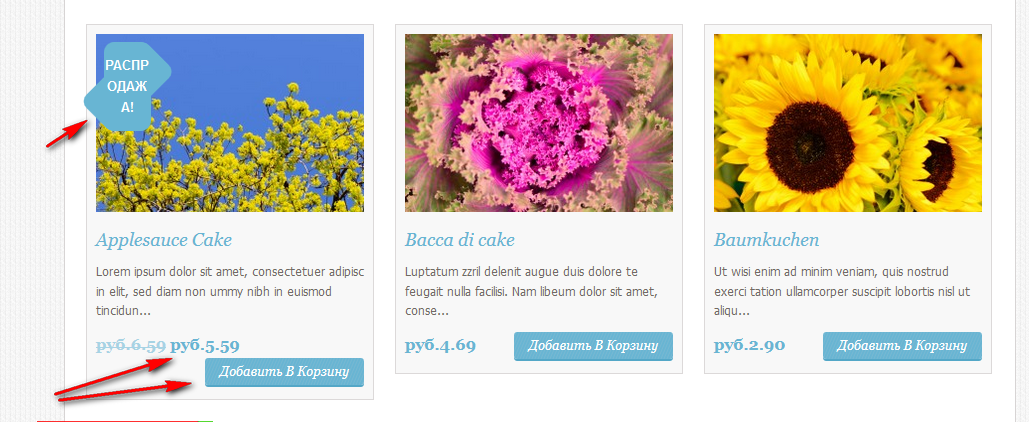
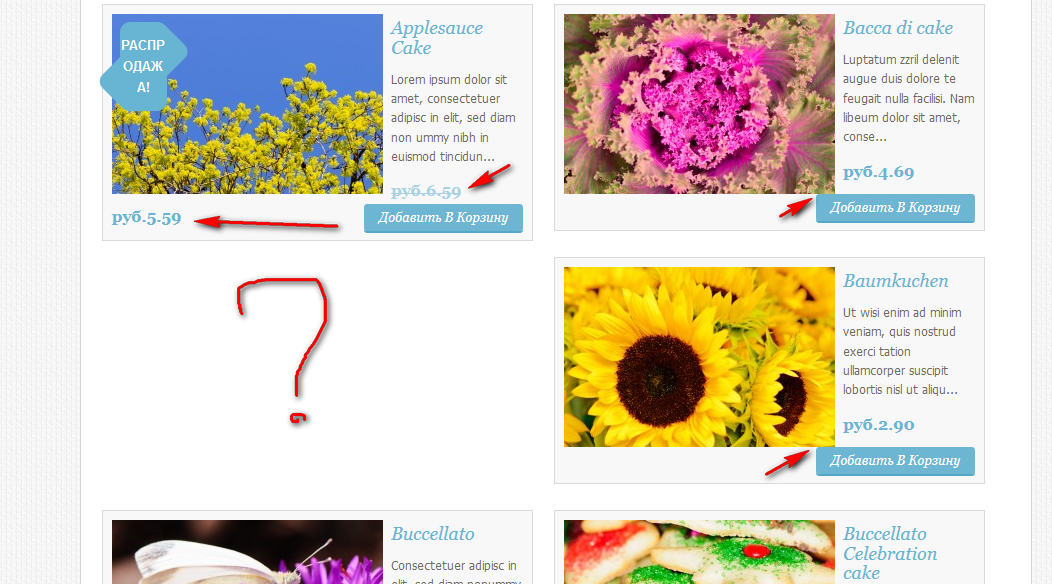
“and what about related products? Bad display if you see
http://comduk.bget.ru/?product=baumkuchen
and what about this next?
http://habrastorage.org/files/cab/850/15d/cab85015d23b494da3740273b5c704fa.png
http://habrastorage.org/files/3d0/a5d/343/3d0a5d343fa5475eb88048a3c1f9b8da.png”
and
“and on main page, when I add in cart http://joxi.ru/RGQpU_3JTJACdKeFhnw”
Thanks!
http://joxi.ru/EqcpUxjKTJABNgjaeDs – about menu. I fixed problem, but not sure that in your codding style.
Hey,
Thank you for purchasing the theme.
The theme has a special kind of look and feel and thus it provides some obvious limitations as well. Furthermore you are using longer than usual text on things. eg your Add button text is 17 chars long.
1) Menu problem is not a bug , its just that you are using more menus than avaiable space , I suggest you go to Themeoptions/Layout and select Layout5 because you have too many menus. Then menus will display ok.
2) To fix related product issue , please go to Theme-options/Woocommerce/Product details and select Display it full size option.
3) To fix sales badge, please see this : http://support.templatation.com/support/solutions/articles/189695-adjust-sale-discount-badge-over-the-product
4) Add to cart icon goes to next line because of shortage of space. because the button text took too long space.
A new version is coming this week which will solve your button positioning issue as well.
Hope this helps.
Big thanks!
How to put a filter like at your demo? I put in primary widget all JS Woo… and 1 or 2 is working, others doesn’t work’s. What the problem? Thanks!
Hi,
Please check http://support.templatation.com/support/solutions/articles/173669-how-to-create-a-unique-sidebar-widget-area-for-shop and http://templatation.com/documentation/justshop/#!/woocommerce_ajax_navigation_widget if you still face problem, I suggest get in touch using : http://templatation.com/support-tickets/ for 1 to 1 assistance
and what about related products? Bad display if you see http://comduk.bget.ru/?product=baumkuchen
and what about this next?
http://habrastorage.org/files/cab/850/15d/cab85015d23b494da3740273b5c704fa.png
http://habrastorage.org/files/3d0/a5d/343/3d0a5d343fa5475eb88048a3c1f9b8da.png
and on main page, when I add in cart http://joxi.ru/RGQpU_3JTJACdKeFhnw P.S sorry that i didn’t writed all in one post.
replied in other thread…
Hey, Templatation! I bought your theme from another account. And I have a question: link on my site with your theme – http://comduk.bget.ru/ look on menu, how to resolve it? Because it’s bug(((
replied in other thread…
Hi Templation, looking at your layout 2 I see that uses an entire page to display products, http://templatation.com/justshop/layout2/shop-2-column-full-width/. What kind of page do you use? I have tried to put FULL WIDTH page, but it always remains with two columns. I would like to present the page as you made it yourself .. What should I set?
Thanks Fabio
Hi Fabio,
The plage you are using was built using shortcode, it is not standard Shop page. Here is the code I made it with:[product_category category="celebration-cakes" columns="2"]
To know more about WC shortcodes please visit: http://docs.woothemes.com/document/woocommerce-shortcodes/
Hi Templation, this is my web site http://pasticceriabianchi.e-otg.it.temp.anaxanet.com/shop/ . I inserted your short code , modify category=”...” but my page is not full width..
Fabio
Hi,
As this is your base Shop page, you dont need to insert shortcode here, please delete the shortcode, go to Themeoptions/woocommerce/products archive, and check the first option
I have seen, read well enough!! Sorry…. I do not know if this is the place because it concerns woocommerce, but I wanted to make this page as your “http://templatation.com/justshop/layout2/shop-2-column-full-width/” . Why in this article you “Reduced Fat Ice Cream” You can make a “select option ” while I in my web in addition to button “select option” on the image I have the icons “offer”? : (
-reposted due to error-
Please give me your wp-admin details and I will sort it for you , you can contact me here : http://templatation.com/support-tickets/
-reposted due to error-
-reposted due to error-
I sent you my wp-admin.. Thank, I await news Fabio
Hi Templation,
I resolved!!!! I’m stupid..because I inserted list price and sold price!!!!
Hi again,
I just can’t seem to activate the footer widget area , can you help me with that
Hi,
Please go to wp-admin/Themeoptions/footer customization and make sure you have selected icon for footer columns as per your requirements. After that, please go to Appearance -> Widgets and drag widgets to Footer1, Footer2 …
Hope this helps.
Hi. I’ve done it. Thanks again!
Many thanks for the previous help Had a small (I hope) query…
I have divided the footer into the 4 columns as standard. How do I put an image into one of the columns? I have gone via Appearance > Widgets > Footer 1 and added a Text widget and have used the following HTML:
I have this image sourced within the images directory but it can’t seem to find it (it’s displaying the broken image icon). Do you know if it is possible for me to add an image there? If so, what would I need to use to be able to do it?
Kind Regards, Rich
Hi,
Please use absolute path of the image in text widget. I do not see the code you entered, please wrap the code in pre tag (google it plz).
But for example, the absolute path of image will be like : http://yoursite.com/wp-content/uploads/2014/02/someimage.pngHi, That makes total sense. I was trying to get it to work using a relative path to the ../images directory. I will try this out later today. Thanks
Good afternoon
I have a pre-sales question.
We liked the theme, but we need to have more than 5 color options to theme.
Is there anyway to add another color that we choose? Like a brown or pink?
Thank you
Hey,
Thanks for your interest in my theme.
The theme already have Pink version. Also , please note I am updating theme in 2 days and adding Brown version too
Meanwhile, Its easy to change color, check it out the steps before you buy : http://themeforest.net/item/justshop-cake-bakery-drinks-wordpress-theme/4747148/faqs/17545
Thanks.