

992 comments found.

Hi – I’m new to website building. Just purchased the theme last night and unzipped the file … however there is no upload folder or zip file to upload to my website … where can I find the zip file so that I may upload my theme to my website.
Hi.,
Thank you for your purchasing…
Please check this youtube for installing the youtube video. https://www.youtube.com/watch?v=a5Zqbz74jOM&list=PL6kpawNbFm9UqfpDM0I1zsPIgPG-3duSM
If you still have issues, Please mail us your site credentials (WP & FTP access logins) immediately via the right bottom form located @ http://themeforest.net/user/designthemes So that, we can check and have a clear look on our end. Then we’ll help you get rid of it ASAP !!
Hi – I’m new to website building. Just purchased the theme last night and unzipped the file … however there is no upload folder or zip file to upload to my website … where can I find the zip file so that I may upload my theme to my website.
Hi
I installed this theme I also Imported dummy data But Following data i not present in dummy contents requesting you to please provide me the same data which you shown in demo
Slider- Files/Images HomePages-2,3,4,5,6 Gallery- All Images are missing
Kindly Provide the exact content/demo data which you showed in DEMO Also pls guide me how to install it again Thanks
Hi..
Please follow the steps listed below:-
In our dummy data we have replaced the original images from placeholder images. Because the images that we have used in the demo are all licensed images.
For the home page 2,3,4,5,6 please dowload the text files from the dropbox link here https://www.dropbox.com/s/qwzxv4occmepgpf/kidszonehomepagetextfiles.zip. The text files contains the shortcodes of the homepages.
Please create a page and paste the shortcode in “Text” mode. Also please use this dropbox link josn file ( https://www.dropbox.com/s/7ja06jm6bn2rjtn/kidszone_layer-slider.json ) and you can import the slider as in our demo.
After importing the slider, please update the images with your own images.
Note: If you like our theme and support, please feel free to give us your best rating (5/5 stars) !!
A client bought the theme and when i select calendar to see the upcoming events it doesn;t show as the active page with the active hover option. Can you look into this?
http://wp.thefoundationsforlearning.com/wordpress/events/Hi.,
As we checked the link we can see the event that you have added for the month August and there is a Read More link to view the event.
Can you be more specific about your issue, so that we can help you better.
Look at the MENU item, it is not set to active.
Hi.,
We have fixed the issue. Kindly, check it out now!.
Thank you so very much!
Thanks !! Looking forward your purchase happily 
hi, theme menu’s do not working icons. why?
Hi.,
Please note that you can get them simply by adding the class name of corresponding icons within your menu items itself.
https://www.dropbox.com/s/5f794vq1x0ti0kp/HeaderMenu-Icons.pngYou can have any icons you preferred to use with Menus easily from, http://fontawesome.io/icons/
https://www.dropbox.com/s/i067m4v38zkkjv7/FontAwesome-Icon-Class.pngNote: If you like our theme and support, please feel free to give us your best rating (5/5 stars) !!
Please at the top bar where you have sign in (or) sign out option. How can I change the sign in (or) sign out option to change to user logon name when a user sign in or register on the site with also an option for logout. Thanks alot
Hi.,
As of now we do not have this option, but surely we will consider this in our future updates.
If you need this change now, we can do it as a customization.
It will take 1-2 hours. We will charge $25/hour.
thanks…
Hi,
The shortcode builder is not showing up and therefore the shortcode is not picking up any styling, how can we fix this?
Thanks.
Hi !.
Go through the following instructions you get a clear view:-
If you have updated the wordpress, you need to update our kidszone theme as well.
Please update our theme with latest version compatible with wordpress 3.9. Follow the below steps to update the theme.
1) Download the theme from themeforest page.
2) If you have made any custom changes in the code, please take a backup of it.
3) Overwrite the updated theme files to the older theme files.
4) go to wp-content/plugins/ through ftp
5) Remove the folder designthemes-core-features/ from wp-content/plugins/
6) Then Login to Dashboard -> Appearance -> Install Plugins. Install the Designthemes Core Features plugin. Thats it. Now you are updated to the latest version.
The shortcode builder issue will be resolved, once you update the theme.
Let us know if you find any difficulties.
Note: If you like our theme and support, please feel free to give us your best rating (5/5 stars) !!
Hi,
before we do any of that, we bought the theme yesterday, downloaded the theme yesterday so do we have the latest version?
Hi.,
Thank you so much for the Purchase .,
If you have downloaded the theme yesterday, then you are having the latest version.
Please mail us your site credentials (WP & FTP access logins) immediately via the right bottom form located @ http://themeforest.net/user/designthemes So that, we can check the shortcode builder issue our end. Then we’ll help you get rid of it ASAP !!
Cheers, just sent you the FTP and wp-admin details
We received your details. Our support team is processing your request. We will update you as soon as possible…. Thanks
Hi Could you please share the code for your demo Home page 2,3,4,5,6. I have set ups some basic pages. Will I loose all my settings pages etc if I import the dummy data?
Hi.,
Please check the attached text files for kidszone home versions of 2,3,4,5,6.
Also the settings wont be changed when the dummy contents is installed.
https://www.dropbox.com/s/qwzxv4occmepgpf/kidszonehomepagetextfiles.zipHi Thank you for sharing this. Could you also please share the code for the `Features` page in your demo site? Or just everything on the demo site?
We have created features page by using featured template. So watch following video for clear view.
https://www.dropbox.com/s/jzv936q120jvybc/featured_template.swfThank you very much for this. It was very helpful.
I have used the features together with dt_facility_container shortcodes. I have see some alignment problems. How can fix the text aligment? Also, I would like to add picture either to right hand or left hand of the text. How can I achieve that, at the moment when I use the image attribute within the [dt_facility_item] it appears at the top of the text. Many thanks for the help.
Please see the alignment issue here: https://www.dropbox.com/s/3vw9b41emfyrfa2/Alignment.PNGthe code : dt_facility_container In the specially designed learning environment of Montessori classroom, children learn their mother tongue and foreign languages, with the help of special language materials, by thinking, experimenting and interacting with each other. Mama Montessori creates a natural atmosphere for learning languages by offering instructors who are native English speakers while also benefiting from the language diversity of residents. While general education will be in Turkish and English, education in a wider range of languages will be offered on demand. /dt_facility_item
Hi.,
Please check your page now. We have fixed it now.
http://mamamaslak.com/feauturesconcept/conclang/Note: If you like our theme and happy with our support, please feel free to give us your best rating (5/5 stars) which would be much appreciated and helpful for us to proceed support you all forever thanks in advance
Also what is there an attribute in the dt_facility_item that can let me to specify the location of the image ( top, right, left, bottom ) ?
Hi..!
You don’t need to place any images in the shortcodes. Just add “Menu Icon Class” for the left side menu pages. Please check the attached screenshot http://snag.gy/nEjqY.jpg . You can use any font awesome icons.
Check this link for the available font awesome icons. http://fortawesome.github.io/Font-Awesome/icons/
...Well that is what I did and used the sample icons … please check the link :
https://www.dropbox.com/s/tre3cvpsjg3brjd/IconAlignment2.PNGHi! Hope that the following screenshot will help you get a clear view on your issue.
http://snag.gy/lTMZ7.jpgHello!
Sometimes when I acces the website http://www.costabravapa.com.mialias.net/ it shows this warning at the top of the page:
Warning: set_time_limit() has been disabled for security reasons in /usr/home/costabravapa.com/web/wp-content/plugins/envato-wordpress-toolkit-master/index.php on line 872
Also when I’m logged in wordpress and editing the site.Then it desappears but it is showed from time to time. Thanks!
Hi..
Please try the solution mentioned in this link. http://themeforest.net/forums/thread/set_time_limit-function-issue-with-envato-toolkit-plugin/97327If you are not sure about it,
Please mail us your site credentials (WP & FTP access logins) immediately via the right bottom form located @ http://themeforest.net/user/designthemes So that, we can check and have a clear look on our end. Then we’ll help you get rid of it ASAP !!
I’m not sure about it because there is already a conditional before set_time_limit(). I’ll send you now the site credentials. Thanks a lot for your support!
we will get back to you ASAP.
Thanks for your answer and to solve the problem!!
Thanks for the update Let us know, if you find any issues in future..
Note: If you like our theme and support, please feel free to give us your best rating (5/5 stars) !!
why r you not answerng ???
Hi,
Please advice. Where can I change Navigation button colors: Screenshot: http://prntscr.com/3p099g
Regards, Mzi
Hi.,
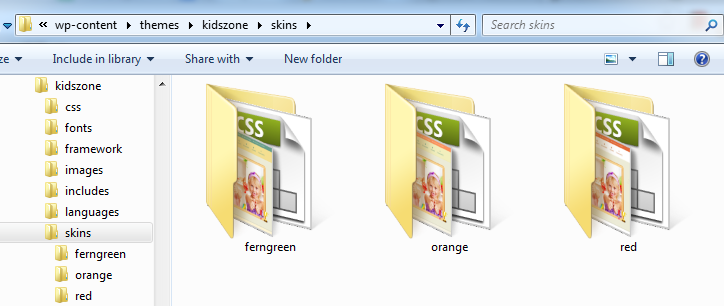
You can change the background color of the nav menus from wp-content/themes/kidszone/skins/ferngreen/style.css line no: 26, if you have selectd the ferngreen skin.
If you have selected any other skin, you need to edit the corresponding style.css file in the corresponding folder.
Note: If you like our theme and happy with our support, please feel free to give us your best rating (5/5 stars) which would be much appreciated and helpful for us to proceed support you all forever… thanks in advance….
Just wondering, The dropdownlists vary a bit between browsers.
http://lemit.be/KidsZone-dropdown.jpgLook at the dropdown button: in IE and FireFox looks like the first while in chrome it looks a lot better.
I know browsers differ, even a lot between versions. But is it possible to give buttons in general the same look in this theme?
Thanks.
Hi.,
We have modified the drop-down lists as per your needs in firefox. Unfortunately! In Internet explore, there no option for changing drop-down list as like in chrome or firefox.
Kindly check the below given URL:
http://soitsme.eu/shop/Note: If you like our theme and support, please feel free to give us your best rating (5/5 stars) !!
Great!! 5* coming up 
Thanks a lot for such great loving appreciations !!..
Hello,
I am setting up a page using the dt_facility_container but within each facility item I wish to add a number of points in an unordered list. If I use the HTML below which is showing just one facility item and the XXXXX representing text, there will be dotted lines with padding between each of the unordered list items which I don’t want.
title='XXXXXXXXXXXXXXXX'">dt_facility_container title=’Our Program’ XXXXXXXXXXXXXXXXXXXXXXX
XXXXXXXXXX
dt_white_wrapper [dt_sc_fancy_ul style=”circle-o”]- XXXXXXXXX
- XXXXXXXXX
- XXXXXXXXX
- XXXXXXXXX
- XXXXXXXXX
- XXXXXXXXX
What custom CSS code will I need to add to remove the dotted dividers between the list items within one facility item section?
Many Thanks!
Hi.,
The dotted lines is a back ground image and comes from the css file wp-content/themes/kidszone/css/shortcode.css line no: 159 (.dt-facility-wrapper ul li).
You can remove the background image from that class.
Note: If you like our theme and support, please feel free to give us your best rating (5/5 stars) !!
Hello again,
Thanks for your response. I had already played around with the css file but if I remove the background image and padding then it removes those two things from between the sections aswell which is not what I am after. I only wish to affect lists within each facility item section not the sections themselves.
I think to get around it I am not going to use the dt_facility_container at all.
Hi.,
Please check the screenshot http://snag.gy/uelug.jpg , we have shown the output of the shortcode you sent to us and let us know what is the exact requirement of yours, so that we can help you better…. thanks.
hi i am using [dt_blog_posts show_feature_image=’true’ show_meta=’true’ limit=’4’ posts_column=’one-half-column’/] in home page but i have to problems one is paging and 2nd is the alignment of posts you can check in screenshot . the problem occurred when one post title is one line and 2nd post title is two lines https://www.dropbox.com/s/r9gka0m4uaeycza/blog.png
Please mail us your site credentials (WP & FTP access logins) immediately via the right bottom form located @ http://themeforest.net/user/designthemes So that, we can check and have a clear look on our end. Then we’ll help you get rid of it ASAP !!
chk inbox i send it now. kindly read note in mail
hey i am having a problem as you can see on this video. i sent all my details ftp and wp-admin. please responde.
http://screencast-o-matic.com/watch/c21VrPnBkfwhy r u not answering me?
Sorry for the inconvenience, Our support team is processing your request. We will update you as soon as possible.
Hello, I have found a couple of threads from 3 and 4 months ago asking about adding new colour variation skins. The responses I found are:
You can create or change your own custom skin (Blue) into this KidsZone theme easily as following,(i). Get into the skins folder from your theme directory, where we’ve added 3 folders with their skin names.
Look at the screenshot we’ve attached here for your reference, http://d.pr/i/2tQi
(ii). Just copy and paste any of them, and then rename it with the new skin name you’re about to be added.
(iii). Then you’ll be needed to edit the “style.css” of new custom skin you’ve replicated. (Just like the images, color, background and border color hex codes with your new custom skin color as needed).
(iv). Now you can find you new custom skin folder (created) on your Buddha Panel skin settings. So you can choose your custom skin and save changes thereby as here, http://d.pr/i/qI9aFirstly, the two links which are referred to displaying screenshots are no longer available. Can you put them back up please. Also, I would prefer to create a new skin under my child theme rather than in the main theme in case something happens to that directory with any updates. Is this possible? If I change all the required hex codes in the skin CSS file will that change everything that is required for the new colour variation or do I manually have to change all the images within the new copied skin directory aswell?
Many thanks.
Hi…! Hope that the following instructions & screenshots will help you get a clear view:-
Replaced the missing images in this reply. You can create or change your own custom skin (Blue) into this KidsZone theme easily as following,
(i). Get into the skins folder from your theme directory, where we’ve added 3 folders with their skin names.
Look at the screenshot we’ve attached here for your reference, http://snag.gy/bMXM5.jpg
(ii). Just copy and paste any of them, and then rename it with the new skin name you’re about to be added.
(iii). Then you’ll be needed to edit the “style.css” of new custom skin you’ve replicated. (Just like the images, color, background and border color hex codes with your new custom skin color as needed).
(iv). Now you can find you new custom skin folder (created) on your Buddha Panel skin settings. So you can choose your custom skin and save changes thereby as here, http://snag.gy/bMXM5.jpg
You can have the new skin in the parent theme itself, because placing the skins in the child theme folder needs many changes. There will be no problem when we upgrade the theme, because you are going to add a new skin and our upgrade process will not touch your new skin folder.
Yes the hexcode changes of the corresponding elements in enough for the new skin and no need to edit the images.
Note: If you like our theme and happy with our support, please feel free to give us your best rating (5/5 stars) which would be much appreciated and helpful for us to proceed support you all forever… thanks in advance..
Hello,
I can not update as arial font type on the top menu. When I select from standard fonts Arial does not reflect changes to the site.
Also google latin-extended options of fonts can I use? Turkish characters involved in the problem. For this reason, I have to choose the latin-extended.
Waiting for emergency assistance.
Hi Go through the following instructions you get a clear view:-
1) You need to update the font directly from the css file, wp-content/themes/kidszone/style.css, line no: 24
2) a) Upload all the font files that you have generated in the folder wp- contents/themes/kidszone/fonts/ (http://snag.gy/jYhz5.jpg)
b) Call the font files path as shown in screenshot http://snag.gy/m8BTf.jpg.c) And use that font-family for the css class that you need.Note: If you like our theme and happy with our support, please feel free to give us your best rating (5/5 stars) which would be much appreciated and helpful for us to proceed support you all forever… thanks in advance
Hello, i just bought the kidszone template and the images slider are not included. Is it b y error because you write on the template description : One click demo install (Install Demo Content from Adminpanel to make your website look exactly like you see it here in the Live Preview) Thanks
Hi.,
Go through the following instruction you get a clear view.
In the dummy data, the original images in the demo will be replaced by placeholder images. You can replace the placeholder images with your own images.
Please use the attached json file for getting the home page slider as our demo. Once installed please replace the images in the slider with your own images, else please purchase license for those images.
https://www.dropbox.com/s/7ja06jm6bn2rjtn/kidszone_layer-slider.jsonNote: If you like our theme and happy with our support, please feel free to give us your best rating (5/5 stars) which would be much appreciated and helpful for us to proceed support you all forever thanks in advance
Hey guys, super great them, thers only one thing, I can´t resize the cataloge images and single image, I chanage the sizes in the usual place in woocmmerce but nothing happend in the front end….http://godixitaltesteo6.com.ar/buabua/?product=guirnaldas I what the to be likehttp://wedesignthemes.com/themes/index.php?theme=kidszone
and also, i edit all the words bit the words but I cant find the one of the cart “items in cant”
thnks a lot
Carmen
Hi.,
Please try resizing the images with the following resize plugin http://wordpress.org/plugins/regenerate-thumbnails/
Note: If you like our theme and support, please feel free to give us your best rating (5/5 stars) !!
Ok, client bought this and now O’m getting an error trying to install it for them…
DesignThemes Core Features Plugin: The package could not be installed. PCLZIP_ERR_BAD_FORMAT (-10) : Invalid archive structure
Can i get a manual download somewhere?
Our plugin files comes along with the theme files. You can always download it from the themeforest. If you still have any issues,
Please mail us your site credentials (WP & FTP access logins) immediately via the right bottom form located @ http://themeforest.net/user/designthemes So that, we can install the theme and plugin for you. Then we’ll help you get rid of it ASAP !!
I sent an email!





)
