992 comments found.

Hi!
Where can I change the name of the fields of the contact page? I’m using the contact page without contact form 7. So I want to change the field Name into Naam (my language)... Thanx!
And I also like to change the colors of the fields…
SOLVED! I’ve found the php where I can change the names. I’m only looking for the colors to change of the contact form.
Hi.,
You need to change the background colors of the text box?
If yes you can edit it from
wp-content/themes/kidszone/skins/ferngreen/style.css
line no: 97. Change the background color in that line.
Hi! Please follow the step below.,
You can edit it from
wp-content/themes/kidszone/framework/theme_shortcodes.php
line no.16
One more question: Where can I change the color of the tabs? Thanks again!
Hi! Hope that the following screenshot will help you get a clear view.
https://www.dropbox.com/s/kkbqzd1wbb6jcld/tabs_bg.pngHello again,
I’d like to change the style of the caption of images. Now it’s light yellow, I’d like to have a zebraprint (so a image). How can I change this? Thanks!
Hi.,
Let us know which image caption you need to change.
We are not sure which section you need to change.
Please help us have a better understanding on it by getting back with any screenshot like references.
So that, we can check and will have a clear look at your end. Then we’ll help you get rid of it ASAP!
Hereby a screenshot: http://www.vangeffenreclame.nl/images/caption.jpg
The caption around the image. It’s yellowish and I want to have a zebraprint…
Hi.,
Can you send us your website link, so that we can check the section and inform you the exact css file from which it is coming.
I’ve send you an email with the site address and login
Hi., We received your details. Our support team is processing your request. We will update you as soon as possible.
hello,
I have buy this theme but the shortcode panel doesn’t appear again….
I have tried your tutorial but that does not still work…
Sorry for my english im french  Thanks !
Solved problem
OMG ! no, this theme is totally crashed, i can’t do anything is this page modification ! help !
Hi.,
Let us know what is the exact issue., along with
Mail us your site credentials (WP & FTP access logins) immediately via the right bottom form located @ http://themeforest.net/user/designthemes So that, we can check and have a clear look on our end. Then we’ll help you get rid of it ASAP !!
hello, message send, thank you
Hi., Kindly help us to confirm that you were actually purchased our theme by getting back to us with the purchase code or send us an email via our profile page http://themeforest.net/user/designthemes (right bottom form).
So that, we’ll help you get rid of it ASAP !!
pls ignore the above message
Sorry, we are not receiving any mail from you,
Send us an email via our profile page http://themeforest.net/user/designthemes (right bottom form). So that, we can check and have a clear look on our end. Then we’ll help you get rid of it ASAP !!
The theme is incompatible with wordpress newest version – the shortcode panel doesn’t appear.
We are waiting the correction of this issue. Thanks.
Hi.,
Our theme is fully compatible with the latest version of wordpress theme. Please check if you have done all the steps that is mentioned here.
1) Download the theme from themeforest page.
2) If you have made any custom changes in the code, please take a backup of it.
3) Overwrite the updated theme files to the older theme files. Update the custom change
that you had already.
1) go to wp-content/plugins/ through ftp
2) Remove the folder designthemes-core-features/ from wp-content/plugins/
3) Then Login to Dashboard -> Appearance -> Install Plugins. Install the Designthemes Core
Features plugin. Thats it. Now you are updated to the latest version.
Note: If you have already updated our theme, just follow the steps 4,5,6 to update our
designthemes-core-features plugin, which will solve all your issues.
Hello!
I translated the entire file “default.po” to Spanish and saved it to, “es_ES.po” but the theme continues in English, do I missed something?
Thanks in advance.
Hi.,
Please check if you have changed the language in the wp_config.php file to define(‘WPLANG’, ‘es_ES’); in line no: 72
Yes of course, the WP installation is in Spanish, WPLANG is set as es_ES, I have checked.
What will be the problem?
Please mail us your site credentials (WP & FTP access logins) immediately via the right bottom form located @ http://themeforest.net/user/designthemes So that, we can check and have a clear look on our end. Then we’ll help you get rid of it ASAP !!
I sent the message. Thanks a lot.
We received your details. Our support team is processing your request. We will update you as soon as possible.
Whenever i move the cursor to check the sub menu,it disappears most times before clicking on it.
Also,the icon on the menu is not coming up as it is on the theme.
Kindly help me look into it asap.Thanks
This is the site URL :www.frannberryfoundationyears.com
Hi.,
We checked your site and it seems to be showing the “Site is under construction” page. We checked in your admin panel for any plugins for the “Site is under construction” page, but we could not find any plugins. Please enable the site to show the exact pages, so that we can check your issue.
I have enabled the site.Kindly check and help resolve the issue.I have sent the login details to the email sent to us earlier.Thanks
Hi!.,
It seems that you have changed your admin username and password. We cannot access your admin page. Please check the attached screenshot and update your menu items with the font awesome class. For the list of available font awesome class you can check this link http://fortawesome.github.io/Font-Awesome/icons/
https://www.dropbox.com/s/z8djcnyl9f1tacr/font-awesome2.pngThanks,it has been resolved
Thanks for the update Let us know, if you find any issues in future..
Note: If you like our theme and support, please feel free to give us your best rating (5/5 stars) !!
I know little about installs. I would like a step by step instruction to upload the exact same theme as your demo. The demo looks wonderful but the install I have looks jumbled and messy.
Thanks
A
Please mail us your site credentials (WP & FTP access logins) immediately via the right bottom form located @ http://themeforest.net/user/designthemes So that, we can check and have a clear look on our end. Then we’ll help you get rid of it ASAP !!
Hi, my feature image for product is all pixelated while the imported image is the right size, even larger. But the gallery image is good. What should i do ? It’s the last thing i have to fix, it’s seems to be a stupid problem but nothing is working to resolve it… Thanks
Hi.,
Kindly., try regenerating the product images with the “Regenerate Thumbnails” plugin. http://wordpress.org/plugins/regenerate-thumbnails/
Hi.,
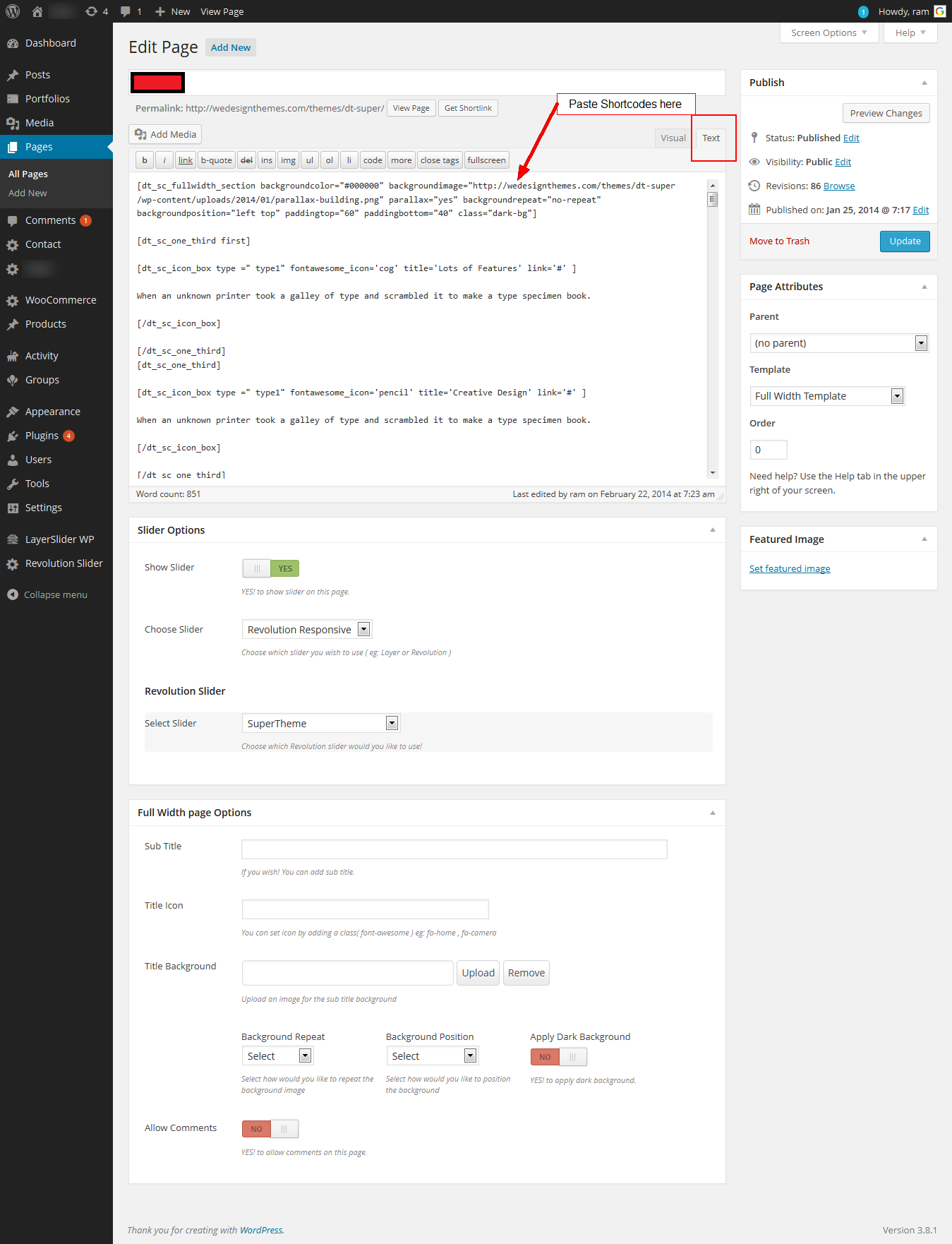
Please check the attached text files for kidszone home versions of 2,3,4,5,6.
Also, please make sure to place it in the “Text” editor mode on your page.
https://www.dropbox.com/s/qwzxv4occmepgpf/kidszonehomepagetextfiles.zipthe problem is that I dont have any ready themes of pages (homepage, the internet-store, gallery, webblog, contacts etc.) Can you make the file in the xml size, so I can use it in all my settings? I dont also have a slide-show and demoversion. I was going to use these themes im my text and pictures. Can you help me, please?
Please try to install the dummy contents from Dashboard -> Kidszone -> General -> Install Dummy Data. Check the attached screenshot for reference.
If you still have any difficulties, Please mail us your site credentials (WP & FTP access logins) immediately via the right bottom form located @ http://themeforest.net/user/designthemes So that, we can install the dummy data for you.
I sent access logins for you.
Hi.,
Sorry, we don’t receive any mail from you.,
Please mail us your site credentials (WP & FTP access logins) immediately via the right bottom form located @ http://themeforest.net/user/designthemes So that, we can check and have a clear look on our end. Then we’ll help you get rid of it ASAP !!
I sent from the email a-stronom@yandex.ru using the form on the website. Verify whether you have received a letter? Can specify the address where I can send.
Hi., We received your details. Our support team is processing your request. We will update you ASAP !!.
Hi,
We took shortcode for recent blog posts from one of the dummy pages and the image is not alongside the three symbols as seen in your dummy site. How can we fix this?
We have fixed the issue, kindly check your site.
http://www.websitefarm.com/mildmay/Let us know, if you find any other difficulties.
Hi, me again… So I’m attempting to make a private gallery page but the gallery “Nothing Found. Apologies, but no results were found for the requested archive.” message shows even when its prompting your for a password above that. Then if I assign images to the gallery it shows the gallery even though the page is password protected. How can we resolve this?
My Client purchased this template, please don’t ignore this comment and move on to the others
Hi.,
Please let us know what assistance do you require from us.
I want to have a photo gallery page password protected. How can I do that?
Hi.,
Only the contents added from the wordpress editor can be password protected.
The gallery page ( which comes from the gallery template) cannot be password protected.
I would like to make the font on the submenu items on the main menu larger but have been unable to find it in the CSS to change it. Can you please advise on where to find this code or where to add it? Thank you!
Hi.,
You can edit it from the css file wp-content/themes/kidszone/style.css line no: 374 (.megamenu-child-container ul.sub-menu > li > ul li a )
Thank you so much for your prompt response, but I am not using the megamenu—can you tell me where this is in the code to change it on the normal menu?
Hi.,
Send your site link for which you need to increase the font size of the sub menus, So that, we can check and let you know.
Hello,
I have uploaded a large logo, and removed the line in the css so that the logo displays full size on a desktop. However, it is very big on a mobile. How do I make it shrink/reduce on a mobile?
Also, the mobile layout body content and navigation menu is very very narrow…how can I make this wider?
Hi!.,
1) We checked your site http://www.websitefarm.com/mildmay/ and the logo seems to be good. Let us know the exact issue, so that we can help you better.
2) Open the file http://www.websitefarm.com/mildmay/wp-content/themes/kidszone/css/responsive.css. Go to line no : 683 ( .container, .intro-text.type1 .container) increase the width as per your need.
Let us know, if you find any other difficulties!
Note: If you like our theme and happy with our support, please feel free to give us your best rating (5/5 stars) which would be much appreciated and helpful for us to proceed support you all forever thanks in advance
Hi,
Thanks for providing brilliant support. There is a small problem that I have encountered. The products are not getting displayed properly. The arrangement has gone completely haywire. Please check the below links http://kidsler.com/ http://kidsler.com/?product_cat=kids-hair-accessoriesI have emailed you my wp and ftp login details.
Hi I just bought your beautiful and very useful theme.
How can I get the revolution slider plugin and the astonishing layer plugin?
Thanks Yoram
Hi..!
Thank you for you purchase…
Revolution and layer slider comes along our theme package so go to Dashboard -> Appearance -> Install plugins and install slider plugins
refer this – http://www.youtube.com/watch?v=a5Zqbz74jOM
Hello,
I just uploaded and installed my theme and the menu styling seems to be missing. Is there a way to fix this problem?
Here is the website to view: http://normagentner.com/newsite/
Thanks!
Hi!
Hope you had a great weekend
Kindly check and make sure that you’ve chosen the corresponding menu locations as we’ve shown below,
https://www.dropbox.com/s/89dsvnyjbe4mos9/Setting-up-Menus.pngNote: If you like our theme and support, please feel free to give us your best rating (5/5 stars) !!
When installing the required plugin “Like This”, wordpress stops working.
Is Like This updated to the latest version? Perhaps it should NOT be required if it isent compatible with the newest wordpress (3.9.1)
Hi!
Hope you had a great weekend
Yes “Like This” plugin is updated with the latest version.
Please mail us your site credentials (WP & FTP access logins) immediately via the right bottom form located @ http://themeforest.net/user/designthemes
So that, we can check check the issue. Then we’ll help you get rid of it ASAP !!
done…. thanks…
Hello,
I have purchased the theme but cannot locate the options for Home Page 2, 3, 4, 5 and 6 in the theme. Also, can I use the map and timings shown on Home Page 5 on Home Page 3 instead of the Contact Form? I am a first time WordPress user.
Thanks, Nitin
Hi.,
Please refer the attached screenshot: http://snag.gy/2JbDY.jpg
We have attached home page 2,3,4,5,6 please download the text files from the dropbox link here
https://www.dropbox.com/s/qwzxv4occmepgpf/kidszonehomepagetextfiles.zip.By using our shortcode builder you can easy to customize page content.
Let us know, if you find any other difficulties!
Note: If you like our theme and support, please feel free to give us your best rating (5/5 stars) !!
Hello designthemes, I have sent the details again. Please check. Please let me know if you have received the login details.
I need your urgent assistance because I am running out of time. Please looking forward to hearing from you. Thanks
I have sent the login details again. Please check. The problem I have is with slides not coming up and I have everything you said. Please I need to deliver this project soon and I am running out of time.
My mail is “comfort_micadenuga@yahoo.com” and I have even sent the login details again to you through – http://themeforest.net/user/designthemes. Please looking forward to hearing from you.
Is this your webmail so that I can send the details to you through your webmail “info@designthemes.com”?
Please let me know if you have received the login details because I have sent it again. Looking forward to hearing from you.
We have sent a mail to your email id. Kindly reply with the ftp and admin, in that email.
I have replied the mail. Please let me know if you have received it and looking forward to hearing from you.
It’s ok now. Thanks