211 comments found.
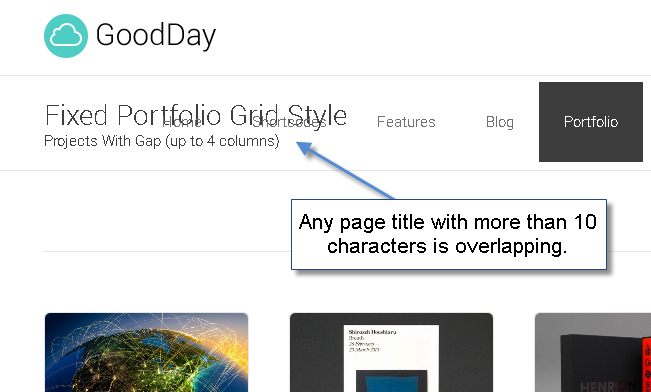
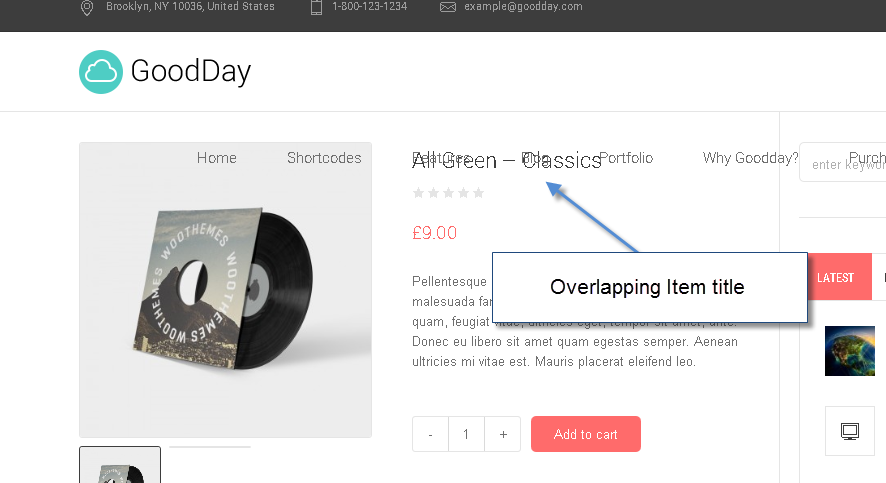
Excellent theme, well thought out and visually very impressive. I’d like to purchase it. I noticed a small issue though with the titles overlapping the menu. I took a few screenshots for you to make it easier to explain.
Number 1: http://i1318.photobucket.com/albums/t650/g008/7-20-201412-02-51AM_zpsd196c634.png
And number 2: http://i1318.photobucket.com/albums/t650/g008/7-20-201412-10-52AM_zps64313719.png
Thanks for your interest!
As to issues on the screenshot – in fact this is mostly connected to menu length, we needed to show maximum functionality, and added to many items. Yet, we are considering releasing an update to make it look fine with 7 menu items, while it s still will be impossible do this for more items. If you need more menu items, you can use another header configuration, as Goodday provides options for this, like on this demo site for instance – http://cmsmasters.net/goodday-photo-studio/
Thanks, appreciate your consideration, should there be any other questions please feel free to ask!
Haven’t updated yet but was wondering if you added any styling or just made the theme woocommerce compatible? Is there a place for the cart icon? Any plans to add a “shop” layout preview?
Thanks for the update!
Thanks for your question!
Of course, WooCommerce is completely styled. You can see a Shop preview here – http://cmsmasters.net/goodday/shop/
You shop page appearance is dependant on color and other settings on your theme general settings. The one you can see via the link is for our default theme, but it will adapt its appearance according to theme settings.
Thank you!

how fix the size of the picture for woocommerce?
Thanks for your question.
Please check the DOCS folder in the archive you have downloaded, and open index.html file with your browser. Reference the WooCommerce section for a detailed instruction on how to setup your woocommerce products.
Should there be any other questions, please feel free to ask!
WooCommerce Functionality Added
To all users: please feel free to download an updated theme archive to enjoy WooCommerce compatibility.
Should you need any help installing an update, our support will gladly help you – http://cmsmasters.net/support/
 Enjoy!
other think; I don’t want a lightbox on the ‘post slider’ ( magnifying glass and the trombone) but just link the thumbnail to the page. It’s possible?
Thanks for asking!
Yet, there is no such option in GoodDay theme, appreciate your understanding.
Thanks!
Hi! Very good theme txs! An update for WooCommerce will it be available for the themes already installed? I have installed woocommerce this week and it is very ugly because it does not take into account the style of goodday. Many thanks for your quick reply and for the possible installation procedure. Bye!
Thanks for asking!
Sure, you will need to re-download the archive from Themeforest and upload all the files from the Update folder. There will be a readme file to guide you through. Also you can re-install the whole theme if you have not applied any changes to it.
The updated theme archive is now being uploaded to Themeforest, should be available for download within several hours or so. Please look for theme version 1.1.0
Thank you!
perfect! thanks a lot!
Please feel free to download the update now!
Hi: I just purchased this theme and when it comes to install the plugin, it refuses to install and gives a message:
The plugin does not have a valid header. Download failed. Forbidden
I followed all instructions within the document.
Can you please help
Thanks!
Thanks for contacting!
As to the issue you have – could you please specify what plugin exactly you are trying to install? In any case, in order to help you we need to see the issue from your end, so we would appreciate if you submitted us a support ticket so that the support team could take a look at it – submit a ticket.
Thank you!
Hi,
Love the theme. Is it any option to remove the “Featured Image” from the profile details page in GoodDay/Medical please? or at least change it size? Cant find it anywhere. Thanks.
Thanks for contacting!
Also thanks for your feedback. You can remove this image from an open profile page by adding the following to the custom css field. Please in your admin panel proceed to Theme Settings – General – Custom Codes and add the following to the Custom Css field. Save the changes.
.profiles.opened-article .profile .profile_content > figure {
display: none;
}
Thanks!
Thanks!! Worked like a charm.
Glad to hear this was helpful, thanks!
I’m ready to purchase ..... just waiting for woo commerce function !!!
Thanks, the update should be available for download within 48 hours or so.
I was just stoping by to ask if you think there might be any conflicts with woo commerce but see others have the same need as me. I would hate to have to go out and buy another theme knowing that you are working on adding it.
I too am wondering about an updated eta on this feature.
Thanks!
Thanks for your interest!
We were planning to release it last week, but there are also some major improvements besides adding WooCommerce, so we are planning to release it within a day or two. Appreciate your patience.
Thank you!
Hi, love the theme. When will woo commerce integration be ready?
Thanks for your interest!
We were planning to release it last week, but there are also some major improvements besides adding WooCommerce, so we are planning to release it within a day or two. Appreciate your patience, please stay tuned!.
Thank you!
Hi, I have sent you the support ticket. I found trouble when applying the theme specially the slider. Please kindly check the support ticket. Thanks!
Thanks, the support team will review your ticket and reply to you as fast as they can. Appreciate your patience!
Hi, I’d like to know if it would be possible to integrate bbpress at this theme. Thanks
Thanks for your interest!
As to bbpress integration – in fact the theme does not feature this. Appreciate your understanding.
Thank you!
Hi Alex,
I have sent a message via helpdesk on the ie9 incompatibility, I am hoping a fix can be found soon.
Many thanks,
NP
Thanks, the support team has received your ticket and will respond to you as fast as they can. Our developers are currently working on the issues with Internet Explorer older versions, we also appreciate your consideration. We will do our best to offer asolution for that.
Thank you!
Many thanks Alex. The site is great in newer browsers but 100% unuseable in ie9. Any help by the dev to issue an update asap would be great
Thanks, Alex and the support team are working on this issue, they will reply to you via tickets.
Many thanks for your continued help with this and look forward to the update.
For me support doesn´t work. I have a ticket since 6-jul without solution. I have tried many times contact but only way doesn´t work.
Thanks for contacting!
We would really appreciate if you submitted specified a ticket number so that we could check what happened to it, as we never leave ticket unreplied to for this long.
Appreciate your patience, Thanks!
Ticket #7441
Thanks, the support team has replied to you and is currently investigating the issue.
Thanks for your consideration!
Still waiting, after 2 work days….
support manager Alex, Jul 13 07:44: Thank you for noticing the connection with animation and for all your understanding. It may take up to 1 working day to solve the problem, hop, such timing is acceptable.
Alex, cmsmasters support manager
Hi again. Our developers are working on the issue, they have replied to you in your ticket. Appreciate your patience.
Dear cmsmasters,
The ad for the template http://themeforest.net/item/goodday-multipurpose-responsive-wordpress-theme/7964929/ states that is a “single end product”, and also mentions that the plug in from ILightBox (third party) is part of the termplate in order to function properly. The problem is that the plug in cannot be unstinstalled.
Another problem is that tabs don’t work, even though I deactivated the animation!
The main issue with the template is the ILightBox plug in.
For these situations I am requesting my money back as of FRIDAY, since I’ve been struggling a lot with this shitty template and I need to buy a another template for my client that is now very upset.
Hi again. Excuse for the delay, your issue is quite extraordinary and it never takes this long to investigate. None of the other customers has reported a problem like that, and neither we can replicate it on our side. We can see from the console that the issue is caused by a plugins script, yet it does take longer than we expected to cooperate with plugin developer regarding this. We understand that you are limited in time, and if you wish to receive a refund, you need to contact Themeforest support about this, as all the financial questions are managed by Envato exclusively and theme authors do not have any access to this. Yet, we will still try to work with iLightbox plugin developer to find a solution for that. Appreciate your understanding.
Thank you!
To Whom It May Concern,
For the last two weeks I’ve been strugling with GoodDay – Multi-Purpose Responsive WordPress Theme. I just cannot make it work, for this reason I’m requesting my money back or some type of redit to buy another template. Below you will find all the conversations that I had with the support team from Envato Marketplaces.
Thanks
Hi again! I finally bought the theme. Works really good, but I have a question and maybe you can help me. How do I change the text within the “Load more projects” button?
Thank you!
Thanks for your question!
In fact right now there is no such option in admin panel, but we are planning to add it in the next theme update. Please allow it some time to be ready and uploaded to Themeforest together with many other improvements we are preparing for GoodDay theme. Appreciate your patience.
Thanks!
Hello again,
I have another question. How do I change the first page? I want to remove the posts list and add some sliders and icon boxes, just like the corporate page is.
Thanks for asking!
You need to create a page with all the needed content in Pages – Add New, and then proceed to Settings – Reading tab in your admin panel and set the page you have created ans a static home page. Please see the screenshot – opan image.
Thank you!
So easy. Thank you.
Glad to hear this was helpful!
I really like the custom page content options, but the theme color picker isn’t working – I change colors and nothing happens. This is making the theme unusable for me… it’s a bummer.
Thanks for contacting!
We would appreciate if you submitted us a support ticket about this so that we could take a look at the issue from your end and see what can be the reason for that – submit a ticket. Just please make sure you add all the requested credentials to your ticket.
Thanks!
This page include demo?
Thanks for being interested in Goodday theme!
The landing page initially is not included in the demo content, but if you need to replicate it, you can contact our support and the support team will help you with that – contact support.
Thank you!
Hi – I am interested in purchasing this theme, but would like to clarify one thing first. On your Wedding site demo, there is a timeline section (titled “Love Story”) – is this included in your visual page builder tool? Or is this enabled via a separate plug-in? I would like to explore the options available with the timeline feature if possible please. Thanks in advance.
Thanks for being interested in GoodDay theme!
The section you mention is created using one of the shortcodes of the visual composer tool – a Blog shortcode in a timeline mode. Please see a quick video screencast for blog shortcode settings I have made to make it clearer for you – play video.
Thanks, should there be any other questions – please feel free to ask!
Thanks for the video! Very helpful. Can I clarify one more thing please? Is it possible to display images in the timeline entries? I couldn’t see any option to do this in the video, but wanted to double-check. Thanks again.
Hi again. Timeline section will display images for standard posts when there is a featured image added to the post when creating a post.
Thanks!