992 comments found.

Is there a way to disable the links in the gallery images. I would just like to have photographs which can be seen in a lightbox? Thanks!
Hi!.,
Thanks for making contact.
You can remove the link from gallery images from the file wp-content/themes/kidszone/includes/gallery-post-layout.php line no: 98. Let us know if you have any queries.
Regards., DesignThemes Support.
Thanks that worked… and how can I remove the tags?
And how can I remove the top black bar with the the wordpress logo and searchbar in it?
And also… how can I change the hover color for the current page item in the main menu (now it takes on the same color as the breadcrumb h1?
Hi!.,
1) You can remove the tags from the file wp-content/themes/kidszone/includes/gallery-post-layout.php line no: 105.
2) Go to Dashboard -> Settings -> BuddyPress -> Settings at the top un-check Show the Toolbar for logged out users. Also remove it from Dashboard -> Users -> Your Profile -> Show Toolbar when viewing site (Uncheck it) -> Save Changes.
3) Paste the following css code in Dashboard -> Kidszone -> Integration -> Custom Css and change the color code as per your wish.
.header2 #main-menu #menu-main-menu > li.current_page_item > a:hover, #main-menu #menu-main-menu > li.current_page_item > a:hover { color: #ff0000; }
Regards., DesignThemes Support.
Hi, I would like to change the background color of the “button” Thanks
Never mind… Found it… if you click on the shortcode it gives you the options. Thanks anyways!
Hi!., Glad that you fixed the issue. Let us know, if you find any issues in future.
Regards., DesignThemes Support.
Hi, Im using some external code from a desktop program that feeds information to the website. The problem is the block of content that is displayed by die Code is not responsive. Is there any advice you can give me that will make it responsive?
Code:
<script src="http://www.d6communicator.com/school/listings.js.php?school=8261&type=gallery&max=5&width=250&color=12196e"></script>
Page URL:
http://www.heavenlyflowers.co.za/gallery/
Thanks
Hi!.,
The content from the external source should be aligned with the css according to the screen size.
Regards., DesignThemes Support.
Hi, on the google maps. Its doesn’t show my address accurate enough. Is there a way I can user coordinates in stead of an address??
Thanks
Hi!.,
Sorry, you cannot use the coordinates in the map shortcode. We will consider it in future updates.
Regards., DesignThemes Support.
Where do you change the layout format for category and archive pages? I have each post set up to display with one column/right sidebar. However, the category and archive links from the “Display Everywhere” widget display with one column/LEFT sidebar. It also displays the Comments Info tab that I’ve turned off for each post. I cannot find where to edit these?
wp-content/themes/kidszone/includes/archive-post-layout.php.You can set the category , archives pages layout from
Buddha Panel -> Speciality Pages -> Archives.
Regards., DesignThemes Support.
Is there a way to change the global settings to post meta options, such as Disable comment info, author info, tag info, etc? All I can find is the individual post settings options. We will be making regular posts and will never want any of that info. I don’t want my client to have to manually make these changes every time they post. If it is not possible through your theme options, can you provide instructions on how/where to make those changes in the code?
Hi!.,
We have global settings for comments section in pages and posts. And we do not have global settings for comments info, tag info and category info. If you need to add that condition first you need to add it to
wp-content/themes/kidszone/framework/theme_options/general.php.
You need to create switch box ( check others how we have done) for comment info, tag info and category info. And you need to save it. Then you need to write the code in front end file like
wp-content/themes/kidszone/single.phpto check the conditions whether to display the info or not.
Regards., DesignThemes Support.
I’m not sure I follow you, and want to make sure we’re talking about the same thing. This is in regards to the icons on the left of the featured image on the main blog page, or wherever the post is displayed. There are a date, comments and post icon, and I want to remove the comment icon since we will never allow comments. This is under the div-class of post-details.
If we are talking about the same thing, then to create a switch box would I simply change this: div data-for=”mytheme-global-post-comment” to this: div data-for=”mytheme-global-post-details”?
Thanks!
In addition to the icons to the left of the featured image, there is also a box below each post (on the archive views) that shows the author and the category. I have completely disabled ALL of these things within a post, and yet they do show on the blog page, and through the post widgets. We really need a way to turn them off on more than the individual post page.
Hi!.,
Thanks for making contact.
1) Check the attached 2 screenshots and make sure you are referring to the section shown in the screenshot and if yes you can disable it from the option shown in screenshot2. Before that make sure you have not set the blog page from the dropdown in Settings -> Readings -> Posts page: (dont select anything in the dropdown). Because selecting a value in the dropdown, the blog page becomes archive page and does not allow the blog page options.
2) Also in archive pages you cannot disable the categories and author from admin panel. Instead you can use this css code in Buddha panel -> Integration -> Custom Css
.archive .post-meta { display: none; }
Regards., DesignThemes Support.
I don’t see any screenshots? I don’t have anything selected under Settings>Readings>Posts, and continue to see post-meta details on archives, recent news and recent posts widget displays, even though I have them disabled in each post. What am I missing?
Hi…
These are the 2 screenshots which we mentioned before. If you disable the post-meta details in each post, then it will be disabled only in the single post page and not in other archives pages or from the recent posts widget. Hope you understand. If you need to remove from those, you need to edit the php pages directly to remove those. If you need to remove it from the recent posts widget then you need to remove it from the file wp-content/themes/kidszone/framework/theme_widgets/recent_posts.php and it you need to remove it from the archive pages then you need it to remove it from the file wp-content/themes/kidszone/includes/archive-post-layout.php
https://www.dropbox.com/s/yww7r8tb6bv9kyf/comments_disable.png?dl=0 https://www.dropbox.com/s/r04ue7g7v3hfgcb/comments.png?dl=0It would make sense that if someone doesn’t want those to display comments, etc. in a post, that they would also not want them to display in the archives and post widgets, or at least have the option to turn them off GLOBALLY. It is frustrating to have to do custom coding that I believe should exist in the theme.
Hi.,
You have the option of disabling the comments globally in posts and pages from Buddha Panel -> General. But we will consider disabling the comments for blogs which comes from shortcodes and archives pages in our future updates.
I found the following shortcode on the About page: dt_facility_container (which includes dt_facility_container title and dt_facility_item image). I cannot find this in the list of shortcodes on your documentation. What is this shortcode called, and how would I generate it in the future if I delete it now?
Hi!
I’ve purchased the theme but now i a little bit disappointed, because i have no chance to change the colors! I want another color for the top-bar, the area behind the logo and so on.
I think this is one of the much important options to make the page more personality.
Please give me some sample css-code to change the color.
Thank you and regards from germany Arndt
Hi!., Please paste this css code in Dashboard -> Kidszone -> Integration -> Custom Css to change the background color of the top bar. Change the color code as per your need.
.top-bar { background-color: #ff0000; }
Thank you! But i need some more changes. I need still the area behind the logo and how can i global change the color from the skins? For example, i want to change the orange to yellow. Regards Arndt
Hi!., Please paste this css code in Dashboard -> Kidszone -> Integration -> Custom Css to change the background color of the header section. Change the color code as per your need.
#header-wrapper { background-color: #ff0000; }
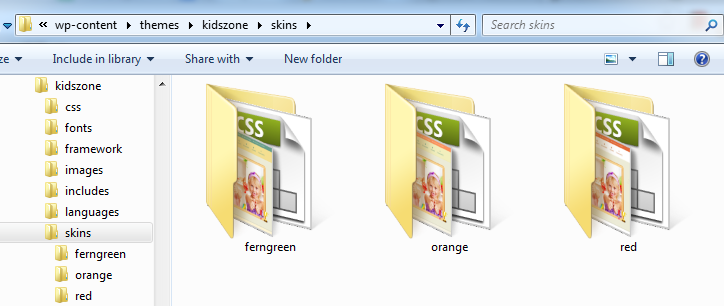
If you need to change the colors of the skins then you need to edit the stylesheet file which is located in the path wp-content/themes/kidszone/skins/ You can find 3 folders inside that path. Depending upon which skin you have selected, you need to edit the style.css inside the folder. For example the skin you have selected it “ferngreen” then you need to edit style.css file inside the folder “ferngreen”
Regards., DesignThemes Support.
Perfect, thank you. But one other question: How can i change the height of the Logo section? I need my logo bigger. Thank you and regards, Arndt
Hi!.,
Please paste this css code in Dashboard -> Kidszone -> Integration -> Custom Css. Increase the height as per your need. You need to adjust the menu css if it goes to second line.
#logo { height: 94px; }
Regards., DesignThemes Support.
Thanks! Is it possible to get the dummy content for the slider??
Hi!.,
Please, Send us a message through the right bottom form @ http://themeforest.net/user/designthemes so that we will send you the import file of the kidszone slider.
Regards., DesignThemes Support.
Hi! I have the following issue :
I have installed a plugin in order to change the fonts of my website to ComicSansMS, and everything is great apart from all the small icons like fa fa-angle-right. You could see the images below :
http://mikrosprigkipas.edu.gr/test/1.png http://mikrosprigkipas.edu.gr/test/2.png http://mikrosprigkipas.edu.gr/test/3.png http://mikrosprigkipas.edu.gr/test/4.png
How could I solve this problem?? Many thanks in advance!!
Hi!.,
Put this code in .htacces and check it.
<FilesMatch ”.(eot|ttf|otf|woff)”> Header set Access-Control-Allow-Origin ”*” </FilesMatch>
Nothing changed..
any ideas??
Thanks in advance!!
Hi.,
Try updating the font awesome files to the latest version. Download the latest version and try with the following steps.
1) Go to Theme-directory -> css replace following files – font-awesome.css and font-awesome.min.css
2) Go to Theme-directory -> fonts replace following file – FontAwesome.otf,fontawesome-webfont.eot,fontawesome-webfont.svg,fontawesome-webfont.ttf and fontawesome-webfont.woff
I changed the files but nothing changed..
Ideas?? thanks again!
Hi!., It seems the font awesome icons are now showing in your site. Please check it.
Great looking theme, congrats!
Quick question, do you know if the community/forums can be made private?
Thanks in advance!
Phoebe
Hi!., Yes the forums can be made private. Also until you make your forums link visible from the menu, no one will know the forum url.
I’m using Wordpress 3.9.2 but the theme is not working properly. When I adjust settings or install and/or activate the plugins the theme uses I can’t open the Kidszone Settingspage anymore.
Is the an solution to trigger this problem?
Greetings Dennis
Hi!., Please mail us your site credentials (WP & FTP access logins) immediately via the right bottom form located @ http://themeforest.net/user/designthemes So that, we can check and have a clear look on our end. Then we’ll help you get rid of it ASAP !!
I posted the url and credentials. Thanks in forward for the help.
Hi!., Please send us FTP details as well.
Regards., DesignThemes Support.
Hi, I have the following issues:
1. Need to disable the main menu on the home page. Them make it visible on all other pages.
2. Need to add the ‘www’ the the Website URL on the Contact Widget
Hi!.,
1) If you disable the menu from the home page, how will you move to other pages without the menu items?
2) Add the website url the same way you have added the email address.
I will have buttons linking to the Different Translations of the website.
Hi!.,
Add this css code to buddha panel -> integration -> custom css.home #main-menu { display: none; }
Regards., DesignThemes Support.
This is the code I use:
Still does not display the ‘www’ dt_phone title=”” no=”011 824 2983”/ dt_address title=”28 1st Avenue, Lambton,Germiston” /
Hi!., We pasted this shortcodes in a new page and it is working fine. Please check this link http://www.heavenlyflowers.co.za/test-contact/
Regards., DesignThemes Support.
YES! But is Does NOT show the ‘www’ in front of the url.
Hi!., We have made the ‘www’ to display in your site. Kindly, check it out now!
Regards., DesignThemes Support.
Thanks!
On the Blog. right next to the image, Can you remove the 2 Bottom Icons? The Comments Icon and the Paper Icon. Only leave the Date Icon?
Thanks
Hi, i’m also having the problem of automatic resizing of a logo, i upload a logo of 282×55 px but the theme makes it appear much larger putting it above the menu and ofcourse it looks pixelated, what is the problem?
thanx

Hi.,
Please try to upload the image of size 195×94, so that the image will not be pixelated.
Regards., DesignThemes Support.
Hi, i want to ask 1 question. it’s template suitable with WordPress version 4.0? Thank you.
Hi.,
Thanks for making contact.
We are working on the update of wordpress 4.0 with this theme. We will release the latest version ASAP.
Looking forward your purchase happily:-)
Regards., DesignThemes.
Thank you for ur reply and i already purchased ur nice template.  and i have one problem.. how to setting banner at my web?
Thank you.
Hi!.,
1) Just go to Dashboard -> Layer slider WP and create some sliders.
2) Then open the home page in backend and update the slider you created in step1 from the “Slider Options” below the editor.
Regards., DesignThemes Support.
Hi, do you provide tutorial how to customize or setting banner?
Hi.,
Kindly, check our slider documentation.
Layer Slider: http://wedesignthemes.com/documentations/layerslider/documentation/
Revolution Slider: http://wedesignthemes.com/documentations/revolution/
Regards., DesignThemes Support.
Hi, can i know how to customize color theme? using my own color. Thank you
Best regards,
Hi.,
You can create or change your own custom skin (Blue) into this KidsZone theme easily as following,
(i). Get into the skins folder from your theme directory, where we’ve added 20 folders with their skin names.
Look at the screenshot we’ve attached here for your reference, http://snag.gy/bMXM5.jpg
(ii). Just copy and paste any of them, and then rename it with the new skin name you’re about to be added.
(iii). Then you’ll be needed to edit the “style.css” of new custom skin you’ve replicated. (Just like the images, color, background and border color hex codes with your new custom skin color as needed).
(iv). Now you can find you new custom skin folder (created) on your Buddha Panel skin settings. So you can choose your custom skin and save changes thereby as here, http://snag.gy/bMXM5.jpg
Regards., DesignThemes Support.
Hi, i got change top-bar color but i cannot change header2 color. can you help me to fix my problem.
Many Thank!
http://didiandfriends.com/homeHi.,
Just add this css code in Dashboard -> Kidszone -> Integration -> Custom Css. Change the color code as per your needs.
#header-wrapper { background: #ff0000; }
Regards., DesignThemes Support.
thank you helps me.
i have another problem which is why image at my shop seem blur and when mouse over image would be ok.. ( http://didiandfriends.com/shop/ ) but when i seen at your website image at shop sharp ( http://wedesignthemes.com/themes/index.php?theme=kidszone)
can you help me for fix my problem.
Many Thank!
Best Regards, Farah
Hi Farah.,
The image which is showing blurred is too small which is why it is blurred. Try to add a bigger image with size of 520×535 so that the issue will be resolved.
Regards., DesignThemes Support.
Hi, i alredy change size 520×535 but it still blurred.
Hi.,
Make sure you have updated the product image sizes are shown in the screenshot.
https://www.dropbox.com/s/bp558wmuqeu01jt/woocommerce_prodcut_images.png?dl=0Regards., DesignThemes Support.
Hi, thank you because help me fix my problem.
can i get the coding to display recent product as example here :
https://drive.google.com/a/ddastudio.tv/file/d/0B8yYz01Yk6podEJHem9nRkFtVXc/view?usp=sharingMany Thank!
Best regards, Farah
Hi Farah.,
Use this shortcode [recent_products per_page=”3” columns=”3” orderby=”date” order=”desc”]
Regards., DesignThemes Support.
hi. thank you rsriram
but error “Warning: Division by zero in /home/didi/public_html/wp-content/plugins/woocommerce/templates/content-product.php on line 33” appear. 
and also Warning: Division by zero in /home/didi/public_html/wp-content/plugins/woocommerce/templates/content-product.php on line 35
Hi.,
Please mail your WordPress and FTP Login Credentials through the right bottom form @ http://themeforest.net/user/designthemes along with the page link where the error is shown so that we will check the issue.
Regards., DesignThemes Support.
Hi, i already send your email but you not reply yet.
Hi.,
We tried this domain ( www.didiandfriends.com/home) too, but still we are getting this error. Kindly, check this screenshot.
https://www.dropbox.com/s/5mhepn21gujy94k/error.png?dl=0Regards., DesignThemes Support.
Hi. can i get coding for blogpost for appear at home page.
Thank you.
Hi.,
Please use following shortcode
[dt_blog_posts posts_column=’one-half-column’ limit=’2’ excerpt_length=’20’ categories=’56’]
Note: change your category id in categories property.
Regards., DesignThemes Support.
I am trying to upload a logo that is only 85 pixels tall (and 320 pixels wide). It is resizing the image to be larger, making it 354×94, and of course it is pixelated. If I upload a taller image it keeps the sizing, but my image is too wide to work above 85 pixels tall. Can you tell me how to fix this?
Hi!., Please mail us your site credentials (WP & FTP access logins) and also your logo that you need to upload immediately via the right bottom form located @ http://themeforest.net/user/designthemes So that, we can help you get rid of it ASAP!!
I found and corrected the problem myself. Frankly, I don’t give out credentials to my sites unless there’s a dire emergency. I so prefer to have questions answered so that I can correct problems, and it also answers that question for others that may have the same problem in the future.
For those with the same problem, I solved it by enabling Custom CSS under integration, and added this css code: #logo { display: inline; float: left; padding: 0; width: auto; height: 85px; margin-top:7px; } My logo was 85px tall rather than 94, which is hardcoded in the css. I decreased the height and increased the margin-top slightly.
Hi.,
You can find it from the file wp-content/themes/kidszone/framework/theme_shortcodes.php line no: 881 approximately. This shortcode is not included in the shortcode generator. We will update it in the shortcode generator in future versions. Please keep a draft page of that shortcode.
Regards., DesignThemes Support.
Hi!.,
Glad that you fixed the issue. Let us know, if you find any issues in future.
Regards., DesignThemes Support.
Hi,
i have a problem with the size from product and categories…
It seems that they are linked? if i change in custom css ”#primary img {max-width: 25%;}” my product images are much to small and category pics are ok. If I change the Value to 100% my product images are ok but my categories are much too large is it possible that i set it separately? Look @ my links to understand what i mean
Another problem.. the “mouseover pics” on my products are also to small and i dont know how to change this!?
Hope you can help me I despair 
Hi!.,
1) Please set the image sizes as shown in the screenshot and regenerate the thumbnails using this plugin https://wordpress.org/plugins/regenerate-thumbnails/
2) Please use same size images as product images, so that the hover effect works correctly.
Hello and thanks for your fast answer…
1) I try it out with this plugin but nothing happens
2) All my Images have the same size! (1600×1200)
Sorry but i need your expertise again
Hi!.,
Please mail us your site credentials (WP & FTP access logins) immediately via the right bottom form located @ http://themeforest.net/user/designthemes So that, we can check and have a clear look on our end. Then we’ll help you get rid of it ASAP !!
Hi.
I’ve tried every plugin I can find to display our staff members in a grid with picture and bio.
No plugin exists, that I can find, to do this.
Any ideas? Desperate!
Many thanks.
(No plugin seems to work with this theme)
Hi., You need the team members to be displayed as shown in the screenshot?
https://www.dropbox.com/s/su2fqcwk8m1t7xq/team.png?dl=0If yes please use the below shortcode attached in the text file
https://www.dropbox.com/s/a5k265u8s6xpzqe/sc.txt?dl=0Thanks for checking on this. Yes, this looks close. Maybe pictures in either squares or circles. I also have biographies with content I need to add.
Hi.,
You need to customize this shortcode function dt_sc_team which comes from the file wp-content/plugins/designthemes-core-features/shortcodes/shortcodes.php as per your need.
Hi, I’ve purchased the “Kids Zone | Responsive Children Theme”.
The problem is I need the theme translated to spanish.
Can you tell me the steps to do this? I’ve tried to translate the default.mo and po of the template without success.
Thanks in advance
Hi.,
Kindly follow the steps below:-
a) You can find the default.po file in the themes folder itself. Get into this path wp-content/themes/alms/languages and you can find the default.po file.
b) If you are running a multi language site, you need to install the wpml plugin.
c) Or if you are running a single language site other than english. Say for example if you are running German site only. Go to wp-config.php and change the language code as define(‘WPLANG’, ‘de_DE’);
d) Then rename the file default.po to de_DE.po and open the file with a poeditor and you can translate all the texts from our theme.
e) Finally you will get the mo file there. Uploading that mo file the site will be fully translated to german.
Hi,
I have a layout issue on my site: http://www.nadines-ausmalbilder.de/tiere/ The entries will float in a wrong way, so the layout is getting broken. On this page, the turtle on the bicycle (date: 25Aug 2014) is the first item which floats wrong. Is there a small css fix available for this issue?
Best regards, Nico
Hi!., The order of the posts displayed is correct. It is displaying in order of the date it is posted. For the alignment issue, please try to use the images of same size. Else regenerate the thumbnails using the plugin https://wordpress.org/plugins/regenerate-thumbnails/
Hi, the order is correct, right. Images of the same size is maybe part of a solution, but also the length of the headline is then still a problem. Articles “bear with letter D” (28Aug 2014) and the “turtle on bicycle” (25Aug 2014) sticks together, there is no space between these items. This shouldn’t be the normal appearance, isn’t it?
Hi!.,
If you fix the thumbnail image issue, we can set a static height from custom css option in buddha panel and make the title section equal to all the posts.
Ok, then show me the css code please. I will implement on my own.
Hi.,
Add this css code in custom css section. Adjust the height as per your needs.
.entry-detail { height: 150px; }
Hi, on my home page I display some blog items. Under the blog items there a navigation block to go to page 1, 2 3 etc. Can this be removed?
Thanks
Hi!.,
Add limit attribute to the blog shortcode as follows,
[dt_blog_posts posts_column=’one-half-column’ limit=’2’ ]
My current code does have that limit on but still displayed the Page number buttons:
[dt_blog_posts posts_column=’one-half-column’ limit=’2’ excerpt_length=’20’ categories=’61’]
Hi.,
What is the url of your admin login page? Because we get “Page not found” error when we go to your admin login page.
Thanks for the fix…
Hi!
Thanks for the update