187 comments found.

Hi,
I’ve bought the theme and imported the demo content but the homepage displays only the slider without the extra content underneath as in your demo website.
How can I please have the shortcode used?
Thank you!
Check out the documentation that covers setting up your homepage. It will go over how to easily setup the homepage content. Most of the content area is easily created with homepage widgets. These are already formatted for you and ready to go. You just have to drop them into the homepage widget area in your desired order 
If you need additional help, feel free to post in our support forums. We are happy to help: http://support.progressionstudios.com
Hi,
I recently purchased the Renovation theme but I can’t seem to find the fonts you used anywhere in the archive. Could you email them to me?
Regards, Octavian.
All of the fonts used can e downloaded from Google Fonts (http://www.google.com/fonts/ ). They are as follows: Logo/Body: “Fira Sans” Headings/Buttons: “PT Sans Narrow”.
If you have any other questions, feel free to post in our support forums:http://support.progressionstudios.com
Hey guys! My client liked the renovation theme but the logo is too small for his logo. Is it abble to customize de menu to make the logo on the left? Thanks
You can use any logo size. There is no limitation on size. Also, you can easily have the logo display on the left or center. This is an option built-in to the theme.
Let me know if you have any other questions.
Hi,
I’m planning to buy this theme for my project. Can I change the colors of black and yellow to blue and red? If so, how? Also, can I change the ‘Portfolio’ word to an image or logo?
having problems paying for this. It won’t accept my Paypal payment. tsk
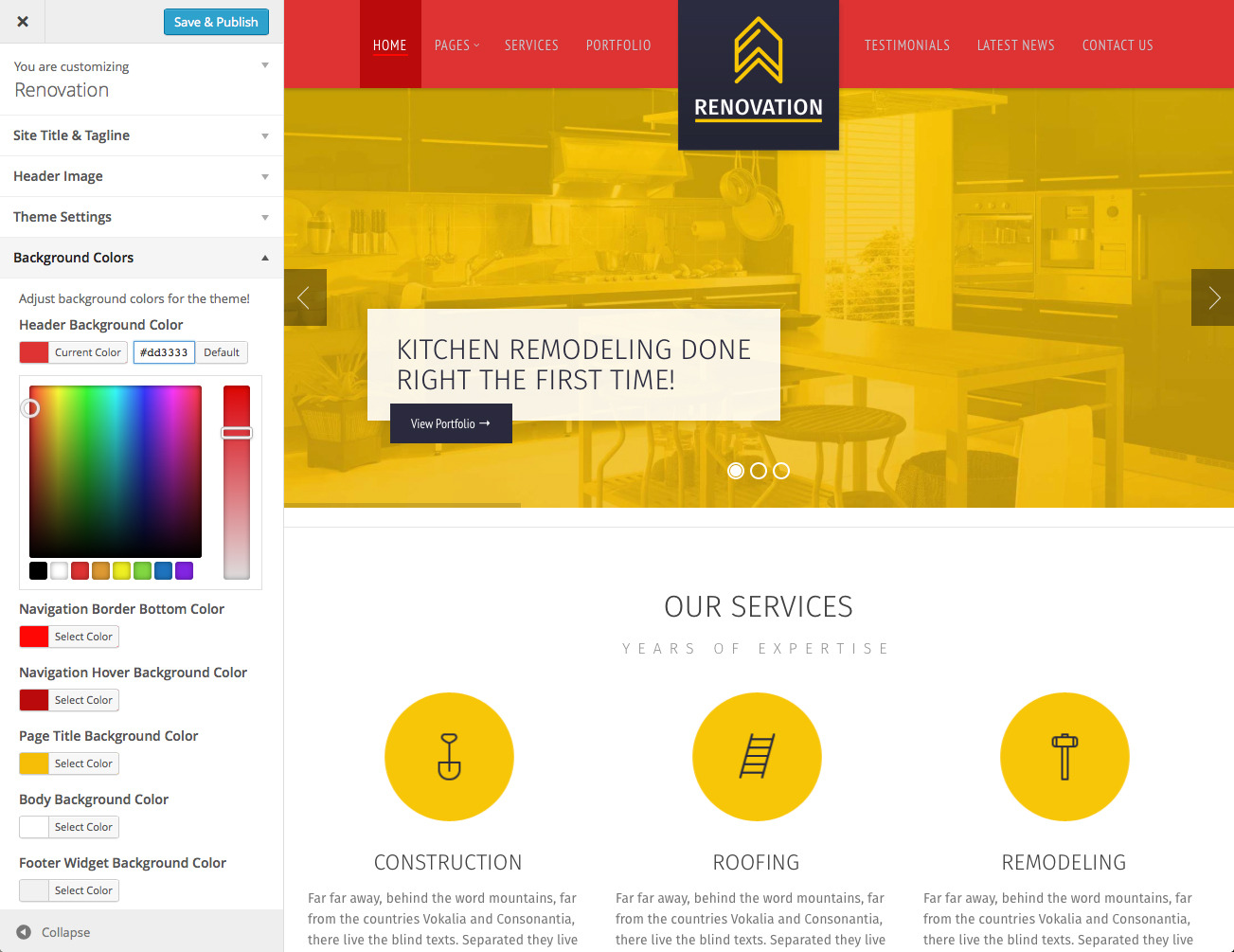
1) Yeah, you can easily adjust all of the colors. There is a front-end color picker that allows you to change colors and preview them. Here is a screen-shot: https://0.s3.envato.com/files/106449255/Screenshots/4-Theme-Customizer.jpg
2) Yeah, you can easily adjust all of the text including ‘Portfolio’. If you want to replace that with an image, that is possible as well.
3) If you are having problems with the payment, contact Envato Support: https://help.market.envato.com/hc/en-us/requests/new?ticket_form_id=37840 You should have no problems paying for the theme. Perhaps there was a minor down-time on PayPals end.
Let me know if you have any other questions.
Hi,
Can I change the ‘Portfolio’ word to an image png or logo?
http://support.progressionstudios.com
already did. Can’t create a new discussion. I didn’t receive any confirmation links in my email. I want to have the Portfolio page as my home page. I want it to show it like this: http://renovation.progressionstudios.com/portfolio_type/portfolio/ and also add the yellow contact us below (also clickable). How can I do that?
If you did not receive a confirmation e-mail, I can manually approve your account. Let me know your username in the forums and I will approve the account.
username is the same
I manually approved your account. You will now see a large Start a New Discussion button in the top right.
I have downloaded and successfully installed the qtranslate plugin, but whenever i choose a different language, only Wordpress admin changes language, and nothing on the website itself.
I am guessing i need to put a PHP action as you would for WPML. What is the qtranslate snippet i would need to put in for qTRANSLATE?
This is the WPML you gave on page 2. <?php do_action(‘icl_language_selector’); ?>
your support page doesnt allow me to add a new discussion item.
You need to confirm your account via email in order to post questions. If you did not receive an email, let us know your username. We can then manually approve your account so you can post in the forums.
i didnt get an email. Username is vmudhar
Okay, we manually approved your account . You will see a large Start a New Discussion in the top right when you login.
My password doesn’t work on your support page, can you please reset it?
http://themeforest.net/user/ProgressionStudios#from
Hello! In an earlier comment you wrote, “we added in an option so the services icon can be clickable.”
Where is this option? I’m not finding it… thanks!!
Yeah, this option is available when editing/creating a service post. Under the content area is a section title “Service Settings” in which you can add-in a link. Here is a screen-shot: http://i.imgur.com/zFLLjWt.jpg
If you have any other questions, feel free to post in our forums. We are happy to help: http://support.progressionstudios.com
Thanks. That makes sense, but it seems like an extra step – wouldn’t it make more sense just to have the link default to the individual Service listing? This way the Services archive page would auto-populate links to all of the services and their descriptions.
We’ll use this setup for now but will probably want to add some programming to the template file to make it automatic so it isn’t an extra step for our client.
I appreciate your fast reply – still loving the theme
I see, you wanted to automatically link to the post page. I created a support forum thread that explains how to do this: http://support.progressionstudios.com/discussion/9199/automatically-linking-the-services-to-the-post-page
That should sort everything out for you .
Awesome—thank you!!!
Hey guys;
I can not find the demo content file

The demo content is located under /Additional Files/Live Preview Files/. Check out the documentation under the heading “Importing Demo Content” if you are unsure how to find or install the demo content. We have a video that walks you through how to install the demo content.
If you have any other questions, feel free to post in our support forums, we are happy to assist:http://support.progressionstudios.com
solved
Hi, Is this theme compatible with Visual builder? http://codecanyon.net/item/visual-composer-page-builder-for-wordpress/242431.
Also, do you by any chance have a demo wp-login to test? Thanks
Yeah, this theme will work with the Visual Composer Page Builder. All of our themes work with the Visual Composer
We don’t have any demo login but we are happy to send documentation if you are curious. Just send is an e-mail via our profile page contact form if you want a copy of the documentation to preview.
Let me know if you have any other questions.
This theme is really nice but I’m missing Our Team page. Are you planning to include? Thanks
Easily add a team page to our theme using this plugin(free): https://wordpress.org/plugins/easy-team-manager/ There are also premium plugins like this one if you want advanced functionality: http://codecanyon.net/item/team-showcase-wordpress-plugin/4936368 Any of the the team plugins will work with our theme
Let me know if you have any other questions.
Hi, im looking to add a header image to the /portfolio-type/ page http://screencast.com/t/aEZDZW0at2f . Its currently grey and it’s not a ‘Page’ so I can’t set a featured image to it.
http://support.progressionstudios.com
As far as that header image goes, you can modify that under Appearance > Header. That is going to be where you control the header background for any category, archive, etc. If you want a custom one for just your portfolio, jump on the forums and we will be able to assist you with that.
Hi,
nice work. I really love your theme. But I don’t understand how to install it. I explain better: when I add the theme on my wordpress, there is this line: “Unable to create directory wp-content/uploads/2014/10. Is its parent directory writable by the server?” What does it mean? And how can I fix it?
HELP ME, PLEASE
Yeah, that is a hosting provider issue. They just have the folder permissions setup incorrectly. You can get this sorted out by contacting your hosting provider support. They will be able to fix this for you quickly.
If you have any other questions, feel free to post in our support forums. We are happy to help: http://support.progressionstudios.com
Hiya
I found the problem. Obviously I had to install some plugins. HOWEVER… now I can’t to anything at all anymore. Getting the following error:
Fatal error: Allowed memory size of 41943040 bytes exhausted (tried to allocate 122880 bytes) in /data/16/3/120/74/3120726/user/3480941/htdocs/NEW/wp-admin/includes/menu.php on line 189
Can’t deinstall any pluggins, can’t click on anything anymore.
Can you help PLEASE!
Thanks
Sorry for the panic – I have solved the problem.
http://support.progressionstudios.com
Hi another thing missing in my toolbar on the left side is the revolution slider. Any idea where I can get/add this?
Thanks
Yeah, check out the documentation in the “Documentation – Help” folder. It will cover how to import the demo slider and demo content.
If you have any additional questions, feel free to post in our support forums. We are happy to help:http://support.progressionstudios.com
Hi Downloaded the theme and already working on it. But noticed there is the shortcode button missing when I’m editing any pages.
Could you help me how I can get this?
Thanks!
http://support.progressionstudios.com
Bought the theme, trying to install the ZIP on my wordpress theme site, and its giving me an error, saying it cannot download as it does not have a .css file?
Make sure you unzip the initial download from ThemeForest. After you unzip the initial download, you will find the documentation, WordPress Theme, and additional files like demo content & photoshop files. The theme file is going to be named “Renovation-WordPress.zip” and should be a very small file-size.
If you have any additional questions, feel free to post in our support forums and we can help:http://support.progressionstudios.com
thanks!
Hi There,
can the theme do sticky menu’s
kind regards
Yeah, you can easily do a sticky/fixed menu. Just open the Theme Customizer under Appearance > Customize and look under Theme Settings. There is a checkmark option for “Set Navigation Fixed”
If you have any additional questions, feel free to post in our support forums and we can help: http://support.progressionstudios.com
Great theme,
one thing, I would i’ve setup the logo to be on left instead of center, but when it is a big screen the logo is about 2/3.
I want it really more on the left. Do you have a CSS snippet that could push the menu+logo more on the left without disrupting the responsive?
I couldn’t confirm my email in the support forum for some reason.
Let us know your username in the support forums and we can manually approve your account. The left logo option aligns the logo with the content on the left. If you want it force the logo outside of the content container, that is no problem. We can help you out with that in the forums.
maximesincerny is my username
And it is exactly the solution i need!
We approved your account. You will now see an orange “Start a New Discussion” button in the top right. I will be checking the forums for your question and answer that quickly .
How do i show the portfolio sub navigation, I followed the instructions to set parent but not working not showing. Please help.
http://support.progressionstudios.com
Can we get the colour picker available in the demo version? I have a client that wants a dark version and I need to see how that would look/work before purchasing.
http://themeforest.net/user/ProgressionStudios#from
Thanks, ok we want a dark theme, so can the text be white and the background to page content be black? Your screenshot seems to show me that the areas that I can change the colour on are limited to certain parts only.
http://themeforest.net/user/ProgressionStudios#from
How do I add my services, and testimonials to the home page, just like you have in the demo? I applied the theme to my existing website and what i get for the home page now is just the slider and the content i used to have, which is just text.
Check out the documentation under “Creating the homepage”. We have written and video documentation covering this. The services and testimonials are added via a simple widget that you drop into the homepage widget area.
If you have any additional questions, feel free to join our support forums. We are happy to help: http://support.progressionstudios.com