582 comments found.

We’ve just created an awesome demo for Mobile Game
http://demo.leafcolor.com/applay/home-mobile-game/
Are you a fan of Clash of Clan
This awesome new Auto Fetch feature is “first” only 4 Apple appstore? Want this function for Google Play Store provide and if so, when? Thx
Hi, Google Play does not provide any API or data library officially now. So we can’t develop auto fetch for Google play until they release an API library. Thanks
I do not know if it’s helpful, but this free WP plugin reads the data from Google Play Store. http://www.blogtogo.de/wp-appbox-app-badge-fuer-google-play-mac-app-store-windows-store-windows-phone-store-co/ Thx
We will research and update if there is a good enough solution. Thanks

hi if i want special customization in this theme , how to contact you about it also does this theme fetch applications info automatically and update it or u have to insert and update them manually
thank you
Hi, thanks for insteresting. You could send us an email via support tab.
And what do you mean “fetch applications info automatically and update”? We’re going to update next version with auto fetch features – you only need to enter Apple appstore link, all title, price, screenshot, description will be filled automaticlly
Applay 2.0 is here with Auto Fetch feature
yeah great feature please support other markets too like google play and windows phone
we will consider to update them soon (if there is a official API from those stores). Thanks
Hio! ...back again
Is there a way to mix Listing Mode and Woo’s purchase / cart function? I would like to offer apps that come directly from the Play Store and other additional own paid apps (which are not listed in Play Store).
One option is currently make a post / portfolio for my own apps. But this has the disadvantage that the categories and thus the navigation is different. It would all categories give twice and it would be possible not clean search function. Basically I want to select virtually at any new Woo Product created between Listing Mode and purchase / card function.
Thx!
Hi, we’re working on it now, each product will have its own style (woo or app listing). Pls wait, thanks
Applay 2.0 has come with single product style chooser
Thumbsup!
don’t forget to rate it 5*
of course – but give me a chance 2 test it
On the theme’s homepage – how do you change the first background image and what is the preferred size of the image?
Hi Tom, thanks for using our theme and Merry Xmas
You could change that BG when editing home page, pls enable visual composer mode, click on edit (first) row (pencil icon), you will see design options. My recomended size is full HD (1920×1080) or qHD 1600×1200
Visual Composer doc: http://vc.wpbakery.com/
Thanks
Thanks, Merry Xmas to you. When viewing the home page on an iPhone 5 the Screenshots title reads as “creenshots” I wondered if this is a bug? You can’t zoom or pan to view the whole title. Wordpress also asks me to activate my copy of Visual Composer but I don’t have a Visual Composer License Key.
Hi, you don’t need to active Visual Composer, just dismiss it. Pls give us a screenshot to understand your problem with title. Thanks
Thx 4 ur nice Theme! WordPress 4.1 is out and in ur full package inclusive WPBakery Visual Composer Plugin is an old version (4.3.3). Current version 4.3.5 is compatible with WP 4.1 but cost 28 bucks http://codecanyon.net/item/visual-composer-page-builder-for-wordpress/242431?ref=mixey
Should I buy it?
Hi, we will update VC in package soon, pls wait
Not working whatsoever on Internet Explorer!
Hi, I’ve checked your URL on my IE, everything works fine. Applay works with IE9 and newer (IE10 and above versions are recommended)
Thanks
Okay sorry for that! Must be my computer or my settings.
How do I change the main logo from the default Applay logo on the top left corner to my logo? I don’t see this anywhere in the Theme Options. I’ve tried under General and Main Navigation but the images simply won’t update.
Hi, you should ensure you are not using page demo templates, they might have static logo for demonstration only. Thanks
Okay no worries! I manually updated it via FTP. Thanks for all the help. You guys have been extremely helpful. 10/10 for sure.
Thanks, if you have any problem, let tell us via Support tab. And pls don’t forget to rate Applay 5*
Another issue. I’m getting the following when importing the theme_options.txt file:
Sorry, there has been an error. This does not appear to be a WXR file, missing/invalid WXR version number
What can I do???
Hi, you can’t import theme_option.txt. You need to copy its content and import it in OptionTree > Settings > Import > Theme Options
Thank you!
An error occurred while installing Applay – Member: Download failed. A valid URL was not provided..
I’m receiving this error every time I try to install the following recommended plugins:
Installing Plugin Applay – Member (1/4)
Installing Plugin Applay – Shortcodes (2/4)
Installing Plugin Applay Showcase (3/4)
Installing Plugin Applay portfolio (4/4)
This is very irritating! What can I do?
http://themeforest.net/item/applay-wordpress-app-showcase-app-store-theme/9381060/faqs/22515
I own Visual Composer and I have it installed. It’s still not working…
How do I manually install XML files on my FTP client? What folder do I move those files to?
Edit: Never mind, I found the .zip files!
If you have any problem, pls send us via Support tab. Thanks
How can I manage my products use packageid instead of only post id as the current like this: https://play.google.com/store/apps/details?id=com.gameloft.android.ANMP.GloftDMHM
If your theme has more management-based products package_id in posts and metaposts table, it will more than sufficient for the purpose appstore.
You could enable Permalink to customize product URL, ex: yousite.com/product/com.gameloft.android.ANMP.GloftDMHM
Read more here http://codex.wordpress.org/Using_Permalinks
Thanks
Thanks for your supports And I have an inquiries in “Add Images to Product Gallery in upload file Image” How can I add image links instead of upload file image
Hi, it’s not possible to use image link unless you modify theme’s code
Thanks
I really need it because my image get from somewhere else (ex: other URL) . I hope you will soon add this option to the next update. Thanks!
Hi, we will consider to update this feature in next update. Thanks
This is indeed a great theme and it will more perfect when you update this feature because my image set on other server or when I want to use the image directly on google (ex: https: // lh6.ggpht.com/6BKH-Ni_Cf1jxTBec3ne7Lkhy3_31g7OY_2_axnuDwsndPuvIzIjnCZeNd_g956RJ_o=h900-rw) as now, it is impossible. Can you tell me when you have an update for this feature to I can development consistent with the my appstore. Thanks!
Hi, we’re working on it. We will release new version soon. Thanks
Applay 2.0 has come with custom screenshots urls and auto fetch iTunes app
That is great! How can i use it?
You just need to enable Auto Fetch in Theme Options > Woocommerce, then add a new product, enter iTunes url of mobile app to iOS url, then click Publish. All app info will be filled automatically
Hi, thanks for sharing. But it’s not official API and could be die one day, we’re waiting and searching a long term solution. Thanks
I’m having a problem with downloading the Visual composer, its asking for a license activation is required?
Hi, thanks for using our theme. You need to install Visual Composer via manual upload. And you don’t need lincense to use it.
Don’t hesitate to ask us if you need help. Thanks
I have manually installed it from your files and that’s what it is asking me for. Thank you – David
I believe I’ve solved the issue, thank you so much for your time and help!
That’s great  don’t forget to rate it 5*
Many thanks for your support. This is the best theme we’ve ever used. Easy to config, flexible and fast. Your theme options panel is my favorite 
Thanks
hi, thanks for nice theme.is there a way to speed up the site? becouse its loads 7 seconds…
Hi, thanks for using our theme
You could optimize your images (reduce size, quality), and use a cache plugin to speedup your site. Thanks
Some lovely comment from our customer:By far one of the best wordpress themes I’ve used (and we have used a LOT!).
Super quick to install, literally takes minutes to customise, super transitions and animations, so many preset options to choose from, and the customer support is second to none.
Can’t recommend it highly enough, to see what we did with it and how different you can make it look check it out at: http://www.tikitapa.com
Can’t wait to see more themes from this developer.
Hi, I am also currently using a template for my app downloading site. But your one looks awesome and far more better than my current one. So does this theme supports app downloading system beside this checkout system. And do u have also option for Windows Phone/Surface beside iOS/Android?
Let me know I am looking forward to buy it but can not if that thing doesn’t have downloading/url linking feature.
Hi, Applay have Listing mode which disable all cart/checkout function and let you use your links to present (download) app
You could enter Window phone store links like this http://demo.leafcolor.com/applay/product/nice-clock/
And there is a Lumia devide for showcase http://demo.leafcolor.com/applay/showcase-devides/ It has 5 colors
Absoluteley killer theme!!! I used it over at http://www.tikitapa.syncinteractive.co.uk for our new footy mobile game we are working on, and the theme is so slick it’s incredible.
1 day on it and the site already looks amazing. So easy to modify, so smooth and sexy and so many options.
By far one of the best themes I’ve used to date! SUPERB!
Wow thanks for kind words, your site is awesome
If Applay helps your work, pls don’t forget to rate it 5*
Pre-purchase question: I would like to know that can I use it for an app download website? And instead of displaying add to cart option can I use download now option and redirect that to desired url to download. Basically I would like to run iTunes and Google affiliate items from app store and Google play on my website.
“More elaborately: Suppose there will be a Download Now Button instead of Add To Cart. Also I don’t need to use checkout because user will be redirected to either on Google Play or on Apple App Store when they press Download Now button.” So please tell me I can do it or not. If I can. Then I will buy it. I am badly in need of such a template like this.
Hi, you can do it with a litle help from us. What you want is what we will update, so we will support you with this feature.Thanks
Thanks for your quick response. Its great to hear that u can do it what I really want. But can u please tell me suppose if I make my purchase today how long it will take for you to do that for me. Because my main aim is to run an app site rather than app selling site.
I will be waiting for your kind response.
Thanks
Hi, after purchase, you should use Applay to understand it. Then use support form to send us more detail about your demand, we will consider and update it as soon as possible.
As I understand, you want to build a listing apps site and all “add to cart/buy” button will become “Download”, and link your custom Appstore or Google play url, isn’t it?
yes thats right. but can u tell me how long u will take to update? because I am eagerly waiting to buy and start running my appsite.
Thanks
We’re working to add a Listing Mode now, it might take 1-2 days. Now you could purchase the theme to start discovering and config it
New update will arrive soon. Thanks
I have already purchased this theme. But I need app listing with download/redirecting functionality to Google Play rather than this add to Cart/checkout system. So please let me know how long it might going to take. Because u told me that u will add this feature in next 2days. So do u have already added this feature?
We’ve done it If you’re using Applay 1.3, you could enable listing mode in Theme Options > Woocommerce > Enable Listing mode
Thanks
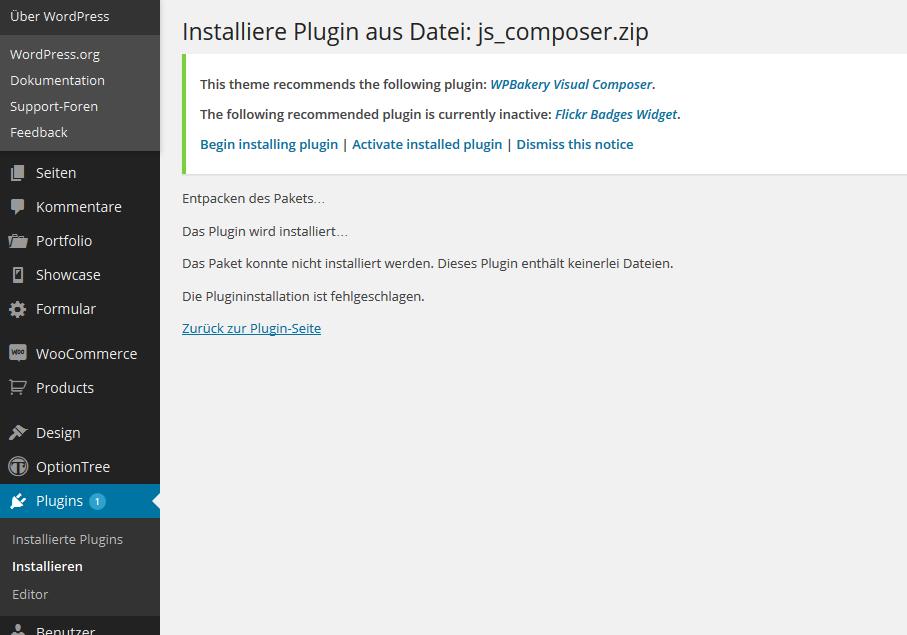
Hello Guys i have a little problem with the Visual Composer Plugin.. I want to upload it , but then it reports an error. The plugin would be incorrect.. Do you have any idea?
Greetings from Germany
Hi, thanks for using our theme. Please give us more detail (screenshot, url, login info) via Support tab. We will try to check and help you.
Thanks
Wow, really fast Support! Thank you!! http://666kb.com/i/ctw7r7x7g0mn62q0f.jpg
“The Plugin couldn’t be installed. It does not contain any files..”
Hi, you should try to re-download theme’s full package, your downloaded file maybe broken. If you can’t install it, let give us admin login, we will help you. Thanks
ok, i’ll send you a mail
i’ve finally found my problem, thank you for your help
That’s great Don’t forget to rate Applay 5* if it helps your work
Thanks
Just read on the previous page that the plugins have to be installed manually, but how do I do this?
Hi, you could find all applay plugins in Full download package > Installation > Plugins. In wp admin, go to Plugins > Add new > Upload to upload and install our plugins. Thanks
Thanks Another question, can I also style a second page the same way the (static) front page is styled?
Yes, you could build another page with Visual composer