227 comments found.

Hey guys,
Almost ready to buy this theme, but have one important thing to figure out with you first.
Our current theme is now “unsupported”, so they don’t update things like PHP etc and our web dev has said that due to a big WooCom and WP update coming in a few years, that we’ll need to be on a new, supported theme or we’ll run into issues.
He’s recommended that we go with a theme that should still be supported for a long time to come and suggested that we buy a theme with a high number o sales and reviews.
We really like this theme, so we’d like to get it, but any chance you can shed some light on my above concerns and give us some faith that this theme will still be managed etc for some years to come, or is this going to be unlikely?
Cheers, Guy.
I’m only asking because although the theme is great and plenty of good reviews, some other themes have many, many more reviews and sales, so instead we’ll need to hear a little bit from you.
Thanks in advance. Cheers.
Hi there,
Thanks for taking an interest! We are always updating our themes and do care on improving them.
The theme is compatible but please read this article here. As well as there will be updates of the theme in the future for sure.
Do let us know if you have any additional questions.
Support
Select Portfolio part of
Qode Interactive
Don’t forget to sign up for our newsletter and be the first to find out all the latest news.
Hi, I am looking for a product showcase sort of a website that can later be used with woocommerce. I would like to use it now only to generate enquiries. As in no add to cart button but only submit enquiry. Is that possible. We may not show the price as well. Is this possible? As this will be a B2B site. Thanks kamal
Hi there,
Thanks for taking an interest!
Shop functionality is achieved with WooCommerce plugin, and catalog mode isn’t available as a standard option. For it, you will need WooCommerce extension https://woocommerce.com/products/catalog-visibility-options/
Also you could consider to use some css if you want just to hide prices on products, for example, and the login widget does not need to be enabled, as you can remove it.
Do let us know if you have any additional questions.
Support
Select Portfolio part of
Qode Interactive
Don’t forget to sign up for our newsletter and be the first to find out all the latest news.
Hi. How do I change the main menu effect from line through to underline? Thank you!
Hi there,
Please submit a request on our helpcenter in the upper right corner and one of our agents will assist you.
Support
Select Portfolio part of
Qode Interactive
Don’t forget to sign up for our newsletter and be the first to find out all the latest news.
bazaar demo not working please check! want to buy!
Hi there,
Thanks for taking an interest! Possible there were some minor interruptions, however the demo website is working and you can check it out now.
Thank you for your patience and let us know if you have any additional questions.
Support
Select Portfolio part of
Qode Interactive
Don’t forget to sign up for our newsletter and be the first to find out all the latest news.
Can we integrate payment gateways like Razorpay?
Hi there,
Thanks for taking an interest! If it is in the WooCommerce list here then it should support it. If it is not, then you should possibly consider using a 3rd party plugin for integration, but we need to point out that we have not tested it and cannot guaranty theme compatibility. You can always try it out on your end for sure.
Thanks for understanding and let us know if you have any additional questions.
Support
Select Portfolio part of
Qode Interactive
Don’t forget to sign up for our newsletter and be the first to find out all the latest news.
Hi! How can I change image on page “About US”? Big image on the top of the page. There are no ability to change it through WPBakery. What I need to do?
Hi there,
On the page About us you do have Title options where you can change the Title background image. https://www.dropbox.com/s/nxmz9v26vwrox07/Screenshot%202020-07-06%2017.38.24.png?dl=0If you have any additional questions we would kindly ask you to submit a request at our help center and our support team will be happy to help.
Thanks.
Support
Select Portfolio part of
Qode Interactive
Don’t forget to sign up for our newsletter and be the first to find out all the latest news.
Hi I can’t manage to change the 1st picture/slider of the main home, can you give me a detail procedure to do so. thanks a lot
Hi there,
Thank you for reaching us!
Since author’s dashboard is meant for general inquiries and pre-sale questions, we would appreciate if you could submit a ticket to our Help Center and include your website URL and one of our support agents will assist you.
Support
Select Portfolio part of
Qode Interactive
Don’t forget to sign up for our newsletter and be the first to find out all the latest news.
Hi,
Does the theme works with Elementor?? Thanks!
Hello,
thank you for taking interest in our theme!
No, unfortunately not. It’s based on WPBakery only. You can see our Elementor-compatible themes here – https://qodeinteractive.com/theme-plugin/elementor-wordpress-themes
Support
Select Portfolio part of
Qode Interactive
Don’t forget to sign up for our newsletter and be the first to find out all the latest news.
Hi. I updated the template and see only shortcode, not the blocks it should. What I can do? It is impossible to keep the site like this.
Hi,
Please enable WPBakery page Builder from Plugins > All Plugins. If you have any further questions, please submit a ticket to our Help Center https://helpcenter.qodeinteractive.com and one of our support agents will assist you.
Support
Select Portfolio part of
Qode Interactive
Don’t forget to sign up for our newsletter and be the first to find out all the latest news.
Please update bazaar/woocommerce/global/quantity-input.php to 4.0.0
Hi there,
Please note that due to safety measures related to COVID-19 the updating of our themes is a bit delayed but please note that we are working really hard on this and that we are constantly working on updating all our themes, however, we can say that the theme is compatible with the latest version of WordPress as well as it is compatible with the latest WooCommerce as well. You will get this message though but it will not affect the performance of the theme as well as it will be added in the theme’s changelog once the update is out. At the moment we don’t have any ETA when this update will come out. You will for sure be notified when the theme update is out. We appreciate your patience and understanding.
If you have any additional questions I would kindly ask you to submit a request at our help center and our support team will be happy to help.
Thanks.
Support
Select Portfolio part of
Qode Interactive
Don’t forget to sign up for our newsletter and be the first to find out all the latest news.
Hello, interested to purchase this theme. Have a question though: Can we have a glimpse(screenshots) of the user dashboard, my account, checkout page of the theme?
Hi there,
Thanks for taking an interest! Please take a look at our themes documentation so you will be able to get a better glimpse on how the theme functions and what possibilities you do have with it. Also as for the Woocommerce checkout you can for sure test this on our demo website processing the whole purchase procedure with a specific product, adding it to the cart, checkout etc.
Do let us know if you have any additional questions and if you need any more detailed screenshots. Thanks.
Support
Select Portfolio part of
Qode Interactive
Don’t forget to sign up for our newsletter and be the first to find out all the latest news.
Hello, how do i activate WPBakery Page Builder plug-in for WordPress (value $ 46) and Slider Revolution Responsive WordPress Plugin included ($ 26 value)? In the file that I downloaded there are no activation codes, thanks
Hi there,
Please note that those plugins does come bundled within the theme and you do not need any activation of the license for them, as they do get updated once the theme is updated. You can read more about bundled plugins here</>.
If you have any additional questions I would kindly ask you to submit a request at our help center and our support team will be happy to help.
Thanks.
Support
Select Portfolio part of
Qode Interactive
Donít forget to sign up for our newsletter and be the first to find out all the latest news.
Hi, my site is not load properly. Demo content is not shown in proper manner. Can you please check. http://rejuvenate.shasvat.in/
Hello,
Thank you for reaching us!
Since author’s dashboard is meant for general inquiries and pre-sale questions, we would appreciate if you could submit a ticket to our forum and include your website URL and one of our support agents will assist you.
Support
Select Portfolio part of
Qode Interactive
Don’t forget to sign up for our newsletter and be the first to find out all the latest news.
he I don’t know how to ask your help center a question so I do it but this way for my website the menu in the header is double displayed on apple computers how can i turn that of
Hi,
Please submit a ticket to our forum. Here’s a link to our help-center:https://helpcenter.qodeinteractive.com
Take look at our article on how to register and submit a ticket:
https://helpcenter.qodeinteractive.com/hc/en-us/articles/360002745418-Welcome-to-Qode-Interactive-Help-Center
Support
Select Portfolio part of
Qode Interactive
Don’t forget to sign up for our newsletter and be the first to find out all the latest news.
Hi there Problem comparability with woocomerce. woocomerce >setting>products>Inventory >Hide out of stock items from the catalog didn’t work with anther theme it’s work
Hi there,
Once we test this on our end it is working perfectly fine. Even with the latest WordPress version as well as with the latest WooCommerce version. So please check if your theme is up to date as well as try to test if any 3rd party plugin of yours might be in conflict with the theme. You can try that out by deactivating the 3rd plugins and check if it will be applied.
For any additional questions you have, I would kindly ask you to submit a request at our help center and our support team will be more than happy to help.
Thanks.
Support
Select Portfolio part of
Qode Interactive
Don’t forget to sign up for our newsletter and be the first to find out all the latest news.
The mobile version of the online store has stopped working. How to solve the problem ? armeyka.ua
Hi there,
Please submit a request on our helpcenter and one of our agents will assist you.
Support
Select Portfolio part of
Qode Interactive
Don’t forget to sign up for our newsletter and be the first to find out all the latest news.
Hi! i think i dont found the option but in my site dont work when you have clic over “Quick Look” dont happed nothin, how can i fix? thanks
Hi there,
We included compatibility for these two YITH plugins: – YITH WooCommerce Quick View plugin – YITH WooCommerce Wishlist plugin so please check if you have them installed and activated.
As well if you still encounter issues I would kindly ask you to submit a request at our help center and our support team will be happy to help.
Thanks.
Support
Select Portfolio part of
Qode Interactive
Don’t forget to sign up for our newsletter and be the first to find out all the latest news.
Ok thnaks i delete this plugins, but instalate now and works, thanks!
Hi there,
Glad we could help!
Support
Select Portfolio part of
Qode Interactive
Don’t forget to sign up for our newsletter and be the first to find out all the latest news.
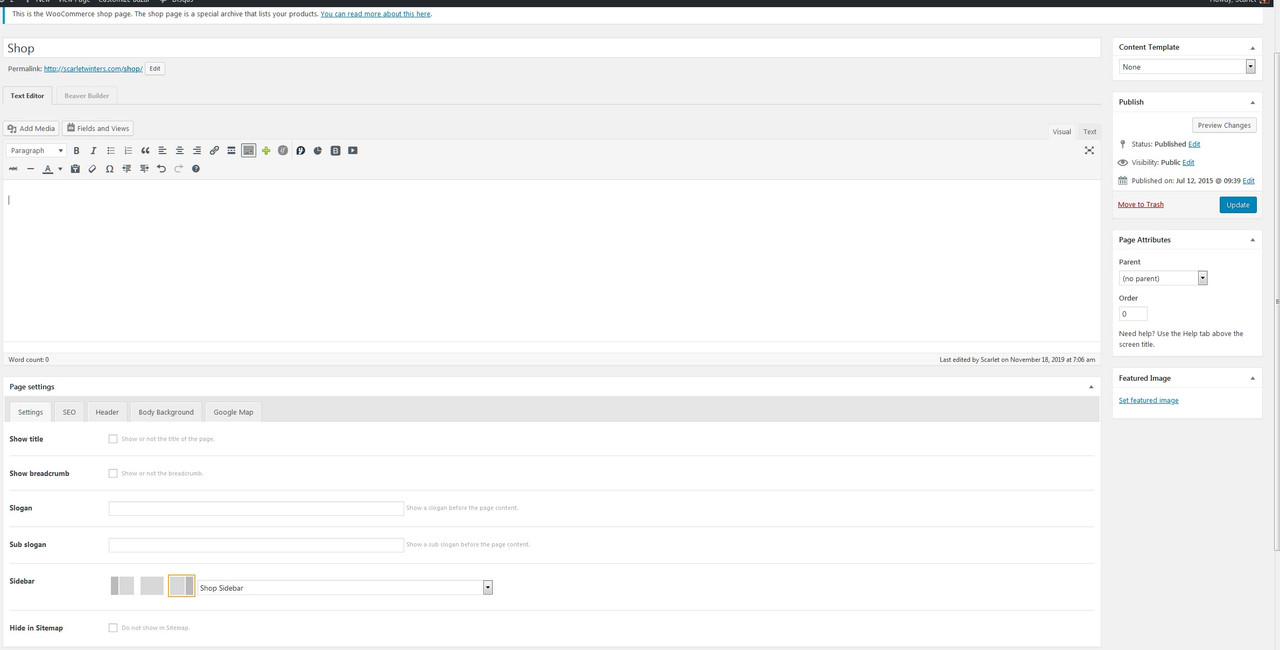
I have looked everywhere this morning… Where do I go to set the default shop sidebar??? I want it to show up on the “Shop” page, the categories page, and individual product pages. Thanks!
Hi there,
To be able to achieve this you will have to choose your default Shop page in Woocommerce > Settings https://www.screencast.com/t/A0n3eOmE Once this is done, you may go to that particular page and select the Sidebar Layout and Widget area that will be displayed over there as in the screenshot below: https://www.screencast.com/t/IIJWo4rV Hope this helped.
Support
Select Portfolio part of
Qode Interactive
Don’t forget to sign up for our newsletter and be the first to find out all the latest news.
So I just did that, and it still doesn’t display the sidebar for “Shop.” https://i.postimg.cc/HkYtkk6D/shoppage.jpg
Hi there,
Please check in Appearance > Widgets if you have your Woocommerce Sidebar widget present. https://www.screencast.com/t/GJw1LhqQc
Support
Select Portfolio part of
Qode Interactive
Don’t forget to sign up for our newsletter and be the first to find out all the latest news.
I only have a “Shop” sidebar; no “Woocommerce” sidebar. https://i.postimg.cc/mDsshrr4/widgets.jpg And I selected “Shop” sidebar on the “Shop” page, but it’s not displaying the stuff in the “Shop” sidebar.
Hi there,
Then I would kindly ask you to create a Woocommerce Sidebar https://www.screencast.com/t/k0HQGfrZ9 So you have one widget area like in the screenshot https://www.screencast.com/t/arAjhbmtgx If you still encounter issues then I would kindly ask you to submit a request at our help center and our support team will be more then happy to help.
Support
Select Portfolio part of
Qode Interactive
Don’t forget to sign up for our newsletter and be the first to find out all the latest news.
In my previous comment, I put that Google maps API’s used in Bazaar, point to Australia, regardless of the address you input. And that it’s happening even in your theme demos. In your case, it’s because the API is expired, as it says so in a message when you visit the map page in your demo.
You said it might be because the API has expired since now Google is charging for the use, but it’s not the case. I created an account, I’m paying for it and still the map is stuck in Australia.
In my case, the API it’s not expired. The map shows fine and you can even move around. But the widget address input is not working well, and the map is stuck in Australia regardless of the address I put into the widget. The API is correct and authorized.
Hi there,
Please provide your site url so we can investigate on this.
Support
Select Portfolio part of
Qode Interactive
Don’t forget to sign up for our newsletter and be the first to find out all the latest news.
As of today, all Google maps API’s used in Bazaar, point to Australia, regardless of the address you input. It’s happening even in your theme demos. Any solutions to this? Thanks!
Hello,
Thank you for reaching us!
This is because Google started charging for the usage of their API key. Ours has expired, that is why it doesn’t show correct address. This is most likely the problem on your side as well.
Support
Select Portfolio part of
Qode Interactive
Don’t forget to sign up for our newsletter and be the first to find out all the latest news.